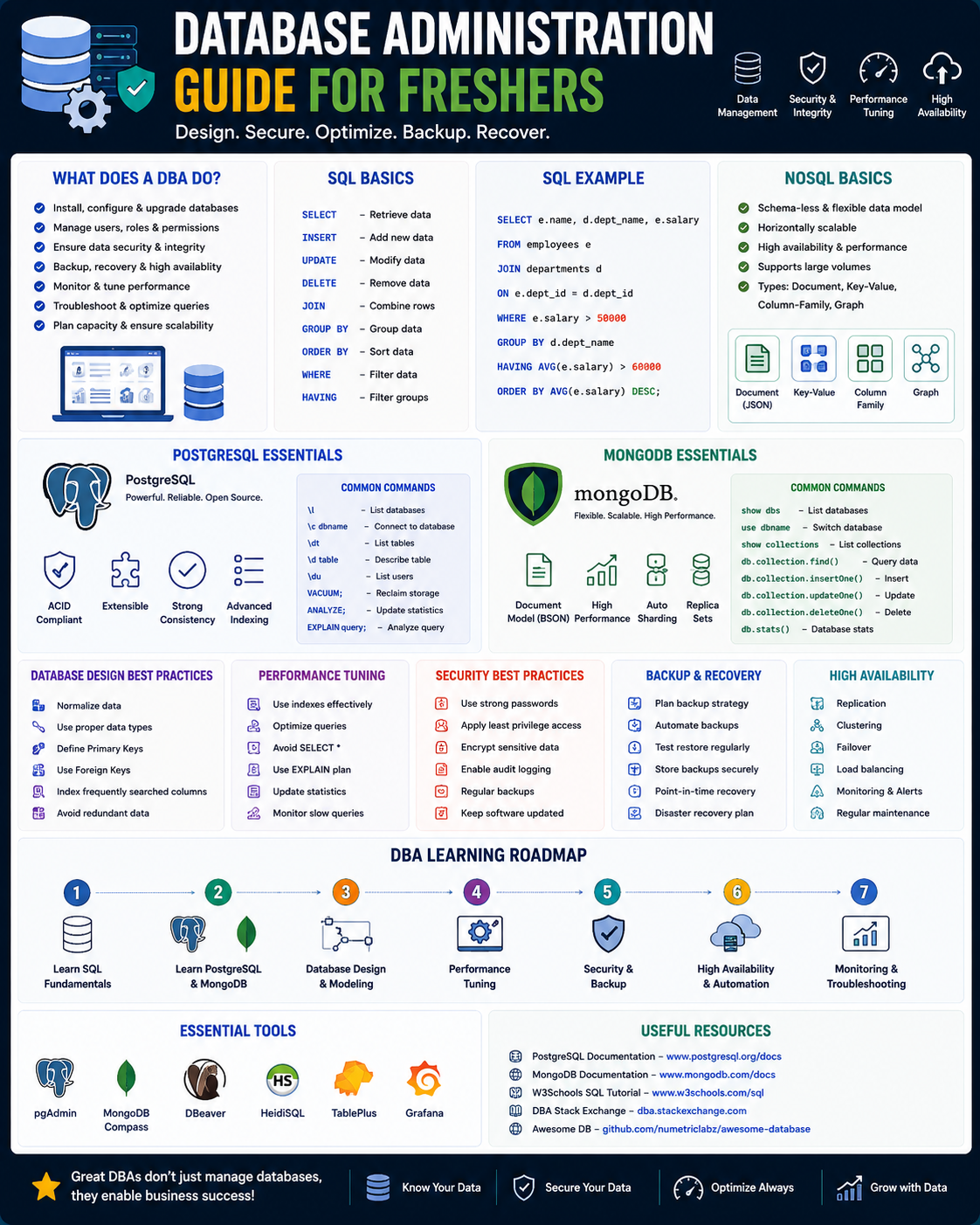
This roadmap is designed for a fresher—someone with analytical thinking, attention to detail, and a desire to become the guardian of an organization's most valuable asset: its data. You will learn SQL, NoSQL, PostgreSQL, and MongoDB by working through a structured path that mirrors how professional database administrators (DBAs) actually work in 2026. The goal is to transform you from someone who "runs queries" into a professional who can design, secure, optimize, and recover critical database systems. This path prepares you for entry-level roles like Junior Database Administrator, Database Analyst, or Associate DBA in a market with over 13,000 annual job openings and 8% projected job growth through 2030 .
The DBA role is unique because your work directly impacts every other team—developers, analysts, executives, and customers all depend on the availability, performance, and integrity of the databases you manage . Unlike developers who build new features, you ensure that existing systems run safely, quickly, and reliably. It is a role that rewards caution, precision, and systematic thinking.
🗺️ Phase 1: The Mindset Shift – What a Database Administrator Really Does (Weeks 1-2)
Before you write any code, understand that being a DBA is fundamentally different from being a developer. Your primary goal is not to build new things but to protect and optimize what exists. This mindset shift is crucial for your success.
What a DBA Actually Does
Database administrators are the gatekeepers of information . Your core responsibilities include :
- Configuring and maintaining the database management system (DBMS)
- Implementing backup and recovery procedures to ensure no data is ever lost
- Managing security and access control so only authorized users can view or modify data
- Performance tuning—identifying and fixing slow queries before users notice
- Capacity planning—ensuring the database has enough storage and compute power for future growth
- Creating documentation for disaster recovery, maintenance procedures, and standard operating practices
- Training employees on how to properly use the database system
The 2026 Database Landscape
In 2026, you need to understand both relational (SQL) and non-relational (NoSQL) databases. Relational databases like PostgreSQL, MySQL, Oracle, and SQL Server remain the backbone for structured, transactional data . NoSQL databases like MongoDB handle unstructured data, high-velocity streams, and flexible schemas .
Why both matter for freshers: Most organizations use multiple database types. Your e-commerce company might use PostgreSQL for customer orders (needs strict consistency) and MongoDB for product catalogs (needs flexible attributes). As a junior DBA, you need basic competency in both.
Prerequisite Check
You need basic computer literacy and a willingness to learn. No prior database experience is required. Create free accounts for GitHub and Great Learning to access their free courses .
Practice Goal for Phase 1: Look at an app you use daily (like Instagram or your banking app). Think about what kind of data it stores—user profiles, posts, transactions, messages. Write down 5 questions a business might ask of that data (e.g., "Which products sold most last month?" or "How many users signed up this week?"). This exercise helps you start thinking like someone who manages data, not just consumes it.
Free Resources for Phase 1:
- Great Learning Database Management Free Courses: This platform offers a comprehensive collection of free, self-paced courses covering everything from DBMS fundamentals to practical SQL database design and administration topics including backup, recovery, and performance tuning .
- CompTIA Database Administrator Career Guide: A free blog post covering what DBAs do, career pathways, common entry-level titles, and recommended certifications like CompTIA Data+ .
📊 Phase 2: SQL Fundamentals – The Universal Language of Data (Weeks 3-6)
SQL is the language used in every data-related tech job, and for DBAs, it is absolutely non-negotiable . You cannot manage a database without being able to query it. This phase builds your foundation.
Core SQL Concepts to Master
SQL Command Categories: Understand the different types of SQL commands and when to use each :
- DQL (Data Query Language):
SELECT statements for retrieving data—this is 80% of what you will write - DDL (Data Definition Language):
CREATE, ALTER, DROP for defining and modifying database structures - DML (Data Manipulation Language):
INSERT, UPDATE, DELETE for changing data inside tables - DCL (Data Control Language):
GRANT, REVOKE for managing user permissions
Essential Query Skills:
- Filtering with
WHERE, sorting with ORDER BY, and logical operators (AND, OR, NOT) - Handling
NULL values correctly using IS NULL and COALESCE—this trips up many beginners - Aggregating data with
GROUP BY and functions like COUNT(), SUM(), AVG(), MIN(), MAX() - Combining tables with
INNER JOIN, LEFT JOIN, RIGHT JOIN, and FULL JOIN - Using subqueries and Common Table Expressions (CTEs) to break complex logic into readable steps
Database Design Fundamentals:
- Understanding primary keys (uniquely identify each row) and foreign keys (link tables together)
- Normalization: Organizing data to reduce redundancy. Learn from 1NF (First Normal Form) through 5NF and Boyce-Codd Normal Form
- Creating Entity-Relationship (ER) diagrams to visualize how tables relate before you build them
Practice Goal: Download a sample database (like Northwind or Sakila). Write queries that answer real business questions: "Which customer spent the most last month?" "What is our average order value by region?" "Find products that have never been sold." Use JOINs across at least 3 tables.
Free Resources for Phase 2:
- Great Learning Free SQL Courses: The Database Management collection includes hands-on SQL training with DML statements, joins, operators, triggers, and advanced SQL—all free with certificates .
- The Complete SQL Bootcamp (Udemy, often free with coupons): A highly recommended course teaching SQL and database design from zero, covering everything from basic queries to advanced joins . Check sites like Course Joiner for active promo codes.
- All-in-One Database Courses (Free coupons): Search for "SQL, MYSQL, POSTGRESQL & MONGODB: All-in-One Database Course" on coupon sites to get comprehensive Udemy courses free .
🖥️ Phase 3: Relational Databases Deep Dive – PostgreSQL & MySQL (Weeks 7-12)
Once you have SQL fundamentals, you specialize in specific database systems. PostgreSQL is recommended as your primary because it is open-source, feature-rich, widely adopted, and has an excellent free course from the University of Michigan .
PostgreSQL Mastery
PostgreSQL is an open-source database that powers applications at companies like Apple, Spotify, and Instagram. It is known for reliability, advanced features, and strong community support .
Core PostgreSQL Skills:
- Creating and managing databases, schemas, and tables
- Understanding data types (numeric, text, date/time, JSON, array)
- Implementing constraints (
NOT NULL, UNIQUE, CHECK, FOREIGN KEY) - Working with indexes (
CREATE INDEX, understanding B-tree vs. GIN indexes) - Writing stored procedures and functions
- Using
EXPLAIN ANALYZE to understand query performance
Advanced PostgreSQL for DBAs:
- Backup and recovery using
pg_dump and pg_restore - Transaction management (
BEGIN, COMMIT, ROLLBACK) - Role-based access control (
CREATE ROLE, GRANT, REVOKE) - Understanding vacuuming and maintenance
MySQL/MariaDB Skills (Optional but Valuable):
While PostgreSQL is your primary, many companies use MySQL. Learn installation, basic administration, and the main differences from PostgreSQL.
Linux Operating System Fundamentals
Most databases run on Linux servers. As a DBA, you will interact with Linux daily through the command line .
Essential Linux Skills:
- Navigation:
cd, ls, pwd, mkdir, rm, cp, mv - File permissions:
chmod, chown - Process management:
ps, top, kill, systemctl - Package management:
apt (Ubuntu/Debian) or yum (RHEL/CentOS) - Text editing with
vim or nano - Viewing logs:
tail -f /var/log/postgresql/postgresql.log
Practice Goal: Install PostgreSQL on a Linux virtual machine (you can use VirtualBox and Ubuntu for free). Practice creating databases, users, and tables entirely from the command line. Schedule an automated backup using cron. This setup mirrors real production environments.
Free Resources for Phase 3:
- PostgreSQL for Everybody (University of Michigan via Coursera): A highly recommended free-to-audit course covering database design, SQL commands, JSON data handling, and NoSQL concepts. You can audit the full specialization at no cost .
- Great Learning PostgreSQL Courses: Free courses covering PostgreSQL installation, commands, operators, and advanced functions like COUNT, SUM, AVG, and date handling .
- Learning Linux for LFCA (Pluralsight): A course teaching Linux fundamentals, system management, security, and cloud Linux skills. Free trial available .
🗄️ Phase 4: NoSQL Databases – MongoDB for Unstructured Data (Weeks 13-15)
NoSQL databases are essential when your data doesn't fit neatly into tables—think social media feeds, product catalogs with varying attributes, or real-time sensor data. You should learn MongoDB specifically .
Core MongoDB Concepts
MongoDB is a document database that stores data in JSON-like documents (BSON) rather than rows and columns . This means:
- Each record can have different fields
- You can nest complex data structures
- Schema changes are much easier than in SQL databases
Essential MongoDB Skills:
- Collections and Documents: Understanding how MongoDB organizes data
- CRUD Operations:
insert(), find(), update(), delete() - Querying: Filtering with comparison operators (
$gt, $lt, $eq), logical operators ($and, $or), and regular expressions - Indexing: Creating and managing indexes for query performance
- Aggregation Framework: MongoDB's powerful pipeline for data transformation (
$match, $group, $sort, $lookup which is like SQL JOIN) - Data Validation: Setting rules for what documents can contain
Comparing MongoDB vs. PostgreSQL (High-Value Interview Skill)
- Data Model
- PostgreSQL (SQL): Tables with rows and columns
- MongoDB (NoSQL): Documents (JSON-like)
- Schema
- PostgreSQL (SQL): Fixed, predefined
- MongoDB (NoSQL): Flexible, dynamic
- Joins
- PostgreSQL (SQL): Supported (INNER JOIN, etc.)
- MongoDB (NoSQL): Limited (use $lookup)
- ACID Transactions
- PostgreSQL (SQL): Full support
- MongoDB (NoSQL): Limited (but improving)
- Best For
- PostgreSQL (SQL): Strict consistency, complex relationships
- MongoDB (NoSQL): Rapid iteration, varied data structures
Practice Goal: Build a small "Product Catalog" application where different product types (books, electronics, clothing) have different attributes. Store this in MongoDB—each document naturally has different fields. Write queries to find all products under $50, regardless of type.
Free Resources for Phase 4:
- Great Learning Free MongoDB Courses: The Database Management collection includes NoSQL and MongoDB topics covering collections, documents, CRUD operations, aggregation, joins, installation, data import, and data exploration .
- Complete Database Course (Free Udemy coupons): The "SQL, MYSQL, POSTGRESQL & MONGODB: All-in-One Database Course" includes MongoDB modules covering indexing, validation, Data API, and Charts. Check Course Joiner for active promo codes .
🛠️ Phase 5: Database Administration Core Skills (Weeks 16-20)
This is the heart of what it means to be a DBA. These skills—backup, security, performance, monitoring—are what employers hire you for .
Backup and Recovery (Non-Negotiable)
Data loss is a career-ending event. You must master how to prevent it and how to recover when things fail.
Core Concepts:
- Full backups: Complete copy of the entire database
- Incremental backups: Only changes since the last backup (faster, smaller)
- Point-in-time recovery (PITR): Restoring to exactly 2:15 PM, not just "latest backup"
- Write-ahead logging (WAL): PostgreSQL's method of ensuring durability
- Testing your backups: A backup that hasn't been tested doesn't exist
Practice Goal: Set up automated backups for your PostgreSQL database. Simulate a "disaster" (delete a critical table) and practice restoring from backup. Time how long it takes. Document the procedure so anyone on your team could follow it.
Security and Access Control
Database breaches are catastrophic. Your job is to ensure only authorized people access data .
Core Concepts:
- Authentication: Verifying who someone is (username/password, certificates)
- Authorization: What they can do once authenticated (roles, privileges)
- Principle of least privilege: Users should have exactly the permissions they need, nothing more
- Encryption at rest: Encrypting data stored on disk
- Encryption in transit: Encrypting data moving between application and database (TLS/SSL)
- Auditing: Logging who did what, when
Practice Goal: Create three user roles for your database: readonly_user (can only SELECT), data_entry_user (can INSERT and UPDATE but not DELETE), and admin_user (full control). Verify that each user truly cannot perform operations outside their role.
Performance Tuning and Optimization
Users notice when the database is slow. Your job is to find and fix performance problems before users complain .
Core Concepts:
- Indexing: The #1 performance lever. Learn what indexes are, when to use them, and when they hurt performance
- Query analysis: Using
EXPLAIN to understand how the database executes a query - Slow query logs: Identifying which queries need optimization
- Resource monitoring: CPU, memory, disk I/O, connection counts
- Connection pooling: Managing database connections efficiently
Practice Goal: Take a slow query (write one on purpose by JOINing many tables without indexes). Run EXPLAIN ANALYZE to see what the database is doing. Add an index. Re-run EXPLAIN ANALYZE and measure the improvement. Document the before-and-after metrics.
Operational Excellence
Entry-level DBA job postings explicitly mention these skills :
- Monitoring and alerting: Setting up systems that notify you before problems become critical
- Automation: Using scripts to handle routine maintenance (backups, index rebuilds, log rotation)
- Disaster recovery planning: Documenting procedures so recovery is calm, not chaotic
- Infrastructure as Code (IaC): Using Terraform to provision database infrastructure consistently
- Scripting: Python or Shell scripting to automate repetitive DBA tasks
Free Resources for Phase 5:
- Equifax Entry-Level DBA Job Description (as learning checklist): This real job post explicitly lists skills required: backup/recovery, monitoring solutions (DataDog, Prometheus, Grafana), automation with Terraform, and operational excellence. Use it as your competency checklist .
- Great Learning DBA Topics: Their course collection includes backup, recovery, and performance tuning modules .
- Quest GenAI for DBAs (Free demos): Explore interactive demos showing how AI can explain unfamiliar SQL, automate code generation, and provide troubleshooting recommendations .
☁️ Phase 6: Cloud Databases & Modern Data Platforms (Weeks 21-24)
Most companies now run databases in the cloud. Understanding cloud database services is essential for entry-level roles, with cloud certification strongly preferred according to recent job postings .
Major Cloud Database Offerings
- **AWS:] Amazon RDS (Relational Database Service) for PostgreSQL/MySQL, Amazon DynamoDB for NoSQL, Amazon Redshift for data warehousing
- Azure: Azure SQL Database, Cosmos DB (multi-model NoSQL)
- Google Cloud: Cloud SQL, Cloud Spanner (global distributed database)
Core Cloud DBA Skills:
- Automatic scaling and high availability: Configuring multi-AZ deployments
- Managed backups: Understanding provider backup policies and retention
- Monitoring: Using cloud-native tools (CloudWatch, Azure Monitor)
- IAM integration: Managing database access through cloud identity systems
Practice Goal: Sign up for AWS Free Tier. Launch a PostgreSQL database using Amazon RDS (this is free for 750 hours/month at small sizes). Connect to it from your local machine. Take a manual snapshot. Delete the database and restore from your snapshot. You have just done cloud DBA work.
Data Warehousing Basics
Data warehousing involves collecting and storing large volumes of data from various sources for analysis and reporting . Key concepts include:
- ETL (Extract, Transform, Load): Getting data from source systems into the warehouse
- Dimensional modeling: Star schemas, snowflake schemas, fact tables, dimension tables
- OLAP (Online Analytical Processing): Analyzing multidimensional data
Free Resources for Phase 6:
- AWS Free Tier: 12 months of free access to RDS (750 hours/month), enough for learning and portfolio projects
- Great Learning Data Warehousing Topics: The database management collection includes data warehousing concepts and BI support .
- Quest GenAI Demos (Free): Interactive walkthroughs showing AI-powered database management for cloud and on-premises environments .
📚 Phase 7: Scripting, Automation & AI Tools (Weeks 25-26)
Modern DBAs write code to automate routine tasks. You need basic scripting skills to be effective .
Automation and Scripting
Python for DBAs:
- Connecting to databases using
psycopg2 (PostgreSQL) or pymongo (MongoDB) - Writing scripts to generate reports, check system health, or automate maintenance
- Using
cron to schedule Python scripts
Shell Scripting for DBAs:
- Automating backup scripts
- Parsing log files
- Monitoring disk space and sending alerts
Infrastructure as Code (IaC):
- Using Terraform to provision database instances, networks, and storage
- Version-controlling your infrastructure
Practice Goal: Write a Python script that connects to your PostgreSQL database, runs a SELECT COUNT(*) on your largest table, prints the result, and emails you if the count is unexpectedly low (which might indicate data loss). Schedule this script to run daily using cron.
AI Tools for DBAs – The 2026 Force Multiplier
AI is not replacing DBAs, but it is making good DBAs significantly more productive. In 2026, DBA-specific AI tools can :
- Explain unfamiliar SQL: "AI Explain" translates complex or legacy SQL into plain English, saving hours deciphering inherited code
- Generate SQL from natural language: "AI Ask" lets you ask questions in English ("Show me all customers who haven't ordered in 90 days") and receive working SQL
- Automate code generation: "AI Code" turns your requirements into production-ready PL/SQL within your existing workflow
- Provide troubleshooting recommendations: "AI Alarms" suggests fixes for database issues and allows follow-up questions
Practice Goal: Use a free LLM (ChatGPT or Claude) to generate a complex SQL query. Ask the AI to explain a query you find confusing. Ask it to suggest indexes for a slow query. Document what the AI did well and where it needed correction—critical skill for using AI responsibly in production.
Free Resources for Phase 7:
- Quest GenAI for Database Management (Free demos): Interactive walkthroughs showing AI Explain, AI Code, AI Ask, and AI Alarms in action. Watch how these tools solve real DBA challenges .
- Terraform (Free): Open-source IaC tool with extensive documentation and free tier for learning.
📚 Consolidated Resource Toolkit
Completely Free, Comprehensive Resources
Great Learning Free Database Management Courses are a one-stop shop for free, self-paced database education with certificates. The collection covers : DBMS and RDBMS fundamentals, normalization (1NF through 5NF and BCNF), SQL joins (INNER, LEFT, RIGHT, FULL), MySQL and PostgreSQL administration, NoSQL and MongoDB (collections, documents, CRUD, aggregation), and backup, recovery, and performance tuning. All courses include practical projects like HR Database Management System. Available at mygreatlearning.com.
The 2025 Database Administrator RoadMap (Javarevisited blog) is a comprehensive guide from an experienced DBA breaking the role into 9 categories: SQL Mastery, Database Theory, Data Modeling, Popular Databases (MySQL, PostgreSQL, Oracle, SQL Server), NoSQL (MongoDB, Redis), Linux Administration, Security, Performance Tuning, and Cloud Databases . It includes specific course recommendations for each category and projects the job market numbers (13,000+ annual openings).
PostgreSQL for Everybody (University of Michigan via Coursera) is a highly recommended, free-to-audit specialization covering database design, SQL queries, JSON data handling, and even touches on NoSQL concepts. A must-do for PostgreSQL learning .
All-in-One Udemy Database Courses (Free with coupons) provide intensive, comprehensive training that normally costs $100+ but is frequently available free through coupon sites. Search for "SQL, MYSQL, POSTGRESQL & MONGODB: All-in-One Database Course" on Course Joiner. The complete course covers SQL syntax, all major commands, MySQL and PostgreSQL administration, and MongoDB (indexing, validation, Data API, Charts) . Coupons are time-limited but regularly renewed.
CompTIA DBA Career Guide is a free blog post covering what DBAs do, how to become one, common entry-level job titles (Data Analyst, Data Architect, Systems Analyst), and recommended certifications .
Equifax Entry-Level DBA Job Description is a real job posting that serves as an authentic competency checklist. It lists required skills including BS in Computer Science, less than 2 years experience, cloud certification, Terraform, automation, and monitoring tools (DataDog, Prometheus, Grafana) . Use this to guide your learning.
Quest GenAI for DBA Demos are free interactive walkthroughs showing how AI tools help DBAs: Explain complex SQL, Automate code generation, Answer natural language questions, and Provide troubleshooting recommendations. No signup required to view .
GitHub Database Learning Notes like the complete-sql-and-database-course repository provide free, community-maintained reference notes covering SQL fundamentals, database models, normalization, and advanced queries .
Certifications That Matter (After Experience)
CompTIA Data+ is an entry-level certification teaching data manipulation, statistical methods, and analysis across the data lifecycle. Recommended by CompTIA as a starting point for aspiring DBAs .
AWS Certified Database – Specialty validates expertise in AWS database services (RDS, DynamoDB, Redshift). Cloud certification is "strongly preferred" for entry-level roles according to recent job postings .
Oracle Certified Professional (OCP) is for those targeting Oracle Database environments. Oracle is widely used in financial services and large enterprises.
💼 Career Application & Next Steps
Database administration remains a stable, well-compensated career with consistent demand. The Bureau of Labor Statistics projects 8% growth through 2030, with over 13,000 annual job openings .
1. The Fresher Entry Point
Junior Database Administrator focuses on monitoring systems, performing backups, managing user access, and troubleshooting performance issues. Requires SQL proficiency, basic Linux, understanding of backup/recovery, and <2 years experience . Found in every company that stores data—which is essentially every company.
Database Analyst focuses more on querying and reporting while learning administration skills. A common entry path from data analysis to DBA.
Data Analyst is a related entry-level role that teaches SQL, data manipulation, and database interaction—excellent preparation for transitioning to DBA .
Industries actively hiring include financial services and banking (heavy Oracle/SQL Server usage), technology companies (PostgreSQL, MySQL, MongoDB), healthcare (strict compliance requirements), e-commerce (high-transaction environments), and government (data security focus).
2. The Career Progression Path
Junior DBA (<2 years): Focus on backups, monitoring, user management, and learning from senior DBAs. This is where the Equifax job posting fits .
Mid-level DBA (2-5 years): Performance tuning, complex query optimization, disaster recovery planning, automation scripting.
Senior DBA (5+ years): Architecture design, mentoring junior DBAs, capacity planning, cross-database strategy.
Database Architect: Designing database systems for new applications, choosing technologies, establishing standards.
3. Build Your Portfolio (Three Definitive Projects)
Project 1 (Complete PostgreSQL Deployment):
- What: Install PostgreSQL on a Linux VM (Ubuntu is fine). Create a database for a practical application (e.g., a library management system). Design tables with proper relationships (books, members, loans, reservations). Load sample data (minimum 1000 rows). Demonstrate: Writing 5 complex
JOIN queries that answer real business questions, Creating indexes and using EXPLAIN ANALYZE to show performance improvement, Implementing row-level security so members can only see their own loans, and Setting up automated daily backups with pg_dump. - Why: This single project covers SQL proficiency, database design, security, and backup—the core DBA skills employers seek.
Project 2 (MongoDB Application):
- What: Build a small product catalog where different product types (books, electronics, clothing) have different attributes. Demonstrate: Inserting documents with varying schemas (no need to "migrate" when adding a new product type), Writing queries that find products across categories (e.g., "Find all products under $50"), Creating an index and showing query performance improvement, and Understanding when MongoDB is the right choice vs. PostgreSQL.
- Why: Employers want DBAs who understand both SQL and NoSQL. This proves you can work with document databases.
Project 3 (Disaster Recovery Simulation – The "DBA Fire Drill"):
- What: Document your PostgreSQL backup and recovery procedure. Then, simulate a disaster: Delete a critical table. Time how long it takes to restore from backup (aim for under 5 minutes). Write a one-page "Runbook" that anyone on your team could follow to perform the restore. Include: Backup strategy (full daily + WAL archiving), Step-by-step restore procedure with commands, and Time-to-recovery metrics.
- The Narrative: "I designed and tested a disaster recovery plan that restores a 10,000-row database from full backup in under 3 minutes. The runbook is documented for any team member to execute."
- Why: This is the most important real-world DBA skill. A candidate who can discuss disaster recovery with concrete examples stands out immediately.
How to Document Your Portfolio: Create a GitHub repository named "dba-portfolio." For each project, include: README.md with project overview, setup instructions, and what you learned, SQL scripts (schema creation, queries, backup commands), Screenshots of successful restores or query performance improvements, and a brief reflection on challenges faced and how you solved them.
4. The Interview Question You Will Be Asked
Question: "A developer calls you and says their application is slow. They think it's the database. How do you diagnose and fix this problem?"
Your Answer: "I would approach this systematically, not guess. First, I would check if the problem is actually the database or something else—network latency, application logic, or resource contention elsewhere. I would check database metrics: CPU, memory, disk I/O, and connection count. Are we maxed out on any resource?
If resources look normal, I would enable slow query logging to capture the specific queries that are running slowly. Once I identify a slow query, I would run EXPLAIN ANALYZE to see the database's execution plan. Most often, the problem is missing indexes—the database is doing a full table scan when it could use an index.
I would add an appropriate index and re-run EXPLAIN ANALYZE to verify the performance improvement. I would also check if the query plan changed recently—sometimes a database's statistics get outdated. Running ANALYZE updates statistics and can fix suddenly slow queries.
If indexes don't help, I would look for locks—is one query blocking another? The pg_locks view shows this. I would also check for unused or duplicate indexes, which can slow down writes. Finally, I would document the issue and solution so the development team can write better queries or adjust their schema for future performance."
This answer demonstrates systematic troubleshooting, knowledge of database internals (execution plans, statistics, locks), and collaboration with developers—exactly what hiring managers seek.
5. Sample Resume Entry
text
Junior Database Administrator (Project-Based) | Portfolio

• Deployed and secured PostgreSQL database on Linux VM supporting 10,000+ records with automated daily backups and point-in-time recovery documented in runbook
• Wrote 25+ complex SQL queries using INNER/LEFT joins, aggregations, and window functions to answer business questions
• Improved query performance by 85% through strategic index creation, validated with EXPLAIN ANALYZE before/after metrics
• Configured MongoDB document database with flexible schemas and indexes for e-commerce product catalog application
• Automated database health checks using Python scripts, reducing manual monitoring time by 90%
• Completed DBA-aligned training covering backup/recovery, access control, performance tuning, and cloud databases (AWS RDS)
🎯 Your Next Steps for This Week
Do not try to master SQL, PostgreSQL, MongoDB, Linux, and cloud simultaneously. Build momentum with small, achievable wins.
Step 1: Set Up Your Learning Accounts (Day 1)
- Create free account on Great Learning to access their free database courses
- Create GitHub account for portfolio hosting
- Sign up for Coursera to audit "PostgreSQL for Everybody"
Step 2: Start the Great Learning SQL Path (Week 1)
Begin with their introduction to DBMS and RDBMS fundamentals. Complete the normalization module (1NF through BCNF). This gives you the theory foundation.
Step 3: Write Your First SQL Queries (Week 1-2)
Use the free all-in-one database course (get coupon from Course Joiner) to start writing actual SQL . Run SELECT, INSERT, UPDATE, DELETE. Practice joins on the course's sample data.
Step 4: Install PostgreSQL (Week 2)
Download and install PostgreSQL on your laptop. Load a sample database (the course provides one). Connect using psql command line.
Step 5: Run Your First EXPLAIN (Week 2)
Write a query that JOINs several tables. Run EXPLAIN ANALYZE before adding indexes. Add an index. Run EXPLAIN ANALYZE again. See the difference yourself.
Step 6: Join the Database Community
Follow database subreddits (r/PostgreSQL, r/mongodb, r/SQL). The community is knowledge-sharing and welcoming to beginners who ask thoughtful questions.
The moment you successfully restore a database you accidentally deleted—and you realize you can fix it because you tested your backups—you will understand the core of database administration. It is not about preventing every problem. It is about having systems in place so no problem is permanent. You have the roadmap. Start your journey today.




 Group / 1: 1 Sessions