This roadmap is designed for a fresher—someone with strong analytical thinking and a desire to become the backbone of modern business connectivity. You will learn Cisco Networking, Firewalls, VPNs, and SD-WAN through a structured path that mirrors how professional Network Administrators actually work in 2026. The goal is to transform you from someone who "uses the internet" into a professional who can design, configure, secure, and troubleshoot the networks that organizations depend on. This path prepares you for entry-level roles like Junior Network Administrator, Network Support Technician, or NOC Analyst in a market where networking skills remain foundational to IT infrastructure.
The role of a Network Administrator is unique because when the network works, no one notices you—but when it breaks, everyone knows your name. You are the guardian of connectivity, responsible for ensuring that data flows securely and efficiently between users, applications, and the outside world.
🗺️ Phase 1: The Mindset Shift – What Network Administration Really Means (Weeks 1-2)
Before you configure your first router, understand that network administration is not about memorizing commands. It is about understanding how data moves, where it can be intercepted, and how to keep it flowing. The best network administrators think like architects: they plan for growth, anticipate failures, and design for resilience.
What a Network Administrator Actually Does
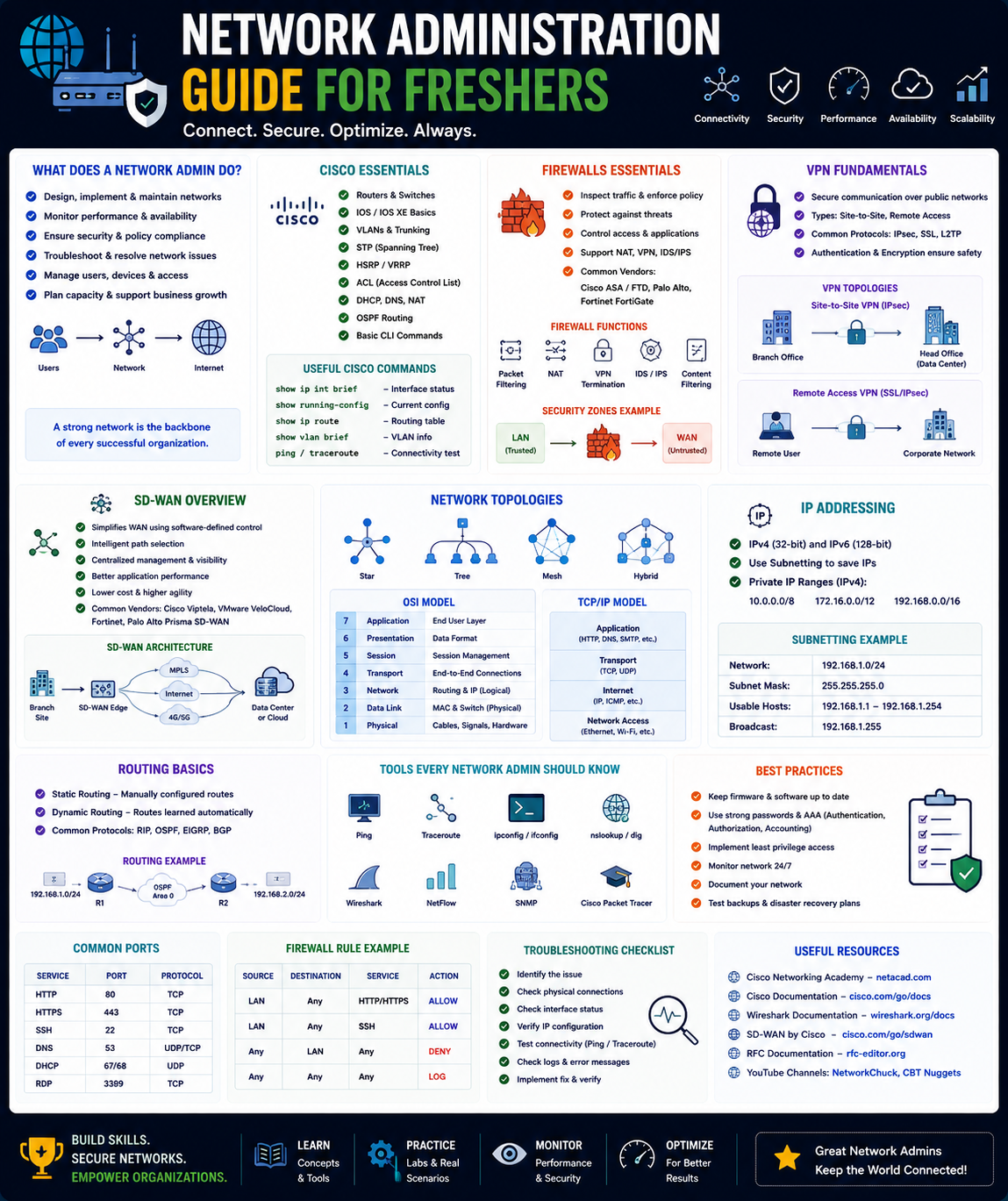
Network Administrators are responsible for the day-to-day operation of computer networks . Your core responsibilities include:
- Configuring and managing network hardware including routers, switches, firewalls, and wireless access points
- Monitoring network performance to identify bottlenecks, failures, or security incidents before users notice
- Implementing security controls such as firewalls, VPNs, and access lists to protect data in transit
- Troubleshooting connectivity issues using tools like ping, traceroute, and protocol analyzers
- Planning for capacity so the network can handle growth without redesign
- Documenting network configurations so disasters can be recovered and changes can be tracked
The 2026 Networking Landscape
In 2026, network administrators need skills across multiple domains :
- Traditional Networking: TCP/IP, routing protocols (OSPF, BGP), switching (VLANs, STP), and subnetting remain foundational
- Network Security: Firewalls (ACLs, zone-based policies), VPNs (IPsec, SSL), and intrusion detection/prevention
- SD-WAN (Software-Defined Wide Area Networking): Modern approach to connecting branch offices and cloud resources intelligently
- Cloud Networking: Virtual networks, cloud firewalls, and hybrid connectivity (AWS, Azure, Google Cloud)
- AI-Assisted Operations: Using AI tools for troubleshooting, log analysis, and predictive maintenance
Why this matters for freshers: The fundamentals haven't changed, but how you apply them has. Employers want candidates who understand core protocols AND can work with cloud and SD-WAN technologies .
Prerequisite Check
You need basic computer literacy and a willingness to learn. No prior networking experience is required. Sign up for free accounts:
- Cisco Networking Academy (netacad.com) – free course materials and Packet Tracer access
- Cisco DevNet – free learning tracks and sandbox environments
- GitHub – for portfolio hosting and sharing lab configurations
Practice Goal for Phase 1: Draw a diagram of your home network. Identify every device (router, switch, access point, computers, phones, smart TVs). Label which device connects to which. Trace how a packet would travel from your laptop to a website. This simple exercise builds the visualization skill every network admin needs.
Free Resources for Phase 1:
- Cisco Networking Academy (NetAcad): Offers free introductory networking courses covering all critical fundamentals with hands-on Packet Tracer activities. Find a local academy or access materials directly at NetAcad.com .
- Network Administrator Free Course (Formatemp, Italy): A 120-hour virtual classroom course covering everything from network basics to firewalls and VPNs. Requires Italian residency and employment status but demonstrates the comprehensive curriculum structure you should follow .
🌐 Phase 2: Networking Fundamentals – The OSI Model, TCP/IP, and Core Protocols (Weeks 3-6)
Every network professional must master the foundational concepts. These are tested in every interview and used in every troubleshooting session .
Core Concepts to Master
The OSI Model (7 Layers):
This is your mental map for troubleshooting. When something breaks, you work your way up:
- Physical (Layer 1) – Cables, connectors, signals, power
- Data Link (Layer 2) – MAC addresses, switches, Ethernet, VLANs
- Network (Layer 3) – IP addresses, routers, subnetting, routing protocols
- Transport (Layer 4) – TCP (reliable, ordered), UDP (fast, connectionless), ports
- Session (Layer 5) – Establishing, maintaining, and ending connections
- Presentation (Layer 6) – Encryption, compression, translation
- Application (Layer 7) – HTTP, DNS, SMTP, FTP – the data users actually see
TCP/IP Protocol Suite:
- IP Addressing and Subnetting: The single most important skill. Learn binary conversion, CIDR notation, subnet masks, network vs. host portions, and VLSM (Variable Length Subnet Masking). Practice until it becomes second nature .
- TCP vs. UDP: TCP provides reliable, ordered delivery with three-way handshake (SYN, SYN-ACK, ACK). UDP is connectionless, faster, used for streaming and DNS .
- Common Ports: Memorize these: HTTP (80), HTTPS (443), SSH (22), DNS (53), DHCP (67/68), SMTP (25), FTP (21)
Ethernet and Switching:
- MAC Addresses: Layer 2 addresses burned into network interfaces
- Switches: Forward frames based on MAC address tables. Learn about broadcast domains, collision domains, and how switches learn addresses
- VLANs (Virtual LANs): Logically segment networks. A single physical switch can host multiple isolated networks (Sales VLAN, Engineering VLAN, Guest VLAN)
IP Routing:
- Routers: Forward packets between networks based on IP addresses and routing tables
- Static vs. Dynamic Routing: Static routes are manually configured. Dynamic routing uses protocols like OSPF and BGP to learn routes automatically
- Default Gateway: Where a device sends packets destined for other networks
Practice Goal: Calculate subnet ranges for 10 different IP addresses with CIDR notations /8 through /30. Write a cheat sheet. Then, use Cisco Packet Tracer to build a small network with 2 routers, 2 switches, and 4 PCs. Configure IP addresses and static routes so every PC can ping every other PC .
Free Resources for Phase 2:
- Cisco Networking Academy (Free): The definitive source for structured networking education. Access free course materials, Packet Tracer activities, and instructor-led options through community colleges and nonprofits .
- Cisco Learning Network: Community forum where experienced professionals share study advice. Read through the 200-301 CCNA study threads for resource recommendations and exam tips from those who've passed .
- Jeremy's IT Lab (Free on YouTube): Highly recommended by the Cisco community as one of the best free CCNA preparation resources. Complete course covering all exam topics with clear explanations .
🔒 Phase 3: Firewalls – The First Line of Defense (Weeks 7-10)
Firewalls are your primary tool for controlling what traffic enters and leaves your network. Every organization uses them .
Core Concepts to Master
Firewall Types:
- Packet Filtering: Examines individual packets against ACLs (Access Control Lists) based on source IP, destination IP, port, and protocol. Fast but stateless (doesn't track connections)
- Stateful Inspection: Tracks the state of active connections. Allows return traffic automatically. Modern firewalls (including pfSense, Cisco ASA, Fortinet) are stateful
- Next-Generation Firewalls (NGFW): Application awareness, intrusion prevention, SSL inspection, and user identity integration
Access Control Lists (ACLs):
- Standard ACLs: Filter only by source IP address (numbered 1-99)
- Extended ACLs: Filter by source/destination IP, protocol, port, and more (numbered 100-199)
- Implicit Deny: Every ACL has an invisible "deny all" at the end. Traffic not explicitly permitted is blocked
Firewall Rules Best Practices:
- Least Privilege: Allow only what is necessary, block everything else
- Order Matters: Rules are processed top-to-bottom. Place specific rules before general rules
- Default Deny: Start with "deny all" and add explicit allows
- Document Everything: Every rule should have a comment explaining why it exists
Network Address Translation (NAT):
NAT allows private IP addresses (like 192.168.1.x) to communicate with the public internet using a single public IP. Types include:
- Static NAT: One-to-one mapping (public IP to private IP)
- Dynamic NAT: Pool of public IPs assigned as needed
- PAT (Port Address Translation): Many private IPs share one public IP using different ports (how your home router works)
Practice Goal: Download and install pfSense (free, open-source firewall) in a virtual machine. Configure:
- WAN interface (DHCP from your router) and LAN interface (static 192.168.1.1)
- DHCP server for your lab network
- Firewall rules allowing HTTP/HTTPS out, blocking everything else in
- Port forwarding to an internal web server you set up on a Linux VM
Document every rule with comments explaining the business purpose.
Free Resources for Phase 3:
- Google Cloud Firewall Lab (Coursera Project): Free, self-paced hands-on lab where you create a custom network, three subnetworks, and apply firewall rules using network tags. No software installation required—works entirely in the cloud console .
- pfSense Firewall Configuration Lab (GitHub): Complete open-source lab guide for configuring a network-based firewall using pfSense. Includes ICMP configuration, traffic redirection, SSH management, and VPN setup. Use Ubuntu and Kali Linux VMs for testing .
🔐 Phase 4: VPNs – Secure Remote Connectivity (Weeks 11-13)
VPNs (Virtual Private Networks) encrypt traffic between locations or users, allowing secure communication over untrusted networks like the internet .
Core Concepts to Master
Why VPNs Matter:
- Remote Access: Employees working from home connect securely to corporate resources
- Site-to-Site: Connecting branch offices to headquarters over the internet
- Privacy: Preventing ISPs and attackers from seeing your traffic
VPN Technologies:
IPsec (Internet Protocol Security):
The industry standard for site-to-site VPNs. Operates at Layer 3. Components include:
- AH (Authentication Header): Provides integrity and authentication
- ESP (Encapsulating Security Payload): Provides encryption, authentication, and integrity
- IKE (Internet Key Exchange): Negotiates security associations and manages keys
SSL/TLS VPNs:
- Operates at Layer 7 (application layer)
- Uses standard HTTPS (port 443) – often bypasses restrictive firewalls
- Typically used for clientless remote access (web portal)
VPN Protocols Comparison:
- OpenVPN: Open-source, highly configurable, strong security. Uses SSL/TLS
- WireGuard: Newer, simpler, faster. Gaining rapid adoption
- IPsec: Mature, widely supported, complex configuration
Practice Goal: In your pfSense VM (from Phase 3), configure an OpenVPN server for remote access. Export a client configuration. Connect from your host machine or another VM. Verify that your traffic routes through the VPN and that your public IP changes to the VPN endpoint's IP.
Free Resources for Phase 4:
- Cisco Networking Academy (VPN modules): The NetAcad curriculum includes comprehensive coverage of VPN technologies including IPsec configuration .
- pfSense VPN Lab (GitHub continuation): Extend your firewall lab with VPN configuration. The guide includes step-by-step instructions for configuring a VPN server, exporting client data, and managing connections .
⚡ Phase 5: SD-WAN – The Modern Enterprise WAN (Weeks 14-16)
Traditional WANs use expensive MPLS circuits and static routing. SD-WAN (Software-Defined Wide Area Networking) intelligently routes traffic over multiple links (broadband, LTE, MPLS) based on application requirements .
Core Concepts to Master
What Makes SD-WAN Different:
- Application-Aware Routing: Voice calls go over the low-latency link, file backups go over cheap broadband
- Centralized Management: Configure once, deploy everywhere from cloud dashboard
- Zero-Touch Provisioning: New branch routers self-configure when plugged in
- Security Integrated: End-to-end encryption, segmentation, and cloud security
Cisco SD-WAN Architecture:
- vManage: Centralized management dashboard
- vSmart: Control plane – distributes routing policies
- vBond: Orchestrator – authenticates and directs devices
- vEdge/cEdge: Customer edge routers at branches
SD-WAN Benefits:
- Reduced MPLS costs by using cheaper broadband
- Improved application performance through intelligent path selection
- Faster branch deployment (days instead of weeks)
- Better visibility into application performance
Getting Hands-On with SD-WAN:
While full SD-WAN labs require licenses and hardware, you can learn concepts through:
- Cisco DevNet Sandbox: Free, pre-configured SD-WAN environment where you can test concepts
- GNS3/EVE-NG: Virtual lab environments (free options available) that can run Cisco SD-WAN images
- Cisco U Free SD-WAN Content: Cisco U offers free SD-WAN training lessons including "Cisco SD-WAN Architecture and Analytics Overview"
Practice Goal: Watch David Bombal's SD-WAN walkthrough on YouTube. Follow along with the DevNet Sandbox. Diagram a network connecting 3 branches to headquarters using SD-WAN concepts. Label the control plane vs. data plane traffic.
Free Resources for Phase 5:
- Cisco DevNet (Free Learning Track): Offers free SD-WAN basics and labs including the Cisco SD-WAN Sandbox (pre-configured environment) and DevNet Learning Labs focused on SD-WAN. Start with "Getting Started with Cisco SD-WAN" .
- Cisco U Free SD-WAN Content: Free training materials including the "SD-WAN Small Branch Design Case Study" and "Catalyst SD-WAN vAnalytics Overview" lessons. No purchase required .
- YouTube Channels (Free): David Bombal, Kevin Wallace, and NetworkChuck offer free SD-WAN walkthroughs and lab setups demonstrating real configurations .
🤖 Phase 6: AI Tools for Network Administration – The 2026 Force Multiplier (Weeks 17-18)
AI is not replacing Network Administrators. It is augmenting them. In 2026, AI tools help you troubleshoot faster, automate routine tasks, and predict problems before they happen .
Cisco AI Assistant for Networking
The Cisco AI Assistant is a conversational AI interface designed to optimize network management, automate routine tasks, and promote proactive troubleshooting .
What It Can Do:
- Answer natural language questions about your network ("Show me all switches with high CPU usage")
- Recommend configurations based on best practices
- Troubleshoot issues by analyzing logs and telemetry
- Identify security threats through pattern recognition
Free Access: The Meraki Learning Hub offers a free online training course about the AI Assistant. Sign in with a free Cisco SSO account to start training .
AI-Powered Troubleshooting Workflows
Using LLMs for Networking:
- Configuration Generation: Ask ChatGPT to generate ACL rules or OSPF configurations for specific scenarios
- Log Analysis: Paste error logs and ask for diagnosis and remediation steps
- Concept Explanation: "Explain BGP route selection in simple terms"
- Troubleshooting Simulation: "I can ping the gateway but not 8.8.8.8. What should I check?"
Important Cautions
AI tools are powerful but can hallucinate. Always:
- Verify AI-suggested configurations in a lab before production
- Understand WHY a solution works, not just that it works
- Cross-reference with official documentation (Cisco, IETF RFCs)
Practice Goal: Use a free LLM (ChatGPT or Claude) to generate a configuration for a simple network with 2 routers running OSPF. Paste the configuration into Packet Tracer and test it. Document what worked, what didn't, and why. Then ask the AI to explain the OSPF metrics used in your specific topology.
Free Resources for Phase 6:
- Cisco Meraki AI Assistant Training (Free): Free online course on the Meraki Learning Hub. Sign in with free Cisco SSO account to access training .
- NPower Path2TECH: NetSA Program (Free, US-based): 26-week free training program for young adults (New York metro area) covering networking, systems administration, and importantly, integrates generative AI tools into the curriculum. Includes certification prep for CompTIA Network+, Linux+, and Microsoft Azure. This is a real-world example of how AI is being incorporated into networking training today .
🛠️ Phase 7: Hands-On Lab Environment – Your Personal Sandbox (Weeks 19-20)
Theory alone won't get you hired. You need a lab where you can break things and fix them. The best part? It's mostly free.
Free Lab Resources
Cisco Packet Tracer (Free) – Cisco's network simulation software. Includes routers, switches, firewalls, wireless, and even IoT devices. Perfect for CCNA-level practice. Requires a free Cisco NetAcad login .
GNS3 (Free) – More advanced emulator that runs real Cisco IOS images. You'll need to supply your own IOS images (available through employer or Cisco Learning Network). Steeper learning curve but more realistic .
EVE-NG Community Edition (Free) – Another powerful emulator. Supports multi-vendor labs (Cisco, Juniper, Palo Alto, etc.) .
Virtual Machines (Free):
- pfSense: Open-source firewall/router – essential for security labs
- Ubuntu Server: Linux for testing connectivity, hosting services, learning CLI
- Kali Linux: Security-focused distro for testing your firewall rules
Cloud Sandboxes (Free):
- Cisco DevNet Sandbox: Pre-configured environments including SD-WAN, DNA Center, Meraki – available 24/7 with some reservation requirements
- Google Cloud Free Tier: Includes limited VPC and firewall configuration for cloud networking practice
Building Your Lab: Minimum Viable Setup
- Laptop/Desktop with 16GB RAM minimum (32GB better) and virtualization enabled
- VirtualBox (free) or VMware Workstation Player (free) installed
- Cisco Packet Tracer installed (free registration)
- Ubuntu Server VM (1GB RAM) for testing
- pfSense VM (2GB RAM) for firewall practice
- Kali Linux VM (2GB RAM) for testing security controls
You now have a $0 networking lab worth thousands of dollars in training value.
Practice Goal: Build the following topology in Packet Tracer:
- 3 routers in a triangle (OSPF routing)
- 2 switches per router (VLANs 10, 20, 30)
- 3 PCs per switch (one per VLAN, different subnets)
- Configure trunk ports, inter-VLAN routing, and ACLs restricting VLAN-to-VLAN traffic
Take screenshots of your working topology. This is your first portfolio piece.
📚 Consolidated Resource Toolkit
Completely Free, Comprehensive Resources
Cisco Networking Academy (NetAcad) is the definitive free resource for structured networking education. Access free course materials covering every exam topic, free Packet Tracer simulation software for hands-on practice, and global academy locator for finding instructor-led courses at community colleges and nonprofits. Register at netacad.com .
Cisco Learning Network is the community hub for certification candidates. Features active forums where experienced professionals share study advice, free study materials and quizzes under "Webinars and Videos" section, and official CCNA blueprint (exam topic list). Cisco U platform offers 37+ hours of CCNA training with labs and assessments .
Cisco DevNet (Free Learning Tracks) offers free SD-WAN basics and labs, the Cisco SD-WAN Sandbox (pre-configured environment), and DevNet Learning Labs with step-by-step SD-WAN exercises. Register for free at developer.cisco.com .
Cisco U Free Content provides free training lessons including "SD-WAN Small Branch Design Case Study" and "Catalyst SD-WAN vAnalytics Overview." Also includes CCNA prep program practice quizzes. Access at u.cisco.com .
Jeremy's IT Lab (YouTube) is the free YouTube course highly recommended by the Cisco community. Complete CCNA preparation covering every exam topic. Supplement with Wendell Odom's YouTube content .
YouTube Channels (Free): David Bombal (CCNA and advanced topics, also shared free Udemy access via LinkedIn), Kevin Wallace (SD-WAN walkthroughs), NetworkChuck (engaging beginner resources), and Jeremy Cioara and Aaron Jayachandaran (Cisco-focused content) .
GitHub Networking Labs such as the pfSense Firewall Configuration Lab provide complete open-source lab guides for configuring network-based firewalls. Includes ICMP configuration, traffic redirection, SSH management, VPN setup, and step-by-step instructions using Ubuntu and Kali Linux VMs. Clone and follow along at github.com/Yaw121 .
Google Cloud Firewall Lab (Coursera Project) is a free, self-paced hands-on project where you create a custom network, three subnetworks, and apply firewall rules using network tags. No software installation required—works entirely in cloud console. Filter for free projects on Coursera .
Coursera Cisco Networking Courses include free-to-audit courses covering OSI models, TCP/IP, data centers, network infrastructure, and certification preparation. Filter for "Free" and "Beginner" level. Topics include network monitoring, administration, security, routing protocols, and automation with Python .
NPower Path2TECH: NetSA is a US-based free 26-week training program for young adults (New York metro area). Covers networking, systems administration, cloud technologies, and generative AI. Includes certification prep for CompTIA Network+, Linux+, and Microsoft Azure. Applications open periodically .
Italian Free Network Administrator Course (Formatemp) is a 120-hour virtual classroom course free for Italian residents (unemployed/employed workers seeking new roles). Covers OSI model, TCP/IP, subnetting, switches, VLANs, routers, firewalls, VPNs, and uses Cisco Packet Tracer. Requires application and selection .
Recommended Certifications (After Foundational Learning)
CCNA (Cisco Certified Network Associate) is the industry gold standard for networking professionals. Recommended resources: Official Certification Guide (OCG) by Wendell Odom, Jeremy's IT Lab (free YouTube), Boson ExSim for practice exams, and Cisco Packet Tracer for labs .
CompTIA Network+ is the vendor-neutral alternative covering networking fundamentals. The NPower program reports nearly half their students complete this certification .
CompTIA Linux+ is useful as many network devices run Linux-based operating systems .
Microsoft Azure Fundamentals is increasingly relevant as networks extend to the cloud .
💼 Career Application & Next Steps
Network administration remains a stable, well-compensated career. The NPower NetSA pilot program achieved 70% completion rates and 41% placement directly into tech roles, with an expected 80% placement rate within a year of graduation .
1. The Fresher Entry Point
Junior Network Administrator / NOC Analyst monitors network performance, troubleshoots connectivity issues, configures routers and switches, and manages user access. Requires understanding of TCP/IP, subnetting, routing, switching, and firewall basics .
Network Support Technician provides frontline support for connectivity issues, assists with hardware installation, and documents network configurations. Excellent entry point for hands-on learners.
IT Support Specialist (Networking Focus) serves many small and mid-sized businesses needing someone who handles both helpdesk and basic network administration.
Industries actively hiring include managed service providers (MSPs), telecommunications, financial services, healthcare, and every organization with an internal IT department.
2. Build Your Portfolio (Three Definitive Projects)
Project 1 (Complete Small Office Network):
- What: Design and document a network for a 50-user office. Include: Edge firewall (pfSense) with NAT and ACLs, Core switch with VLANs (10-Sales, 20-Engineering, 30-Guest), Routing between VLANs, Wi-Fi access points with guest isolation, Remote access VPN for employees
- The Narrative: "I designed a secure, segmented network for a 50-person office. My design separates sensitive traffic, provides guest internet access, and supports remote employees through VPN. The documentation is complete enough for any network admin to implement."
- Why: This single project demonstrates understanding of firewalls, switching, routing, VLANs, wireless, and VPNs—the complete small business networking stack.
Project 2 (Troubleshooting Lab Portfolio):
- What: Document 5 common network problems and their solutions. Examples: "Cannot reach internet but can ping gateway," "Intermittent connectivity on one switch port," "VPN connects but cannot access internal resources," "DHCP not assigning addresses," "Slow file transfers across WAN." For each, show: Symptoms (what user sees), Diagnostic commands used (
ping, traceroute, show ip route, show vlan, debug commands), Root cause identified, Resolution steps taken, Prevention measures documented - Why: Troubleshooting is what you will do every day. Documenting your process proves methodology over memorization.
Project 3 (SD-WAN Design Proposal):
- What: Write a 2-page proposal for replacing traditional MPLS WAN with SD-WAN for a 5-branch retail company. Include: Current state (MPLS costs, hub-and-spoke, static routing), Proposed architecture diagram (vManage, vSmart, vEdge at each branch), Benefits projected (cost savings, application-aware routing, centralized management), Migration plan (branch-by-branch, rollback procedures)
- Why: SD-WAN knowledge is increasingly requested in job descriptions. This demonstrates strategic thinking beyond basic configuration.
How to Document Your Portfolio: Create a GitHub repository named "network-admin-portfolio." For each project, include README.md with project overview, architecture diagram (draw.io is free), configuration files or scripts, screenshots of working ping tests, and troubleshooting documentation.
3. Certifications That Open Doors
CCNA (Cisco Certified Network Associate) remains the most recognized entry-level networking certification. After completing your lab work and Jeremy's IT Lab course, budget for the exam (approximately $300). The 200-301 exam covers network fundamentals, IP connectivity (routing), IP services (DHCP, NAT, NTP), security fundamentals, automation, and programmability .
CompTIA Network+ is vendor-neutral and often required for government positions. About half of NPower graduates complete this certification, often before CCNA .
Entry-Level Cloud Certifications: Microsoft Azure Fundamentals or AWS Cloud Practitioner demonstrate understanding of cloud networking concepts—increasingly valuable .
4. The Interview Question You Will Be Asked
Question: "A user calls complaining they cannot access the internet. Their laptop shows it's connected to Wi-Fi. How do you troubleshoot?"
Your Answer: *"I would start at Layer 1 and work up. First, I'd check if other devices on the same Wi-Fi have internet—is this isolated or company-wide?*
Layer 2 verification: Check if the laptop has a valid IP address. I'd ask the user to open Command Prompt and run ipconfig. If they have a 169.254.x.x address, they aren't getting DHCP. If they have a valid IP, I'd ping the default gateway. If that fails, it's a local network issue—maybe switch port, VLAN assignment, or physical cable.
Layer 3: If gateway pings succeed, I'd ping 8.8.8.8 to rule out DNS issues. If that works but browsing fails, it's DNS. If 8.8.8.8 fails, the router or ISP might be down—I'd check our edge router and ISP status page.
Layer 7: If pings work but browser doesn't, check proxy settings. Could be malware or misconfigured browser.
Finally, I'd document everything. If it's a recurring pattern, I'd look for deeper issues like DHCP scope exhaustion or network loops. I've actually set up alerts in my lab that notify me when DHCP usage exceeds 80%."
This answer demonstrates the OSI model, systematic methodology, familiarity with diagnostic commands, and proactive monitoring—exactly what hiring managers seek.
5. Sample Resume Entry
text
Junior Network Administrator (Project-Based) | Portfolio

• Designed and documented complete 50-user office network including pfSense firewall with ACLs, multi-VLAN switching (10,20,30), inter-VLAN routing, and OpenVPN remote access
• Built virtual lab environment using Cisco Packet Tracer and GNS3, configuring OSPF routing across 3 routers with full connectivity testing
• Troubleshot and documented 5 common network failures with diagnostic command outputs and resolution procedures
• Completed CCNA-aligned training covering TCP/IP, subnetting, VLANs, ACLs, NAT, and DHCP/DNS configuration
• Configured pfSense firewall with port forwarding, traffic rules, and VPN server, validated with Kali Linux penetration testing VM
🎯 Your Next Steps for This Week
Do not try to learn routing, switching, firewalls, and SD-WAN simultaneously. Build momentum with one core skill at a time.
Step 1: Register for Free Accounts (Day 1)
- Cisco Networking Academy (netacad.com) – access Packet Tracer and course materials
- Cisco DevNet (developer.cisco.com) – access free learning tracks
- GitHub – create portfolio repository
Step 2: Install Packet Tracer (Day 1-2)
Download from NetAcad after registration. Complete the "Getting Started" tutorial within Packet Tracer. Build your first network: 1 router, 1 switch, 2 PCs. Configure IPs, ping successfully.
Step 3: Complete First NetAcad Module (Week 1)
Start the "Introduction to Networks" course. Complete modules on OSI model and TCP/IP. Take notes.
Step 4: Master Subnetting (Week 2)
Use online subnetting practice sites. Practice daily for 15 minutes. Learn binary conversion until automatic. This skill alone will differentiate you.
Step 5: Build Your pfSense Lab (Week 2-3)
Download VirtualBox and pfSense ISO. Follow the GitHub lab guide . Configure your first firewall rule. Block ICMP (ping) from LAN to WAN. Test from a Ubuntu VM.
Step 6: Join the Cisco Learning Network (Week 1)
Introduce yourself in the CCNA study group. Read the pinned "best study methods" thread. Learn from others' experiences—what worked, what didn't .
The moment you successfully configure a router, ping a device across your virtual network, and then block that ping with a firewall rule, you will understand the basics of network administration. You are not just "using the internet"—you are now controlling how data moves through it. That is the beginning of a career. Start building your lab today.




 Group / 1: 1 Sessions