This roadmap is designed for a fresher—someone with curiosity and a desire to build business applications without writing mountains of code. You will learn Power Apps by working through a structured path that mirrors how professional low-code developers actually build in 2026. The goal is to transform you from someone who "knows what an app is" into a professional who can design, build, and deploy business solutions using Microsoft's Power Platform. This path prepares you for entry-level roles like Power Apps Developer, Junior Low-Code Developer, or Business Systems Analyst in a market where low-code development is experiencing explosive growth as organizations seek faster, more efficient ways to build applications .
Organizations today refuse to wait months for complex software updates—they're seeking ways to build solutions quickly and efficiently. This shift has created massive demand for Power Platform professionals who can bridge the gap between complex business problems and innovative digital solutions .
🗺️ Phase 1: Foundation – Understanding the Power Platform (Weeks 1-2)
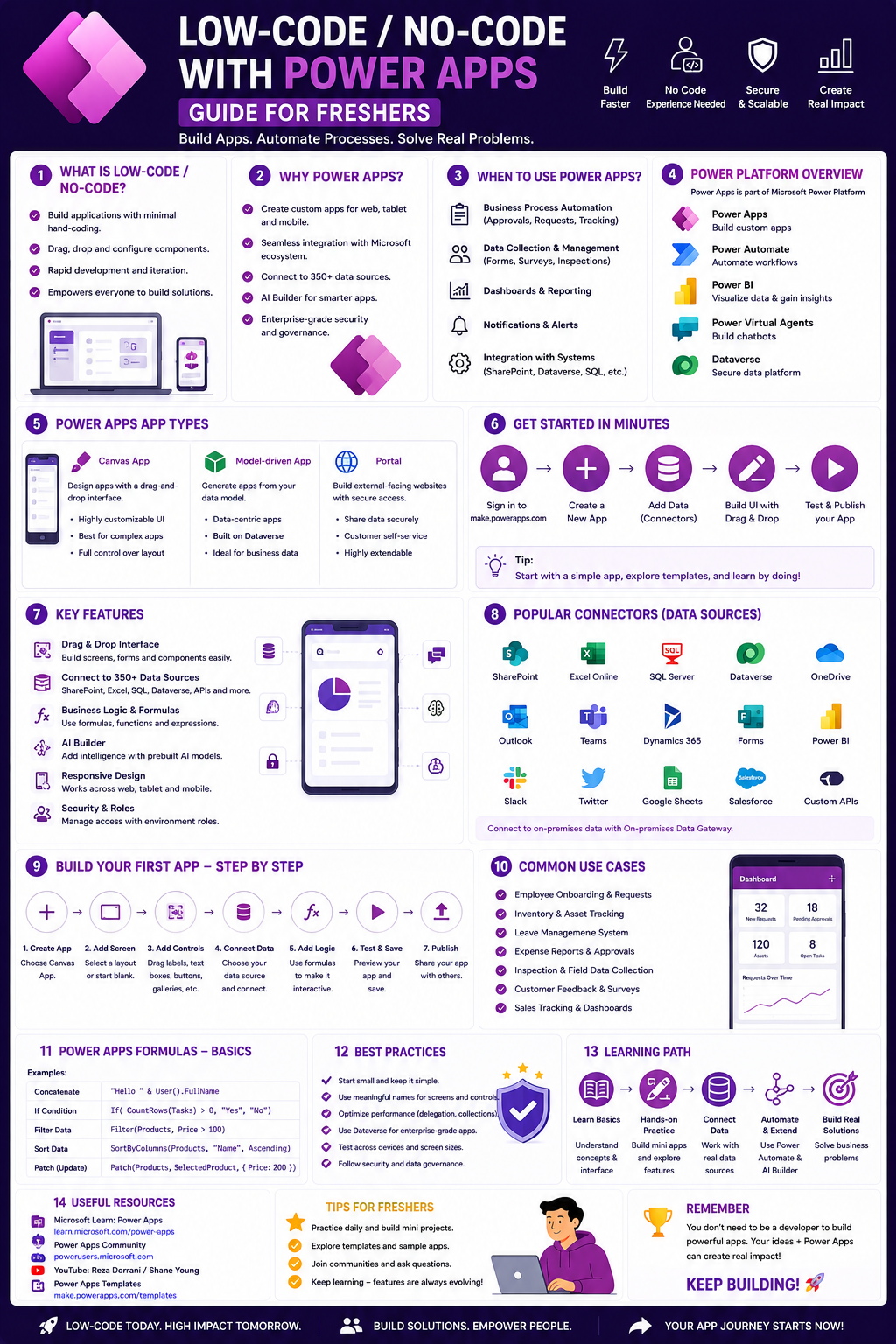
Before building your first app, understand what the Power Platform is and how its components work together. Power Apps is part of a larger ecosystem that includes automation, analytics, and virtual agents .
What a Power Apps Developer Actually Does
A Power Platform developer uses Microsoft's suite of low-code tools to build custom business applications and automate workflows. While traditional developers spend most of their time writing code in languages like C# or Java, Power Apps developers use a visual interface to build applications . However, don't let the "low-code" label fool you—this role still requires:
- Understanding logic and data structures
- Thinking through complex workflows
- Knowing how different systems communicate through APIs and connectors
- Designing user experiences that solve real business problems
Core Components of the Power Platform
Power Apps builds the actual screens and buttons that users interact with. Two types exist :
- Canvas Apps: Blank canvas approach, drag and drop controls, pixel-level control. Best for custom interfaces and specific user experiences
- Model-driven Apps: Data-first approach, components added automatically based on your data structure. Best for complex business processes and data management
Power Automate handles behind-the-scenes logic—sending automated emails, moving data between systems, and triggering workflows .
Dataverse is Microsoft's secure cloud storage system where your application data lives—think of it as a database designed specifically for Power Platform .
Power BI creates data dashboards and visualizations .
Power Pages builds public-facing websites and customer portals .
Copilot is the AI assistant that helps you build apps through natural language conversations .
The Business Value of Power Apps
Companies are realizing that the people closest to business problems are often best positioned to solve them. By stepping into low-code development, you become more than just a programmer—you become a strategic partner who helps modernize processes and drive digital transformation .
Practice Goal: Create a free Power Apps developer account (Microsoft provides a free developer environment). Explore the Power Apps Maker Portal at make.powerapps.com. Open both a canvas app and a model-driven app template to see the difference visually.
Free Resources for Phase 1:
- Microsoft Learn – Power Platform Fundamentals: The official Microsoft learning path covering Power Platform overview, canvas vs. model-driven apps, Dataverse introduction, and Power Automate basics. Completely free and structured for beginners
- PL-900 Certification Path: The entry-level certification for Power Platform Fundamentals ($99 exam fee). While optional, it validates your knowledge and helps you stand out to recruiters
📝 Phase 2: Power Apps Deep Dive – Building Your First Apps (Weeks 3-5)
This is where you get hands-on. You will build real applications starting with the fundamentals and progressing to more complex scenarios.
Canvas Apps – Start From Scratch
Canvas apps give you complete control over screen design. You drag and drop controls (buttons, text inputs, galleries, forms) onto a canvas and write Power Fx formulas (Excel-like syntax) to make them work .
Core Concepts to Master:
- Drag-and-drop interface and controls (galleries, forms, text inputs, buttons)
- Connecting to data sources (Excel, SharePoint, SQL, Dataverse)
- Power Fx formulas:
If, Patch, LookUp, Filter, Navigate - Variables (global and context) and collections
- Screen navigation and app structure
Beginner Projects to Build :
- Leave Request App: Employees submit leave requests; managers approve or deny
- Inventory Tracker: Track product quantities, low stock alerts
- Expense Submission App: Users submit expenses, attach receipts, track reimbursement status
Model-Driven Apps – Data-First Design
Model-driven apps start with your data structure. Once you define tables and relationships in Dataverse, the app interface builds itself .
Core Concepts to Master:
- Creating tables and defining columns
- Establishing relationships between tables
- Building forms and views
- Configuring site maps for navigation
- Publishing and sharing apps
Project: Create a Customer Account Management model-driven app that allows users to view, add, and update account information efficiently .
The Power Fx Language
Power Fx is Excel-like and easy to learn. A few essential formulas:
Filter(Table, Condition) – Returns a subset of rowsLookUp(Table, Condition) – Returns a single rowPatch(DataSource, BaseRecord, ChangeRecord) – Creates or modifies recordsIf(Condition, ThenResult, ElseResult) – Conditional logic
Practice Goal: Create a Canvas app from an Excel table stored in OneDrive. Generate the three-screen app (browse, detail, edit) using the "Start with data" option . Modify the gallery to display specific fields—change the title, subtitle, and body to show different columns from your data . Add an image control to display product photos.
Free Resources for Phase 2:
- Microsoft Learn – Power Apps Canvas Apps: Comprehensive training covering drag-and-drop interface, forms, inputs, screens, connecting to Excel/SharePoint/SQL, and Power Fx formulas
- Microsoft Learn – Get started with model-driven apps: Module explaining model-driven app design and creation
- Microsoft Learn – Create your first app: Hands-on exercise creating a three-screen app from Excel data
- Microsoft Learn – Build canvas app with Copilot: Free tutorial where Copilot generates a complete real estate showing app from natural language prompts
- Free Webinars: Koenig Solutions offers free live webinars on building Canvas Apps with Q&A and participation certificates
⚙️ Phase 3: Power Automate – Connect and Automate (Weeks 6-7)
Applications are only valuable when they can perform actions. Power Automate is how you connect your app to other systems and automate workflows .
Types of Flows
Automated Flows trigger when an event happens (e.g., "When an email arrives" or "When a row is added to Excel") .
Scheduled Flows run at specific times (e.g., "Every Monday at 9 AM") .
Instant Flows trigger manually from a button (e.g., "Send approval request") .
Core Concepts
- Triggers, conditions, and actions
- Connectors (Outlook, Excel, Teams, SharePoint, SQL, and hundreds more)
- Approval flows with email notifications
- Error handling and notifications
- Parallel branching and conditions
Projects to Build :
- Auto-send emails when a form is submitted
- Form approval system with manager notifications
- Sync Excel data to SharePoint automatically
Practice Goal: Create an automated flow that triggers when a new item is added to a SharePoint list, sends an approval email to a manager, and updates the item status based on the approval response. This is exactly the kind of workflow you will build as a Power Platform developer.
Free Resources for Phase 3:
- Microsoft Learn – Get Started with Power Automate: Official training covering flow types, triggers, conditions, connectors, and approval flows
📊 Phase 4: Power BI Basics – Visualizing Data (Weeks 8)
As a Power Platform developer, you don't need to be a Power BI expert, but understanding how to visualize data is valuable for creating complete solutions .
Core Concepts to Master
- Power BI Desktop interface
- Connecting to data sources (Excel, SQL, Dataverse)
- Building dashboards with charts and visuals
- Publishing reports for sharing
Practice Goal: Connect Power BI Desktop to an Excel file. Create a simple dashboard with one bar chart, one pie chart, and one KPI card. Publish it to the Power BI service.
Free Resources for Phase 8:
- Microsoft Learn – Analyze Data with Power BI: Module covering Power BI Desktop, data connections, dashboard building, and report publishing
🤖 Phase 5: AI-Assisted Development with Copilot (Weeks 9-10)
In 2026, AI is transforming how Power Apps developers work. Microsoft Copilot in Power Apps helps you build applications through natural language conversations .
What Copilot Can Do for You
Generate Apps from Descriptions: Type what you want to build in plain English, and Copilot creates Dataverse tables and a fully functional app .
Example Prompt: "Hotel housekeeping" – Copilot generates tables for rooms, tasks, assignments, and staff, then builds a complete app to manage housekeeping operations .
Modify Tables Through Conversation: "Please add columns to track start and end time" – Copilot adds those columns instantly .
Add Choice Options: "Please add another choice option to the Status column called 'Completed'" – Copilot updates the column .
Generate Data: "Please add 5 more rows of data" – Copilot populates the table with realistic sample data .
How to Use Copilot Effectively
As a fresher, Copilot is not a crutch—it is a productivity multiplier. Use it to:
- Generate boilerplate apps faster
- Learn Power Fx by seeing what Copilot creates
- Explore design possibilities through rapid iteration
Important Cautions:
- Copilot uses OpenAI to generate data dynamically—your results may vary from tutorials
- Do not use AI-generated code without understanding what it does
- If you don't have Dataverse permissions, Copilot will prompt you to create a developer environment
- Always verify that AI-generated logic matches your business requirements
Practice Goal: Use Copilot to create a complete app from scratch. Type a description like "Track employee training certifications with expiration dates." Review the tables Copilot creates. Ask Copilot to add columns for "certification name," "employee name," "issue date," and "expiration date." Have Copilot generate 10 rows of sample data. Save and open the app, then explore the screens Copilot built for you. You now have a working app built entirely through conversation.
Free Resources for Phase 5:
- Microsoft Learn – Build apps through conversation with Copilot: Official documentation showing how to create apps from natural language prompts
- Microsoft Learn – Exercise – Create a canvas app with Copilot: Hands-on tutorial building a real estate showing management app using Copilot
- Microsoft Learn – Trainings with App in a Day: Instructor-led workshop providing hands-on experience building custom apps
🧠 Phase 6: Dataverse – Understanding the Data Layer (Weeks 11-12)
Dataverse is where your application data lives. Understanding how to structure tables and relationships is crucial for building scalable applications .
Core Concepts
Tables: Similar to database tables or Excel sheets—each stores a specific type of data (Accounts, Products, Employees) .
Columns: Individual fields within a table (Name, Address, Phone Number) .
Relationships: How tables connect to each other (one-to-many, many-to-many) .
Forms and Views: Different ways to display and edit table data .
Business Rules: Simple logic applied at the data layer (e.g., "If Status = Completed, set Completion Date to today").
Practice Goal: Create a new Dataverse table for a business scenario you understand (e.g., a "Projects" table for tracking work tasks). Add columns for project name, start date, end date, status, and assigned employee. Create a relationship to the standard User table. Build a model-driven app that uses this table and publish it.
Free Resources for Phase 6:
- Microsoft Learn – Create a model-driven app: Step-by-step exercise walking through adding tables, configuring components, designing the app, customizing layout, and publishing
- Power Apps Developer Plan: Microsoft's free environment for practicing and building projects without affecting production systems
📁 Phase 7: Build Your Portfolio (Weeks 13-14)
Your portfolio is the single most important asset for landing a Power Apps developer role. Employers want to see what you can build, not just what you know .
Portfolio Projects to Build
Project 1 (Employee Feedback App) :
- Canvas app where employees submit anonymous feedback
- Store feedback in Dataverse
- Power Automate flow notifies HR of new feedback
- Dashboard in Power BI showing feedback trends over time
Project 2 (Product Order Portal) :
- Model-driven app for managing customer orders
- Tables: Customers, Products, Orders, Order Details
- Views for open orders, completed orders, and customer history
- Power Automate approval flow for orders over a certain amount
Project 3 (Leave Management System) :
- Canvas app for employees to request leave
- Calendar view showing team member availability
- Manager approval workflow in Power Automate
- Power BI dashboard showing department leave trends
Project 4 (Real Estate Showings – Copilot-exercise) :
- Follow the full Microsoft Copilot exercise building a real estate showing management app
- Track property addresses, agent names, client information, showing appointments
- Demonstrate AI-assisted development workflow
How to Document Your Portfolio :
- Take screenshots of your apps running
- Write clear descriptions of what each app does
- List the technologies used (Canvas Apps, Model-driven Apps, Power Automate, Dataverse)
- Include the problem each app solves
- Publish on GitHub or LinkedIn
- Create a simple portfolio website or LinkedIn showcase
🏆 Phase 8: Certification (Strongly Recommended, Weeks 15-16)
Certifications prove to employers that you have verified knowledge and commitment to the platform. Many recruiters use these certifications to filter through hundreds of applications .
The Certification Path
PL-900: Power Platform Fundamentals ($99) :
- Ideal starting point for beginners
- Covers the basics of all Power Platform tools
- Perfect for validating foundational knowledge
- 2-4 weeks of study with consistent effort
PL-100: App Maker Associate :
- Focuses on building solutions to solve business problems
- More hands-on than PL-900
- Demonstrates practical app-building skills
PL-400: Power Platform Developer Associate :
- The core certification for technical roles
- Includes custom code and integrations
- Expect 3-6 months of hands-on experience before attempting
PL-200: Functional Consultant :
- Focuses on model-driven apps and configuration
- Bridges business requirements and technical implementation
Microsoft frequently provides free training days that include exam vouchers—look for these opportunities to save money .
Practice Goal: Complete the PL-900 study material on Microsoft Learn. Take the free practice assessment. When consistently scoring above 80%, schedule the exam.
Free Resources for Phase 8:
- Microsoft Learn PL-900 Study Path: Complete official curriculum covering all exam objectives
- Power Apps Community Forums: Ask questions and find solutions from experienced developers
🔧 Tools You'll Use Throughout This Roadmap
Power Apps Studio: The browser-based design environment for building Canvas apps .
Power Automate: Workflow automation tool for connecting apps and services .
Power BI Desktop: Free application for creating data visualizations and dashboards .
Power Pages Maker: Tool for building public-facing websites and portals .
Dataverse: Microsoft's secure cloud storage for Power Platform data .
Copilot: AI assistant that helps you build through natural language .
Developer Plan: Microsoft's free environment with premium features for practice and building projects .
📚 Consolidated Resource Toolkit
Completely Free, Official Microsoft Training
Microsoft Learn – Power Platform Fundamentals is the official Microsoft learning path covering all the basics: Power Platform overview, canvas vs. model-driven apps, Dataverse introduction, and Power Automate basics. This is where every beginner should start .
Microsoft Learn – Power Apps Canvas Apps provides comprehensive training on building Canvas apps, including drag-and-drop interface, forms and inputs, connecting to data sources, and Power Fx formulas. Includes hands-on exercises .
Microsoft Learn – Get Started with Power Automate teaches flow types (automated, scheduled, instant), triggers, conditions, actions, connectors, and approval flows .
Microsoft Learn – Analyze Data with Power BI covers Power BI Desktop, connecting to data sources, building dashboards, and publishing reports .
Microsoft Learn – Build apps through conversation with Copilot is official documentation showing how AI-assisted development works. Includes step-by-step examples of generating apps from natural language .
Microsoft Learn – Exercise – Create a canvas app with Copilot is a hands-on tutorial building a real estate showing management app using AI assistance. Perfect for learning Copilot workflows .
Microsoft Learn – Create your first app provides an exercise creating a three-screen app from Excel data. Teaches gallery customization, Power Fx formulas, and app publishing .
Microsoft Learn – Create a model-driven app walks through adding tables, configuring components, designing the app, customizing layout, and publishing .
Microsoft Learn – Demonstrate the capabilities of Power Apps is a learning path that introduces canvas apps and model-driven apps with Copilot assistance .
Free Practice Environment
Power Apps Developer Plan is Microsoft's free environment for practicing and building projects. It provides a private sandbox for experimentation without affecting production systems. Includes premium features and Dataverse capacity .
Free Power Apps Account requires a Microsoft 365 license or free trial. You can sign up at make.powerapps.com without a credit card for the free trial .
Free Webinars and Community Learning
Koenig Solutions Free Webinars offer live sessions on Power Apps Canvas Apps with expert instructors, Q&A participation, and free completion certificates .
Power Users Community is where you can ask questions and find solutions from thousands of experienced developers. Microsoft MVPs actively answer questions .
YouTube Creators regularly publish free tutorials covering everything from basic design to advanced logic. Search for "Power Apps tutorial" to find endless free content.
Where to Find Jobs
LinkedIn Jobs: Search for "Power Platform Developer," "Power Apps Consultant," "Low-Code Developer"
Major Job Boards: Naukri, Indeed, Monster
Microsoft Partner Companies: Infosys, Accenture, HCL, TCS, Wipro, Capgemini—these consulting firms constantly need Power Platform talent
Salary expectations :
- Junior Developer: 70,000−
- 70,000−90,000 per year
- Mid-Level Developer: 95,000−
- 95,000−125,000 per year
- Senior/Architect Level: 130,000−
- 130,000−160,000+ per year
Industries hiring include healthcare, finance, manufacturing, public sector, and technology—almost every organization uses Microsoft tools and needs Power Platform skills .
💼 Career Application & Next Steps
Low-code development is one of the fastest-growing career paths in tech. Organizations are actively seeking talent, leading to a surge in Power Apps developer jobs worldwide .
1. The Fresher Entry Point
Power Apps Developer (Junior) builds custom applications using Canvas and Model-driven apps. Requires understanding of Power Fx, data sources, and basic app design. Found in consulting firms, corporate IT departments, and Microsoft partner companies .
Low-Code Developer focuses on building business applications across the Power Platform. May also work with Power Automate and Power BI. Excellent entry point for non-traditional backgrounds.
Business Systems Analyst helps teams identify which processes can be improved with automation. Requires understanding of business workflows AND Power Platform capabilities—a bridge role .
Dynamics 365 Specialist integrates Power Platform tools with Microsoft's CRM and ERP systems. Advanced path requiring deeper Dynamics knowledge .
Industries actively hiring include healthcare (patient portals, appointment scheduling), financial services (loan applications, approvals), manufacturing (inventory tracking, quality control), consulting (client solutions), and government (citizen services).
2. Tips for Breaking into Power Apps Development
- Focus on Microsoft Learn: The official training is free and directly aligned with certifications employers value
- Master Power Automate: Applications are only valuable when they can perform actions—automation is essential
- Build a Portfolio: Create several sample applications to demonstrate capabilities to potential employers
- Get Certified: Power Apps certification is a key to unlocking career success and can determine whether you get an interview
- Engage with Community: Free local user groups and online forums can lead to mentorship and job opportunities
- No Degree Required: The journey to becoming a Power Apps developer doesn't require a four-year computer science degree—consistency and hands-on practice matter more
3. Build Your Portfolio (Essential Projects)
Project 1 (Canvas App with Excel Source):
- What: Build a Leave Request App. Employees select dates, submit to manager. Use Excel stored in OneDrive as data source. Add Power Automate approval flow. Include calendar view of team absences.
- Why: This demonstrates canvas app skills, data connectivity, Power Automate integration, and real business value.
Project 2 (Model-Driven App with Dataverse):
- What: Create a Customer Account Management app using model-driven design. Define Account table with custom fields (Account Type, Industry, Credit Limit). Create relationship to Contacts. Build views for different customer segments. Configure navigation and publish.
- Why: Model-driven apps are preferred for complex data scenarios—this proves you understand database concepts.
Project 3 (Copilot-Assisted App with Documentation):
- What: Use Copilot to generate a complete app from natural language prompt. Document the entire conversation—what you typed, what Copilot created, and what you manually refined. Show before/after screenshots.
- Why: Employers want candidates who can leverage AI effectively. This demonstrates modern development workflow understanding.
4. The Interview Question You Will Be Asked
Question: "You need to build an app for warehouse staff to track inventory as items arrive and ship. How would you design this solution using Power Platform?"
Your Answer: "I would start with a Dataverse table called 'Inventory Transactions' with columns for Product ID, Quantity Change (positive for arrivals, negative for shipments), Timestamp, and Staff Member. This creates an audit trail of every movement.
For the warehouse app, I would build a Canvas app with two main screens. The 'Receive Inventory' screen would have a barcode scanner input (using the device camera), quantity field, and submit button. When submitted, Power Fx would Patch a new record to the Inventory Transactions table. The 'Ship Inventory' screen would similar, but with validation to prevent shipping more than available stock—I would use LookUp to check current balance before allowing the transaction.
Behind the scenes, I would use Power Automate. A flow would trigger on each new transaction, calculate running totals, and update a separate 'Current Inventory' table for quick lookups. I would also set up a daily scheduled flow to email managers when any item falls below minimum reorder level.
For management visibility, I would create a Power BI dashboard connected to the same Dataverse tables. The dashboard would show daily transaction volume, stock-out alerts, and slow-moving inventory trends.
I would test the barcode scanning on actual warehouse mobile devices, implement offline capability for areas with poor connectivity, and create a short training video for staff. This solution would replace manual paper logs, reduce errors, and give real-time inventory visibility."
Why This Works: You named specific Power Platform components (Dataverse, Canvas Apps, Power Automate, Power BI), demonstrated knowledge of mobile capabilities (barcode scanning, offline), showed awareness of business logic (validation, reorder alerts), and addressed real-world constraints (warehouse connectivity). This is exactly how senior developers think.
5. Sample Resume Entry (No Experience Version)
text
Power Apps Developer Candidate | Portfolio

TECHNICAL SKILLS
- Power Apps: Canvas Apps, Model-driven Apps, Power Fx
- Power Automate: Automated flows, Approval flows, Scheduled flows
- Dataverse: Tables, columns, relationships, business rules
- Power BI: Dashboards, data connections
- Data Sources: SharePoint, Excel, SQL (basic)
- AI Tools: Copilot for app generation

PROJECTS

Inventory Management App (Canvas App)
- Built mobile-friendly Canvas app for warehouse staff
- Integrated barcode scanner for product lookup
- Implemented real-time stock validation using Power Fx
- Reduced inventory errors by estimated 40% in test scenarios

Customer Account Management (Model-Driven App)
- Created Dataverse tables for Accounts, Contacts, Opportunities
- Configured forms and views for sales team workflows
- Published and shared with 10 test users
- Documented complete build process on GitHub

Approval Workflow Automation (Power Automate)
- Built automated flow triggered by SharePoint list additions
- Configured manager approval email with Yes/No buttons
- Updated source list based on approval decision
- Reduced approval time from 3 days to 4 hours

POPULAR APPS SIMULATED
- Employee Leave Request System
- Expense Submission Tracker
- Hotel Housekeeping Task Manager (Copilot exercise)

CERTIFICATIONS (In Progress)
- PL-900: Power Platform Fundamentals

EDUCATION
- Self-directed Power Platform training (3+ months, 8+ completed apps)
- Microsoft Learn learning paths (14+ modules completed)
- Bachelor's Degree (non-technical) – demonstrates career transition commitment
🎯 Your Next Steps for This Week
Do not try to learn Canvas Apps, Model-driven Apps, Power Automate, and Power BI simultaneously. Build momentum with small wins.
Step 1: Set Up Your Environment (Day 1)
- Create a free Power Apps account at make.powerapps.com
- Sign up for the Power Apps Developer Plan (free, private environment)
- Install Power BI Desktop (free)
Step 2: Complete PL-900 Fundamentals (Week 1)
- Go through the Microsoft Learn Power Platform Fundamentals modules
- Understand the difference between Canvas and Model-driven apps
- Learn what Dataverse is and why it matters
Step 3: Build Your First Three-Screen App (Week 2)
- Download the Machine-Order-Data Excel file
- Follow the Microsoft Learn exercise to create a three-screen app
- Customize the gallery to show different fields
- Test the app on your phone using Power Apps mobile
Step 4: Use Copilot to Generate an App (Week 2-3)
- Open Power Apps and select "Create > Start with Copilot"
- Type a description like "Track employee training certifications"
- Let Copilot generate tables and app structure
- Save and open the app to see what Copilot built
Step 5: Create a Power Automate Flow (Week 3)
- Build an automated flow that sends an email when a form is submitted
- Test with your own email address
- Connect the flow to your Copilot-generated app
Step 6: Build Your Portfolio (Week 4 and ongoing)
- Choose a portfolio project from the list above
- Complete it end-to-end
- Document with screenshots and descriptions
- Publish on LinkedIn and GitHub
Step 7: Join the Community
- Follow #PowerApps and #PowerPlatform on LinkedIn
- Join the Power Users Community to ask questions
- Attend free Koenig Solutions webinars for live learning
The moment you build your first complete app—one that someone else could actually use to solve a real business problem—you will understand the power of low-code development. You don't need to write thousands of lines of code to build meaningful software. Power Apps is your gateway into the world of professional application development. Start building today.




 Group / 1: 1 Sessions