This roadmap is designed for a fresher—anyone with curiosity and a desire to build real automation that saves time, reduces errors, and creates business value. You will learn Low-Code/No-Code Automation using tools like n8n, Power Automate, Zapier, Make, and emerging AI platforms through a structured path mirroring how professional automation builders work in 2026. The goal is to transform you from someone who "does repetitive tasks" into a professional who can design, build, and deploy automated workflows solving real business problems. This path prepares you for roles like Automation Specialist, Junior RPA Developer, Citizen Developer, or Business Systems Analyst, with average US salaries reaching approximately $129,000 annually, reflecting intense demand for business-savvy builders.
🗺️ Phase 1: The Mindset Shift – What Low-Code Automation Really Means (Weeks 1-2)
Before building your first workflow, understand that low-code automation is not about replacing developers—it's about empowering everyone to solve business problems faster. Low-code automation platforms allow you to create set-and-forget workflows using visual tools and pre-built components without needing deep technical expertise.
What an Automation Builder Actually Does
Low-code automation builders identify repetitive, time-consuming tasks and build workflows that execute them automatically. Your core responsibilities include:
- Analyzing processes: Finding bottlenecks where manual work slows things down
- Connecting systems: Bridging gaps between email, CRMs, databases, spreadsheets, and APIs
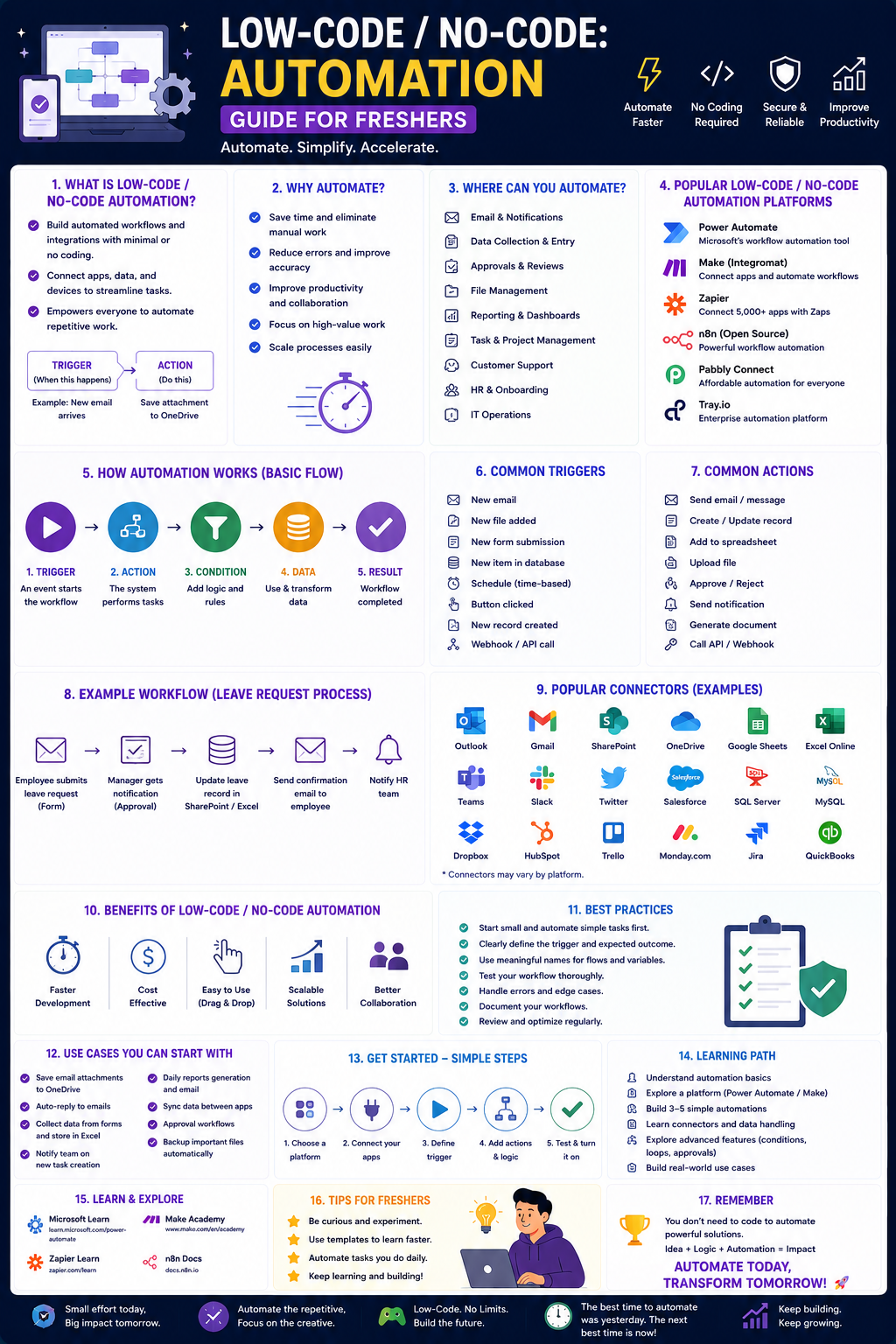
- Building workflows: Creating triggers (what starts the automation), actions (what the automation does), and conditions (when different paths should execute)
- Testing and maintaining: Ensuring automations work correctly and updating them as business needs change
Why This Path Matters for Freshers in 2026
The low-code market is projected to reach $65 billion by 2027, with approximately 41% of organizations now having active citizen developer initiatives. Employers increasingly ask: "Can you automate repetitive work? Can you use AI tools responsibly?" Traditional languages aren't obsolete, but job competition is high—these modern ecosystems offer better salaries, faster hiring, global opportunities, and less competition for freshers.
Practice Goal for Phase 1: Look at your daily routine—academic work, part-time job, or even personal tasks. Identify three repetitive activities you do weekly (e.g., renaming files, organizing emails, copying data between spreadsheets). Describe how you would automate each if you had magic powers. This is your first automation thinking exercise.
Free Resources for Phase 1:
- Free Clawdbot Course 2026 (TechGig): A beginner-friendly program teaching students to build AI-powered automation bots with no course fee. Designed for college students, freshers, and graduates across any background—Arts, Commerce, Science, or Engineering.
- n8n Introduction Workshop (AI Factory Austria): Free online workshop offering structured introduction to n8n platform covering nodes, triggers, API connections, data transformation, AI service integration, and best practices. Includes certificate upon completion.
🔧 Phase 2: Core Automation Platforms – Learn by Building (Weeks 3-8)
This is where you get hands-on. You will build real automations starting with visual no-code tools before progressing to more flexible platforms.
Where Low-Code Fits vs. Traditional Coding
Organizations now offer multiple development approaches:
- Traditional coding: Maximum control but takes months to build apps (best for public-facing products or regulated industries)
- No-code/Low-code platforms: Build internal business apps in days, not months, with drag-and-drop tools
- AI/Vibe coding: Describe what you want in natural language; AI writes the code (best for prototyping concepts without sensitive data)
Platform Deep Dives
Power Automate (Microsoft Ecosystem) – Best for organizations using Microsoft 365, SharePoint, Teams, Outlook. Learn to build three types of flows:
- Automated flows: Triggered by events (e.g., "When email arrives with attachment, save to OneDrive")
- Scheduled flows: Run at specific times (e.g., "Every Monday at 9 AM, generate weekly report")
- Instant flows: Triggered manually from a button (e.g., "Send approval request")
n8n (Open-source, Flexible) – The "bread and butter" for professionals in 2026. n8n is flexible enough for complex builds but simple enough to ship fast. Key features include nodes (pre-built connectors), triggers (what starts the workflow), and the ability to add custom JavaScript/Python code when needed.
Zapier/Make (Beginner-friendly) – These platforms offer the most intuitive drag-and-drop interfaces. Learn to create "Zaps" (Zapier) or "Scenarios" (Make) that connect apps like Gmail, Google Sheets, Slack, and CRMs.
Beginner Projects to Build (increasing complexity):
- Email-to-Spreadsheet: Automatically save email attachments to Google Drive and log details in Sheets
- Form-to-Notification: When a Google Form is submitted, send formatted message to Slack or Teams
- Daily Summary Report: Pull data from spreadsheet, format as email, and send every morning
- Approval Workflow: When expense report submitted, email manager, wait for Yes/No, update spreadsheet
Practice Goal: Set up a free account on Make or Zapier. Build a simple automation: when you receive an email with a specific label, automatically add a row to Google Sheets containing the sender, subject, and date. Test it with your own email address.
Free Resources for Phase 2:
- n8n Use Case Workshops (AI Factory Austria): Free online workshops building practical use cases: Email-to-Task Automation, Generate Financial Reports, Parse Incoming Invoices from Outlook. Each results in a fully working automation prototype.
- Microsoft Power Platform Fundamentals (PL-900): Entry-level certification ($99 exam) covering Power Apps, Power Automate, and Power BI basics. Self-study in 2–4 weeks.
- SimpleOne No-Code Training: Free learning track for individuals with no technical background focusing on core system administration, configuring business processes, and building applications using visual no-code tools.
🤖 Phase 3: AI-Enhanced Automation – The 2026 Force Multiplier (Weeks 9-12)
In 2026, automation and AI are converging. You will learn to integrate AI services into your workflows for document processing, content generation, and intelligent decision-making.
AI Integration in Automation Workflows
Modern automation platforms let you incorporate AI capabilities without becoming an AI expert:
- RAG Systems (Retrieval-Augmented Generation): Build document processing pipelines that ingest files, retrieve relevant content, and power intelligent chatbots
- Invoice Parsing: Automate reading incoming invoices, extracting key fields (vendor name, amount, date), and forwarding structured data to downstream systems
- Content Workflows: Use AI to generate report summaries, categorize incoming requests, or draft email responses
AI-Assisted Workflow Tools for Freshers
n8n + AI Services: The Playground Bundle teaches integrating AI services into automations for real-world use cases.
Clawdbot: Beginner-friendly platform where students build AI-powered automation bots focusing on real-world use cases: auto-formatting reports, internship application tracking, data cleaning. Open-source access via GitHub lets you study real automation logic.
Lovable & Framer: No-code builders allowing you to ship apps and websites using only natural language descriptions.
Make & Zapier AI Integrations: Both platforms now offer AI steps (text generation, categorization, summarization) that plug directly into visual workflows.
Responsible AI Use – Critical for Professionals
The Playground Bundle includes training on Trustworthy AI covering:
- EU AI Act risk classes and requirements
- GDPR compliance for data protection
- Copyright law awareness for training data and generative AI outputs
Practice Goal: Build a document processing workflow. Use n8n (or Make/Zapier) to read a PDF, extract text, send to an AI service for summarization, and save the summary to Google Docs. Document each step and identify where human verification remains necessary.
Free Resources for Phase 3:
- Playground Bundle – n8n Use Cases (AI Factory Austria): Hands-on program building Document RAG System & Customer Support Bot, Email-to-Task Automation, Financial Reports Generation, and Invoice Parsing workflows. Free for participants from SMEs and public administration from EU/EuroHPC JU member countries.
- Free Clawdbot Course: Learn to create basic AI-powered workflows connecting tools to trigger actions automatically. Includes GitHub access for exploring open-source workflows.
- The Ultimate AI Toolkit Course (The Blue Whale AI Academy): Covers automation with Zapier/Make, no-code builders like Lovable/Framer, AI assistants (Gemini, Grok, Copilot), and video tools for scaling content.
📊 Phase 4: Building Systems – Governance, Scale & Real Projects (Weeks 13-16)
As your skills grow, you must understand how automation fits into larger organizational contexts. This phase prepares you for professional roles.
Shadow IT – The Hidden Risk
When non-technical teams build workflows without IT involvement, they create unmanaged tools with security gaps, data silos, and scaling issues. Professional automation builders need platforms with built-in governance: centralized access management, audit trails, and IT visibility.
Building Scalable Automations
Not all platforms handle growth equally. Consider:
- Will the platform handle increased automation complexity and more users?
- Does it support custom code (Python/JavaScript) for advanced logic?
- Can you modify workflows visually AND extend with scripting?
Professional Portfolio Projects
Build these three projects to demonstrate real capability:
Project 1: Internal IT Request Workflow:
- Build form for employees to submit IT requests (new laptop, software access, password reset)
- Create approval flow routing to appropriate manager based on request type
- Automatically create ticket in tracking system or send to IT team channel
- Send confirmation to requester with expected timeline
Project 2: Customer Support Automation:
- Connect email support inbox to workflow
- Categorize incoming emails by issue type using AI
- Route to appropriate team member
- Auto-respond to common questions (password reset, shipping status)
- Log all interactions to CRM or spreadsheet
Project 3: Financial Report Generator:
- Build workflow collecting data from multiple sources (spreadsheets, database, API)
- Process and aggregate metrics
- Generate formatted report (PDF or Google Doc)
- Email to stakeholders on monthly schedule
How to Document Your Portfolio:
- Create GitHub repository for workflow definitions (JSON/YAML exports)
- Write clear descriptions: problem being solved, technologies used, step-by-step breakdown
- Include screenshots of successful runs and error handling
- Add reflection on limitations and potential improvements
Free Resources for Phase 4:
- DataArt IT Camp 2026: Free online course (16–28 March 2026) focusing on competencies employers actually expect. Includes "No-Code Superpowers" webinar on real AI implementation for non-developers. Participants receive certificates upon completion.
- Glide Blog – How to build internal tools in 2026: Comprehensive guide covering defining app scope, identifying data sources, and choosing between traditional development, no-code platforms, or AI-powered vibe coding.
🏆 Phase 5: Certification (Strongly Recommended – Weeks 17-18)
Certifications validate your knowledge to employers. Citizen developer certifications require just 2–4 weeks of self-study and focus on practical application development.
Entry-Level Certifications for Freshers
Microsoft Power Platform Fundamentals (PL-900): $99 exam covering Power Apps, Power Automate, Power BI. Self-study in 2–4 weeks. Most recognized entry-level credential.
ServiceNow Micro-Certifications: Free certifications covering workflow automation and Flow Designer. No proctored exams required.
Salesforce Platform App Builder: $200 exam for building applications on Salesforce without code. Valuable if targeting Salesforce ecosystem.
Kissflow Academy: Free training for no-code app development fundamentals.
DataArt IT Camp Certificate: Free participation certificate upon completing workshops.
What Employers Value
Recruiters in 2026 care less about certificates and more about whether you can actually automate tasks, save time, and improve workflows. The Clawdbot approach emphasizes "doing first, theory later"—small automations delivering visible impact quickly.
Practice Goal: Complete PL-900 study material on Microsoft Learn for 2–3 weeks. Take free practice assessment. When consistently scoring above 80%, schedule exam (~$99).
Free Resources for Phase 5:
- Microsoft Learn PL-900 Study Path: Complete official curriculum covering all exam objectives
- SimpleOne Learning Center: Free courses on low-code automation, system administration, and business application design
- AI Factory Austria Certificate: Completion certificate after finishing introduction workshop + use case workshop + Trustworthy AI module
📚 Consolidated Resource Toolkit
Completely Free, Comprehensive Programs
Playground Bundle – n8n Use Cases (AI Factory Austria): Hands-on program teaching design, connection, and automation of workflows integrating data, APIs, AI services, and business tools. Builds complete functional use cases from data ingestion to AI-driven outputs. Covers responsible AI legal aspects (EU AI Act, GDPR, copyright). Free for SMEs and public administration from EU/EuroHPC JU member countries.
Free Clawdbot Course 2026 (TechGig): Beginner-friendly program teaching students to build AI-powered automation bots with no course fee. Focuses on real-world use cases: automating academic/admin tasks, creating basic AI-powered workflows, connecting tools to trigger actions automatically, building simple automation projects from scratch. Access to open-source workflows via GitHub.
DataArt IT Camp 2026: Free online course (16–28 March 2026) focusing on competencies employers actually expect. Includes "No-Code Superpowers" webinar on real AI implementation for non-developers. Certificates upon completion.
Microsoft Learn – Power Platform: Free self-paced learning covering Power Automate, Power Apps, Dataverse. Complete official modules with hands-on exercises.
SimpleOne Learning Center: Free low-code automation training for non-technical specialists. Focuses on core system administration, configuring business processes, building applications using visual no-code tools, and maintaining solutions once live.
Free Online Platforms to Practice
n8n (Self-hosted, Free): Open-source workflow automation. Most flexible platform for building complex automations without paid tiers.
Make (Free tier): Visual platform with generous free tier (1,000 operations/month). Excellent for beginners learning automation logic.
Zapier (Free tier): 100 tasks/month free. Most intuitive interface for absolute beginners.
Microsoft Power Automate (Free with Microsoft account): 750 runs/month free. Deep integration with Microsoft ecosystem (Outlook, SharePoint, Teams).
Glide (Free tier): Build internal business apps starting from data (spreadsheets or databases). 10 published apps, 2,500 rows total, core features included.
AI-Assisted Automation Tools
Lovable & Framer (Free tiers): Ship no-code apps and websites using natural language description. Turn ideas into working prototypes conversationally.
ChatGPT/Claude (Free tiers): Use as automation design assistant. Describe workflow needs, ask for platform recommendations, generate documentation.
Clawdbot GitHub: Explore open-source automation workflows, review real-world logic, modify existing projects. Builds technical confidence through transparency.
💼 Career Application & Next Steps
Low-code automation is one of the fastest-growing career paths in tech. The surprise? Citizen developers sometimes command higher mid-level salaries than professional developers because business-savvy builders who understand operational processes AND wield automation tools are rare.
1. The Fresher Entry Point
Citizen Developer / Automation Specialist (Junior): Builds departmental solutions in days, automating inspection checklists, audit forms, equipment tracking, and workflow approvals. Average US salary: ~$129,348 annually. Requires business process understanding + platform proficiency.
AI Automation Intern / Workflow Automation Assistant: Hands-on role building automations for operations, marketing, or HR teams. Found across manufacturing, construction, healthcare, and field service organizations.
Operations or Process Executive: Automation-enabled role where you apply workflow skills to improve efficiency in logistics, customer support, or data management.
Business Systems Analyst: Helps teams identify automation opportunities and implements solutions using Power Automate, n8n, or no-code platforms.
Industries actively hiring include: Manufacturing (equipment inspection, quality processes), construction (paper inspection forms digitization), healthcare (patient tracking systems, billing automation), retail/e-commerce (inventory management, order tracking), and IT operations (routine task automation).
2. Build Your Portfolio (Three Essential Projects)
Project 1 (Support Ticket Automation):
- Connect email inbox to workflow using Power Automate or Make
- Categorize incoming messages by keyword (billing, technical, general)
- Auto-assign to different team channels or create tickets
- Log all interactions to spreadsheet with timestamps
- Document workflow diagram and test results
Project 2 (Document Processing Pipeline):
- Build workflow that monitors folder for new PDFs
- Extract text, send to AI service for summarization
- Save summary to Google Doc or database
- Trigger notification when complete
- The Narrative: "I built an automated document processing pipeline that reduced manual review time from 20 minutes to 2 minutes per document"
Project 3 (Approval Workflow System):
- Design form for expense or leave requests
- Build approval flow routing to appropriate manager
- Implement escalation if manager doesn't respond within 2 days
- Track all requests in SharePoint list or Dataverse table
- Create dashboard showing pending vs. approved by department
How to Document Your Portfolio: Create GitHub repository for workflow definitions. For each project, include README with: problem statement, platform used, step-by-step workflow explanation (trigger → actions → conditions), screenshot of working automation, metrics showing time saved, and reflection on limitations.
3. Certifications That Open Doors
Microsoft Power Platform Fundamentals (PL-900): Most recognized entry-level credential ($99 exam). Self-study in 2–4 weeks.
ServiceNow Micro-Certifications: Free certifications for workflow automation, Flow Designer, and citizen developer skills through Now Learning platform.
AI Factory Austria Certificate: Free completion certificate after attending introduction workshop + use case workshop + Trustworthy AI module.
DataArt IT Camp Certificate: Free participation certificate recognized by employers.
4. The Interview Question You Will Be Asked
Question: "You notice your team spends 5 hours every week manually copying data from emails into a spreadsheet. How would you automate this?"
Your Answer: "First, I would analyze the process. What triggers the need? What data is being copied and where does it end up? I'd map the current workflow: email arrives → worker reads → identifies relevant fields (sender, date, request type) → opens spreadsheet → adds row → saves.
Next, I would design the automation. Using Power Automate or Zapier, I'd create a trigger: 'When email arrives in specific folder or with specific label.' Then actions: parse email content, extract key fields using natural language processing if needed, add row to spreadsheet with timestamp. I'd add error handling: if email format unexpected, flag for manual review.
I would build this incrementally. First automate one email type, test with 10 samples, verify accuracy, then expand to all categories. I'd also set up monitoring email to notify me of failures. Finally, I'd document the automation and train team members how to report exceptions.
The result would reduce manual data entry time from 5 hours to 15 minutes weekly—ROI of approximately 95% time savings within first month. I'd track metrics to demonstrate value to management."
Why This Works: You demonstrated process analysis methodology, named specific platforms, described incremental approach (build → test → expand), mentioned error handling and documentation, and quantified business value.
5. Sample Resume Entry (No Experience Version)
text
Automation Specialist Candidate | Portfolio

TECHNICAL SKILLS
- Platforms: Power Automate, n8n, Make, Zapier, Microsoft Power Apps
- Integration: Email (Outlook, Gmail), Spreadsheets (Excel, Google Sheets, Airtable), Cloud Storage (OneDrive, Google Drive, SharePoint)
- AI Integration: Document processing, summarization, categorization
- Concepts: Triggers, conditions, actions, approval flows, error handling

PROJECTS

IT Request Workflow Automation (Power Automate)
- Built department request system reducing processing time from 2 days to 4 hours
- Implemented approval routing with manager assignment logic
- Created tracking dashboard showing request status by category
- Documented complete workflow with error handling procedures

Document Processing Pipeline (n8n + AI)
- Developed automated workflow monitoring document uploads
- Integrated AI summarization reducing manual review time by 80%
- Saved processed summaries to Google Drive with automated naming convention
- Published workflow as reusable template with documentation

Support Ticket Categorization (Make)
- Built email-to-ticket workflow with AI-powered auto-categorization
- Implemented routing logic assigning tickets to correct team members
- Configured escalation notifications for time-sensitive issues
- Logged all interactions to Google Sheets for reporting

CERTIFICATIONS
- Microsoft Power Platform Fundamentals (PL-900) – In progress
- AI Factory Austria n8n Workshop Certificate – Completed

EDUCATION
- Self-directed low-code automation training (3+ months, 8+ production workflows built)
- Microsoft Learn learning paths (12+ modules completed)
- Bachelor's Degree (any field) – demonstrating analytical thinking
🎯 Your Next Steps for This Week
Do not try to learn Power Automate, n8n, Zapier, and AI integration simultaneously. Build momentum with small wins.
Step 1: Set Up Your Free Accounts (Day 1)
- Microsoft account for Power Automate (free)
- Make or Zapier free tier
- GitHub account for portfolio hosting
- (Optional) Google account for Sheets/Drive testing
Step 2: Choose Your Starting Platform (Week 1)
- Power Automate if your university/organization uses Microsoft 365
- Make/Zapier for absolute easiest start (most intuitive interface)
- n8n if you want open-source flexibility (self-host for free)
Step 3: Build Your First Workflow (Week 1-2)
- Connect Gmail/Outlook to Google Sheets
- Trigger: "When email with label arrives"
- Action: "Add row to spreadsheet with sender, subject, date"
- Test with your own email address
Step 4: Take Free n8n Workshop (Week 2-3)
- Register for AI Factory Austria's free Introduction workshop
- Complete Trustworthy AI self-learning module
- Attend one Use Case Workshop (Email-to-Task or Financial Reports)
Step 5: Build Real Automation for Yourself (Week 3-4)
- Identify personal time-waster (organizing files, tracking applications, formatting reports)
- Build workflow solving YOUR problem
- Document process in GitHub repository
Step 6: Explore Clawdbot or Ultimate AI Toolkit (Week 4)
- Enroll in Free Clawdbot Course for beginner AI automation focus
- Or explore Ultimate AI Toolkit course for broader tools (Zapier/Make + Lovable/Framer)
Step 7: Join the Community
- Follow #PowerAutomate, #n8n, #CitizenDeveloper on LinkedIn
- Join n8n community forums or Reddit r/Automate
- Free AI Factory Austria community for networking
The moment you build your first workflow that saves you from a repetitive task—watching emails automatically organize themselves, data copy itself, reports generate without your intervention—you will understand the power of low-code automation. You don't need to write thousands of lines of code to build meaningful automation. Low-code is your gateway into the future of work. Start building today.




 Group / 1: 1 Sessions