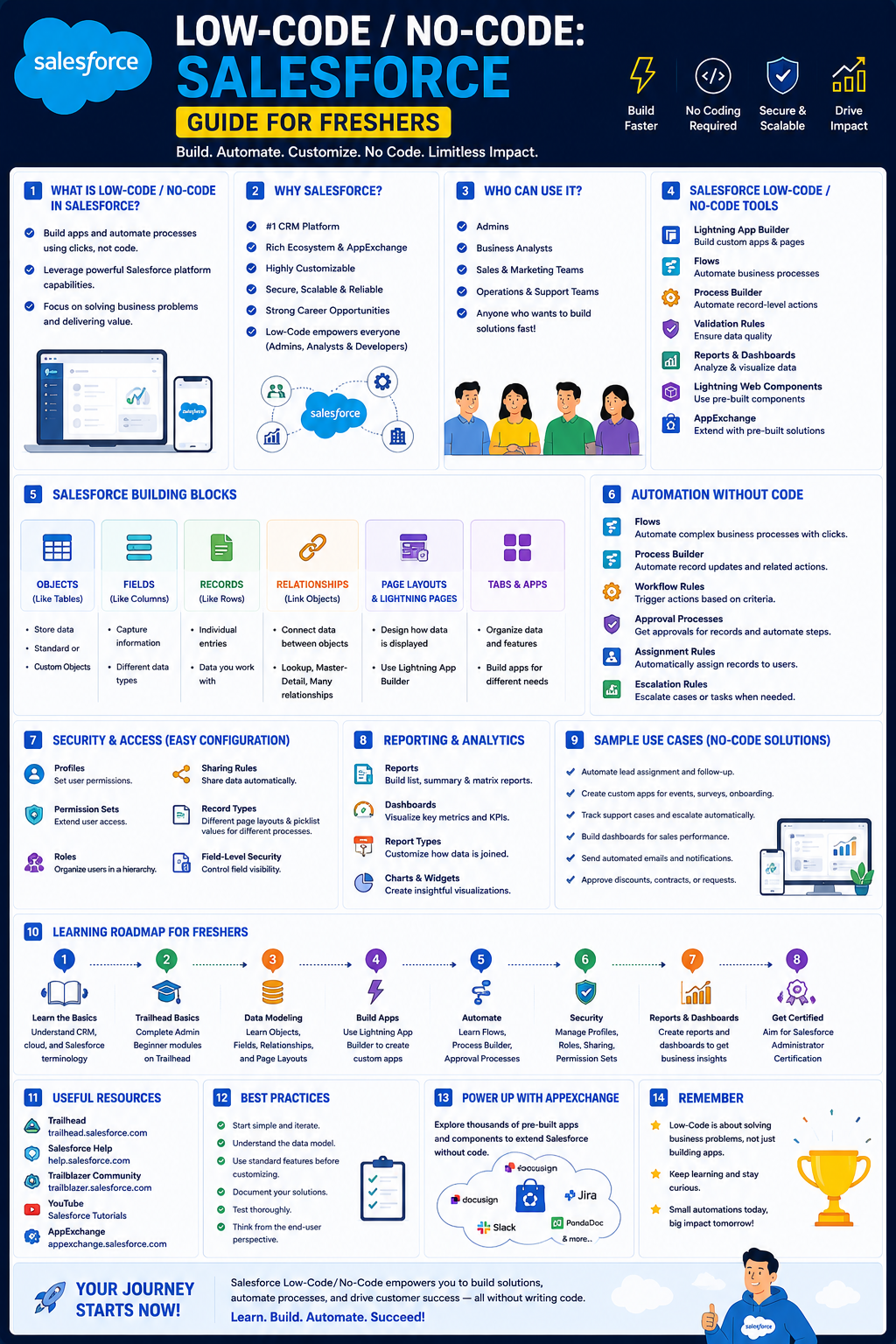
This roadmap is designed for a fresher—anyone with curiosity and a desire to build business solutions without writing complex code. You will learn Salesforce low-code development using declarative tools like Flow Builder, Lightning App Builder, and the new AI-powered Agentforce Vibes IDE. The goal is to transform you from someone who "knows what CRM means" into a professional who can design, build, and deploy business applications on the world's #1 CRM platform—used by companies like Amazon, Google, Spotify, and thousands of startups. This path prepares you for entry-level roles like Salesforce Administrator, Junior Salesforce Developer, or Salesforce App Builder with zero or minimal coding required.
Salesforce offers one of the best career opportunities for freshers because demand is huge, the barrier to entry is low, and the ecosystem offers multiple non-coding paths. Even better, Salesforce provides an entire free learning ecosystem called Trailhead, along with a free Developer Edition org where you can practice everything you learn.
🗺️ Phase 1: The Mindset Shift – What Low-Code Salesforce Development Really Means (Weeks 1-2)
Before building your first app, understand that Salesforce is a cloud-based CRM (Customer Relationship Management) platform that helps companies manage customers, sales, leads, marketing, support, and automation. Low-code development on Salesforce means you can build applications using "clicks, not code"—configuring the system through point-and-click tools rather than writing traditional programming languages.
What a Low-Code Salesforce Professional Actually Does
Salesforce low-code professionals focus on using declarative development tools to solve business problems. Your core responsibilities include:
- Designing data models: Creating custom objects, fields, and relationships to store business data
- Building user interfaces: Using Lightning App Builder to create pages and record layouts
- Automating business processes: Using Flow Builder to create automated workflows without code
- Managing security: Controlling who can see and edit what data through profiles, roles, and permission sets
- Creating reports and dashboards: Providing visibility into business performance
The 2026 Salesforce Career Roles for Freshers
Before starting, understand the available career paths:
Salesforce Administrator (Best for Beginners – No Coding Required)
- Manage users, create fields and objects, automate processes, create reports and dashboards
- No programming knowledge needed
- Fresher salary (India): ₹4–8 LPA
Salesforce App Builder (Low-Code Path)
- Build custom applications using declarative tools (Flow Builder, Lightning App Builder, Schema Builder)
- Basic CRM understanding required; programming knowledge helpful but optional
- Fresher salary: Comparable to Administrator roles with growth toward ₹10–20 LPA
Salesforce Developer (Some Coding Required)
- Write Apex code, build Lightning Web Components
- Requires programming knowledge (JavaScript, OOP concepts)
- Fresher salary: ₹6–12 LPA
Salesforce Business Analyst (Zero Coding)
- Gather requirements, work with clients, design solutions
- Best for non-technical professionals
- Fresher salary: ₹4–8 LPA
Why this matters for freshers: You can start your Salesforce career without knowing how to code through the Administrator or App Builder path. The ecosystem is booming, offering diverse career paths where you can start as an Admin, then become a Developer, Consultant, or Architect as your skills grow.
Prerequisite Check
You need basic computer literacy and a willingness to learn. No prior Salesforce or coding experience is required. Set up:
- Trailhead account (free at trailhead.salesforce.com) – the official Salesforce learning platform
- Salesforce Developer Edition org (free) – your personal practice environment
- Trailhead GO mobile app (free) – learn on the go from anywhere, even offline
Practice Goal for Phase 1: Create your free Trailhead account. Complete the "Get Started with Salesforce" module (about 30 minutes). Navigate through the Salesforce Setup menu and familiarize yourself with the Lightning Experience interface.
Free Resources for Phase 1:
- Salesforce Tutorial (Official): Free step-by-step tutorials covering Salesforce basics, customization, automation tools, reports and dashboards, and admin/developer skills. Beginner-friendly with real-world scenarios. Sign up for a free Developer Edition org at developer.salesforce.com
- Trailhead by Salesforce: The free gamified learning platform with guided learning paths and modules. Earn points and badges as you learn
- Salesforce Career Roadmap 2026 (Trailhead Titans): Complete guide covering what Salesforce is, career roles, salary expectations (₹4–30 LPA), and step-by-step learning path from scratch
🛠️ Phase 2: Salesforce Fundamentals – Build Your CRM Foundation (Weeks 3-5)
Before building custom apps, you must understand Salesforce's core building blocks. This phase focuses on understanding data models and security—the foundation of every Salesforce application.
Core Concepts to Master
Objects, Fields, and Relationships
- Standard Objects: Pre-built tables like Accounts, Contacts, Leads, Opportunities, Cases
- Custom Objects: Tables you create for your unique business needs
- Fields: Columns within objects that store specific data (text, numbers, dates, picklists)
- Relationships: How objects connect to each other (Lookup and Master-Detail)
Security and Data Access
- Organization-Wide Defaults (OWD): Baseline sharing settings for each object
- Profiles and Permission Sets: Control which users can access which objects and fields
- Sharing Rules: Grant additional access beyond OWD for specific users
- Field-Level Security: Control visibility of individual fields
User Interface Customization
- Page Layouts: Arrange fields on record pages
- Record Types: Offer different picklist values and page layouts for different business processes
- Lightning App Builder: Drag-and-drop tool for creating pages
Practice Goal: Create a custom object called "Project" with fields for Project Name, Start Date, End Date, and Status. Create a tab for it. Create a page layout organizing these fields into logical sections. Share it with a test user.
Free Resources for Phase 2:
- Salesforce for Admins Bootcamp Learning Track: Role-based track for new Salesforce Administrators covering organizational needs analysis, security model development, custom solutions, and no-code automation
- Salesforce App Builder Training (Locus IT): Comprehensive syllabus covering Salesforce architecture, data modeling, security management, UI customization, business process automation, and deployment. No programming knowledge required
- Trailhead Modules: "Data Modeling" module, "Security Basics" module, "Lightning Experience Customization" module
⚡ Phase 3: Low-Code Automation – Flow Builder Mastery (Weeks 6-9)
Flow Builder is the most powerful low-code automation tool on the Salesforce platform. It allows you to create sophisticated business processes without writing Apex code.
Why Flow Builder Matters
If you learn only one low-code tool on Salesforce, make it Flow Builder. It replaces older automation tools (Process Builder, Workflow Rules) and handles everything from simple field updates to complex approval processes and screen-based user interactions.
Core Flow Concepts
Flow Types
- Screen Flows: Present screens to users for data collection (e.g., a guided wizard)
- Record-Triggered Flows: Automatically run when records are created, updated, or deleted
- Scheduled Flows: Run at specified times
- Autolaunched Flows: Run from other flows, processes, or Apex
Flow Elements and Resources
- Elements: The building blocks - assignments, decisions, loops, actions, subflows
- Resources: Variables, formulas, collections that store and manipulate data
- Connectors: Paths connecting elements in sequence
Automation Best Practices
- Use Record-Triggered Flows for before-save or after-save logic
- Use Screen Flows for user-facing data collection wizards
- Implement error handling and fault paths
- Test flows thoroughly before activation
Projects to Build
Beginner Project: Lead Assignment Flow
- Create a record-triggered flow that runs when a Lead is created
- Assign the Lead based on geographic region (e.g., ZIP code prefix)
- Update Lead owner automatically
Intermediate Project: Expense Approval Screen Flow
- Build a screen flow where employees submit expense reimbursements
- Collect amount, category, receipt upload
- Route to manager for approval (using Approval Processes)
- Update expense record status based on decision
Advanced Project: Onboarding Wizard
- Create multi-screen flow for new employee onboarding
- Collect personal information, IT equipment requests, training selections
- Create records in multiple objects (Employee, Equipment Request, Training Enrollment)
- Send confirmation email via Flow
Practice Goal: In your Developer Edition org, build a record-triggered Flow that runs when an Opportunity is closed won. The Flow should update the Account record (e.g., increment a "Closed Won Count" field) and create a follow-up task for the sales rep.
Free Resources for Phase 3:
- Flow Builder Bootcamp Learning Track: Trailhead track covering use case analysis, flow types, screen layouts, record-triggered flows, and best practices for creating and managing Flows
- Salesforce App Builder Training Flow Module: Section covering Flow Builder, approval processes, validation rules, and formula fields
- Salesforce Tutorial Automation Section: Learn Process Builder, Flows, and Approval Processes through step-by-step tutorials
🏗️ Phase 4: Build Complete Applications – Lightning App Builder (Weeks 10-12)
Now you combine your data model and automation skills to build complete business applications using clicks, not code. The Lightning App Builder is your primary tool.
Lightning App Builder Mastery
The Lightning App Builder allows you to create responsive, dynamic user interfaces without writing HTML, CSS, or JavaScript.
What You Can Build
- Lightning Apps: Collections of pages with navigation
- Record Pages: The interface users see when viewing a record
- Home Pages: Custom dashboards and components for users
- Utility Bar: Persistent actions at the bottom of the screen
Components You Can Add
- Standard Components: Related Lists, Chatter, Activity Timeline
- Custom Components: Built-in drag-and-drop components
- Dynamic Forms: Conditionally display fields based on record data
- Dynamic Actions: Show/hide buttons based on user context
App Building Workflow
- Plan your app – wireframe the user experience
- Create necessary custom objects and fields
- Build flows for any automated processes
- Design pages using Lightning App Builder
- Create Lightning App to organize pages
- Assign app to user profiles
- Test with end users and iterate
Complete Application Projects
Project 1: Event Management App
- Custom objects: Events, Speakers, Attendees, Sessions
- Relationships: Events have Speakers (Lookup), Sessions (Master-Detail)
- Flows: Session registration flow, post-event survey flow
- Pages: Event home page, session schedule, speaker directory
- App: "Event Manager" Lightning App with navigation tabs
Project 2: Help Desk Ticketing App
- Custom objects: Tickets, Ticket Comments, Ticket Escalations
- Automation: Record-triggered flow for SLA calculation, approval flow for escalations
- Pages: Ticket record page with dynamic forms, queue view
- Security: Different page layouts for agents vs. managers
Project 3: Employee Recognition App
- Custom objects: Recognition Awards, Nomination, Award Categories
- Automation: Screen flow for submitting nominations, approval flow for manager sign-off, scheduled flow for monthly award digest email
- Pages: Leaderboard dashboard, nomination form page, recognition feed
- Reports: Recognizing trends, top nominators
Practice Goal: Build a complete "Project Management" Lightning App. Create Project and Task custom objects with a Master-Detail relationship. Build screens for viewing projects and their related tasks. Create a screen flow for logging time against tasks. Package everything into a Lightning App with navigation tabs.
Free Resources for Phase 4:
- Salesforce App Builder Training: Complete syllabus covering Lightning App Builder, page layouts, record types, dynamic forms, dynamic actions, custom tabs, branding, and navigation
- Salesforce Tutorial Customization Section: Learn to customize fields, page layouts, and apps through step-by-step tutorials
🚀 Phase 5: Developer Edition – Your Free Practice Org (Weeks 13-14)
Salesforce provides a completely free Developer Edition org where you can practice everything without affecting real business systems. This is your sandbox for experimentation and portfolio building.
What You Get for Free
March 2026 Major Upgrade brought powerful new features to Developer Edition at no cost:
- Agentforce Vibes IDE: Browser-based VS Code environment launching directly from Setup. Fully authenticated, org-aware development with Salesforce extensions, CLI, and GitHub integration pre-configured
- Agentforce Vibes with Claude Sonnet 4.5: AI-powered coding assistant with two modes:
- Plan mode: Analyzes your org, clarifies requirements, generates implementation plan
- Act mode: Creates and modifies Apex, LWCs, triggers, and test classes from natural language
- Salesforce Hosted MCP Servers: Connect external AI tools to your Salesforce data via natural language
Usage Limits (Important to Know)
- 110 requests per month with Claude Sonnet 4.5
- 1.5 million tokens per month
- Monthly refresh through May 31, 2026
- After May 31: one-time-only final allocation
Strategy: Use monthly cycles for exploration and learning; use final allocation to complete your portfolio projects.
Getting Started with Your Developer Org
- Sign up at developer.salesforce.com
- Navigate to Setup to explore system configuration
- Access Agentforce Vibes IDE from Setup menu
- Create test data (or install sample data packages)
- Build, break, rebuild—your practice org is completely safe
Practice Goal: Sign up for your free Developer Edition org. Launch Agentforce Vibes IDE from Setup. Explore the VS Code environment—notice how Salesforce metadata loads automatically. Use the integrated terminal to run a simple Apex test.
Free Resources for Phase 13-14:
- Salesforce Developer Edition Signup: Free at developer.salesforce.com
- Agentforce Vibes Documentation: Official Salesforce guide to using the AI-powered IDE including plan mode, act mode, and agent skills
- Salesforce CLI Documentation: Learn to use the command-line interface for metadata management
🤖 Phase 6: AI-Assisted Low-Code Development (Weeks 15-16)
In 2026, AI is transforming how Salesforce applications are built. Headless 360 means everything on Salesforce is now an API or MCP server that AI coding agents can call directly. The goal is that in the future, most code will be written by agents, not humans.
The New AI-Assisted Workflow
For Low-Code Builders (You don't need to write code—you direct the AI):
- Describe what you want in natural language
- AI analyzes your org structure (no hallucinated field names)
- AI generates implementation plan for your review
- AI creates Apex, flows, or components on your behalf
- You review, test, and refine
Agentforce Vibes in Action
- "Create a trigger that prevents duplicate Accounts based on email" – Vibes reads your actual org structure first
- "Build a screen flow for expense approval" – Vibes scaffolds the flow
- "Generate a Lightning Web Component for the help desk ticket counter" – Vibes creates the component
Salesforce Headless 360
Announced at TDX 2026, Headless 360 means any AI agent in any development tool can build applications that target Salesforce. This is significant because:
- It's designed for non-programmers: Headless 360 aims to expand the tent to bring in people who historically haven't been part of the Salesforce ecosystem
- You can vibe-code entire applications: Natural language description → AI agent builds on Salesforce platform
Important Cautions
Salesforce acknowledges that AI agents are "probabilistic, not deterministic"—they "reason their way to unexpected outcomes". Key considerations:
- AI-generated code must be reviewed; don't deploy without understanding
- Salesforce provides testing centers, observability, and guardrails for agent behavior
- The platform's security features and trust boundaries protect you from some risks
Practice Goal: In your Developer Edition org, open Agentforce Vibes IDE. Type a natural language request: "Create a validation rule on Opportunity that prevents closing as Won unless Amount is greater than 1000." Let Vibes generate the Apex. Review the code. Do you understand what it does? Deploy it (if you understand) or ask Vibes to explain it.
Free Resources for Phase 15-16:
- Agentforce Vibes IDE (Free in Developer Edition): Browser-based VS Code with AI-powered development using Claude Sonnet 4.5. Use plan mode to generate implementation plans before acting
- Headless 360 Overview: Salesforce's initiative making everything on the platform accessible to external AI coding agents
- Trailhead AI & Agentforce Modules: Bite-sized lessons across AI, Data, and Agentforce skills. Every AI skill you learn goes towards unlocking Agentblazer Status—recognition of your proficiency using agentic AI
📚 Phase 7: Certification & Portfolio Building (Weeks 17-20)
Certifications validate your knowledge to employers. Start with the entry-level certifications that require no coding, then progress based on your career goals.
The Certification Roadmap for Freshers
Salesforce Associate (Entry-level)
- Validates basic Salesforce knowledge
- Perfect first certification for absolute beginners
- Self-study: 2-3 weeks
Salesforce Administrator (Recommended First Major Cert)
- Most recognized entry-level credential for the no-code path
- Covers configuration, security, automation, reporting
- Self-study: 1-2 months with consistent effort
Salesforce Platform App Builder (Low-Code Focus)
- Focuses on building applications using declarative tools
- Covers data modeling, UI customization, business logic, security
- Prerequisite: Administrator recommended but not required
- Self-study: 2-3 months of hands-on practice
Salesforce Business Analyst (Zero Coding)
- Focuses on requirements gathering and solution design
- Best for non-technical career path
Salesforce Developer (Coding Path)
- Requires programming knowledge
- For those who want to code (Apex, JavaScript)
Building Your Low-Code Portfolio
You don't need professional experience to demonstrate Salesforce capability. Create these portfolio artifacts:
Portfolio Project 1 (Complete Business App)
- What: Build a complete application for a specific business scenario (e.g., "Student Course Registration" for a training center)
- Include: Custom objects (Students, Courses, Enrollments), Relationships (Course to Enrollment Master-Detail), Flows (Registration workflow with seat availability check), Pages (Course catalog, registration form, student dashboard), Reports (Enrollment summary, waitlist report)
- Document: Problem statement, solution overview, screenshots of objects, flows, pages, testing results
Portfolio Project 2 (Automation Showcase)
- What: Build a complex Record-Triggered Flow that handles multiple conditions and updates multiple records
- Example: Order processing flow that checks inventory, reserves stock, calculates discounts, creates fulfillment record, sends email
- Document: Business requirements, flow diagram (using Draw.io), step-by-step flow builder screenshots, edge cases handled, testing evidence
Portfolio Project 3 (AI-Assisted Build Documentation)
- What: Use Agentforce Vibes to generate a component or flow
- Document: Your natural language prompt, AI-generated output, any manual modifications you made, testing results
- Reflection: What did AI do well? Where did you need to intervene?
How to Document Your Portfolio
- Create a GitHub repository for your project documentation (even though no code, store screenshots and flow exports)
- Write clear README: problem being solved, technologies used, step-by-step build walkthrough
- Include screenshots and (if possible) short screen recordings of your app in action
- Add reflection: what was challenging, how you solved it, what you'd improve
Community and Credibility
Trailhead Badges and Ranks: Every module you complete earns points and badges. As you climb the Trailblazer Ranks, your progress is visible on your public Trailblazer Profile—share this with employers.
Trailblazer Community: Join events, workshops, and networking spaces. Community engagement is a key career accelerator.
Agentblazer Status: As you learn AI and Agentforce skills on Trailhead, you unlock Agentblazer Status—recognition of your proficiency using agentic AI. Showcase these achievements on your profile.
Practice Goal: Complete the Administrator certification study material on Trailhead. Take the free Webassessor practice exam. When consistently scoring above 80%, schedule the exam (approx $200 USD, varies by region).
Free Resources for Phase 17-20:
- Trailhead Certification Preparation Modules: Official Salesforce study materials for Associate, Administrator, App Builder, and other certifications
- Salesforce App Builder Training: Complete course including real-time project and case study implementation – business requirement gathering, data model design, application building, testing, and deployment
- Salesforce Tutorial Certification Prep: Beginner-friendly tutorials that prepare you for Salesforce certification exams
- Trailhead GO Mobile App: Learn from anywhere, complete quizzes, earn points and badges, track progress with widget providing real-time updates
📚 Consolidated Resource Toolkit
Completely Free, Official Salesforce Learning
Trailhead (trailhead.salesforce.com) is Salesforce's free gamified learning platform. It offers guided learning paths and modules with points, badges, and ranks. Key features include:
- Learning stages from L0 (Overcoming Beginner Confusion) to L8 (Continuous Growth)
- Bite-sized lessons across Agentforce, Data, AI, and more
- Free Trailhead Playgrounds – hands-on practice environments
- Virtual agent that can explain topics differently on demand – "summarize this unit" or "explain this topic differently"
Trailhead GO Mobile App is the reimagined free mobile app to learn Salesforce skills and connect to the Trailblazer Community from anywhere. Features include:
- Bite-sized lessons – learn anytime, even offline
- Quizzes to test knowledge and earn points
- Real-time progress tracking with home screen widget
- Direct access to support experts, Salesforce Help articles, and global Trailblazer Community
- Virtual agent for real-time assistance
Salesforce Developer Edition is a completely free org for practice. Now includes:
- Agentforce Vibes IDE (browser-based VS Code)
- Agentforce Vibes with Claude Sonnet 4.5 (AI-powered coding)
- Salesforce Hosted MCP Servers
- Monthly usage: 110 requests, 1.5M tokens (refresh through May 31, 2026)
Salesforce Tutorial (Official) offers free step-by-step tutorials for beginners covering:
- Salesforce Basics and CRM fundamentals
- Customization (fields, page layouts, apps)
- Automation Tools (Process Builder, Flows, Approval Processes)
- Reports & Dashboards
- Admin & Developer Skills
Completely Free Bootcamps and Learning Tracks
Salesforce for Admins Bootcamp is a role-based learning track for new Salesforce Administrators. You will learn how to:
- Analyze organizational needs and develop security models
- Build custom solutions meeting stakeholder needs
- Implement no-code automations for data quality and case management
- Use Flow Builder to streamline business processes
- Analyze data across organizations with Reports and Dashboards
Flow Builder Bootcamp is a track for experienced Administrators who need to streamline business processes with no-code automated solutions. Covers:
- Creating automated no-code solutions with Salesforce Flow
- Translating requirements into detailed design plans
- Building Screen Flows and managing layouts
- Implementing Record-Triggered Flows
- Best practices for creating and managing Flows
Salesforce App Builder Training (Locus IT) is comprehensive low-code training covering:
- Salesforce Platform & App Builder Foundations
- Data Modeling & Schema Design (Custom Objects, Fields, Relationships)
- Security & Data Access Management (Profiles, Roles, Permission Sets, Sharing Rules)
- User Interface Customization (Lightning App Builder, Dynamic Forms)
- Business Process Automation (Flow Builder, Approval Processes, Validation Rules)
- Real-Time Project & Case Study Implementation
Salesforce Career Roadmap 2026 (Trailhead Titans) is a complete career guide from scratch:
- What Salesforce is and why it matters
- Career roles (Admin, Developer, BA, Consultant) with salary ranges ₹4–30 LPA
- Step-by-step learning path from beginner to job-ready
- Certification strategy and job search guidance
Free AI-Assisted Development Tools
Agentforce Vibes IDE (in free Developer Edition) is a browser-based VS Code environment for building agents or apps with AI. Includes:
- Claude Sonnet 4.5 as default coding model
- Plan mode (analyzes org, clarifies requirements, generates implementation plan)
- Act mode (creates and modifies Apex, LWCs, triggers based on natural language)
- Predefined agent skills for tasks like creating custom tabs or generating flows
Salesforce Hosted MCP Servers provide standardized way for external AI tools to connect to Salesforce data. Features:
- Connect Claude Desktop, Cursor, or Claude Code to your Salesforce org
- Query Salesforce data through natural language
- Respects org's security model (object/field-level security, sharing rules)
- Prototype AI-driven integrations before production
Community Resources
Trailblazer Community is Salesforce's global community of learners and professionals. Benefits include:
- Events, workshops, and networking spaces
- Direct access to support experts and Salesforce Help articles
- Virtual agent for real-time assistance
LinkedIn Learning Salesforce Content offers professional development resources (free with some organizational subscriptions)
YouTube and Additional Free Content
Salesforce YouTube Channel provides free video tutorials on all platform features. Search for "Flow Builder tutorial" or "Salesforce Admin beginner"
Salesforce Ben and Salesforce Einstein Hub are free community blogs with tutorials, tips, and certification guidance
💼 Career Application & Next Steps
The Salesforce ecosystem is booming. Salesforce is one of the world's #1 CRM platforms used by companies across every industry, creating massive demand for certified professionals.
1. The Fresher Entry Point
Salesforce Administrator (No Coding Required) : Manages users, creates fields and objects, automates processes, creates reports and dashboards. Best for freshers, non-programmers, and career switchers. Fresher salary (India): ₹4–8 LPA
Salesforce App Builder (Low-Code) : Designs and builds custom applications using declarative tools. Requires basic CRM understanding; programming helpful but optional. Fresher salary: ₹5–10 LPA
Salesforce Business Analyst (Zero Coding) : Gathers requirements, works with clients, designs solutions. Best for non-technical professionals. Fresher salary: ₹4–8 LPA
Industries actively hiring include technology (SaaS, product companies), financial services (banking, insurance), healthcare, retail/e-commerce, manufacturing, and every company that manages customers professionally
Salary Growth (India Market) :
- Fresher: ₹4–8 LPA
- 2 years experience: ₹8–15 LPA
- 5 years experience: ₹15–30 LPA
2. The Learning Stages (L0–L8) from Salesforce Experts
Bhakti Sadavarte (Associate Director at InfoBeans with 20+ years Salesforce experience) explains the structured path:
🔹 L0 - Overcoming Beginner Confusion: Start small, stay consistent
🔹 L1 - Choose Your Role: Decide if you'll pursue Admin (no code), Developer (build apps), Consultant (solution-driven), or Architect (design systems)
🔹 L2 - Build Fundamentals: Learn Salesforce basics and CRM fundamentals
🔹 L3 - Certification Strategy: Aim for Salesforce Associate or Salesforce Administrator certifications
🔹 L4 - Practical Experience: Work with Trailhead Playgrounds, create dashboards, volunteer for NGOs
🔹 L5 - Engage with Community: Join events, workshops, and networking spaces
🔹 L6 - Build Your Brand: Showcase your skills, share projects, stay visible
🔹 L7 - Job Strategy: Prepare strategically, align learning with career goals
🔹 L8 - Continuous Growth: Keep upgrading—technology never stands still
Key Advice from Salesforce Professionals:
- Continuous learning is key—never stop evolving with technology
- Don't rely on one skill or tool; versatility makes you valuable
- Learn at least one programming language; it builds logic and adaptability
- Engage with Trailhead & Trailblazer Community to network and grow
- Keep building your brand; credibility opens doors before your resume does
3. Common Myths About Salesforce Careers (Busted!)
❌ Myth: Salesforce is only for sales teams
✅ Reality: Salesforce is used across departments! Marketing automates campaigns, customer service personalizes interactions, and operations streamlines processes
❌ Myth: You need a coding background to succeed
✅ Reality: While advanced customization involves coding (Developer path), many Admin roles focus on configuration, automation, and reporting. Trailhead equips you with necessary skills—no coding necessary!
❌ Myth: Salesforce careers are a dead end
✅ Reality: The Salesforce ecosystem is booming, offering diverse career paths. Start as an Admin, then become a Developer, Consultant, or even a Salesforce Architect
4. The Interview Question You Will Be Asked
Question: "You're a new Salesforce Administrator. How would you identify which processes to automate first?"
Your Answer: "I would start by understanding the business's pain points. What tasks are repetitive, time-consuming, or prone to error? I would shadow end users or interview department leads to identify their biggest frustrations.
Next, I would map the current process. What triggers it? What steps are involved? Where do decisions happen? What systems or people does it touch?
Then, I would prioritize based on impact vs. effort. High-volume, high-error processes that affect many users come first. For example, lead assignment for a sales team—if leads are currently assigned manually, that's a perfect candidate for a Record-Triggered Flow.
I would start with a small pilot for one high-priority process, test with a subset of users, gather feedback, iterate, then expand. I always document the automation in a runbook and train users before full rollout. Finally, I would set up monitoring to ensure the automation is working correctly—maybe a scheduled flow that emails me a weekly summary of automation runs.
Throughout, I would use Trailhead to learn best practices and consult the Trailblazer Community for similar use cases."
Why This Works: You demonstrated process analysis methodology (pain points → mapping → prioritization), named specific Salesforce tools (Record-Triggered Flow, scheduled flows), showed risk awareness (pilot, test, iterate), and referenced the learning resources (Trailhead, Community) that help you succeed.
5. Sample Resume Entry (No Experience Version)
text
Salesforce Administrator Candidate | Trailhead Portfolio

TECHNICAL SKILLS
- Core Salesforce: Objects, Fields, Relationships, Page Layouts, Record Types
- Automation: Flow Builder (Screen Flows, Record-Triggered Flows), Approval Processes, Validation Rules
- Security: Profiles, Roles, Permission Sets, Organization-Wide Defaults, Sharing Rules
- UI: Lightning App Builder, Dynamic Forms, Dynamic Actions
- Reporting: Custom Reports, Dashboards, Report Types
- Tools: Trailhead Playground, Developer Edition Org

PROJECTS

Event Management Application (Trailhead Project)
- Built complete Lightning App for managing events, speakers, and attendees
- Created custom objects with Master-Detail relationships
- Built Screen Flow for attendee registration with seat availability validation
- Designed Lightning pages with dynamic forms and related lists
- Created reports showing registration trends by event type

Lead Assignment Automation (Flow Builder)
- Built Record-Triggered Flow that runs on Lead creation
- Implemented geographic routing logic based on postal code prefix
- Reduced manual lead assignment time by estimated 90% in test scenario
- Documented flow with error handling and audit trail

Employee Onboarding Wizard (Screen Flow)
- Designed multi-screen Flow for new employee onboarding
- Collected personal information, IT requests, training selections in single session
- Created records across three objects (Employee, Equipment Request, Training Enrollment)
- Added confirmation email step via Flow action

CERTIFICATIONS
- Salesforce Certified Administrator – In progress (exam scheduled)
- Trailhead Ranger Rank (current)

EDUCATION
- Self-directed Salesforce training (4+ months, 20+ Trailhead modules completed)
- Salesforce App Builder Training – Course completion
- Bachelor's Degree (any field) – demonstrating analytical and communication skills
🎯 Your Next Steps for This Week
Do not try to learn data modeling, automation, and app building simultaneously. Build momentum with small Trailhead modules.
Step 1: Set Up Your Free Accounts (Day 1)
Step 2: Complete Your First Trailhead Module (Week 1)
- Search "Get Started with Salesforce" – about 30 minutes
- Navigate through Setup menu in your Developer Edition org
- Earn your first badge
Step 3: Choose Your Learning Path (Week 1-2)
- Explore the "Salesforce for Admins" bootcamp track
- Read the Salesforce Career Roadmap 2026 to understand roles and timeline
- Decide: Administrator (no code) vs. App Builder (low-code) vs. Developer (some coding)
Step 4: Build Your First Custom Object (Week 2)
- In your Developer Edition org, navigate to Object Manager
- Create a "Project" custom object
- Add fields (Project Name, Start Date, End Date, Status)
- Create a tab and page layout
- Add test records
Step 5: Build Your First Flow (Week 3)
- Open Flow Builder from Setup
- Create a simple Record-Triggered Flow that updates a field when a condition is met
- Test it by creating a test record
- Document your flow in a GitHub README
Step 6: Set Up AI-Assisted Development (Week 3)
- In your Developer Edition org, open Setup → Agentforce Vibes
- Launch the browser-based IDE
- Practice using Plan mode (analyze before acting)
- Generate a simple Apex class using natural language just to see how it works
Step 7: Join the Trailblazer Community (Week 1)
- Follow #Salesforce and #Trailhead on LinkedIn
- Join the Trailblazer Community in the Trailhead app
- Connect with other learners—the community is exceptionally welcoming to beginners
The moment you build your first Flow—watching records update automatically without any manual intervention—you will understand the power of low-code automation on Salesforce. You don't need to write thousands of lines of code to build meaningful business applications. Salesforce low-code is your gateway into a career with global demand, excellent salaries, and opportunities across every industry. Start your Trailhead journey today.




 Group / 1: 1 Sessions