🗺️ A Modern Roadmap for Web & App Development: React & Next.js
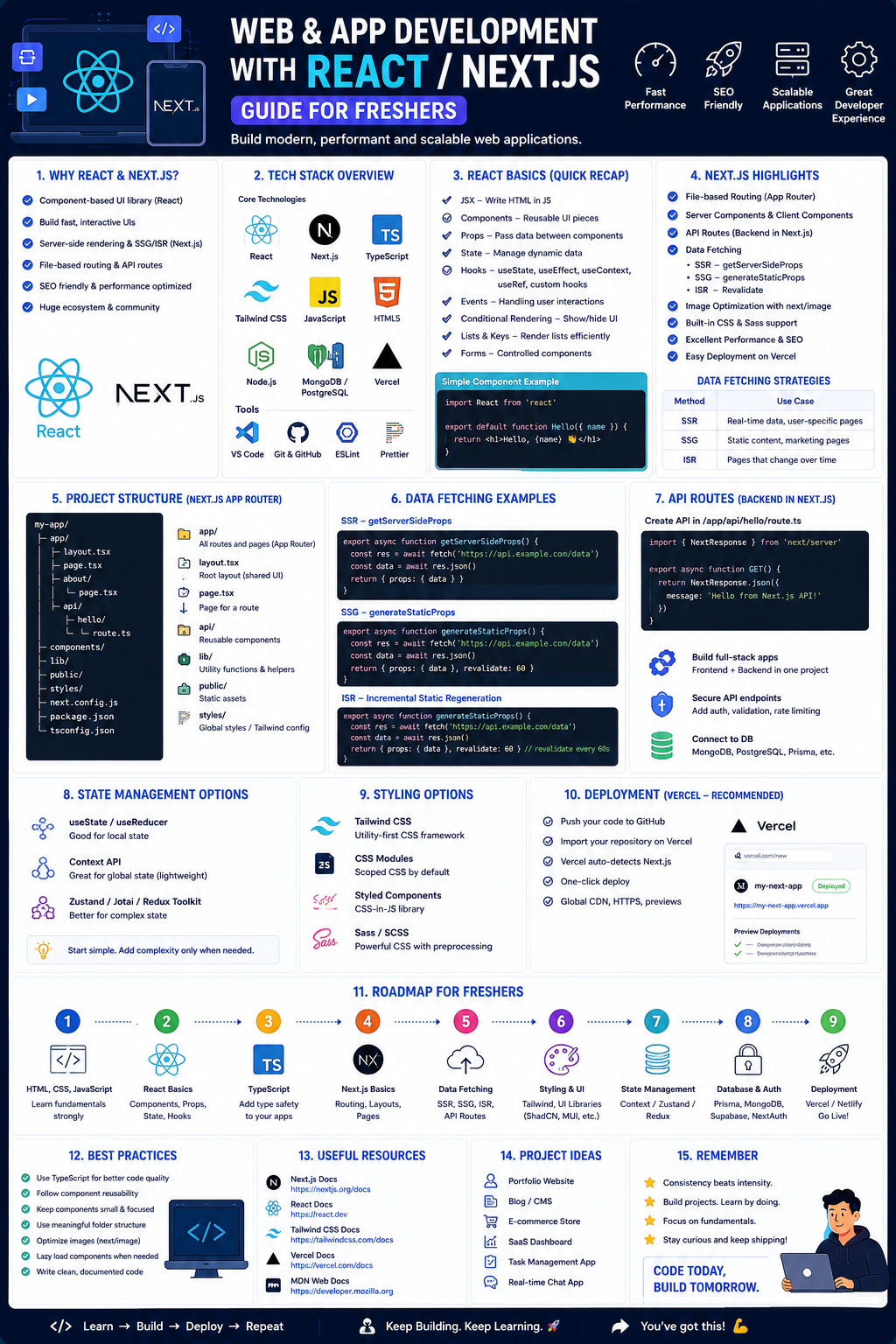
Welcome to the most practical, no-nonsense roadmap for becoming a job-ready developer using React and Next.js in 2026. This guide is specifically designed for freshers—those with basic JavaScript knowledge who are ready to build production-grade applications.
If you’ve been feeling overwhelmed by random tutorials, this roadmap will give you a clear, structured path. It shows you what to learn, when to learn it, and why it matters, with a focus on leveraging AI tools to accelerate your growth rather than replacing your skills.
The Mindset Shift: In 2026, your value isn't just writing code. It's about understanding architecture, performance, and how to strategically integrate AI capabilities into your apps.
📌 The Tech Stack at a Glance
Before we dive into the weeks, here is the modern stack that employers are looking for right now:
- Frontend: React 19 / Next.js 15 (App Router)
- Language: TypeScript (Non-negotiable for production apps)
- Styling: Tailwind CSS
- AI Integration: Vercel AI SDK, LangChain, OpenAI API
- Backend (within Next.js): API Routes, Server Actions
- Tools: Git, GitHub Copilot / Cursor (AI-assisted coding)
Phase 1: The Unskippable Foundation (Weeks 1-3)
Goal: Solidify your JavaScript fundamentals. Do not skip this to "get to React faster."
You need to master modern JavaScript (ES6+) as if your career depends on it—because it does. Focus exclusively on:
let, const (avoid var), Arrow functions, Template literals- Destructuring (objects & arrays) & Spread/Rest operators
- Critical Array Methods:
.map(), .filter(), .reduce() (You will use .map() constantly in React) - Asynchronous JavaScript: Promises,
async/await (Essential for API calls) - ES Modules (
import/export)
Practice Goal: Build a small, dynamic project using only vanilla JS (e.g., a Weather App using the Fetch API, or a Todo List with localStorage). Do not use any framework yet.
Recommended Resources:
- Full-Stack Development for Beginner (Udemy - Free with coupon): Use code
UDEAFFHP22025 to get it for free. The early modules cover these JS prerequisites perfectly. - "The Complete JavaScript Course" (Udemy - often on sale): Look for coupons via Course Joiner for free access.
⚛️ Phase 2: React 19 Fundamentals (Weeks 4-7)
Goal: Learn to "Think in React" by building component-based user interfaces.
This is where you start learning the library that powers over 44% of web development jobs.
- Core Concepts: JSX syntax, Functional Components, Props (data flow)
- State & Hooks:
useState (managing changing data), useEffect (side effects like fetching data) - Lists & Keys: Properly rendering lists using
.map() and unique key props - Forms: Controlled components and basic validation
Practice Goal: Build a Complete Todo List Application in React.
- Features: Add tasks, delete tasks, mark complete, filter by status (All/Active/Completed).
- Persist tasks to
localStorage using useEffect.
Recommended Resources:
- Full-Stack Development for Beginner (Free Udemy Course): The React sections teach JSX, Components, Props, State, Hooks, and building a Products List App.
- Scrimba's Learn React (Free): Interactive screencasts where you code along with the instructor.
🚀 Phase 3: Next.js 15 & The App Router (Weeks 8-12)
Goal: Transition from a React library user to a full-stack framework developer.
Next.js is the React framework for production, used by companies like Netflix, Twitch, and Nike. In 2026, you must learn the App Router (Next.js 13+), not the older Pages Router.
- The New Paradigm: Understanding the difference between Server Components (default) and Client Components (
'use client'). - Routing & Layouts: File-based routing, nested layouts, and dynamic routes.
- Data Fetching:
fetch in Server Components, using async/await directly. - Server Actions: Handling form submissions and data mutations without building an external API.
Practice Goal: Build a Full-Stack Contacts App. Create pages to list contacts, view a single contact, and add a new contact using Server Actions.
Recommended Resources:
- Scrimba's "Learn Next.js" (Free, 4.4 hours): The best interactive option. You build a project called "PrintForge" while learning the App Router.
- Official Next.js Tutorial (Free): The documentation-driven, canonical guide from Vercel.
- Traversy Media Next.js Crash Course (YouTube - Free): A fast, 1-2 hour overview to see the big picture.
🧠 Phase 4: Level Up – Styling & State Management (Weeks 13-15)
Goal: Write maintainable, scalable code for larger applications.
- Styling with Tailwind CSS v4: The utility-first framework that is now standard in modern stacks. Instead of writing custom CSS, you compose classes like
flex, p-4, and bg-blue-500 directly in your JSX. - TypeScript: You don't need to be an expert yet, but learn the basics (
interface, type, useState<Type>) to make your code safer and more professional. - State Management for Complexity: While
useState works for local data, you will learn Zustand or Redux Toolkit for managing global state that many components need access to (e.g., a user's shopping cart).
Practice Goal: Refactor your Contacts App. Add TypeScript interfaces for your Contact data type. Implement a light/dark mode theme toggle using Zustand to manage the theme state globally.
🤖 Phase 5: The AI Edge – Building Intelligent Apps (Weeks 16-18)
Goal: Learn how to integrate AI features—because "AI won't replace developers who use AI".
In 2026, adding AI to your portfolio (e.g., chatbots, summarizers) is no longer a "bonus"—it sets you apart from the competition.
- The Core Stack: You will use Next.js API Routes (or Server Actions) as a secure proxy to call LLMs like OpenAI's GPT or Anthropic's Claude, keeping your API keys safe.
- Tools: The Vercel AI SDK is the standard for handling streaming responses and managing chat state.
- RAG (Retrieval Augmented Generation): A technique to let your AI answer questions based on your own documents (e.g., a corporate knowledge base).
Practice Goal: Build an AI-Powered Document Chatbot.
- Create a Next.js app with a text area for pasting content.
- Use the Vercel AI SDK to send that content as context to OpenAI.
- Allow the user to ask questions about the text and get intelligent answers.
Recommended Resources:
- "Build AI-Enhanced Web Apps" (O'Reilly): A book that walks you through building a voice-based interview assistant and a RAG-powered knowledge system using Next.js.
- Full-Stack Development for Beginner (Free Udemy Course): The final modules teach you to build an AI Chatbot App integrating ChatGPT, Gemini, and Claude APIs.
📚 Phase 6: Developer Experience & Tools (Weeks 19-20)
Goal: Learn the tools that make you a 10x developer.
- AI Coding Assistants: Learn to use GitHub Copilot, Cursor, or Windsurf. The course included in Phase 1 teaches you how to use them for code completions, generating prompts, and debugging.
- Git & GitHub: You must know
git add, commit, push, pull, and how to handle merge conflicts. - Deployment (Vercel): This is the standard deployment platform for Next.js. You will connect your GitHub repo and deploy with zero configuration.
💼 Career Application & Next Steps
This roadmap prepares you for Junior Frontend Developer, React Developer, or Next.js Developer roles. The median salary for software developers is roughly $133,080/year, with 15% job growth projected through 2034.
🗂️ Your Job-Ready Portfolio (Build These 3 Projects)
Do not list random tutorials. List these three projects on your resume.
- Full-Stack Application (The "Boring" App): A task management or expense tracker app built with Next.js, Tailwind CSS, and Prisma (database). Host it on Vercel.
- Shows: You can build, style, and deploy a working full-stack app.
- AI-Integrated Tool: The AI document chatbot or a movie recommendation app powered by an LLM API.
- Shows: You understand modern AI workflows, API security, and asynchronous state management.
- Component Library/Design System: Create a small set of reusable, accessible components (Buttons, Modals, Cards) documented in Storybook.
- Shows: You know how to write reusable code that teams can rely on.
📝 Sample Resume Entry (for Freshers)
text
**Junior Frontend Developer | Project-Based Portfolio**

- **Technologies:** React 19, Next.js 15 (App Router), TypeScript, Tailwind CSS, Vercel AI SDK.
- **AI Chatbot Application:** Built a RAG-powered support assistant using Next.js API routes and OpenAI, reducing documentation lookup time by an estimated 70% in testing.
- **Full-Stack Contacts App:** Developed a CRUD application using Next.js Server Actions and Prisma ORM with PostgreSQL, featuring server-side rendering for improved SEO.
- **Version Control & AI Tools:** Managed code using Git/GitHub workflows and accelerated development using GitHub Copilot and Cursor AI.

**Certifications & Learning:**
- Scrimba Learn Next.js (Free Completion Certificate) [citation:8].
- Full-Stack Development for Beginner (Udemy - 100% Free via coupon).
🎤 The Interview Question You Will Be Asked
"Can you explain the difference between a Server Component and a Client Component in Next.js 15?"
Your Answer: "Absolutely. In Next.js 15 with the App Router, components are Server Components by default. They run only on the server. This means they can directly access databases or file systems and their JavaScript code never gets sent to the browser, which significantly reduces bundle size and improves initial page load speed. However, if a component needs interactivity—like using useState, useEffect, or handling button clicks—I must explicitly mark it as a Client Component with the 'use client' directive at the top of the file. This allows React to 'hydrate' it in the browser, making it interactive while keeping the rest of the page efficient." .
🎯 Your Next Steps for This Week
Do not try to learn everything at once. Consistency over intensity.
Step 1: Secure the Free Udemy Course.
Go to Course Joiner and use the code UDEAFFHP22025 to enroll in the "Full-Stack Development for Beginner" course for FREE.
Step 2: Install VS Code & Git.
Set up your development environment. Install Node.js and the VS Code extensions for Prettier and ESLint.
Step 3: Complete the JavaScript Modules.
Start the free course and finish the JavaScript refresher module. Do not skip to the React part yet.
Step 4: Deploy Your First React Project.
After Week 4, build a simple static React page and deploy it for free via Vercel.
Step 5: Follow the Roadmap Creators.
Connect with developers like Shlok Gautam and AbmKoders on LinkedIn for daily tips and updated resources.
The moment you successfully deploy your first Next.js application that interacts with an AI API, you will realize you are no longer just a "learner"—you are a builder. The future belongs to developers who adapt. Start your journey today.




 Group / 1: 1 Sessions