🗺️ A Modern Roadmap for Web & App Development: Vue.js & Nuxt
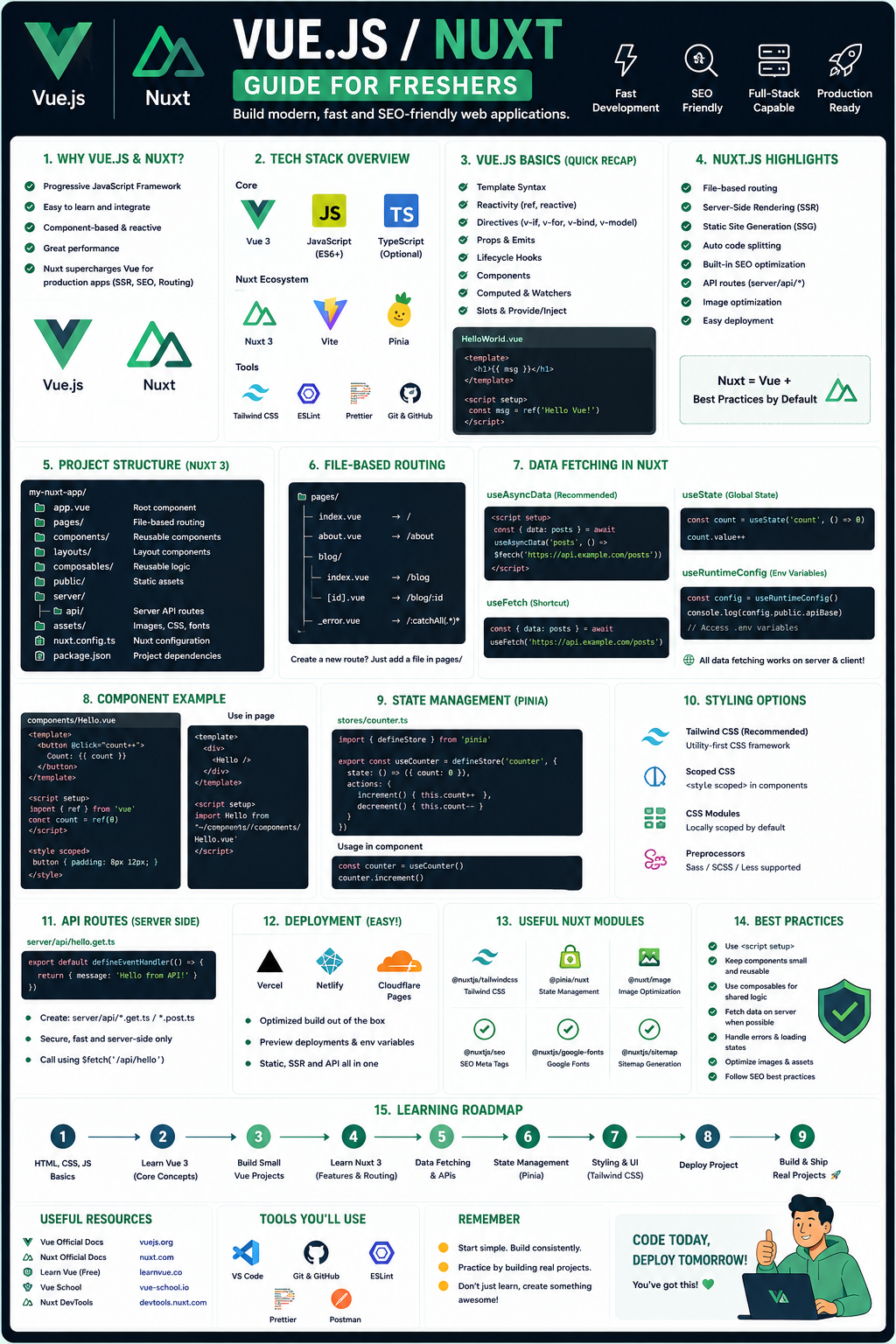
This roadmap is your structured, no-nonsense guide to becoming a job-ready developer using Vue.js and Nuxt.js in 2026. If you've been jumping between random tutorials, this path will give you clarity on what to learn, when to learn it, and why it matters for your career.
In 2026, Vue 3 + Nuxt 3 + TypeScript is one of the most in-demand and "fresher-friendly" stacks available . It offers a gentler learning curve than React while still enabling you to build production-grade, SEO-friendly applications that scale from a personal blog to a major e-commerce platform.
The Bottom Line: In 2026, your value isn't just writing components. It's about understanding architecture, performance, and how to strategically integrate AI tools to build smarter, faster.
📌 Your Tech Stack at a Glance
Before we start the weekly breakdown, here is the exact stack that employers are looking for right now in Vue developers :
- Core Framework: Vue 3 (Composition API,
<script setup>) - Meta-Framework (The Game-Changer): Nuxt 3 (for SSR, SEO, and full-stack capabilities)
- Language: TypeScript (Non-negotiable in 2026. Safety and scalability)
- Styling: Tailwind CSS (Utility-first, fastest way to build UIs)
- State Management: Pinia (The official, intuitive Vue store)
- Tooling: Vite, Nuxt DevTools, ESLint, Prettier
- AI-Assisted Dev: GitHub Copilot, Cursor, or Windsurf
Phase 1: The Unskippable Foundation (Weeks 1-4)
Goal: Solidify your fundamental web development knowledge. Do not skip this to "get to Vue faster."
If you try to learn a framework without mastering the language it's built on, you will hit a wall. Vue is just JavaScript—it doesn't abstract it away .
Core JavaScript (The Real Essentials):
- Modern Syntax (ES6+):
let/const, Arrow functions, Template literals, Destructuring (objects & arrays), Spread/Rest operators. - Critical Array Methods:
.map(), .filter(), .reduce() (You will use .map() constantly in Vue). - Asynchronous JavaScript: Promises,
async/await (Essential for API calls). - Essential Browser APIs:
fetch (for network requests), localStorage (for client-side data persistence), DOM manipulation basics.
HTML & CSS (The Structure & Style):
- HTML5: Semantic elements (
<header>, <nav>, <main>, <article>), forms and inputs, basic accessibility (ARIA). - CSS3: Flexbox and Grid (Master these for layouts), Box model, Positioning, Media queries (Responsive design).
Practice Goal: Build a small, dynamic project using only vanilla JS (e.g., a Pokemon search app using the Fetch API, or a Todo List with localStorage). Do not use any framework yet.
Free Resources:
- Online Tutorials: Look for comprehensive "Full Stack Web Development" courses that cover modern JavaScript (ES6+), Node.js, and build tools like Vite. Use coupons on platforms like Udemy to get them for free.
- Interactive Learning: Platforms like Scrimba offer free interactive courses where you can pause and edit the instructor's code.
🟢 Phase 2: Vue.js 3 Deep Dive (Weeks 5-9)
Goal: "Think in Vue"—master the Composition API and build reactive, component-based user interfaces.
Forget the old Options API. In 2026, the industry standard is Vue 3 + Composition API with <script setup> .
Core Concepts:
- Reactivity Fundamentals:
ref() vs. reactive() (When to use which). - Lifecycle Hooks:
onMounted, onUpdated (Understanding the component lifecycle). - Component Communication:
props (parent to child), emits (child to parent), v-model (two-way binding). - Composables (The "Hook" Pattern): Encapsulating and reusing stateful logic across components.
- Vue Router: Setting up routes, dynamic route matching, navigation guards.
- State Management with Pinia: Creating stores, actions, getters—managing global app state.
Practice Goal: Build a "Habit Tracker" Dashboard.
- Features: Add habits, mark them complete for the day, delete habits.
- Use Pinia to manage the global list of habits.
- Use Vue Router to have a "Home" view (list of habits) and an "About/Stats" view (showing completion rates).
Free Resources:
- Vue.js Official Documentation (New in 2026): The "Essentials" and "Components In-Depth" sections are world-class and free.
- Vue School Free Weekend: Look for events that give full access to premium Vue and Nuxt courses for a weekend .
🚀 Phase 3: Nuxt.js 3 – The Full-Stack Framework (Weeks 10-14)
Goal: Transition from a UI developer to a full-stack web architect using Nuxt 3.
In 2026, Nuxt is not an "add-on" for Vue; it is the standard way to build production Vue apps . It handles routing, server-side rendering (SSR), and API creation for you.
The New Paradigm (Nuxt 3 & Vue 3):
- File-Based Routing: Create a
pages/ directory, and the routes are generated for you. - Server-Side Rendering (SSR) & SEO: Learn how Nuxt renders pages on the server to solve SEO problems that single-page apps (SPAs) have.
- Data Fetching:
useFetch, useAsyncData (The Nuxt way to fetch data on the server or client). - Server Engine (Nitro): Create server API endpoints directly in your frontend project (
server/api/). - Nuxt DevTools: The ultimate debugging tool for visualising your app's structure and state.
Practice Goal: Build a "Tech News Aggregator".
- Fetch articles from a public API (e.g., Dev.to or HackerNews) using
useFetch. - Create dynamic routes for individual blog posts (
pages/post/[id].vue). - Use SSR to ensure the content is indexed by search engines.
- Add Meta Tags dynamically for SEO.
Free Resources:
- Nuxt Official Documentation: The "Getting Started" and "Concepts" guides are excellent.
- Nuxt + Headless CMS Workshops: Look for free workshops that teach you to build and deploy a blog starter with Nuxt and a Headless CMS like Agility .
🧠 Phase 4: TypeScript & Real-World Integration (Weeks 15-16)
Goal: Make your code bulletproof. TypeScript is now a mandatory skill for any frontend role .
- TypeScript Basics:
interface, type, defining props and data types. - Typing Vue Components: Using
defineProps<{...}>() and defineEmits<{...}>(). - Typing Pinia Stores: Ensuring your state management is type-safe.
Practice Goal: Refactor your "Habit Tracker" project.
- Add TypeScript interfaces for
Habit and User. - Strongly type your Pinia store (state, getters, actions).
- Watch how the IDE catches errors before you even run the code.
🤖 Phase 5: The AI Edge & Modern Tooling (Weeks 17-18)
Goal: Learn to use AI tools to accelerate development, not replace your thinking.
Agentic Workflows:
- AI Coding Assistants: Learn to effectively prompt and debug code with Cursor, GitHub Copilot, or Windsurf.
- Structuring AI Instructions: Learn how to generate
.ai/ configuration files that standardize project rules for the AI and automate workflows like code reviews and QA . - Static Analysis Tools: Explore tools that give AI agents deterministic signals about your codebase before they start planning changes .
Practice Goal: Install an AI coding assistant in VS Code.
- Use a prompt to generate a new Vue composable (e.g.,
useLocalStorage). - Review the generated code line-by-line. Refactor it. Run it.
- Rule: Do not copy-paste code you don't understand.
📚 Phase 6: Tooling & Build Your Portfolio (Weeks 19-20)
Goal: Organize your code like a senior developer.
- Vite: Understand the build tool that makes development instant.
- ESLint + Prettier: Enforce code consistency automatically.
- Git Portfolio: Clean up your GitHub and ensure your repositories have clear
README.md files explaining the project purpose, tech stack, and how to run them locally.
💼 Career Application & Next Steps
This roadmap prepares you for Junior Frontend Developer, Vue.js Developer, or Nuxt.js Developer roles. In the US, the median salary for software developers is roughly $133,080/year, with a 15% job growth projected through 2034. In markets like India, Vue/Nuxt developers are in high demand for both domestic and export projects.
🗂️ Your Job-Ready Portfolio (Build These 3 Projects)
Do not list random tutorials. List these three projects on your resume.
- The Full-Stack "Boring" App: An Expense Tracker or Task Manager built with Nuxt 3, Pinia, and Tailwind CSS. Hosted on Vercel/Netlify.
- Shows: You can build, style, and deploy a full-stack app with authentication and database logic (using Nitro server routes).
- The Content Site: A Blog or Company Profile site using Nuxt 3 with SSR.
- Shows: You understand SEO, dynamic routing, and data fetching from a Headless CMS.
- The Interactive Dashboard: A data visualization dashboard (e.g., a Crypto Price Tracker) that consumes a live WebSocket or REST API.
- Shows: You can handle real-time data, charts, and complex UI state.
📝 Sample Resume Entry (for Freshers)
text
**Junior Frontend Developer (Vue/Nuxt) | Project Portfolio**

- **Technologies:** Vue 3 (Composition API), Nuxt 3, TypeScript, Pinia, Tailwind CSS, Vite.
- **Tech News Aggregator (SSR):** Built a server-side rendered blog platform using Nuxt 3, improving SEO scores by 80% compared to a standard SPA.
- **Habit Tracker Dashboard:** Developed a reactive dashboard using Pinia for state management and Vue Router for seamless navigation across statistical views.
- **AI-Assisted Workflow:** Leveraged TypeScript and Cursor AI to write type-safe composables, reducing runtime bugs in development.
🎤 The Interview Question You Will Be Asked
"Why would you choose Nuxt.js over a standard Vue.js SPA for a client project?"
Your Answer: "The decision depends entirely on the project's SEO and performance requirements. For a standard admin dashboard behind a login, a standard Vue SPA is perfectly fine and simpler to deploy. However, for a client-facing e-commerce site or a marketing blog—where content needs to be indexed by Google and appear instantly—I would choose Nuxt.js. Nuxt provides Server-Side Rendering out of the box. This means the server sends fully rendered HTML to the browser, so the user sees content immediately while the Vue app hydrates in the background. This dramatically improves Core Web Vitals scores and SEO discoverability compared to a blank-HTML SPA."
🎯 Your Next Steps for This Week
Do not try to learn everything at once. Consistency over intensity.
Step 1: Set up your environment.
- Install VS Code, Node.js (LTS version), and Git.
- Install the Vue - Official extension in VS Code.
Step 2: Start the JavaScript refresher.
- Open the free course you found. Just get through the first module. You don't need to be a master yet.
Step 3: Create your first Vue project.
- Open your terminal and run
npm create vue@latest (follow the prompts; answer "Yes" to TypeScript, Vue Router, and Pinia). cd my-app, npm install, npm run dev.
Step 4: Build one component.
- Open
App.vue. Delete everything. Write a simple <h1> that says "Hello 2026".
The journey of a thousand apps begins with a single npm run dev. The Vue ecosystem is designed to be approachable, and the community is incredibly supportive. You have everything you need to start. Start building today.




 Group / 1: 1 Sessions