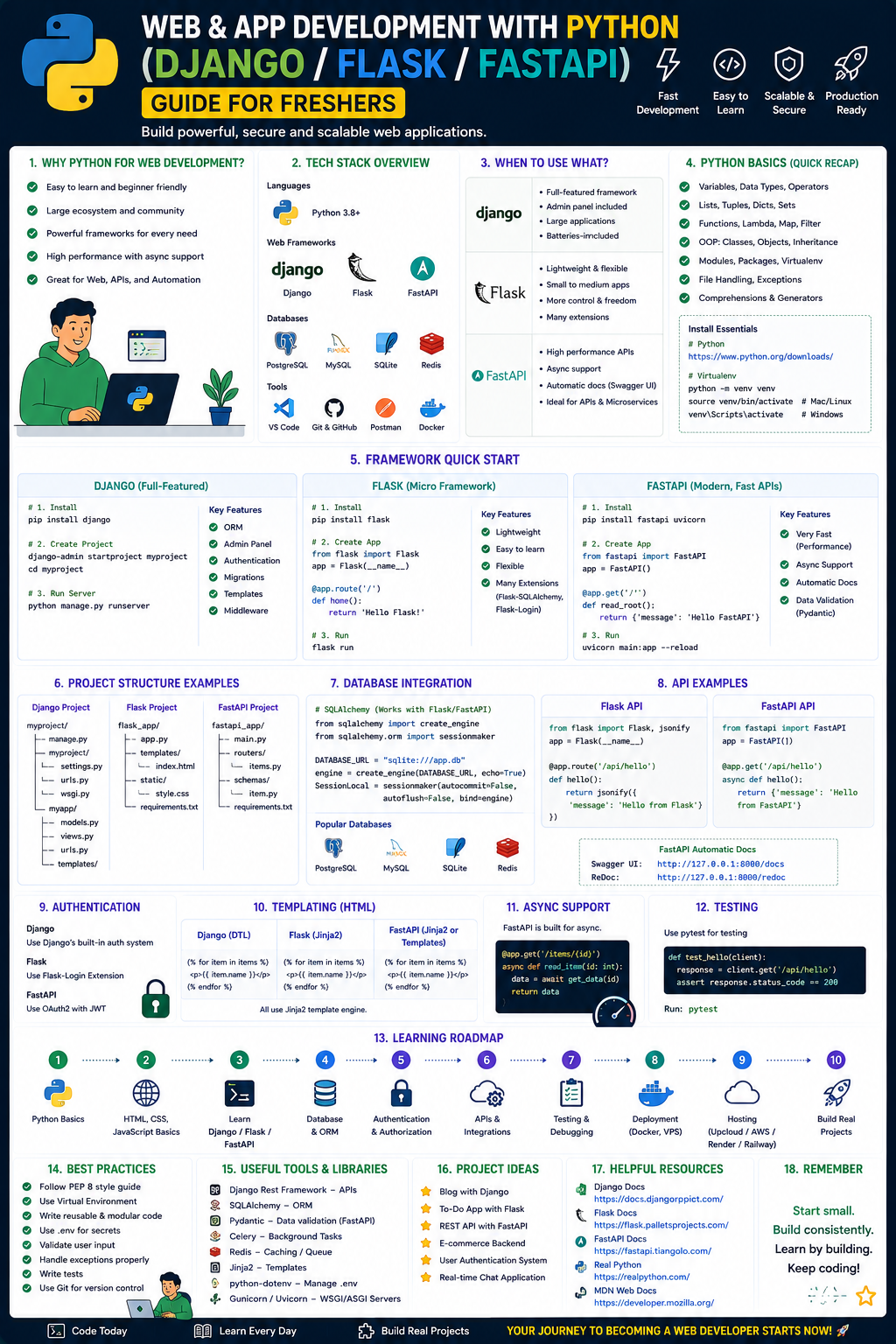
Here’s a structured Python Web & App Development roadmap for freshers, covering backend (Django/Flask/FastAPI) with optional AI-assisted learning, plus free/paid resources and career guidance.
1. Foundational Skills (Before Frameworks)
Topics:
Python syntax, OOP, data structures, error handling, virtual environments, pip, Git basics, HTTP fundamentals (methods, status codes), REST principles.
Free Resources:
Paid (often free with trial/audit):
- Coursera: Python for Everybody (University of Michigan)
- Udemy: 100 Days of Code: Python (Angela Yu)
Practice:
2. Choose Your First Framework (Beginner → Intermediate)
A) Flask – Minimal, learning-friendly
Best for: First REST APIs, small projects, understanding request-response cycle.
Resources:
Practice project:
To-do API with JWT auth, SQLite, and Swagger docs.
B) Django – Full-featured, job-ready
Best for: Admin panels, monoliths, rapid prototypes.
Resources:
Practice project:
Blog with comments, user profiles, search, and deployment on Render.
C) FastAPI – Modern, async, high performance
Best for: APIs, microservices, real-time apps.
Resources:
- Free: Official FastAPI Tutorial
- Free: FastAPI – The Complete Course (YouTube – "Code In a Jiffy")
- Paid: Udemy FastAPI: The Complete Course (Jose Salvatierra)
Practice project:
URL shortener with Redis caching and API rate limiting.
3. Core Backend Concepts (Must for jobs)
Databases (PostgreSQL, MongoDB)
- Free Resources: PostgreSQL Tutorial, MongoDB University
- Paid Resources (example): SQL for Developers (Pluralsight)
Auth & Security (JWT, OAuth, bcrypt)
- Free Resources: Auth0 Academy
- Paid Resources (example): Web Security Fundamentals (LinkedIn Learning)
Deployment (Docker, Render, AWS)
- Free Resources: Docker's Getting Started, Render Docs
- Paid Resources (example): Udemy Docker & Kubernetes (Bret Fisher)
Testing (pytest, unittest)
- Free Resources: pytest official tutorial
- Paid Resources (example): Testing Python (TestDriven.io)
4. Using AI Tools (Ethically & Effectively)
How to use AI as a beginner (not as a crutch):
- Explain code you don’t understand.
- Generate boilerplate (Django models, FastAPI routers).
- Debug error messages (paste traceback into ChatGPT/Claude).
- Write tests – ask for
pytest cases after writing a function.
Tools:
- Free: GitHub Copilot (student pack), ChatGPT 3.5/4o, Claude, Phind.com
- Paid: Copilot Pro, Cursor IDE, Windsurf
Warning: Do not copy-paste entire projects. Always understand the logic. Employers will ask you to explain your code.
5. Portfolio Projects (Stand out)
Build 3 projects increasing in complexity:
- Flask mini-project – URL shortener with click tracking (CSV or SQLite).
- Django full-stack – Job board with resume uploads, search, and email alerts.
- FastAPI microservice – Weather API aggregator with caching and async calls.
Host all on Render, PythonAnywhere, or Railway (free tiers).
Add GitHub READMEs with:
- Demo link (screencast)
- ER diagram
- API endpoints table
- Setup instructions
6. Career Application & Next Steps
Entry-level job titles:
- Backend Developer (Junior)
- Python Web Developer
- API Developer
- Django Developer (often startup-friendly)
Where to apply (India & global):
- India: Wellfound, Internshala, Cutshort, Hirect, LinkedIn (filter by “Entry level”)
- Global: AngelList, Upwork (small gigs for portfolio), RemoteOK, We Work Remotely
Resume tips for freshers:
- Don’t list “AI chatbot projects from YouTube.”
- Show your own twist – e.g., “Job board with salary prediction using regression”
- Add Live API endpoints (Render auto-spins down – mention that)
Interview prep (Python backend):
- Solve 30 LeetCode easy/medium (arrays, strings, hash tables)
- Know SQL joins and indexing basics
- Be able to design a small system like “chat app with rate limiting”
Certifications (optional but helpful):
- Free: freeCodeCamp’s Back End Development cert
- Paid: PCEP (Python entry-level), DjangoCon workshops
Next steps after First Job:
- Learn Docker + Kubernetes basics
- Add PostgreSQL + Redis to your stack
- Study message brokers (RabbitMQ, Celery)
- Optionally start a Django + HTMX side project (no JS)
7. Sample 6-Month Training Plan (No AI shortcuts)
Month 1: Python + Git + CLI + HTTP
Weekly time commitment: 10–12 hours
Month 2: Flask + SQLite + Jinja templates
Weekly time commitment: 10 hours
Month 3: Django (models, admin, forms)
Weekly time commitment: 12 hours
Month 4: Django REST Framework (DRF) + JWT
Weekly time commitment: 10 hours
Month 5: FastAPI + async + Docker
Weekly time commitment: 8–10 hours
Month 6: Build portfolio + deploy + apply for internships
Weekly time commitment: 12 hours
Daily Habit: Code for 45 minutes. Write one test. Push to GitHub.
Here are project ideas with GitHub template links for each month of your training, plus extra inspiration for AI-enhanced and portfolio-ready projects.
Month 2-3: Flask Beginner Projects
1. To-Do List Application
What you learn: GET/POST requests, form handling, Jinja templating, basic CRUD
- GitHub:
github.com/Hosmairys/Flask-Python – Simple task manager with MVC structure - Enhancements: Add user login, task deadlines, categories
2. AI Code Breaker Game
What you learn: Basic AI logic integration, session management, Flask routes
- GitHub:
github.com/ImAliShaikh/AI-Code-Breaker-Game – Human vs AI number guessing game - Enhancements: Add difficulty levels, score tracking
3. Personal Portfolio with Blog
What you learn: Database models, user comments, admin interface
- GitHub:
github.com/macktireh/mysite-portfolio-blog – Share projects and write tutorials - Enhancements: Add like buttons, tag system, search functionality
Month 4: Django Intermediate Projects
1. University Bus Reservation System
What you learn: Django models, user roles (student/admin), PostgreSQL integration
- GitHub:
github.com/ImAliShaikh/BUS-Point-Reservation-System – Real-world booking system - Enhilities: Add payment simulation, route maps, email confirmations
2. Awards Platform
What you learn: Django admin customization, static files, testing
- GitHub:
github.com/danielcaamal/portfolio-01-basic-backend-projects/tree/main/django/awards - Enhancements: Add user voting, category management, winner announcements
3. News Website (Toutiao clone)
What you learn: Class-based views, pagination, media file handling
- Resource: CSDN tutorial series with full code – search "Django仿头条新闻网站"
- Enhancements: Add breaking news ticker, category filters
Month 5: FastAPI Advanced Projects
1. Twitter-like API
What you learn: Async operations, JWT authentication, API versioning
- GitHub:
github.com/danielcaamal/portfolio-01-basic-backend-projects – Professional Twitter simulation - Enhancements: Add rate limiting, user mentions, hashtag trends
2. Sorting Algorithm Visualizer
What you learn: WebSocket connections, real-time updates, algorithm implementation
- Resource: FastAPI + WebSocket sorting demo – listed in CSDN projects
- Enhancements: Add algorithm speed control, comparison charts
3. URL Shortener with Analytics
What you learn: Redis caching, click tracking, API rate limiting
- Build from scratch using FastAPI + Redis + SQLite
- GitHub reference: Search "fastapi-url-shortener" for examples
Month 6: Portfolio-Ready Projects
1. Full-Stack React + Flask Boilerplate
What you learn: JWT authentication, SQLAlchemy, deployment
- GitHub:
github.com/4GeeksAcademy/pt-68-jwt – React frontend + Flask API template with user auth - Deploy on: Render.com or Heroku (instructions included)
2. Hexagonal Architecture Project (Advanced)
What you learn: Clean architecture, dependency injection, testability
- GitHub:
github.com/topics/hexagonal-architecture?l=python – 101+ Python examples - Pick one: Flask with SQLAlchemy hexagonal or FastAPI Clean Architecture
3. Web Framework from Scratch
What you learn: Deep HTTP understanding, socket programming
- GitHub:
github.com/rao457/ZeroTrust_Web_From_Scratch – Build your own framework with raw sockets, session auth, SQLite - Note: Not production-ready – purely for learning
AI-Enhanced Projects (Use Tools Responsibly)
Beginner: AI-Powered Chatbot API
Tech: Flask + OpenAI API (or free Hugging Face models)
AI usage: Generate boilerplate routes, handle API responses, write documentation
Intermediate: Smart Blog Recommender
Tech: Django + scikit-learn + Celery
AI usage: Debug ML integration, write data pipeline code, optimize database queries
Advanced: RAG-Powered Documentation Assistant
Tech: FastAPI + LangChain + ChromaDB
AI usage: Generate API endpoint schemas, write test cases, refactor code structure
Warning: Always understand AI-generated code. Practice explaining each line in interviews.
How to Use These GitHub Templates
bash
# 1. Clone the repository
git clone <repository-url>

# 2. Set up virtual environment
python -m venv venv
source venv/bin/activate  # or venv\Scripts\activate on Windows

# 3. Install requirements
pip install -r requirements.txt

# 4. Run database migrations (if Django/FastAPI)
python manage.py migrate  # Django
# or
alembic upgrade head     # FastAPI with Alembic

# 5. Start the development server
python app.py            # Flask
python manage.py runserver  # Django
uvicorn main:app --reload  # FastAPI
README Template for Your Portfolio
markdown
# Project Name

**Live Demo:** [Render/Railway link]
**GitHub:** [Your repo]

## Features
- [Feature 1]
- [Feature 2]

## Tech Stack
- FastAPI/Flask/Django
- PostgreSQL/SQLite
- Docker (optional)
- [Other tools]

## Setup Instructions
1. Clone: `git clone ...`
2. Install: `pip install -r requirements.txt`
3. Run: `python app.py`

## API Endpoints
| Method | Endpoint | Description |
|--------|----------|-------------|
| GET | /api/users | List all users |
| POST | /api/users | Create user |

## Screenshots
[Add images here]

## What I Learned
- [Key takeaway 1]
- [Key takeaway 2]
Quick Links to Find More Projects
- GitHub Topics: Search
topic:flask, topic:django, topic:fastapi - Awesome Lists:
github.com/search?q=awesome+flask - CSDN/Django: Search "Django项目实战 完整代码"




 Group / 1: 1 Sessions