



Welcome!

Inspiring learning for every stage of life.

Login
img
Web & App Development  :  .NET / C#
  • Programming & Development

Web & App Development : .NET / C#

Description

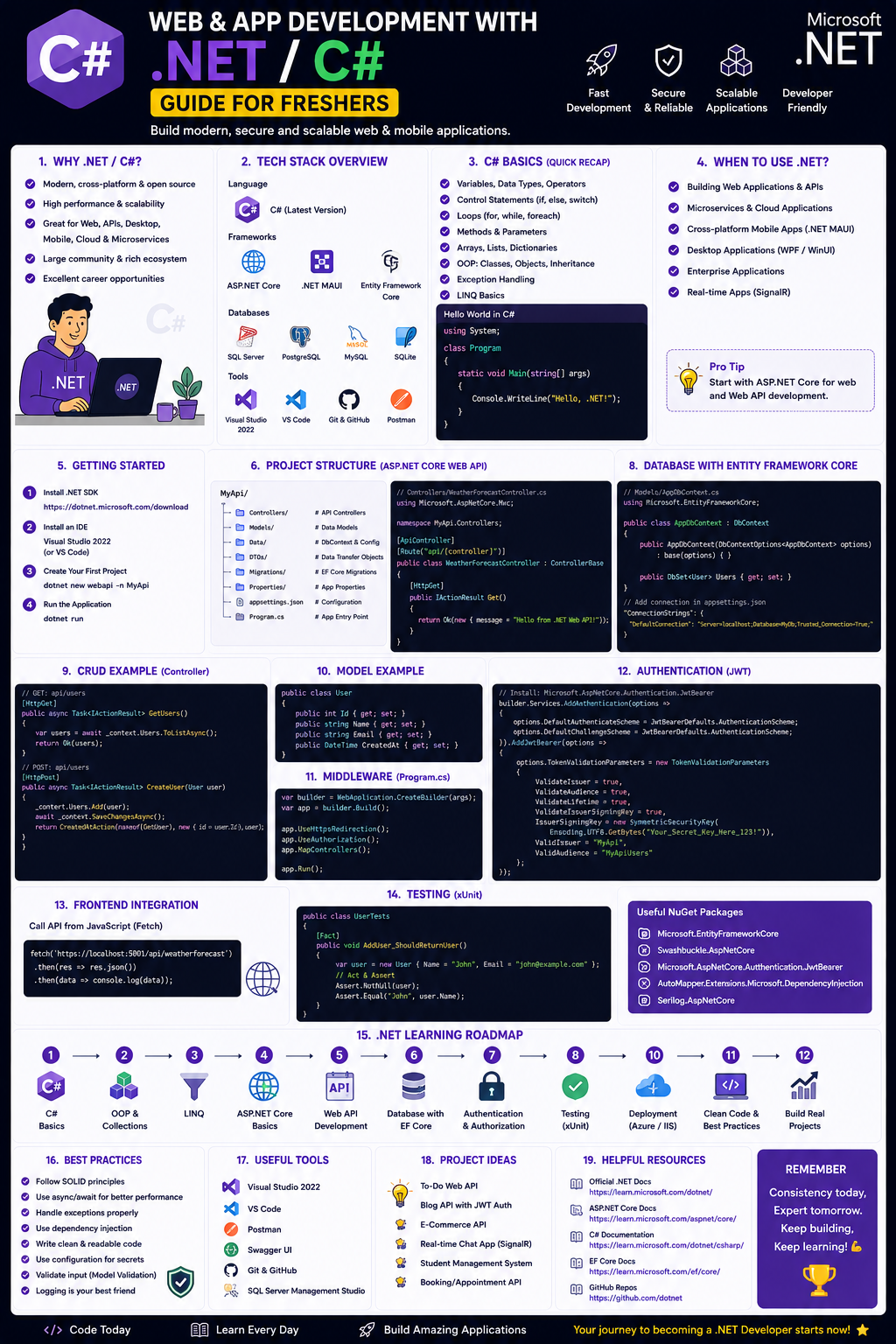
Here’s a structured .NET / C# Web & App Development Roadmap for freshers, covering AI-assisted learning, free/paid resources, and career steps


1. Foundation (Weeks 1–4) – Core C# & .NET Basics

Topics:

  • C# syntax (variables, loops, conditionals, methods)
  • OOP (classes, inheritance, polymorphism, encapsulation)
  • Collections (List, Dictionary, Arrays)
  • Exception handling, LINQ basics
  • .NET CLI, solution/project structure

AI Tools to Use:

  • GitHub Copilot (free for students) or Codeium (free) – for code suggestions.
  • ChatGPT / Claude – explain concepts, debug errors, generate practice problems.

Free Resources:

Paid Resources:

  • Udemy: C# Basics for Beginners by Mosh Hamedani (~$10–15)
  • Pluralsight: C# Fundamentals (first 10 days free trial)

Practice:

  • Solve 1–2 easy problems daily on LeetCode (filter by C#).
  • Build: Console calculator, to-do list, number guessing game.


2. Web Development Core (Weeks 5–12) – ASP.NET Core & APIs

Topics:

  • ASP.NET Core MVC architecture
  • Razor Pages or Razor Views
  • REST API development (Controllers, routing, HTTP methods)
  • Dependency Injection, Middleware
  • Entity Framework Core (Code-First, Migrations, LINQ queries)
  • Authentication (JWT, Cookies)

AI Tools:

  • GitHub Copilot Chat – generate controllers, DbContext, endpoints.
  • Blackbox.ai – real-time API endpoint suggestions.

Free Resources:

Paid Resources:

  • Udemy: ASP.NET Core MVC by Neil Cummings (~$15)
  • Pluralsight: Building APIs with ASP.NET Core

Practice:

  • Build a simple Blog API (CRUD + SQLite + Swagger)
  • Add JWT authentication and role-based access
  • Connect to PostgreSQL or SQL Server (LocalDB)


3. Frontend for .NET Devs (Weeks 13–16) – Optional but Recommended

Topics:

  • HTML5, CSS3, Tailwind CSS (quick styling)
  • Basic JavaScript + Fetch API to call your .NET API
  • Optional: Blazor (WebAssembly or Server) for full-stack C#

AI Tools:

  • V0.dev (by Vercel) – generate UI components from text prompts.
  • Uiverse.io – copy-paste Tailwind/HTML components.

Free Resources:

Paid Resources:

  • Frontend Masters: Intro to HTML/CSS (~$39/month)

Practice:

  • Build a simple frontend that lists data from your .NET API and adds new records.
  • Or use Blazor to build a real-time dashboard.


4. Mobile with .NET (Optional – Weeks 17–20)

Topics:

  • .NET MAUI (cross-platform iOS/Android/Windows)
  • MVVM pattern, Bindings, Navigation
  • Local storage (SQLite-net)

Free Resources:

Paid Resources:

  • Udemy: MAUI & Xamarin Forms by Eduardo Rosas

Practice:

  • Convert your to-do list console app into a mobile app with MAUI.


5. DevOps + Deployment (Weeks 21–24)

Topics:

  • Git & GitHub basics
  • CI/CD with GitHub Actions or Azure DevOps
  • Deploy to Azure App Service / Azure Static Web Apps
  • Environment variables, app settings, logging (Serilog)

AI Tools:

  • AWS CodeWhisperer – for infrastructure-as-code (if using AWS).
  • Terraform with AI copilot – generate deployment scripts.

Free Resources:

Paid Resources:

  • Udemy: DevOps with .NET Core (often ~$12)

Practice:

  • Deploy your blog API to Azure App Service (free tier)
  • Set up a GitHub Actions workflow to run tests and deploy on push to main.


6. Portfolio & AI-Augmented Project (Weeks 25–28)

Build one complete project that includes:

  • Backend API (ASP.NET Core)
  • Authentication (JWT or Identity)
  • Database (PostgreSQL/SQL Server)
  • Simple frontend (Blazor or plain HTML/JS)
  • Deployed live (e.g., Azure)
  • GitHub repo with README, tests, CI badge

Use AI for:

  • Generating boilerplate code
  • Writing unit tests (xUnit)
  • Explaining SQL joins or LINQ errors
  • Writing commit messages and docs

Project ideas:

  • Task manager with due dates and user roles
  • Book catalog with search and user reviews
  • Expense tracker with charts (use Chart.js in frontend)


Career Application & Next Steps

Entry-level roles to target:

  • .NET Developer (Junior)
  • Full Stack Developer (C# + JS/Blazor)
  • API Developer
  • Application Support Engineer (with dev skills)

Resume & job search tips:

  • Highlight your GitHub + live project link.
  • Mention AI-assisted debugging and efficiency (e.g., used Copilot to speed up CRUD generation).
  • Add keywords: ASP.NET Core, Entity Framework, REST, JWT, SQL Server, Git, CI/CD.

Certifications (optional but helpful):

  • Microsoft Certified: Azure Developer Associate – good for cloud roles.
  • freeCodeCamp Back End Development (not .NET but shows API understanding).

Networking & practice:

Next learning after first job:

  • Microservices with Steeltoe or Dapr
  • Real-time apps with SignalR
  • Performance tuning (MiniProfiler, BenchmarkDotNet)
  • DDD + Clean Architecture


Course Curriculum

  • New Lesson

  • Quiz: New Quiz

Instructors

Beena Malla

Beena Malla

No code, Low Code, Digital Marketing, Entrepreneurship, Startup Mentorship, AI Tools, Customer Acquistion, Sales, Marketing, Operations, Servers Management, AI Programming

Passionate supporting Talent, Women, LGBTQ friendly aiming at helping them on self empowerment. Motivating on Jobs, Leadership & Entrepreneurship

  • Students Unlimited
  • Lessons 1
  • Skill level Beginner
  • Language English
  • Certifications Yes
  • Instructor Beena Malla
Price: Free
Login to Enroll
marquee icon Group / 1: 1 Sessions
marquee icon Online Mentorship
marquee icon Quality Courses
marquee icon Experienced Mentors
marquee icon Valuable Mentorship with Placement Assistance