Proactive & Predictive Support Training Roadmap (Zendesk AI, Intercom, Gainsight CS)
This roadmap is designed for customer service professionals who want to master the shift from reactive problem-solving to proactive, data-driven support. The industry has fundamentally transformed—what once measured success by how quickly you reacted to tickets now demands predicting issues before they happen and guiding customers to resolution before they ever need to ask for help .
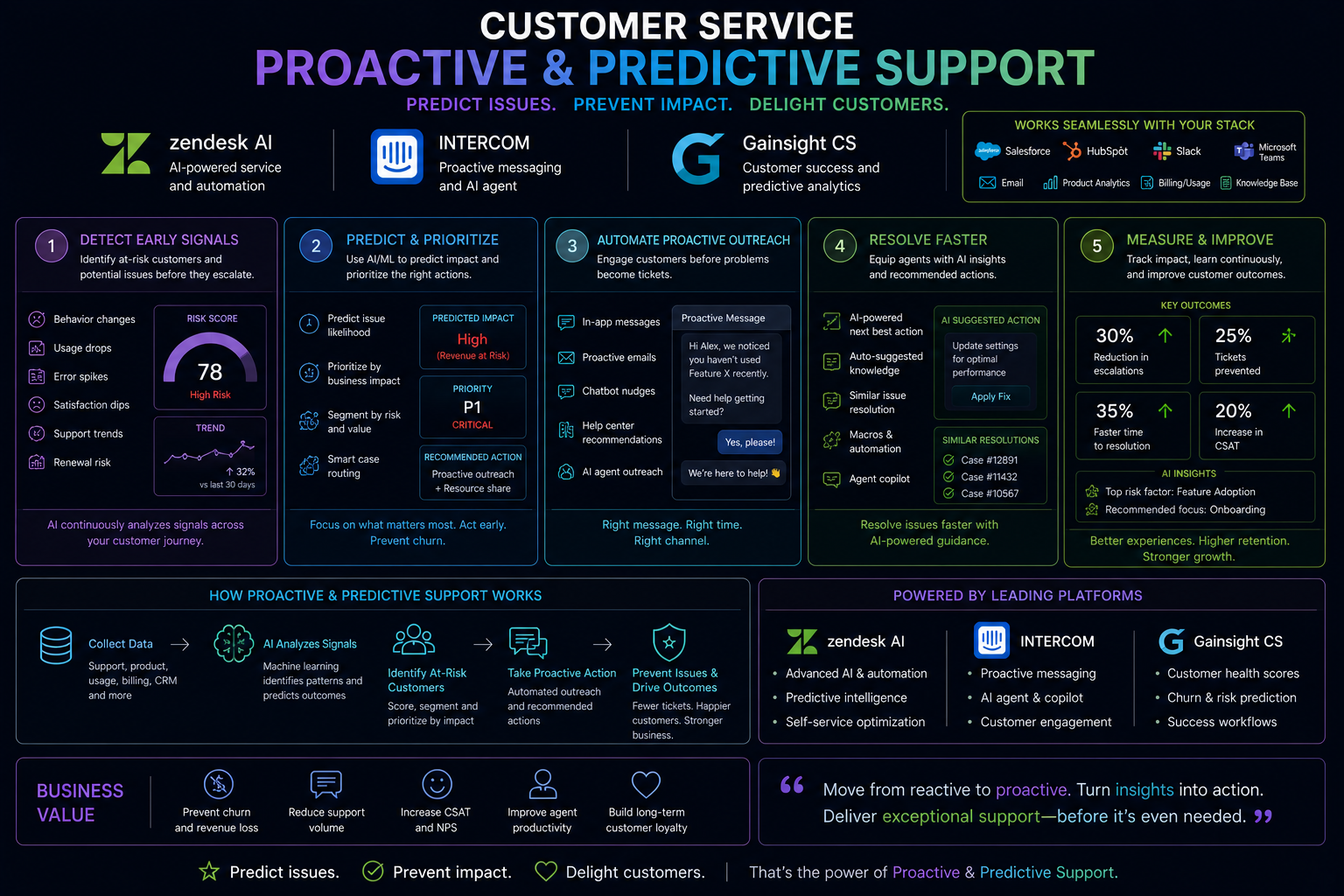
Understanding the Proactive & Predictive Support Stack
Before diving into training, understand how these three platforms work together to create a complete proactive support ecosystem.
Zendesk AI provides the frontline automation layer. Its AI agents handle routine questions across messaging, email, and web forms, using your knowledge base to resolve common issues without human intervention . What makes Zendesk unique is the Resolution Learning Loop—a continuous improvement engine that analyzes every interaction to make future resolutions smarter and faster. Every conversation you handle makes the entire system more intelligent .
Intercom Fin AI Agent serves a similar frontline function but offers distinctive features for complex troubleshooting. Fin can be trained as a Service Agent with two core skills: handling common queries with deep knowledge from your FAQ content, and triaging complex technical issues by guiding customers through troubleshooting steps . Fin also offers Guidance functionality—natural-language instructions that train the AI to follow your brand voice, policies, and escalation rules .
Gainsight CS is the strategic layer for Customer Success operations. While Zendesk and Intercom handle incoming support volume, Gainsight enables proactive outreach. You will build Customer Health Scores that analyze product usage data to identify at-risk customers before they churn. You will orchestrate digital customer journeys that automatically trigger educational content when customers hit specific milestones. You will identify expansion opportunities by detecting when customers are ready for upgrades .
The Integration Point matters enormously. Proactive support requires data flowing between these systems. When Gainsight detects a customer struggling with a feature, it should trigger a Zendesk workflow or Intercom message offering help—before that customer submits a frustrated ticket asking what went wrong.
The 14-Week Proactive & Predictive Support Training Roadmap
Phase 1: Weeks 1-4 – Foundations: The Proactive Support Mindset
What to focus on
Before touching any tool, understand the fundamental philosophy shift. Traditional support measures speed—first response time, average handle time, tickets closed per hour. Proactive support measures prevention—how many issues were resolved before customers ever needed to ask .
The best support operations teams embrace a core philosophy: prevent before you support. Self-service and proactive help reduce ticket volume. Measure what drives loyalty, not just speed. Escalate with context, preserving customer history. Feed insights upstream so support data drives product and success improvements .
Ivanti's journey illustrates this transformation. Starting as early as 2018, they wove machine learning into their support infrastructure to analyze customer behavior before a case was even submitted. The system would look at where customers had been, what documentation they had already accessed, and what entitlements they had—then recommend relevant articles. This modest beginning already deflected up to 12 percent of incoming support requests .
The shift from reactive to proactive
Ask yourself: what would it mean if your team could identify every customer showing signs of struggle before they churn? What if you could automatically surface relevant help articles based on what a customer is trying to do right now? What if AI could summarize a complex support call immediately after it ends, capturing action items and preparation for follow-up?
These are not futuristic scenarios. They are happening today at organizations like Ivanti, SeatGeek, and RD Station. The professionals who understand how to build these systems will define the future of customer service .
Free resources for Phase 1
The Intercom podcast episode "The Ticket: Exploring customer service career paths in the age of AI" provides foundational context on how AI is reshaping support roles and creating new career paths . The Gainsight customer story about RD Station demonstrates real-world proactive CS implementation and results . The SkillsMP support operations philosophy page outlines the core principles of proactive support design .
Paid resources for Phase 1
LinkedIn Learning offers "Customer Success Management Fundamentals" covering proactive CS strategies. Coursera provides "Customer Success" specialization through the University of California.
Practical application
Audit your current support operation against the proactive philosophy. Calculate your current deflection rate—percentage of tickets resolved without human intervention. Identify three common customer problems that could be prevented with better education or earlier intervention. Write a one-page memo proposing one proactive initiative your team could implement within 30 days.
Phase 2: Weeks 5-8 – Frontline AI Agents with Zendesk and Intercom
What to focus on
This phase builds your frontline automation layer. You will learn to deploy AI agents trained on your knowledge base, configure them to match your brand voice, and measure their performance.
Zendesk AI deployment
Zendesk's setup wizard guides you through training an AI agent using your website content or manually added information . The wizard crawls your URLs to build an initial knowledge base, then lets you test the agent by asking questions in a simulator before going live.
Key configuration steps include naming your AI agent and selecting a conversation style—casual, professional, or friendly. These choices control how the agent communicates with customers . You can then test the agent via email or messaging widget, asking questions related to your knowledge base to validate responses. Zendesk automatically creates a help center article based on your content during this setup process .
Intercom Fin as a Service Agent
Intercom trains Fin with two essential support agent skills . The deep knowledge skill handles common queries using your FAQ content, how-to guides, and best practices. The troubleshooting skill guides customers through technical issues, gathering context before escalation.
Training Fin involves several steps. First, ensure Fin has access to your knowledge base covering FAQs, how-to guides, best practices, and basic troubleshooting. Second, use Fin Attributes to automatically classify every conversation by issue type, sentiment, or urgency. Third, create Guidance—natural-language instructions that train Fin on your brand tone and policies .
Guidance examples
Communication style guidance might read: "If a customer sounds upset, confused, or mentions a bad experience, respond gently and with empathy. Acknowledge the emotion before offering help" . Content guidance might specify: "If a customer says they're experiencing an issue with saving a project, always use the public article 'Troubleshooting projects' to walk them through the exact steps" .
Procedures for complex troubleshooting
For technical issues, Fin Procedures can be created with specific triggers. For example, you might set a procedure to trigger when a customer reports a bug, error message, or technical issue with the product. The procedure would instruct Fin to gather details, check for active incidents via data connectors, and escalate with full context if unresolved .
Free resources for Phase 2
Zendesk's free trial includes the AI agent setup wizard with guided configuration . Intercom's free trial includes Fin AI Agent training modules and Guidance templates to accelerate setup . The Zendesk AI support documentation provides tutorials on building knowledge bases and testing AI agents .
Paid resources for Phase 2
Full AI agent functionality requires paid subscriptions to Zendesk Suite or Intercom plans. Advanced features like Fin Procedures require managed availability and may need account manager approval .
Practical application
Sign up for Zendesk free trial. Complete the AI agent setup wizard using your website URL. Test the agent with 20 common customer questions, noting which responses are accurate and which need improvement. Then sign up for Intercom free trial. Train Fin using your knowledge base. Create one Communication Style guidance and one Content guidance. Test both agents head-to-head with the same questions to understand their different strengths.
Phase 3: Weeks 9-11 – Proactive Customer Success with Gainsight CS
What to focus on
While frontline AI agents handle incoming volume, Gainsight enables you to reach out before customers ever have a problem. This phase focuses on building digital customer success programs that scale.
Digital Customer Success fundamentals
Gainsight's Digital Customer Success training teaches you to leverage digital CS strategies to gain efficiencies and address common customer needs through proactive, self-serve motions . You will learn how to accelerate digital journeys with data-driven personalization, how to align digital programs with CSM activities, how digital learning paths improve and scale customer education, and how predictive digital strategies are fueling new productivity .
Customer Health Scoring
A Customer Health Index (CHI) analyzes multiple hypotheses representing key customer behavior indicators to predict churn . RD Station developed a CHI analyzing over 150 customer behavior signals. By integrating this CHI with automated Calls to Action (CTAs) in Gainsight, they could proactively act on customers showing lower engagement before those customers churned .
Journey Orchestration
Gainsight's Journey Orchestrator enables you to create personalized customer journeys that scale. RD Station used Journey Orchestrator to automate communication and scheduling, reducing CSM effort while increasing customer engagement . For example, when a customer hits specific adoption milestones, the system automatically triggers educational sequences.
Digital programs aligned to CSM activities
The most successful proactive CS organizations balance high-touch and digital motions. RD Station structured their scaled CS team into three divisions . Pooled CS proactively delivers outcomes at scale without 1:1 meetings. Lifecycle Programs provide framework of result validation for renewals. Experience Programs prioritize customer education and communication. All three work together to help CSMs do more with less.
Predictive strategies fueling productivity
Predictive digital strategies identify which customers need human attention and which can be served digitally. RD Station's program achieved an 85 percent improvement in customer adoption and a 25 percent increase in CSM coverage without expanding the team—while 20 percent of customers executed upsells or cross-sells through scaled education motions .
Free resources for Phase 3
Gainsight offers free "Digital Customer Success" certification through Gainsight University . Gainsight customer story library provides real-world case studies including the RD Station implementation . The Gainsight Help Center includes documentation on Journey Orchestrator, Health Scores, and Playbooks.
Paid resources for Phase 3
Full Gainsight CS platform requires enterprise licensing. Gainsight certification exams may have fees depending on program.
Practical application
Using Gainsight's free training, build a mock Customer Health Score for a product you know. Define three adoption metrics, three engagement metrics, and three outcome metrics. Set threshold triggers for "green" (healthy), "yellow" (at risk), and "red" (action required). Then design a digital journey for new customer onboarding with four automated touchpoints over 30 days.
Phase 4: Weeks 12-14 – The Continuous Improvement Loop and Career Preparation
What to focus on
This phase integrates everything. You will learn to analyze interaction data for improvement opportunities, automate fixes without code, and measure the business impact of proactive support.
The Resolution Learning Loop
Zendesk's Resolution Learning Loop is the engine of continuous improvement. Every service interaction—whether resolved by AI or human—makes the next one smarter . The loop works by analyzing all your interaction data to identify opportunities for improvement: tickets, conversations, agent actions, even data from external systems. Hidden in metrics like first response time, customer satisfaction, and average handle time are opportunities: mistakes, SLA breaches, poor training, churn risks, and broken workflows. Before AI, most of this was invisible .
Turning insights into automation
Zendesk provides tools to act on these insights. Admin Copilot recommends auto-replies for emerging issues. Action Builder lets you set up automated workflows without code. App Builder creates side-bar tools using natural language prompts. Knowledge Builder generates help center content from conversation insights . The result is that every future issue of the same type can be resolved faster .
Breaking the automation glass ceiling
Organizations seeing climbing automation rates share one thing in common: they are not deploying AI and hoping for the best. They are using AI to attack common problems and then crucially, learning, iterating, and improving . SeatGeek automated over half of all support interactions with AI agents, more than doubling satisfaction scores. Lyon Airport reached 85 percent automation rates . These results are achievable, but not by magic—they require continuous improvement.
What blocks improvement
Three main obstacles prevent organizations from reaching high automation rates. Siloed data in external AI agents or single-channel systems cannot fuel improvement because interaction data isn't connected . If AI agents aren't connected to the same tools as human agents, resolution quality stalls . Without AI-driven QA that goes beyond sampling 2 to 5 percent of interactions to analyze all conversation data, you will miss insights to improve processes and fill knowledge gaps .
Measuring what matters
Ivanti tracks a blend of traditional KPIs and AI-specific metrics . Deflection rate—the percentage of support requests resolved without human intervention—remains a cornerstone. But satisfaction is equally critical: they marry deflection with CSAT. If AI handles a case but frustrates the customer, that is not success. They also track an "effort score" captured at the close of every human-handled incident, measuring whether the interaction felt seamless from the customer's perspective. On the cost side, they calculate savings by comparing average cost per incident to the number of cases deflected by AI .
The emerging AI CX role architecture
Ivanti's experience demonstrates how AI creates new career paths rather than eliminating jobs. Their team has evolved into new roles as AI trainers and quality monitors . The technology met with excitement rather than fear because it eliminated what Sterling Parker calls "low work"—necessary yet soul-sapping administrative duties. AI now auto-summarizes voice calls, assigns action items, and prepares documentation, freeing agents to focus on solving complex problems .
As Parker put it: "AI isn't replacing us. It's helping us become better versions of ourselves" .
Free resources for Phase 4
The Zendesk blog article "Breaking through the automation glass ceiling" provides detailed explanation of the Resolution Learning Loop and best practices for continuous improvement . Intercom's podcast on customer service career paths discusses the new roles emerging in AI-first support organizations . The Gainsight webinar library offers sessions on measuring CS impact.
Paid resources for Phase 4
Zendesk Suite with AI features requires paid subscription. Gainsight platform access requires enterprise licensing.
Practical application
Build a continuous improvement framework for your team. Define your baseline automation rate. Identify the top three failure modes where AI currently escalates unnecessarily. Fix one knowledge gap and retest. Document the before-and-after automation rate. Then build an executive dashboard tracking deflection rate, CSAT for AI-resolved cases, and cost savings from automation. Present as a one-page business case for expanding proactive support.
Your Portfolio Projects
Build these four artifacts during your training. They demonstrate exactly what hiring managers for proactive and predictive support roles are looking for.
Project One: The Deployed AI Agent Documentation
Using Zendesk free trial, deploy an AI agent trained on your knowledge base or manual content. Document your configuration choices: name, conversation style, knowledge sources. Test the agent with 20 common questions and report accuracy rate. Identify three improvements you would make and how you would implement them using the Resolution Learning Loop approach.
Project Two: The Fin Guidance Library
Using Intercom free trial, create a complete Guidance library for a mock support team. Include Communication Style guidance (brand voice, empathy protocols, escalation triggers). Include Content guidance for top three customer intents. Document how you would measure Guidance effectiveness using Fin's built-in reporting, which shows how often each guidance was used and what percentage of those conversations were resolved .
Project Three: The Digital Customer Success Program
Design a complete digital CS program for a SaaS product. Define your Customer Health Score with three component categories. Build a journey map for first 90 days with automated touchpoints for key milestones. Create playbooks for when customers hit red, yellow, and green health scores. Propose how this program would increase CSM coverage (target: 25 percent increase without new hires).
Project Four: The Continuous Improvement Framework
Build a framework for moving from current automation rate to target rate within 90 days. Include data sources you will analyze, methods for identifying improvement opportunities, a process for turning insights into automated workflows, and metrics for measuring success at each stage. Use the Resolution Learning Loop as your model .
Career Application
Job Titles to Target
The proactive and predictive support career ladder has distinct roles with increasing compensation.
Support Operations Analyst requires one to three years of experience. You analyze ticket data to identify automation opportunities, build dashboards measuring support performance, and optimize knowledge bases. The salary range is 55,000to
55,000to80,000.
AI Support Specialist requires two to four years of experience. You train, configure, and optimize AI agents across Zendesk and Intercom. You monitor AI performance, update knowledge bases, and refine Guidance based on customer feedback. The salary range is 65,000to
65,000to95,000.
Customer Success Operations Manager requires four to seven years of experience. You own digital customer success programs, health scoring, and journey orchestration. You manage scaled CS motions that serve hundreds or thousands of customers efficiently. The salary range is 85,000to
85,000to130,000.
AI Trainer / Quality Monitor is an emerging role created by AI adoption. You review AI-generated responses for accuracy and brand alignment, provide feedback to improve AI performance, and develop training data from real customer interactions. This role often transitions from senior agent positions as AI handles frontline volume. The salary range is 50,000to
50,000to75,000 .
Automation Program Manager requires five to eight years of experience. You own the roadmap for support automation, lead cross-functional initiatives to improve deflection rates, and report ROI to leadership. The salary range is 100,000to
100,000to150,000.
Director of Customer Experience Operations requires eight or more years of experience. You set CX operations strategy, own the technology stack, and drive continuous improvement across all channels. The salary range is 130,000to
130,000to180,000.
Required Skills Based on Industry Standards
Based on analysis of job postings and the Ivanti case study, employers expect a specific combination of technical, analytical, and soft skills .
Technical skills require platform proficiency with Zendesk AI, Intercom Fin, Gainsight CS, or equivalents. You need knowledge base management skills to structure content for AI consumption. NLU fundamentals help you understand how intent recognition and sentiment analysis work under the hood. Basic SQL is useful for querying support data when building custom reports.
Analytical skills include deflection rate analysis—measuring what percentage of tickets AI resolves versus escalates. Root cause identification helps you find why AI fails on specific queries. Customer health scoring design is the ability to build predictive churn models. A/B testing and optimization skills help you test Guidance variations to improve resolution rates.
Soft skills include systems thinking—understanding how AI, agents, knowledge, and processes interact. Empathy remains essential for when AI escalates to humans—and for training AI to recognize when escalation is needed. Change management helps you lead teams through AI adoption. Communication skills translate technical AI metrics into business value for leadership.
Certifications That Matter
Zendesk AI Agent Certification validates platform proficiency (available through Zendesk training portal, pricing varies).
Intercom Fin Certification covers AI agent configuration, Guidance creation, and performance optimization. Available through Intercom Academy for customers.
Gainsight Digital Customer Success Certification is completely free and covers digital CS strategies, health scoring, and journey orchestration .
Salesforce Service Cloud Consultant certification covers service operations and automation (exam fee approximately $200).
KCS (Knowledge-Centered Service) Certification validates methodology for knowledge management that directly improves AI agent accuracy.
The Proactive Support Job Search Strategy
Your portfolio matters more than your certifications. Create a portfolio website or document showcasing your four projects. Each project should clearly show your process, your tools, your results, and the business impact.
On your resume, replace generic bullet points with proactive support achievements. For example: "Deployed Zendesk AI agent achieving 45 percent deflection rate on tier-1 support volume, reducing average handle time by 30 percent." Or "Built Gainsight digital CS program covering 1,000+ customers with 3 CSMs, increasing adoption metrics by 85 percent while maintaining CSAT above 90."
In interviews, articulate specific proactive support workflows you have built. For example: "I used Zendesk's Resolution Learning Loop to analyze 500 escalated tickets, identified that 40 percent related to password reset issues, created a knowledge article, and trained the AI agent. Deflection rate on password queries increased from 20 percent to 75 percent within two weeks."
The Ivanti example provides powerful talking points. Sterling Parker noted that AI eliminated "low work," freeing agents to focus on solving complex problems. He found that "my team's work became more meaningful. They're happier, more engaged, and their job satisfaction has increased because they get to spend their time on higher-value contributions" . Use this framing—AI enables better work, not less work.
Interview Preparation
Questions that come up in every proactive support interview loop include: How would you measure the success of an AI agent beyond deflection rate? Walk me through how you would identify which customer issues to automate first. Describe a time you used data to predict a customer problem before it happened. How do you balance automation with human empathy? What is your approach to training an AI agent on a new product launch? Tell me about a time you turned around an underperforming AI agent.
The 30-60-90 day framework hiring managers expect includes auditing current ticket volume by category and calculating baseline automation rate in the first month. The second month focuses on quick wins like deploying AI agent for top three ticket categories, implementing one digital CS journey, and establishing performance dashboards. The third month is about scaling: rolling out AI agent across all categories and channels, building continuous improvement processes, and reporting ROI to leadership with specific metrics on cost savings and CSAT improvement .
Immediate Next Steps for the Next 7 Days
Day One: Read the Zendesk article "Breaking through the automation glass ceiling" to understand the Resolution Learning Loop framework and what's possible with continuous improvement .
Day Two: Sign up for Zendesk free trial. Complete the AI agent setup wizard with your website content. Test the agent with five common customer questions .
Day Three: Create Intercom free trial. Walk through Fin setup and create your first Guidance . Test Fin with the same five questions and compare responses.
Day Four: Enroll in Gainsight's free Digital Customer Success certification . Complete the first module covering digital CS fundamentals .
Day Five: Define your portfolio project focus. Choose between the deployed AI agent documentation, Fin Guidance library, Digital CS program design, or continuous improvement framework. Commit to completing one project within 30 days.
Day Six: Update your LinkedIn headline. Change it from "Customer Service Professional" to "Proactive Support Specialist | AI Agents + Digital CS | Zendesk + Intercom + Gainsight." Follow CX operations leaders and join customer success communities.
Day Seven: Start your first portfolio project. Document your process publicly on LinkedIn to build visibility and demonstrate the continuous improvement mindset hiring managers seek.
The Long Game
Proactive and predictive support is not a trend—it is the future of customer service. The shift from reactive to proactive is as fundamental as the shift from phone-only to omnichannel. Every customer interaction today is an opportunity to improve the next one. Every AI agent that learns from a conversation makes the entire system smarter for all future customers .
The most successful CX operations professionals in 2026 will be continuous improvement experts. They will not just deploy AI and hope. They will attack common problems, learn from every interaction, iterate relentlessly, and measure what truly matters—not just speed, but customer effort, satisfaction, and loyalty .
Your customer service background is your foundation. You already understand customer needs, escalation patterns, and what good service looks like. This roadmap builds the technical tools—Zendesk AI, Intercom Fin, Gainsight CS—that transform a customer service professional into a proactive support strategist.
The new career paths AI is creating are not threats—they are opportunities. AI trainers, quality monitors, conversation designers, automation program managers—these roles did not exist five years ago. They exist today because organizations have realized that AI needs human expertise to reach its full potential .
Start your week one actions today. Deploy that first AI agent. Build that first digital journey. Create that first continuous improvement loop. The future of customer service is proactive, predictive, and powered by AI—and now, that future includes you.
2+ yrs support, analytical




 Group / 1: 1 Sessions