Customer Education & Onboarding Training Roadmap (Whatfix, WalkMe, Appcues, Userpilot, CMS)
This roadmap is designed for customer service and success professionals who want to master the discipline of customer education and product adoption. The role has fundamentally shifted—what once required endless 1:1 calls and repetitive training sessions now demands scalable, always-on educational programs that empower customers to succeed independently . Companies that do customer education well see substantial wins across every metric that sustains a business, from product adoption and engagement to renewals and advocacy .
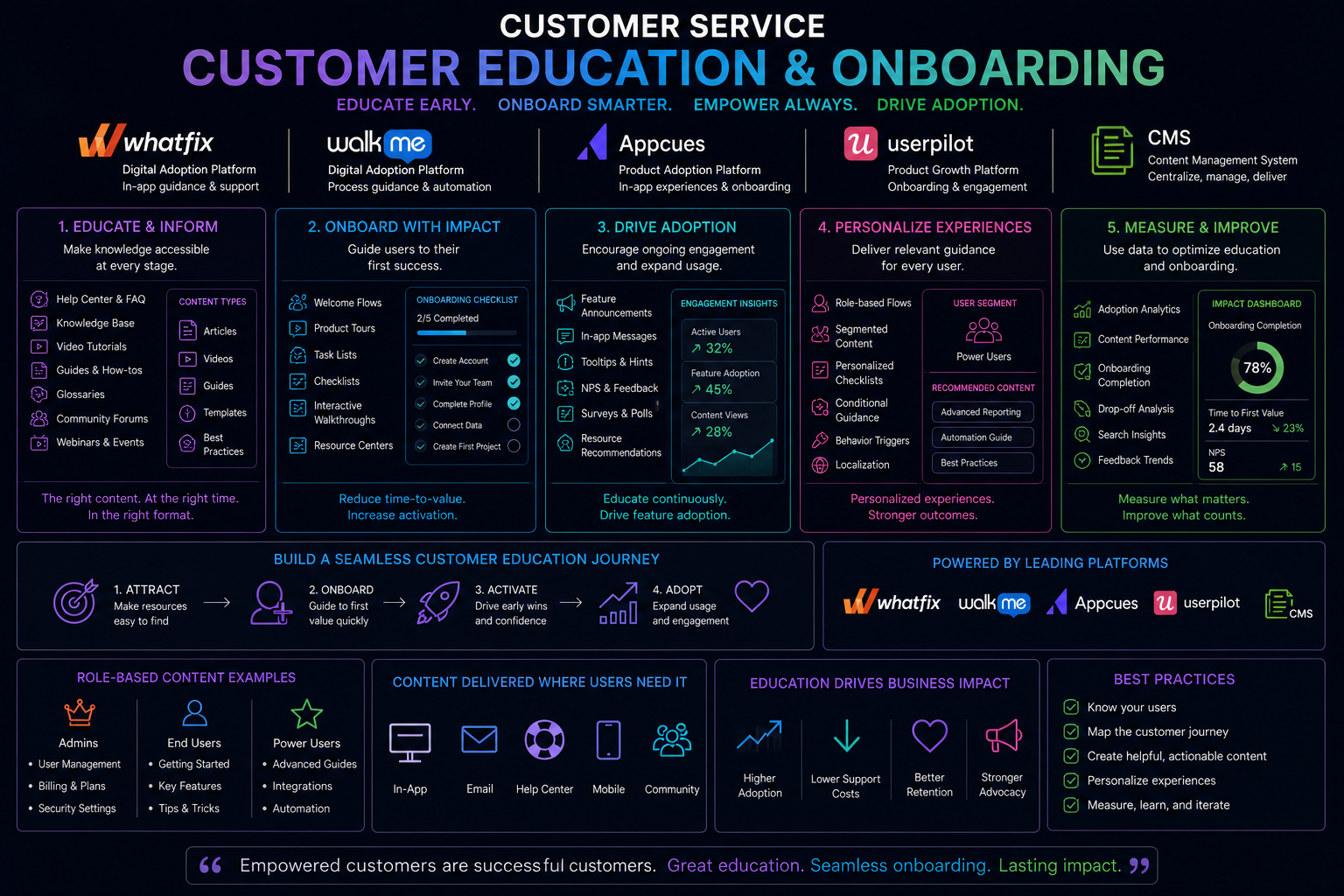
Understanding the Customer Education & Onboarding Stack
Before diving into training, understand the distinction between two complementary categories of tools and how they work together .
Product Adoption Software (Digital Adoption Platforms) helps new users get started quickly with in-app guidance. These tools are built into your product and show tips, guides, and nudges during usage. They include popups, checklists, tooltips, and product tours. The goal is to drive users to their "aha moment"—when they first realize your product's value. Key platforms in this category are Appcues (best for cross-channel end-user engagement), Userpilot (focused on in-app onboarding and analytics), Whatfix (enterprise training with compliance features), and WalkMe (complex enterprise workflows) .
Customer Training Platforms (Learning Management Systems) help users keep learning over time. These are standalone tools offering self-paced and live learning experiences including courses, certifications, webinars, and help articles. They are best for teaching complex material and certifying users. These two categories are not mutually exclusive—they are most powerful when used together. You can use product adoption tools to onboard users inside your SaaS app while using an LMS to deliver deeper, structured customer education .
Content Management Systems (CMS) serve as the repository for your educational content—help articles, video tutorials, documentation, and downloadable guides. A well-organized CMS makes content discoverable and reusable across your adoption tools and training platforms.
The 14-Week Customer Education & Onboarding Training Roadmap
Phase 1: Weeks 1-4 – Foundations of Customer Education Strategy
What to focus on
Before touching any tool, understand the strategic framework that makes customer education effective. The most successful programs share common foundations .
Lifecycle-aligned structure means mapping training to key customer journey stages: onboarding, activation, adoption, expansion, and renewal. Each stage demands different enablement. A new user signing up needs lightweight, contextual guidance like in-app tooltips. An established user needs advanced workflows and integration training.
Learning paths for different user segments are essential for personalization. Content that is mismatched—too basic, too advanced, or off-role—disengages users. Design distinct training tracks for admins (setup, configuration, team rollout), end users (day-to-day workflows), and technical users (integrations, APIs, data management) .
Modular content creates standalone learning modules that can be reused across training paths. Examples include 3-5 minute explainer videos, "how to get started" checklists, and short quizzes to reinforce learning. Modular design helps you scale customer training, making it easier to update and personalize without rebuilding courses .
Automated, event-driven delivery ensures timing is right. Connect learning moments to behavioral events like first login, feature unlocked but unused, or admin changes. When logins drop, send an automated refresher. When a user hits a milestone, trigger advanced training .
The IRR framework helps prioritize where to start: Impact (does it move a metric that matters, like time-to-value or retention?), Repeatability (does it happen often across many accounts?), and Readiness (do you already have content or subject matter experts to build resources quickly?) .
Free resources for Phase 1
The LearnWorlds blog article "How to create always-on customer training programs to scale customer success" provides detailed guidance on lifecycle-aligned structure, learning paths, modular content, and automated delivery . The article includes a 30-day implementation plan and the IRR prioritization framework. Gainsight customer stories (available through their website) offer real-world examples of digital customer success programs.
Paid resources for Phase 1
LinkedIn Learning offers "Customer Success Management Fundamentals" covering proactive CS strategies, including customer education components. Coursera provides "Customer Success" specialization through the University of California.
Practical application
Map a complete customer journey for a product you know. Identify five stages from onboarding through renewal. For each stage, define the key question customers have and the educational resource that would answer it. Then use the IRR framework to prioritize which stage to tackle first. This mirrors the strategic planning professional customer education leads do before selecting tools.
Phase 2: Weeks 5-8 – In-App Guidance with Appcues and Userpilot
What to focus on
Product adoption platforms enable you to guide users directly inside your application without engineering support. This phase builds your hands-on skills with the platforms best suited for customer-facing adoption .
Appcues for cross-channel engagement
Appcues was built specifically to help you engage your customers across in-app, email, and mobile—not just inside the product surface . This difference in mission shapes everything downstream. The visual builder lets you create Flows, Checklists, Banners, Pins, Surveys, and NPS without needing front-end developers. No jQuery. No CSS. No professional services packages that run out after 80 hours. Fast-moving teams can successfully implement and launch onboarding flows within days .
Key features to master include the visual flow builder for creating step-by-step walkthroughs, behavioral targeting that triggers experiences the moment an event occurs, user segmentation for personalized onboarding, A/B testing for comparing different flows, and cross-channel Workflows that orchestrate across in-app, email, and mobile. When a user doesn't complete an onboarding step, you can trigger a follow-up email. When they hit a usage milestone, you can send a push notification about a relevant feature .
Userpilot for in-app onboarding and analytics
Userpilot is built for product-led onboarding, helping SaaS teams create UI-based onboarding flows, tooltips, and in-app prompts without code. It's what many mid-market teams reach for when larger platforms' pricing feels steep and implementation complexity feels like overkill .
Key features include a no-code experience builder, built-in product analytics with funnels, retention tracking, and trends, NPS and survey tools for collecting user feedback, a resource center for in-app help documentation, and granular segmentation for targeting. Userpilot's pricing starts at $249 per month, making it accessible for smaller teams .
Essential features across both platforms
Regardless of which platform you use, you need these capabilities : in-app guidance that shows tooltips and step-by-step guides directly inside the product, user onboarding flows with personalized welcome tours and progress tracking, behavioral targeting that triggers messages based on what users do or don't do, user segmentation that groups users by behavior and product usage, product analytics that tracks feature interaction and drop-off points, surveys and feedback tools for collecting NPS and in-app feedback, A/B testing for optimizing flows, and multi-language support for global audiences.
Free resources for Phase 2
Appcues offers free demos and a free trial for hands-on practice. The Appcues blog provides detailed comparisons and best practices for customer-facing engagement . Userpilot offers free demos and a free trial. The Userpilot blog includes comprehensive guides to no-code onboarding and product analytics .
Paid resources for Phase 2
Appcues paid plans start at 300permonth(billedannually)forupto1,000monthlyactiveusers[citation:1][citation:4].Userpilotpaidplansstartat
300permonth(billedannually)forupto1,000monthlyactiveusers[citation:1][citation:4].Userpilotpaidplansstartat249 per month . Both platforms offer enterprise plans with additional features.
Practical application
Using Appcues free trial, build a three-step onboarding flow for a mock product. Create a welcome modal, a tooltip for the key feature, and a checklist for first-time setup. Set up behavioral targeting to show the flow only to new users. Publish your flow to a test environment. Then using Userpilot free trial, build a similar flow and compare the builder experiences. This hands-on comparison teaches you which platform fits different use cases.
Phase 3: Weeks 9-11 – Enterprise Digital Adoption with Whatfix and WalkMe
What to focus on
Whatfix and WalkMe are enterprise-grade digital adoption platforms built for complex software environments and compliance-driven training needs. While they share many features with Appcues and Userpilot, they serve different primary audiences .
Whatfix for enterprise adoption
Whatfix is an enterprise-grade digital adoption platform built to accelerate digital transformation outcomes across mission-critical applications. It's a strong option for large enterprises with process compliance requirements, regulatory-driven training, and governance-friendly deployment needs .
Key features include role-based guidance that adapts to user permissions, SCORM and LMS integration for formal training programs, AI-powered content creation and task automation, automatic translations for global teams, simulation-based training through Mirror (sandbox environments where users can practice without risk), and omnichannel content integration with existing knowledge assets .
Whatfix is easier to implement than WalkMe—you just install their Chrome or Firefox extension and copy JavaScript snippets to get started . However, the builder requires many clicks per action and features important for customer engagement like slideouts, pins, goals, and A/B testing aren't available .
WalkMe for complex workflows
WalkMe pioneered digital adoption for employee training, with a focus on helping employees navigate enterprise applications like Workday, Salesforce, and SAP . After being acquired by SAP in 2024, WalkMe's direction remains enterprise compliance and employee workflows rather than customer-facing engagement .
Key features include DeepUI technology that detects changes in apps and automatically updates guidance, WalkMe Workstation (an employee hub for accessing all apps from one interface), conversational UI, IDP integration, and low-code editor . WalkMe also offers a certification program through the Digital Adoption Institute, with free training for roles including Builder, Project Leader, Data Analyst, and Designer .
The tradeoffs for customer-facing teams are significant. WalkMe implementations require detailed planning, technical involvement, and ongoing configuration. Most of what makes WalkMe strong—enterprise compliance, session recording, employee training workflows—isn't what you need for customer onboarding . Setup often requires WalkMe-certified specialists and the total cost of ownership is high, with licensing, implementation, and support costs adding up fast .
Choosing between Whatfix and WalkMe for your use case
If your organization needs to train employees on complex internal software with compliance requirements, either platform works, with Whatfix being easier to implement and maintain . If you need customer-facing onboarding and engagement, neither platform is ideal—Appcues or Userpilot are better fits . If your organization has both needs (employee training AND customer onboarding), the two categories can work together: Whatfix/WalkMe for internal systems, Appcues/Userpilot for your product's customer experience.
Free resources for Phase 3
Whatfix offers free demos and recorded webinars on their website. WalkMe offers free training and certification through the Digital Adoption Institute—you need an active WalkMe Editor account and can sign up at the Digital Adoption Institute . WalkMe support documentation provides articles on technical setup, design, and customization .
Paid resources for Phase 3
Both Whatfix and WalkMe require enterprise licensing with custom pricing—neither publishes prices publicly. User reports suggest WalkMe starts around 9,000peryearandWhatfixstartsaround
9,000peryearandWhatfixstartsaround1,200-2,000 per month .
Practical application
Request demos from both Whatfix and WalkMe. Compare the builder interfaces and core features. Build a simple tooltip flow in each platform's demo environment. Document which platform felt more intuitive for customer-facing guidance versus employee training. For most customer education professionals, the answer will be that Appcues or Userpilot are better fits—but knowing Whatfix and WalkMe helps you work with enterprise clients or internal IT teams who mandate these platforms.
Phase 4: Weeks 12-14 – Always-On Training Programs and Career Preparation
What to focus on
This phase integrates everything into a complete customer education system. You will learn to build always-on training that works in the background, scales without adding headcount, and proves business impact .
Building the always-on training layer
An always-on customer training layer gives your team breathing room. It shortens time-to-value, reduces support volume, and allows CSMs to focus on strategic work and human moments that matter .
The building blocks include lifecycle-aligned training mapped to onboarding, activation, adoption, expansion, and renewal. Learning paths designed for different user segments (admins, end users, technical users). Modular content that can be reused across training paths. Automated, event-driven delivery triggered by behavioral events. And measurement systems that track engagement, behavior change, and business outcomes .
Automating content delivery
Setting up event-driven automation requires connecting your LMS, CRM, and analytics tools through native integrations or middleware like Zapier . Connect learning moments to behavioral events such as first login, feature unlocked but unused, or admin change. When logins drop, send an automated refresher email. When a user hits a milestone, trigger advanced training. The goal is to create a closed feedback loop where customer behavior triggers learning, and learning data feeds back into customer insights .
The 30-day launch plan follows a proven pattern . Week 1: Choose your pilot use case using the IRR framework—onboarding is often the best starting point. Week 2: Create your first learning path by repurposing existing content like Looms, slides, and support articles into 3-5 core lessons. Week 3: Automate delivery using behavioral triggers from your CRM or product analytics platform. Week 4: Launch with 10-20 new accounts as a pilot, track engagement and business outcomes, then iterate.
Measuring what matters
Track three key areas . Learning engagement metrics include course completion rates, time spent on activities, median time to completion, and qualitative learner feedback from surveys. User behavior metrics compare trained versus untrained users on feature adoption, login frequency, and ticket submission. Team efficiency metrics capture time reclaimed from onboarding and repetitive support tasks.
The bottom line is business outcomes—reduced time-to-value, time saved from onboarding, fewer support hours. These translate into ROI. If these aren't moving, no matter how high the completion rates, it's time to rethink your strategy .
Free resources for Phase 4
The LearnWorlds article on always-on customer training provides the complete 30-day implementation plan, IRR framework, and measurement guidance . Zapier's blog offers tutorials on connecting LMS and CRM platforms for automated content delivery. Gainsight's customer story library provides real-world examples of digital customer success programs.
Paid resources for Phase 4
An LMS like LearnWorlds (29−299permonthdependingonplan)isthefoundationalplatformforcustomertraining.Zapierpaidplansstartat
29−299permonthdependingonplan)isthefoundationalplatformforcustomertraining.Zapierpaidplansstartat20 per month for higher task limits.
Practical application
Build a complete 30-day pilot program for a product you know. Define your pilot use case—onboarding is the safest bet. Create three core learning modules repurposing existing content. Set up automation to enroll new users in the learning path. Define your success metrics: time-to-value reduction target, completion rate target, and ticket reduction goal. Launch your pilot with a small user group. Document results and create a one-page business case for scaling the program. This exercise mirrors what hiring managers for customer education roles expect you to have done.
Your Portfolio Projects
Build these four artifacts during your training. They demonstrate exactly what hiring managers for customer education roles are looking for.
Project One: The In-App Onboarding Flow – Using Appcues or Userpilot free trial, build a complete onboarding flow for a mock product. Include a welcome modal, three tooltips for key features, a progress checklist, and an exit survey. Document your targeting logic and A/B test plan. Publish to a test environment and record a walkthrough video.
Project Two: The Learning Path Design – Design a complete certification program for a product user. Define learning objectives, create a course outline with 5-7 modules, develop knowledge check questions, and design a final assessment. Specify passing criteria and certification renewal timeline. This mirrors the Customer Education Lead role at Glean, which requires designing certifications that rigorously evaluate learner proficiency and align with business objectives .
Project Three: The Automated Training Workflow – Using Zapier (free tier) and any LMS or form tool, build an automated workflow that enrolls new users in a training course based on a CRM trigger. Document your trigger, action, and fallback logic. Show proof of automation working with test data.
Project Four: The Customer Education Strategy Deck – Build a 15-slide strategy deck for a product you know. Include customer journey map, learning path design for three user segments, technology stack recommendations with budget estimates, success metrics dashboard, 90-day implementation roadmap, and ROI calculation showing projected support ticket reduction and time-to-value improvement. This mirrors the strategic planning required in the Glean Customer Education Lead role which owns the vision, roadmap, and KPIs .
Career Application
Why This Matters Now
Robert Half's 2026 Salary Guide identifies Customer Education Specialist as an emerging role gaining traction in 2026 . These professionals create and deliver onboarding content, product tutorials, and webinars to empower users, combining product guidance with problem-solving support. The role is growing in demand as companies recognize that scalable customer education drives retention and reduces support costs.
Job Titles to Target
Customer Education Specialist is an emerging role requiring two to four years of experience. You create and deliver onboarding content, product tutorials, and webinars to empower users . The salary range is 55,000to
55,000to85,000 depending on location and industry.
Customer Education Manager requires four to seven years of experience. You own the education strategy, manage content creation, and measure program impact. The salary range is 85,000to
85,000to130,000. The Customer Education and Certification Lead role at Glean offers 160,000to
160,000to200,000 plus equity for candidates with five or more years of experience in customer education, learning and development, or customer success .
Product Adoption Specialist requires two to five years of experience. You build in-app onboarding flows, analyze user behavior, and optimize activation rates. The salary range is 70,000to
70,000to110,000.
Customer Success Operations Manager requires five to eight years of experience. You own digital customer success programs, health scoring, and scaled education motions. The salary range is 90,000to
90,000to140,000.
Senior Instructional Designer requires four to seven years of experience. You design learning experiences, develop multi-format content, and establish assessment frameworks. The salary range is 75,000to
75,000to115,000.
Director of Customer Education requires eight or more years of experience. You own the education function, set strategy, manage team, and report to leadership. The salary range is 130,000to
130,000to180,000 plus bonuses.
Required Skills Based on Job Postings
Based on analysis of the Glean Customer Education Lead role and industry standards, employers expect specific skills .
Technical skills require platform proficiency with product adoption tools (Appcues, Userpilot, Whatfix, or WalkMe). LMS experience is essential—you should have hands-on experience with a learning management system. Content creation capabilities include video, written guides, visuals, and interactive resources. Basic analytics helps you track engagement and identify gaps.
Instructional design skills include the ability to craft learning objectives, outcomes, assessments, and learning paths. Formal instructional design or curriculum building experience is highly valued .
Operational skills include setting up content workflows, governance models, and refresh cadences. You need program management capabilities to manage roadmaps and hit deadlines. Data orientation helps you use insights to prioritize and iterate.
Strategic skills include lifecycle alignment—mapping training to customer journey stages. Cross-functional partnership matters deeply—you will work with customer outcomes, support, product marketing, partner enablement, and sales enablement . Communication excellence means simplifying complex topics with clear, concise writing.
Certifications That Matter
WalkMe Certification is available for free through the Digital Adoption Institute with active WalkMe Editor access. Role-based learning paths include Builder, Project Leader, Data Analyst, Designer, Champion, and Architect .
Whatfix Certification is available through Whatfix Academy for customers. Pricing varies by agreement.
Appcues Certification is available through Appcues. Pricing not publicly listed.
Userpilot Demo is the primary way to learn the platform, with documentation available on their website.
Certified Customer Service Professional (CCSP) credential from Robert Half's salary guide is valued in service-focused roles .
Instructional Design Certification is available through ATD (Association for Talent Development) or Coursera. Pricing varies.
The Job Search Strategy
The Glean Customer Education Lead job description provides a blueprint for what hiring managers seek . They want someone who can build and scale a world-class education system that turns customers into confident, self-sufficient power users. The role is a growth flywheel—moving customers from onboarding to activation, adoption, certification, and ultimately advocacy while measurably reducing reliance on 1:1 support and accelerating time-to-value.
Your portfolio matters more than your resume. Create a dedicated website or document showcasing your four projects. Each project should clearly show your process, your tools, your results, and the business impact .
On your resume, replace generic bullet points with education-specific achievements. For example: "Designed and launched onboarding flow achieving 65 percent completion rate and reducing time-to-value by 40 percent." Or "Built learning path for admin users that decreased support tickets by 35 percent within 90 days."
In interviews, articulate specific education workflows you have built. For example: "I used the IRR framework to prioritize onboarding as our first use case. Within 30 days, I repurposed existing content into a 5-module learning path, set up automated enrollment via Zapier, and launched with 20 pilot customers. Completion rates hit 80 percent, and support tickets about setup dropped by half."
Interview questions to prepare for include: How would you design a certification program that proves customer proficiency? Walk me through how you would prioritize which training content to build first. How do you measure whether customer education is actually driving retention? What's your approach to working with product marketing and customer success on shared education initiatives? Tell me about a time you turned around an underperforming training program.
The 30-60-90 day framework for customer education roles includes auditing existing education assets and technology in the first month, identifying gaps, and conducting stakeholder interviews. The second month focuses on quick wins like launching one learning path, automating enrollment for one user segment, and establishing baseline metrics. The third month is about scaling: building the full customer education roadmap, implementing continuous improvement processes, and reporting ROI to leadership with specific metrics on ticket deflection and time-to-value reduction .
Immediate Next Steps for the Next 7 Days
Day One: Read the LearnWorlds article on always-on customer training programs . Understand the strategic framework before touching any tool.
Day Two: Sign up for Appcues free trial. Complete their onboarding tutorial. Build your first simple flow—a welcome modal is perfect.
Day Three: Sign up for Userpilot free trial. Compare the builder experience to Appcues. Note which platform feels more intuitive for your use case.
Day Four: Request demos from Whatfix and WalkMe. Understand the enterprise use cases before committing time to platforms that may not fit.
Day Five: Define your portfolio project focus. Choose between the in-app onboarding flow, learning path design, automated training workflow, or customer education strategy deck. Commit to completing one project within 30 days.
Day Six: Update your LinkedIn headline. Change it from "Customer Service Professional" to "Customer Education Specialist | Product Adoption + Learning Design | Appcues + LMS." Follow customer education leaders and join communities like GainSight Pulse or Customer Education Meetups.
Day Seven: Start your first portfolio project. Document your process publicly on LinkedIn to build visibility and demonstrate the builder mentality hiring managers seek .
The Long Game
Customer education is one of the highest-leverage investments a SaaS company can make. The professionals who can design always-on training that scales without adding headcount will be the most valuable in the job market.
The distinction between product adoption tools (in-app guidance) and customer training platforms (structured learning) matters enormously . Successful programs use both layers together. In-app guidance drives users to their first "aha moment." Customer training platforms keep them learning and growing over time .
The most successful customer education professionals in 2026 will be hybrid strategists. They will combine instructional design expertise with platform proficiency. They will know how to build in-app flows and how to design certification programs. They will use automation to scale their impact while preserving the human touch when customers need it.
Your customer service background is your foundation. You already understand customer needs, common questions, and where training gaps exist. This roadmap builds the technical tools—Appcues, Userpilot, Whatfix, WalkMe, LMS platforms—that transform a customer service professional into a customer education leader.
Start your week one actions today. Build that first onboarding flow. Design that first learning path. Launch that first automated program. The market for customer education talent has never been stronger , and the professionals who can architect scalable training for the AI era will shape the future of customer success.
Experience / Knowldge into Training/L&D




 Group / 1: 1 Sessions