This roadmap is designed to take you from a complete beginner to a professional CMS specialist in 2026. The landscape has shifted significantly—AI tools now accelerate development dramatically, and enterprise platforms like Webflow have gained substantial market ground alongside WordPress's continued dominance.
The strategy follows a Three-Phase Approach:
- Foundation: Master universal concepts (information architecture, responsive design, hosting fundamentals, SEO principles) that apply across all systems.
- Platform Selection & Specialization: Choose your path based on market demand and career goals, learning both the interface and the code behind it.
- AI-Augmentation: Learn to use AI tools for rapid design iteration, content generation, code troubleshooting, and client communication.
Phase 1: The Universal Foundation (4-6 Weeks)
Before touching any CMS, you must understand what makes a website function. A CMS is merely a user-friendly interface for managing a database that serves web pages; the underlying principles are universal.
Core Concepts to Master:
- Information Architecture (IA): How to organize content logically with hierarchical navigation, categories, tags, and custom post types. This same mental model applies to WordPress categories, Squarespace collections, and Webflow CMS collections.
- The Frontend Trinity: HTML (semantic structure), CSS (responsive layouts, flexbox, grid, media queries), and enough JavaScript to understand interactivity (modals, mobile menus, form validation). You do not need to be a developer, but you need to be able to read, copy, paste, and tweak.
- Responsive Design Principles: Mobile-first approach, fluid grids, breakpoints, touch targets. Every client will check their site on an iPhone; this is non-negotiable.
- SEO Fundamentals: Title tags, meta descriptions, header hierarchy (H1→H6), alt text, semantic HTML, page speed, and structured data (schema markup).
- Hosting & Domains: DNS management (A records, CNAME), nameservers, hosting types (shared, VPS, managed WordPress, serverless), SSL certificates, and backup strategies.
How to learn this for free:
- FreeCodeCamp: Complete the "Responsive Web Design" certification. This is the single best free resource for learning real HTML and CSS with hands-on projects.
- The Odin Project: The foundational HTML/CSS sections are excellent for understanding how the web actually works before adding a CMS on top.
- Mozilla Developer Network (MDN): The definitive reference. When you do not understand a CSS property, search "MDN [property name]".
Practice:
Build a complete 3‑5 page static website using only HTML and CSS. Host it for free on Netlify or GitHub Pages. Include a navigation bar, responsive grid layout, contact form (even if it does not submit), and footer. This exercise proves you understand the underlying technology.
Phase 2: Platform Specialization (8‑12 Weeks)
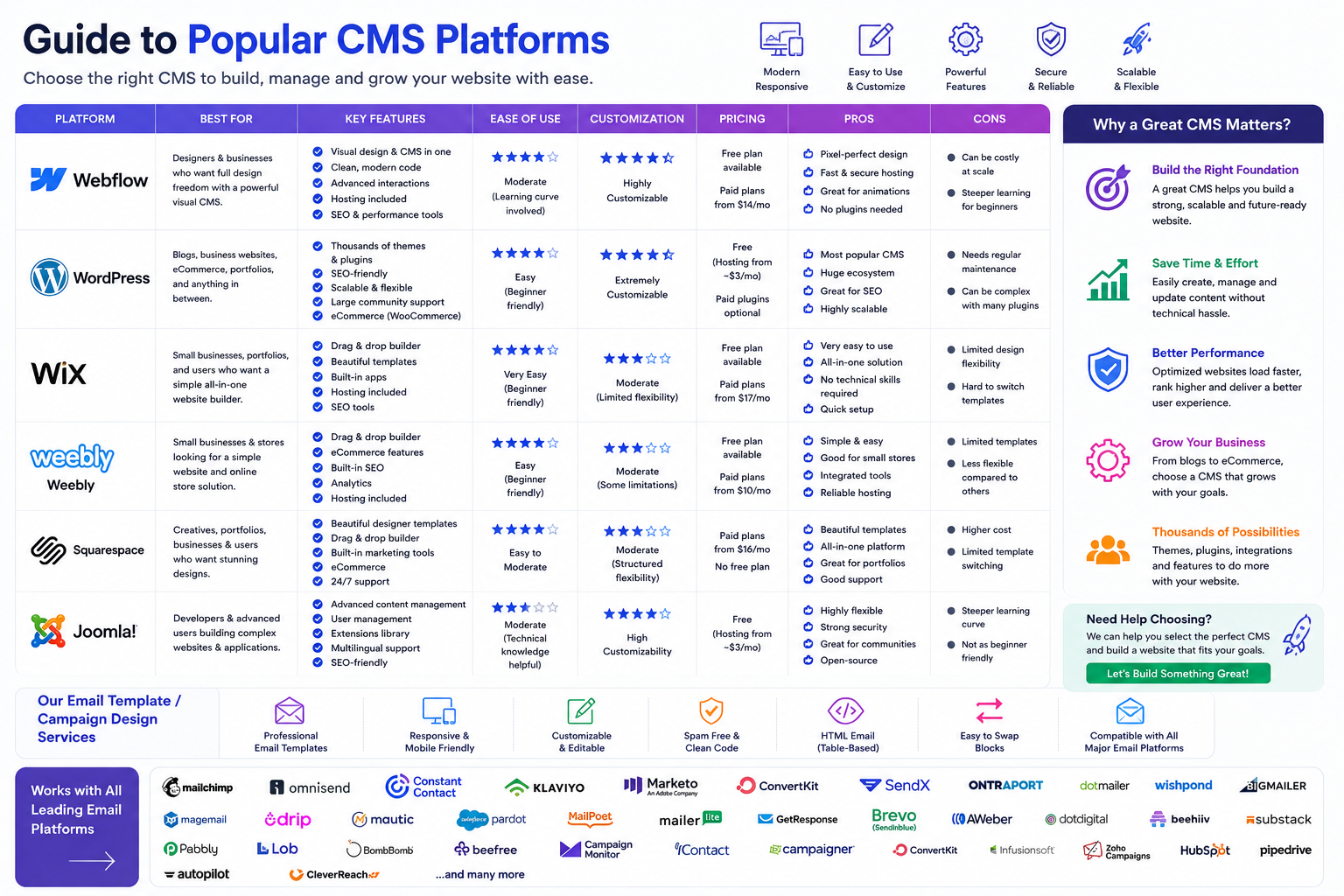
Do not learn all six platforms superficially. Depth in one or two platforms is vastly more valuable for employment than shallow familiarity with many. The table below summarizes the strategic position of each platform to help you decide.
WordPress powers over 40% of the web and offers the highest job volume. Its ecosystem includes affordable shared hosting all the way up to enterprise‑grade WordPress VIP. It is open‑source, which means full control but also a steeper learning curve. Best suited for developers, agency owners, and enterprise consultants.
Webflow is the fastest‑growing visual development platform. It generates clean, semantic HTML/CSS code that you can export. It combines visual design with CMS capabilities, making it ideal for designers who want to code without writing code. Webflow skills are currently in high demand for premium agency work.
Squarespace + Wix lead the DIY and small business segments. These are closed, all‑in‑one systems limiting custom code but offering the fastest path from zero to live site. They are best suited for freelance designers serving small businesses and creatives.
Joomla has declined in market share but still has a loyal enterprise following, particularly in Europe. It is more complex than WordPress but offers advanced access control out of the box. Best suited for legacy system maintainers and specific European agencies.
Weebly, now part of Square, has been largely absorbed into Square Online. The standalone platform is legacy. Training resources are scarce, and career focus here is narrow. Not recommended for new specialists.
Path A: WordPress — The Enterprise Standard
Target Roles: WordPress Developer, Agency Owner, Enterprise CMS Consultant, Content Manager.
Official & Free Resources (Highly Recommended):
- Learn.wordpress.org: The official learning hub. The new WordPress Facilitator Training Program (launched April 2026) provides self‑guided courses and complete workshop facilitation guides. There is no application process; all resources are openly accessible.
- WordPress Education Programs: The foundation now offers WordPress Campus Connect (hands‑on campus events), WordPress Credits (university credit for contributing 150 hours), and WordPress Student Clubs (on‑going campus communities).
- WordPress.tv: Thousands of free tutorial videos from WordCamp conferences worldwide.
Emerging Credentials:
- The WordPress project is developing credential pathways, including an AI Leaders micro‑credential piloted in early 2026. These will carry professional value as the ecosystem matures.
Third‑Party Paid Resources:
- Udemy: Search for highest‑rated "WordPress Theme Development" courses. Look for those updated within the last six months.
- LinkedIn Learning: Structured video libraries with exercise files.
- OSTraining: Specializes in Joomla and WordPress video training.
AI Edge for WordPress:
- Use Cursor or GitHub Copilot within VS Code to generate WordPress PHP loops, Custom Post Type registration code, and advanced database queries in seconds.
- Learn to prompt AI to debug white screens or plugin conflicts by pasting error logs.
Path B: Webflow — The Designer's Power Tool
Target Roles: Webflow Designer, Freelance Agency Owner, Startup Founder.
Official Resources:
- Webflow University: Completely free, exceptionally well‑produced video tutorials covering everything from the visual interface to CMS Collections, interactions, and hosting setup.
- Webflow Certification: Webflow offers an official certification program for professionals. This distinguishes you in the freelance marketplace.
Paid & Community Resources:
- Flow College (by Timothy Ricks): A highly regarded third‑party training platform specifically for Webflow mastery.
- Webflow Experts Directory: Once skilled, you can list yourself here to attract clients.
AI Edge for Webflow:
- Webflow has integrated AI features for generating layouts and component structures. Learn to prompt the AI to scaffold an entire page structure, which you then refine manually.
- Use Relume Library AI to generate sitemaps and wireframes that can be imported directly into Webflow.
Path C: Squarespace — The Professional Freelancer Path
Target Roles: Squarespace Designer, Creative Agency Freelancer.
Official Resources:
- Squarespace Circle: This is the essential program for professionals. By joining Circle (free for those building client sites), you unlock exclusive perks, deeper discounts, longer client trial periods, and a global community of designers and developers. You earn points for new client projects, unlocking higher status tiers with better rewards.
- Squarespace Help Center: Comprehensive written and video documentation.
Training Courses:
- Skillshare / Class Central: Look for comprehensive courses like "Squarespace: Building your Perfect Website" covering third‑party integrations (Google Analytics, Mailchimp, Disqus).
AI Edge for Squarespace:
- Squarespace has a built‑in AI Design Kit that generates a complete site layout in under four minutes. Learn to use this as a rapid prototyping tool, then heavily customize the output for client uniqueness.
Path D: Joomla — The Niche Enterprise Option
Target Roles: Joomla Developer (primarily European market), Legacy System Maintainer.
Official Resources:
- Joomla! Documentation Wiki: The official, community‑maintained documentation.
- Joomla! Community Magazine: Monthly articles with tips and case studies.
Training Courses (Use Caution Regarding Versions):
- Important Warning: Many tutorials still cover Joomla 2.5 or 3.x, which are obsolete and unsupported. Ensure any course explicitly mentions Joomla 4.x or 5.x.
- OSTraining: One of the few vendors maintaining up‑to‑date Joomla 4/5 video training.
- JoomlaDay Conferences: These occur globally. Sessions are often recorded and posted on YouTube. This is where the current community shares modern techniques.
AI Edge for Joomla:
- The Joomla ecosystem is less AI‑integrated than WordPress. Your value is in understanding Joomla's advanced access control (ACL) and extension architecture rather than AI‑accelerated building.
Phase 3: Master AI Tools for Workflow (Integrate Throughout)
Modern CMS training is inseparable from AI. The distinction between "CMS specialist" and "prompt engineer" is blurring rapidly.
What to learn:
- AI‑Assisted Content Generation: Using Claude or ChatGPT to draft blog posts, product descriptions, meta tags, and even full page copy that matches a brand voice guide.
- Code Generation & Troubleshooting: Using Cursor IDE or GitHub Copilot to write, explain, and debug HTML/CSS/JavaScript. Paste an error message and ask, "Why is this happening in my WordPress theme?"
- Design Ideation with Midjourney / DALL‑E: Generate placeholder images, hero section concepts, or logo variations to present to clients before committing to final assets.
- SEO Content Briefs: Use AI to analyze top‑ranking pages for a keyword and generate a content outline that matches search intent.
Free Resource: The WordPress AI Leaders micro‑credential (piloted 2026) will likely be the first official credential in this space.
Paid Resource: Platforms like HubSpot Academy and Coursera are adding "AI for Marketers" and "AI for Web Design" specializations.
Career Application & Next Steps
CMS professionals are hired to solve business problems—speed, design quality, SEO visibility, e‑commerce revenue—not to click buttons. Your portfolio and positioning matter more than the number of certifications you hold.
Immediate Actions to Take (Next 30 Days):
1. Build a "Live" Portfolio Piece
- Do not just list "Completed tutorials." Build a live URL for something specific: a portfolio for a photographer friend, a landing page for a local event, or a blog about a hobby.
- Action: Buy a cheap domain (10‑15)andonemonthofhosting(
- 10‑15)andonemonthofhosting(5‑10). Install WordPress or Webflow (or use a Squarespace/Wix free trial). Launch a real URL you can put on your resume.
2. Specialize Your Positioning
- For Designers: Highlight "Figma to Webflow," "Responsive Design," and "Custom Squarespace CSS." Show before/after visuals.
- For Developers: Highlight "Custom Post Types," "REST API integration," "Plugin/Extension Development," and "Headless CMS setups."
- For Marketers/Content Managers: Highlight "SEO‑optimized content structures," "Editorial workflow management," and "Analytics integration."
3. Understand the Career Paths
WordPress Developer: You build custom themes and plugins using PHP, JavaScript, and the WordPress REST API. This is the highest‑paying technical track in the CMS ecosystem. You can work at agencies, as a freelancer, or for enterprise WordPress VIP clients.
Webflow Designer/Developer: You visually design and build responsive sites using Webflow's interface, often exporting code or using Webflow hosting. This role is growing rapidly for premium agencies and startup founders.
CMS Consultant: You advise organizations on which platform to choose based on their budget, technical capacity, and growth plans. Broad knowledge across platforms is essential.
Content Manager / Marketer: You use the CMS daily to publish, optimize, and manage content workflows. Less technical but requires strong editorial and SEO skills.
Freelance Website Designer: You build sites for small businesses on Squarespace, Wix, or WordPress using pre‑built themes. Lower barrier to entry but also lower pricing unless you specialize.
4. The "Freelance First" Strategy
- Offer to build a simple 5‑page website for a local non‑profit, church, or family business for free or a small fee.
- Why this works: Clients will request changes. You will learn to navigate the CMS editor, handle media uploads, manage revisions, and communicate deadlines under real‑world pressure. This experience is more valuable than any certificate.
5. Join Professional Communities
- WordPress: The Make WordPress Slack instance, local WordCamps, and the WordPress.org support forums.
- Webflow: Webflow Experts Slack, Webflow Community Forum, and local Webflow meetups.
- Squarespace: Squarespace Circle members‑only community.
- General: Relevant subreddits (r/WordPress, r/webflow, r/squarespace), the CMS developer hashtags on LinkedIn and X.
6. Understand Platform Selection for Clients (Consulting Skill)
A professional CMS specialist is often asked, "Which platform should I use?" You need a decision framework:
- WordPress: When the client needs full ownership, unlimited customization, large plugin ecosystem, or e‑commerce (WooCommerce).
- Webflow: When the client is design‑driven, wants visual development, needs clean exported code, or prefers all‑in‑one hosting.
- Squarespace: When the client is a small creative business needing a beautiful, simple site with minimal ongoing maintenance.
- Wix: When the client is a solo entrepreneur or artist with very low budget and zero technical comfort.
- Joomla: When the client has a large existing Joomla site (usually European enterprise or government) or needs advanced access controls.
The Final Recommendation
Start with FreeCodeCamp's Responsive Web Design certification to master HTML/CSS (4 weeks). Then, choose your primary platform based on your career goals:
- For maximum job opportunity and enterprise salary: Master WordPress using Learn.wordpress.org and join the Facilitator Training Program.
- For premium freelance design work: Master Webflow using Webflow University and pursue Webflow Certification.
- For fast‑start freelance with small businesses: Master Squarespace and join Squarespace Circle.
If you complete the HTML/CSS foundation and achieve deep proficiency in one platform (including the ability to troubleshoot without AI assistance), you will be employable at agencies or as a freelancer. Adding AI tools as accelerators—not crutches—will then elevate you from competent to exceptional.
Any




 Group / 1: 1 Sessions