This roadmap is designed to take you from a complete beginner to a professional email template designer and campaign manager. Unlike general CMS or CRM training, email design requires a specialized skill set rooted in 1990s HTML table structures combined with modern responsive design principles. You are not just writing an email; you are engineering a piece of code that must render perfectly across dozens of vastly different email clients (Outlook, Gmail, Apple Mail, etc.) while avoiding spam filters.
The strategy follows a Three-Phase Approach:
- Foundation: Learn the "Email Code" constraints (tables, inline CSS, client quirks).
- Platform & Tool Mastery: Learn to design in HTML and utilize drag-and-drop builders.
- Campaign Strategy & AI: Learn segmentation, psychology, and how to use AI to generate copy and layouts.
Goal
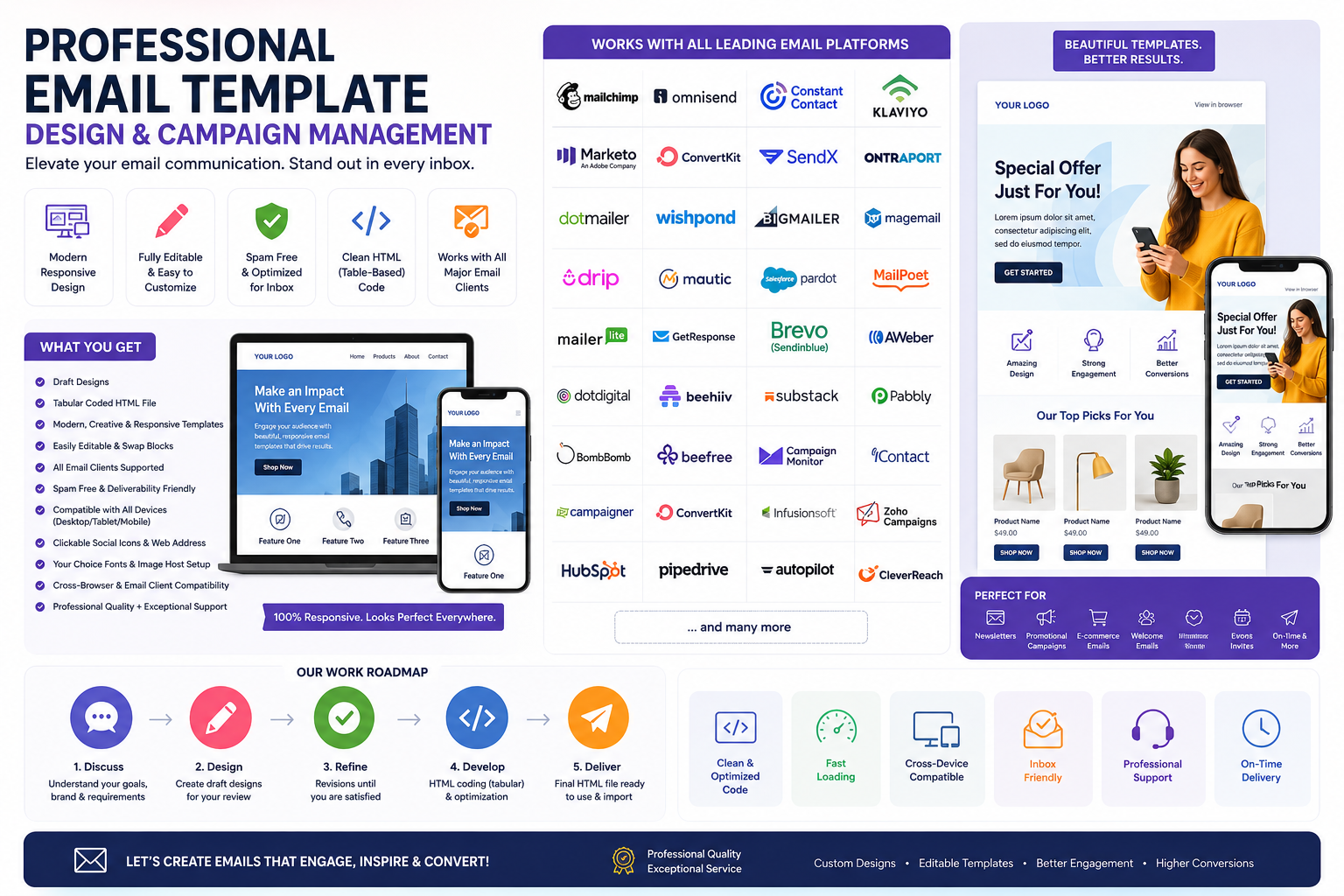
Consider : design an email template that is professional, visually appealing, and mobile-responsive. The template will be fully customizable and can be used for a variety of purposes such as newsletters, promotional campaigns, and more. Working with clients to understand their brand and create a design that aligns with their aesthetic. The final product will be delivered in HTML and can be easily imported into their email marketing platform. Its about elevating clients email communication and stand out in the inbox!
Works with all leading email platforms like Mailchimp, Omnisend, Constant Contact, Klaviyo, Marketo, Convert Kit, Send X, Ontra port, Dotmailer, Wish Pond, Big mailer, Mage mail, Drip, Mautic, Salesforce pardot, Mailpoet, mailerlite, getresponse, brevo, send in blue, aweber, dotdigital , Beehiiv, Substack, Pabbly, Lob, Bomb Bomb, Beefree, campaign monitor, I Contact, campaigner, Convert Kit, Infusionsoft, Zoho, Hubspot, Pipedrive, Auto Pilot, Clever Reach, Design & manage professional email template /campaign /newsletter / e-shot
Your Output should Include:
✔ Draft designs
✔ Email design as tabular coded HTML file
✓ Modern, Creative, Responsive, Editable Template
✓ All Email Client Supported
✓ Spam Free Template
✓ Compatibility Multiple Email Clients & Devices (e.g desktop/tablet/mobile)
✓ Professional Quality + Exceptional Customer Service
✓ Easily Editable, Easily Swap Block
✓ Clickable Social Icons, Web Address
✓ Your Choice Fonts, Image Host Setup
✓ All Email Platforms, Browser Compatibility
Phase 1: The "Email Geek" Foundation (Crucial for Freelancers)
Before you open a template, you must understand that email is NOT a webpage. You cannot use modern flexbox freely; you must use nested `
` tables.
Core Technical Concepts:
- Table-Based Layouts: How to use
,, and `` tags to create columns. - Inline CSS: Why you cannot use external stylesheets and how to use
style="..." on every element. - Fallbacks: How email clients handle (or ignore) web fonts, media queries, and
max-width. - Spam Filter Logic: Avoiding trigger words, managing text-to-image ratios, and setting up proper authentication (DKIM/SPF – though usually the client handles this, you must know what breaks delivery).
How to learn this for free:
- Stripo Education Hub: Stripo provides a massive library of "Email Design Best Practices" and video tutorials explaining the difference between web and email coding.
- GitHub Email Markup: Review open-source "Cerberus" or "Foundation for Emails" templates to see how the pros code tables.
- YouTube (The "Email Code" Niche): Search for "Why Outlook destroys my email layout" to learn specific hacks (like using
<!--[if gte mso 9]> conditional statements).
Practice:
- Build a simple 2-column newsletter layout using only Notepad or VS Code using HTML tables. Do not look at a drag-and-drop builder yet. Use Litmus or Putsmail (free trials) to send it to your own Gmail and Outlook accounts to see how it breaks.
Phase 2: Platform & Design Mastery (8-10 Weeks)
Here you learn the tools. You have two paths: Hard Code (High Freelance Value) vs. Builder Speed (Agency Value) . You need both.
Path A: The Developer (HTML Delivery)
Target Roles: Freelance Email Developer, ESP Migration Specialist.
Skill: You deliver a .html file that can be imported into any platform.
- The Hard Skill: You must master "Fluid Hybrid" coding (spacing that works on desktop and mobile).
- The Resource: Create a Responsive HTML Email Template (One Education / Emagister). This specific course focuses on building graphics, coding buttons with CSS, validating the code, and testing. It is structured to take you from file setup to validation.
- Tool: Beefree (Free tier). Use it to reverse engineer professional templates. Build a template in Beefree, export the HTML, and then open the HTML in a code editor to see how the builder solved specific spacing issues.
Path B: The Strategist (Campaign Management)
Target Roles: Email Marketing Manager, CRM Campaign Specialist.
Skill: Using platform-native builders (like Mailchimp or Klaviyo) and automation workflows.
- The Hard Skill: Knowing when to send and how to segment data.
- The Resource:
- Mailchimp: Coursera Project "Creating and Utilizing a Branded Email Template in Mailchimp" (1-hour project). You will create a branding kit in Canva, rename/modify templates, and connect social accounts.
- Klaviyo (E-commerce focus): Klaviyo Academy (Official, Free). Focus on their "Product Feed" emails and "Flow" automation.
- Mautic (Open Source): Mautic Community Forums. Learning Mautic is valuable because it translates to understanding Marketo and Pardot logic without high licensing fees.
- The "Swiss Army" Tool (Stripo): Stripo is an agnostic design tool that exports directly to Mailchimp, Salesforce, HubSpot, and Sendinblue (Brevo). Udemy has a "Introduction to Email Production" course specifically for Stripo that teaches how to build modules and export to ESPs. This is a massive time-saver.
Phase 3: AI Augmentation & Strategy (Integrate Throughout)
AI will not write your whole email, but it will solve "blank page syndrome" and speed up personalization.
What to learn:
- AI-Assisted Drafting: Using ChatGPT or Jasper to generate subject lines (Tests show urgency vs. curiosity variants) and body copy.
- AI Generation Tools:
- Beefree has AI that generates full email layouts from a text prompt (e.g., "Give me a spring sale newsletter with three product columns").
- Texta.ai offers platform-aware templates specifically for Mailchimp, Klaviyo, and HubSpot to generate lesson emails and sequences.
- AI Coding Assistants: Using Cursor or Copilot within VS Code to write the repetitive HTML table rows for product lists faster.
Many of the major email platforms listed offer official certifications, though the focus and difficulty vary significantly. Here is a breakdown of the most recognized programs available, categorized by how they will likely advance your career.
📌 Platform-Specific Certifications
These are ideal if you plan to specialize in a particular ecosystem or use a specific tool daily.
- Mailchimp: Offers the Mailchimp Certification Exam. This covers foundational marketing concepts within the platform, focusing heavily on automation, audience management, and reporting. It is generally considered a mid-level certification designed for users who manage campaigns professionally.
- HubSpot: The Email Marketing Certification is one of the most popular in the industry. It focuses on strategy, personalization, and analytics within the HubSpot ecosystem. It is free and widely recognized, making it a strong addition to a marketing operations resume.
- Klaviyo: The Klaviyo Product Certification is highly technical regarding data science and segmentation for e-commerce. This is a high-value certification for those specializing in email/SMS marketing for online retail.
- Salesforce (Pardot): Pardot Specialist or Pardot Consultant certifications are available. These are difficult, proctored exams that require deep knowledge of B2B marketing automation, engagement studios, and lead nurturing. Passing these typically commands a high salary.
- Market Engage: There are specific certifications for Adobe Marketo Engage (e.g., Marketo Certified Professional). This is an enterprise-level certification that is expensive and challenging, but it is considered gold-standard for B2B marketing operations roles.
- Zoho: The Zoho CRM (including Campaigns) and Zoho Marketing Automation certifications are available through Zoho Academy. These are vendor-specific and excellent for consultants serving small to mid-sized businesses in the Zoho ecosystem.
📌 Generalist & Production Certifications
If you are more focused on the "design and management" of templates (HTML coding, rendering, and client strategy) rather than the software UI, look at these:
- Email Marketing (DMI): The Digital Marketing Institute (DMI) offers an Email Marketing Specialist certification. It is vendor-neutral, covering lifecycle marketing, A/B testing, and email analytics. It is well-regarded in Europe and North America.
- Certified Email Specialist (CES) : Offered by Pegasus (formerly the Email Experience Council), this is a rigorous, proctored exam for intermediate to advanced practitioners. It focuses heavily on deliverability, authentication (DKIM/SPF), and HTML coding for email clients.
- Litmus Email Certification: Litmus (an email testing platform) offers a certification that focuses on rendering, QA (quality assurance) processes, and development best practices against client quirks (like Outlook).
- Email Design & Coding: Many platforms like Stripo or Beefree offer "Partner Certifications" or "Expert" badges. These usually prove proficiency in using their drag-and-drop builder to produce responsive code.
📌 Adjacent & Foundational Certifications
These are not strictly "Email Marketing" certs but are crucial for managing templates and client work, especially regarding data and project management.
- Google Analytics Individual Qualification (IQ) : Understanding how email traffic impacts website conversion is critical. This certifies you to analyze campaign performance beyond the open rate.
- HTML/CSS: While there is no single "email HTML" cert, a FreeCodeCamp Responsive Web Design Certification or W3Schools HTML Certificate proves you understand the table-based coding required for email clients.
- Project Management (CAPM or PMP) : For those managing client e-shot campaigns or large newsletter calendars, a Project Management certification helps prove operational reliability.
✅ Next Steps for Your Roadmap
- Start with Free, High-Value Certs: If you are just beginning, HubSpot's Email Marketing Certification and Google's Analytics IQ are free and provide immediate foundational knowledge without financial risk.
- Consider the Platform You Use: If your job uses Mailchimp, take the Mailchimp exam. If you are freelancing and clients use different tools, a generalist cert like the DMI Email Specialist might be more valuable to display on a profile.
- Check Credential Maintenance: Most of these certifications expire (usually in 12-24 months). Enterprise certs (like Marketo or Pardot) often require annual renewal fees or retesting, which should factor into your career planning.
Ultimately, if your goal is to "work with clients to deliver tabular HTML code that works everywhere," the Litmus certification or a strong GitHub portfolio of responsive email templates are often more valuable than knowing the specific buttons inside a specific tool like Omnisend.
Career Application & Next Steps
Your client requirements state you need to deliver a "fully customizable, tabular coded HTML file that works on all clients." This is your portfolio.
Immediate Actions to Take (Next 30 Days):
1. Build the "Master Template" (Your Sales Asset)
- Do not wait for a client. Build a universal, clean template.
- The Build: Code a table-based layout with a header, 2 content blocks, a featured article area, a button (coded with for Outlook compatibility), social icons, and a footer.
- The Test: Run it through Email on Acid or Litmus (use a free trial) to get the "pass" report showing it works on iPhone 15, Outlook 2021, and Gmail.
2. Create an Import Guide for Clients
- Since you list 30+ platforms, create a simple 1-page PDF guide titled "How to Import this Code into [Platform Name]."
- Example: For Mailchimp: Create a new campaign -> Code your own -> Paste HTML. For HubSpot: Design Manager -> Create new file -> Paste.
- Why this works: It shows you understand their workflow, not just design.
3. Specialize in a Niche (The "High Value" Differentiator)
- Recruitment Niche: Use templates like the "OCCUPII" style (job boards, hiring platforms) that highlight job opportunities and CTAs for applications.
- E-commerce Niche: Focus on Klaviyo and Omnisend. Learn "Post-purchase flows" and "Browse abandonment" templates.
- Course Creators: Learn the 7-day launch sequence (Pre-launch -> Warmup -> Conversion -> FAQ). This is a strategic skill, not just a design one.
4. Understand the "Business Email" Consulting Angle
- Many professionals use Outlook poorly. They do not know about "Quick Parts" or "Loop Components." CCH Learning offers a course on "Smarter Emails 2026" that covers Outlook templates. You can offer corporate training on internal email efficiency as a upsell to external newsletter design.
5. The Freelance Launch Strategy
- Week 1: Post on r/forhire or Upwork: "Custom coded HTML email template, spam-safe, works in Outlook."
- Week 2: Create a demo video. Show yourself pasting your HTML into Mailchimp, then editing a color in the code, then sending a test to an iPhone.
- Pricing: Do not charge hourly. Charge per "Module." A basic 1-block newsletter is $X. A complex 5-block "Retail Lookbook" is $XX.
The final recommendation:
Start with the Stripo Udemy course to understand the logic of modular email design without drowning in code. Then, take that knowledge and build your Master HTML Template from scratch using a simple code editor (VS Code). Lastly, install Beefree or Mailchimp to learn how AI can generate the initial blocks, which you then export and hand-code tweak. If you can hand-code a table and optimize it for a dark mode Gmail client, you will have skills that command premium rates in any agency.
Any




 Group / 1: 1 Sessions