Unlike a traditional web host that provides you with a place to put your website files, cPanel and Hestia Control Panel (HestiaCP) are the control panels you log into to manage those files, databases, and email accounts once your site is on a server. Choosing the right one is critical for your daily operations and budget, especially when considering the shared and VPS hosting providers listed in your original query.
Here is a detailed comparison of cPanel and HestiaCP in the context of the hosting services
⚖️ cPanel vs. HestiaCP: The Big Picture for SMBs
To understand how these two panels fit into your business, here is a direct comparison of their core philosophies, costs, and ideal users.
- cPanel / WHM (Industry Standard)
- Ideal For: Growing agencies, larger SMBs, and reseller hosts who need a professional, standardized interface and can budget for a premium tool.
- Pricing Model: Paid license (per account per month). Licensing is based on the number of "cPanel Accounts" hosted.
- Key Strengths: Extremely polished, user-friendly interface. The industry standard means most developers are familiar with it. Includes WHM (Web Host Manager) for powerful server-level management.
- Hestia Control Panel (HestiaCP - The Modern Free Alternative)
- Ideal For: Startups, tech-savvy SMBs, and budget-conscious teams running one or more websites on a single VPS.
- Pricing Model: Completely free and open-source.
- Key Strengths: Lightweight, fast, and uses fewer server resources than cPanel. Modern interface focused on essential features like built-in support for Let's Encrypt SSL certificates and multiple PHP versions.
🛠️ Features & Management: What You Can Actually Do
Choosing a control panel is about more than just price; it's about how you prefer to work.
cPanel & WHM (WebHost Manager)
cPanel actually comes in two parts: cPanel for the website owner (managing email, files, databases) and WHM for the server administrator (creating new accounts, setting server-wide limits, installing PHP versions).
- Best for: Businesses that want to create separate, isolated accounts for each client or project. The interface is incredibly refined, and it has a massive ecosystem of add-ons (like the Softaculous 1-click installer).
- Downside for SMBs: It can be overkill if you are only managing your own 2-3 websites. The interface, while powerful, has a steeper learning curve for server-level tasks in WHM.
HestiaCP
HestiaCP is designed to be a lightweight, modern alternative. It strips away the bloat to focus on high-performance essentials.
- Best for: A small business running its own VPS for a single website or a handful of low-traffic sites. It includes support for high-performance web servers (Nginx), automatic SSL certificates (Let's Encrypt), and a built-in firewall (Fail2ban) out of the box.
- Downside for SMBs: It lacks the "heavy" features of cPanel, like a built-in Docker manager or a sophisticated WordPress Toolkit. It also has a smaller community, so finding help for obscure errors can be harder than with cPanel.
🔍 Which Control Panel is Right for Your Business? (Decision Guide)
Refer back to your original "How to Choose a Provider" guide (Scalability, Support, Security, Pricing). Here is how you apply that logic to choose a panel.
Choose cPanel if:
- You are a Reseller or Agency: You need WHM to create separate, secure accounts for different clients.
- You Pay for Support: You want the peace of mind that comes with a commercial product and a wide pool of developers who know it. Your staff are already trained on cPanel.
- Complexity is Not an Issue: You are already paying for a higher-tier hosting plan (like a Dedicated Server from Liquid Web), and the cost of the cPanel license is a small fraction of your overall bill.
Choose HestiaCP if:
- You are Bootstrapping a Startup: You opted for a 4.49/moVPSfromInMotiontosavemoney.Addinga
- 4.49/moVPSfromInMotiontosavemoney.Addinga15/mo cPanel license defeats that purpose.
- You Have Technical Staff: You have someone on your team who is comfortable with the command line (Linux). HestiaCP is great, but it requires more manual configuration for advanced setups.
- You Value Speed and Simplicity: You want a clean, fast interface that doesn't bog down your server. HestiaCP is significantly lighter and faster than cPanel.
💡 A Third Option: "Managed" Hosting as an Alternative
There is a third path that avoids this decision entirely. Several hosts in your original list offer "Managed WordPress Hosting" or their own proprietary panels.
- Providers like SiteGround, Hostinger, and Cloudways have built their own custom dashboards. You don't use cPanel or HestiaCP.
- Why this is great for SMBs: The host handles all the server and panel management for you. You just log into their simple dashboard to manage backups, SSL, and staging sites. This is often the best balance of cost and usability for a small business owner who doesn't want to be a server administrator.
💼 Hosting Solutions for Enterprises and Growing Businesses
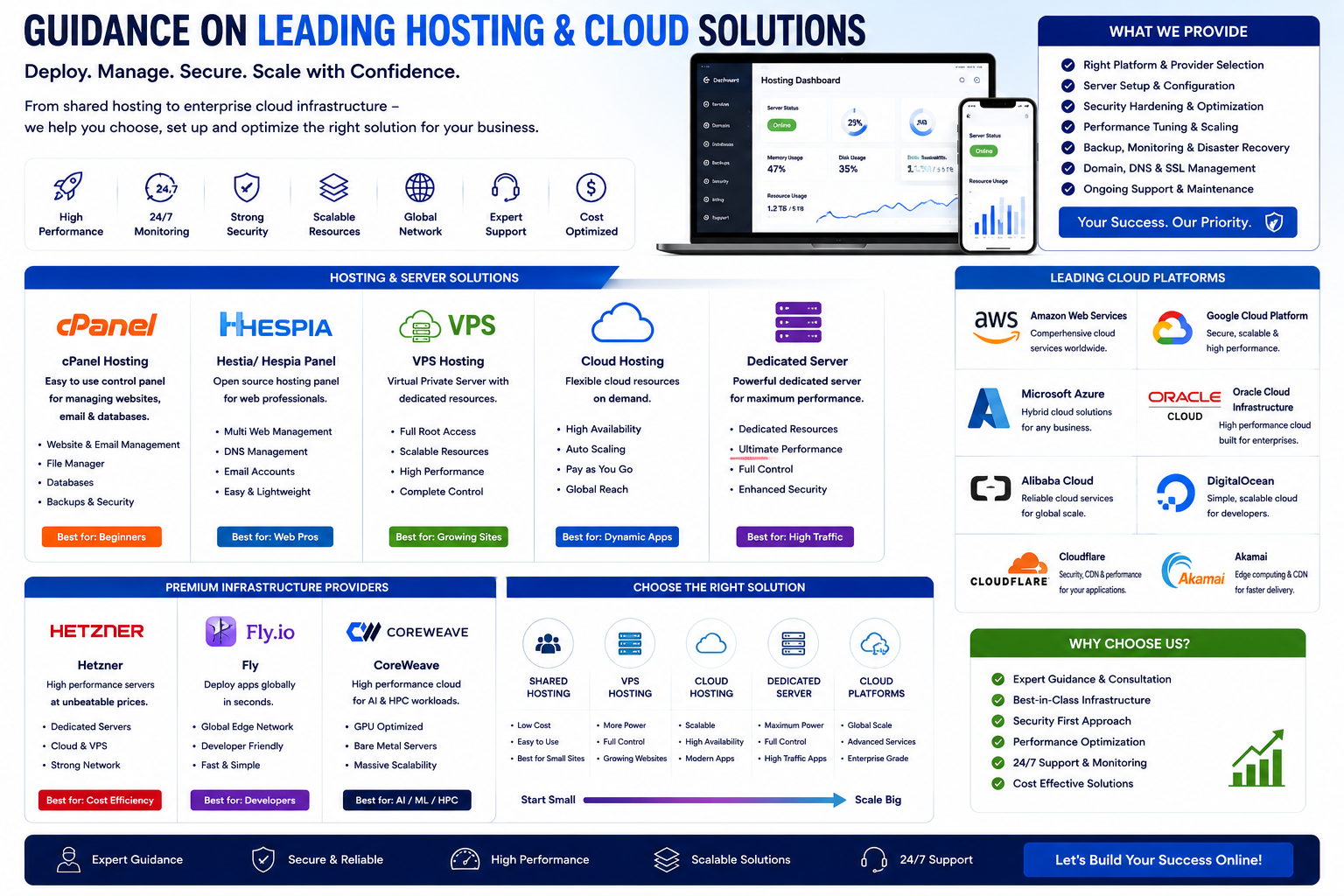
As business needs grow, shared hosting may become insufficient. When your website outgrows shared hosting, you'll need to consider more powerful options like VPS, cloud, or dedicated hosting.
1. VPS (Virtual Private Server) and Cloud Hosting
VPS and cloud hosting offer a middle ground. Your site still lives on a server with other sites, but you get a dedicated portion of the server's resources, offering better performance and security than shared plans.
- Hostinger is an excellent choice for its managed VPS plans that balance affordability with high performance using AMD EPYC processors.
- InMotion Hosting provides flexible and scalable VPS options, starting as low as $4.49/mo, ideal for growing companies.
2. Dedicated Hosting
Dedicated hosting means you lease an entire physical server for your business. This offers maximum performance, security, and control, making it ideal for large enterprises, high-traffic e-commerce sites, and complex applications.
- Liquid Web is the top choice for enterprise-level managed dedicated hosting, offering expert support and robust infrastructure used by major companies like Home Depot and Porsche.
- Hostwinds is highly recommended for its fully managed dedicated hosting plans, an aggressive 99.9999% uptime guarantee, and high level of server customization.
- IONOS is the best budget-friendly entry point for dedicated hosting, perfect for growing small businesses ready to move up from shared plans.
- AccuWeb Hosting is a great choice for companies that require specialized Windows environments (ASP.NET, MSSQL) for their enterprise applications.
💡 What Type of Hosting Does A Business Need?
Choosing the right type of hosting is just as important as picking the provider. Here is a quick guide:
- Shared Hosting: Best for startups, small businesses, and low-traffic websites. It's the most affordable option, but resources are shared, which can affect performance.
- VPS Hosting: Best for growing businesses with moderate traffic. It provides dedicated resources within a shared environment, offering better speed and control.
- Dedicated Hosting: Best for large businesses, high-traffic online stores, and enterprises. You get full server access for maximum speed and security.
- Cloud Hosting: Best for businesses with unpredictable or rapidly growing traffic. It uses multiple cloud servers for great uptime and scalability.
- Managed WordPress Hosting: Best for non-technical users running WordPress sites. The host handles all updates, security, and backups for you.
🔍 How to Choose a Provider for A Business
Here are a few key factors to consider before making your final decision:
- Scalability: How easy is it to upgrade your plan as your business grows? Look for a provider that offers seamless transitions from shared to VPS to dedicated servers.
- Support: What is the quality and availability of customer support? For mission-critical sites, 24/7 support with a proven track record (like SiteGround or Liquid Web) is non-negotiable.
- Security: What security features are included? Essential features include free SSL certificates, automated daily backups, DDoS protection, and malware scanning.
- Performance: What technologies are used to ensure speed? Look for features like SSD or NVMe storage, LiteSpeed servers, and a built-in CDN (Content Delivery Network).
- Pricing: What are the renewal rates? Many providers lure you in with a low promotional price that increases significantly upon renewal, so always check the fine print
AWS Hosting
The Specific Services: AWS Offers Multiple "Hosting Types"
To understand where it fits in relation to the hosting services previously discussed, it is best thought of as the "enterprise-grade engine" that powers many of those other services. While traditional hosting gives you a room on a shared floor or a specific building, AWS gives you the keys to an entire smart city of infrastructure that you can build and scale as needed.
Here is a breakdown of exactly where AWS stands in the hosting world:
☁️ The "Umbrella" Category: Public Cloud Provider
AWS is the world's largest and most dominant public cloud computing provider. Instead of offering just one type of hosting, it is a massive collection of over 200 individual services (compute, storage, databases, AI, etc.) that you can mix and match to create any type of hosting solution imaginable.
⚙️ The Specific Services: AWS Offers Multiple "Hosting Types"
You cannot simply "buy AWS hosting" like you buy a shared plan from Bluehost. Instead, you choose specific AWS products to build your ideal environment. Here is how AWS's services map to the traditional hosting categories mentioned in the previous response
You cannot simply "buy AWS hosting" like you buy a shared plan from Bluehost. Instead, you choose specific AWS products to build your ideal environment. Here is how AWS's services map to the traditional hosting categories mentioned in the previous response.
If you need: Simple, Predictable Hosting (like VPS/Droplets)
- The AWS Service is: Lightsail
- What it means for you: Pre-configured virtual servers with a simple, fixed monthly price. Ideal for small businesses or beginners who want the power of AWS without the complexity.
If you need: Full-Control Virtual Servers (like VPS/Dedicated CPU)
- The AWS Service is: EC2 (Elastic Compute Cloud)
- What it means for you: The heart of AWS. Renting raw virtual computers where you control the OS, software, and security. Best for mid-sized to large businesses needing total flexibility.
If you need: Static Website Hosting (like file storage)
- The AWS Service is: S3 (Simple Storage Service)
- What it means for you: Extremely cheap and scalable storage for hosting static files (HTML, images, JavaScript). Perfect for high-traffic brochure sites.
If you need: Managed Database Hosting
- The AWS Service is: RDS (Relational Database Service)
- What it means for you: AWS installs, patches, and backs up your database (MySQL, Postgres, etc.) for you. You just use the data.
If you need: Serverless Code (No server management)
- The AWS Service is: Lambda
- What it means for you: You simply upload your code, and AWS runs it only when needed. Automatically scales to millions of users. This is cutting-edge cloud native hosting.
There are three main categories of AWS alternatives, each serving different needs: the major competitors that offer similar breadth, simplified platforms for startups and SMBs that want less complexity, and specialized providers that excel in specific areas like AI or database hosting.
☁️ The Main Competitors: The "Hyperscalers"
These three providers control roughly 68% of the global cloud market and are the only true end-to-end alternatives to AWS.
1. Microsoft Azure
Best for: Enterprises already using Microsoft products (Windows Server, Active Directory, Office 365, .NET).
Microsoft Azure is AWS's closest competitor and the fastest-growing of the major cloud providers in absolute revenue terms. It distinguishes itself through deep enterprise integration and its exclusive partnership with OpenAI.
- Key Strengths:
- Unmatched hybrid cloud capabilities—manages on-premises and cloud resources seamlessly
- Azure OpenAI Service offers exclusive enterprise-grade access to GPT models
- Microsoft's "Azure Hybrid Benefit" can reduce Windows Server and SQL Server licensing costs in the cloud by up to 85%
- Holds more compliance certifications than any other cloud provider
- Ideal For:
- Organizations already running Microsoft 365, Dynamics, or .NET applications
- Teams that want to integrate OpenAI models with enterprise security controls
- Regulated industries requiring extensive compliance coverage
2. Google Cloud Platform (GCP)
Best for: Data analytics, machine learning, Kubernetes-first teams, and globally distributed applications.
GCP holds about 11-12% market share and has carved a reputation as "the engineer's cloud". It's built on the same global fiber backbone that powers Google Search and YouTube, delivering measurably lower latency for global traffic.
- Key Strengths:
- BigQuery is widely considered the best cloud data warehouse for price-performance
- Google Kubernetes Engine (GKE) is the gold standard for managed Kubernetes
- Cloud Run offers container-native serverless that scales to zero—no idle costs
- TPUs (Tensor Processing Units) are custom ML accelerators no other provider offers
- Ideal For:
- Data-intensive workloads and AI/ML pipelines
- Teams that value clean APIs and engineering elegance over sheer service breadth
- Applications that benefit from Google's private global network backbone
3. Oracle Cloud Infrastructure (OCI)
Best for: Database-driven applications, workloads requiring bare-metal performance, and cost-conscious enterprises.
Oracle Cloud Infrastructure (OCI) is often underestimated but presents a compelling value proposition. Its VM pricing is typically 50-70% below equivalent AWS instances, and its bare-metal servers deliver consistent, predictable performance.
- Key Strengths:
- For Oracle Database workloads, "Bring Your Own License" on OCI can reduce cloud compute costs by 60-80% compared to AWS
- Generous "Always Free" tier: two AMD VMs (1 OCPU + 1GB RAM each) plus 200GB block storage, indefinitely
- Transparent, predictable pricing without complex calculations
- Ideal For:
- Organizations running Oracle databases and enterprise applications
- Teams needing bare-metal performance for latency-sensitive workloads
- Cloud buyers frustrated with AWS's unpredictable billing
4. Alibaba Cloud : Core Products and Services
Alibaba Cloud offers hundreds of products. Here are the most common ones you'll encounter, organized by category:
Compute (Servers)
- Elastic Compute Service (ECS): Virtual servers that can be launched in minutes. You pay only for what you use .
- Auto Scaling: Automatically adjusts the number of servers you have based on real-time traffic .
Storage & Databases
- Object Storage Service (OSS): Secure, scalable, and cost-efficient storage for any type of data (backups, images, videos). Offers up to 99.9% service availability .
- ApsaraDB for RDS: A managed relational database service that handles backups, recovery, and patches for you .
Networking & Security
- Content Delivery Network (CDN): Speeds up the delivery of your website content to users around the globe by using a network of distributed servers .
- Virtual Private Cloud (VPC): Creates an isolated, secure section of the cloud where you can launch your resources .
- Anti-DDoS & WAF: Built-in protections against common web attacks and large-scale network traffic floods .
💪 Key Strengths and Use Cases
Alibaba Cloud is not just about raw computing power; it is designed for specific strengths and scenarios.
- Cost-Effective: Many users highlight that Alibaba Cloud is often more competitive on pricing than other major cloud providers, helping businesses lower their cloud spending .
- AI & Data Analytics: A major differentiator is its robust AI ecosystem. It offers services like PolarDB for high-performance transactions and the "Tongyi Qianwen" large language model (LLM), making it a good fit for AI-driven projects .
- Seamless Transfers: In addition to hosting apps and websites, it offers products like Data Lake Analytics (DLA), which allows businesses to run queries across different data storage systems without needing to move the data first
Simpler, Developer-Friendly Alternatives
These platforms sacrifice some of AWS's breadth for dramatically simpler interfaces, predictable pricing, and faster onboarding. They're excellent for startups, SMBs, and teams that don't need—or want—hyperscaler complexity.
DigitalOcean
Best for: Startups, small SaaS companies, and developers wanting simplicity.
DigitalOcean has built its reputation on transparent pricing and intuitive interfaces. Its "Droplets" (VMs) start at $4/month, and managed services like App Platform and Managed Databases remove infrastructure management burdens.
- Key Differentiator: Flat-rate billing and an approachable dashboard that doesn't require certification to navigate.
Vultr & Linode (Akamai Cloud)
Best for: Developers and tech startups seeking control without complexity.
Both offer predictable flat-rate pricing, global data center coverage, and full root access. Linode's acquisition by Akamai added enterprise CDN and DDoS protection capabilities.
- Key Differentiator: Simple interfaces with faster provisioning than hyperscalers.
Hetzner
Best for: Compute-intensive workloads on a budget.
A German provider with data centers in Europe and the US, Hetzner offers dedicated servers and VMs at prices that make hyperscaler costs look absurd. A dedicated server with 32 cores, 128GB RAM, and 2×1.92TB NVMe SSDs costs around $150/month—equivalent AWS capacity would cost 5-10x more.
- Key Differentiator: European data residency-friendly, with no managed services complexity.
⚡ Innovators & Specialized Providers
These platforms excel in specific niches where AWS is either overkill or not optimized.
Cloudflare Workers
Best for: High-performance, globally distributed APIs.
Unlike traditional cloud platforms, Cloudflare runs code at the network edge, not centralized regions. Workers (serverless functions) deploy globally and scale automatically.
- Key Differentiator: Ultra-low latency worldwide, pricing based on usage rather than capacity.
Best for: Stateful, globally distributed applications.
Fly.io runs full applications close to users by distributing containers across global regions automatically. It offers more flexibility than pure serverless but less complexity than AWS.
- Key Differentiator: Transparent infrastructure model suitable for stateful workloads.
CoreWeave
Best for: GPU-intensive AI/ML training and inference.
As demand for GPU compute exploded, hyperscalers faced chronic H100 shortages. CoreWeave, built specifically for GPU-dense workloads, consistently delivers better pricing and availability.
- Key Differentiator: Superior availability and pricing for NVIDIA H100, A100, and H200 GPUs
🗺️ The Cloud & Hosting Training Roadmap
The smartest way to learn cloud computing is not to jump between random tutorials but to follow a step-by-step progression. This phased approach ensures you build a solid foundation before moving into complex, specialized skills .
Phase 1: Foundations (Weeks 1-4)
Before you touch a cloud console, you need to understand the "why" and "what" of modern IT infrastructure.
- Core Concepts: Learn the difference between IaaS, PaaS, and SaaS. Understand virtualization, why it matters, and the evolution from on-premise servers to the cloud .
- Key Vocabulary: Get comfortable with terms like Regions & Availability Zones, Scalability (Vertical vs. Horizontal), Elasticity, and the Shared Responsibility Model.
- Operating Systems: Since most of the web runs on Linux, you need to be comfortable with the command line. Learn basic navigation (
ls, cd, pwd), file permissions (chmod), and process management (top, ps). - Practice Goal: You should be able to spin up a free-tier Linux virtual machine and navigate the file system entirely via a terminal.
Phase 2: Core Services on a Major Cloud Platform (Weeks 5-12)
Now, take your foundations and apply them. AWS is the market leader and a great starting point, but the principles apply across Azure and GCP .
- AWS Foundational Services:
- Compute (EC2): Learn to launch virtual servers, configure security groups (firewalls), and SSH into your instances.
- Storage (S3): Master the concept of buckets, objects, and the different storage classes (Standard, Intelligent-Tiering, Glacier for backups) .
- Databases (RDS): Understand how to launch a managed database (like MySQL or PostgreSQL). The key here is "managed"—AWS handles patching and backups for you .
- Networking (VPC): Learn the basics of creating your own private network in the cloud, including subnets and internet gateways.
- Identity (IAM): This is critical. Learn to create users, groups, and roles, and assign permissions using the principle of least privilege .
- Control Panels in Practice:
- On a budget VPS (from providers like DigitalOcean or Vultr), practice installing HestiaCP on a fresh Linux server. Deploy a WordPress site using its interface to understand the "free, hands-on" approach .
- If you can access a cPanel environment (many shared hosting plans include it), explore its feature set, focusing on the File Manager, Email account creation, and the Softaculous 1-click installer.
Phase 3: Automation, CI/CD, & Management (Weeks 13-20)
Manual clicking in a console does not scale. This phase is what separates administrators from modern cloud engineers.
- Infrastructure as Code (IaC): Learn Terraform. This is the industry standard tool for defining your entire cloud infrastructure (servers, databases, networks) in a simple configuration file .
- Containers & Orchestration: Learn Docker (to package applications) and Kubernetes (to manage those packages). Focus on the managed services: EKS (AWS), AKS (Azure), or GKE (GCP) .
- CI/CD Pipelines: Understand how to automate the testing and deployment of code. Learn GitHub Actions or GitLab CI to automatically push code changes from your repository to a cloud server .
- Serverless: Explore AWS Lambda. Understand event-driven architectures where you run code without thinking about servers at all. This is a key differentiator for cloud platforms
Free vs. Paid Training Resources
Here's how to balance free, high-quality content with structured, paid courses that accelerate your progress.
Documentation & Video
- Free Resources: YouTube (FreeCodeCamp, TechWorld with Nana) offers in-depth, full-length courses that cover entire topics from scratch.
- Paid Resources (Why They're Worth It): A Cloud Guru / Pluralsight provide structured learning paths, hands-on labs, sandbox environments, and progress tracking that free videos lack.
Hands-on Practice
- Free Resources: AWS Free Tier gives you 12 months of free access to core services like EC2, S3, and RDS. This is enough to complete many foundational projects.
- Paid Resources (Why They're Worth It): KodeKloud offers excellent hands-on labs without worrying about unexpected cloud bills. Whizlabs provides great certification exam simulators with realistic practice questions.
Foundational Courses
- Free Resources: AWS Skill Builder (Digital courses) provides free, self-paced digital training directly from Amazon itself. This is an authoritative and up-to-date starting point.
- Paid Resources (Why They're Worth It): Coursera and edX offer specializations from universities and companies like Google and IBM. These often include graded assignments and recognized certificates.
Community & Support
- Free Resources: Stack Overflow and Reddit (especially subreddits like r/aws and r/devops) are invaluable for troubleshooting specific errors and learning from real-world problems others have solved.
- Paid Resources (Why They're Worth It): Official Training such as AWS Classroom Training or Linux Foundation courses (for Kubernetes) provide direct access to instructors and a structured Q&A environment.
Control Panels
- Free Resources: Official Docs are your primary support channel. The HestiaCP community forum and its official documentation are well-maintained and cover most common tasks.
- Paid Resources (Why They're Worth It): cPanel University offers both free and paid courses specifically designed for mastering the industry standard panel, including WHM (Web Host Manager) for server administration.
The Smartest Path to Take
Step 1: Start 100% Free
Use YouTube, official AWS docs, and the AWS Free Tier to complete foundational learning over the first two months. Spend $0 during this phase.
Step 2: Invest Strategically
If you are serious about a career in cloud, invest in a KodeKloud or A Cloud Guru subscription (approximately $30-40 per month). This provides structured labs and learning paths that are far more efficient than piecing together free content.
Step 3: Use Certification as a Goal
Use paid practice exams (like those from Whizlabs or TutorialsDojo) to validate your readiness. The AWS Solutions Architect Associate (SAA-C03) is the single most valuable certification to start with.
💼 Career Application & Next Steps
Knowing the theory is only half the battle. You need to prove you can do the work. Here is how you build a portfolio and target specific roles.
Junior Cloud / DevOps Engineer
Core Technologies to Master:
- AWS (EC2, S3, IAM, VPC)
- Linux
- HestiaCP
- Basic Scripting (Bash/Python)
The "Proof of Work" Project to Build:
Deploy a fully functional WordPress or custom web app on a $6/mo VPS. Automate the SSL certificate renewal using HestiaCP and Let's Encrypt. Document the entire process on GitHub.
Why this project matters: This demonstrates that you understand the entire lifecycle of a production web application, from server provisioning to security automation and documentation—skills every junior cloud engineer needs.
Cloud Support Associate
Core Technologies to Master:
- Deep understanding of cPanel/WHM
- DNS
- Email protocols (IMAP/POP3)
- Troubleshooting web server logs (Apache/Nginx)
The "Proof of Work" Project to Build:
Set up a cPanel environment (using a trial license) and simulate common support tickets: resetting a password, creating an email forwarder, restoring a file from a backup, and diagnosing a 500 Internal Server Error.
Why this project matters: Support roles are about solving real customer problems quickly. By documenting how you resolved these common tickets, you prove you understand the daily reality of cloud support and can communicate technical solutions clearly.
Cloud Architect (Preparing)
Core Technologies to Master:
- Terraform
- Docker
- Kubernetes (EKS/AKS)
- CI/CD (GitHub Actions)
- Serverless (Lambda)
The "Proof of Work" Project to Build:
Use Terraform to deploy a "serverless" web application using S3 (for the website), Lambda (for API logic), and DynamoDB (for database). Code the entire infrastructure.
Why this project matters: This is the gold standard portfolio piece. Writing infrastructure as code (Terraform) and building a fully serverless application demonstrates architect-level thinking—automation, scalability, and cost efficiency—all in one project.
🎯 Your Next Steps for This Week
Step 1: Create a Free AWS Account
Sign up and immediately set up a Budget Alarm (e.g., notify you if spending exceeds $10). This is your first real-world security and cost-control task. Never skip this step.
Step 2: Choose Your "Lab Environment"
If you want deep control on a budget, create an account on Vultr or Linode. Spin up a $6/mo Ubuntu server. This gives you full root access to practice Linux and control panel installations.
Step 3: Complete Your First Install
Follow the official HestiaCP installation guide and install it on your new VPS. You now have a fully functioning web hosting control panel. This alone puts you ahead of many beginners.
Step 4: Deploy a "Dummy" Site
Use the HestiaCP interface to create a new web domain, upload a simple index.html file (or install WordPress), and secure it with a free SSL certificate from Let's Encrypt.
Step 5: Document Everything
Create a GitHub repository named something like "homelab-hestiacp-setup." Write a clear README file explaining each step you took, including screenshots and the commands you ran. This becomes your public portfolio.
Any




 Group / 1: 1 Sessions