Training Roadmap: AI Tools for Creative & Design (Advanced)
Overview
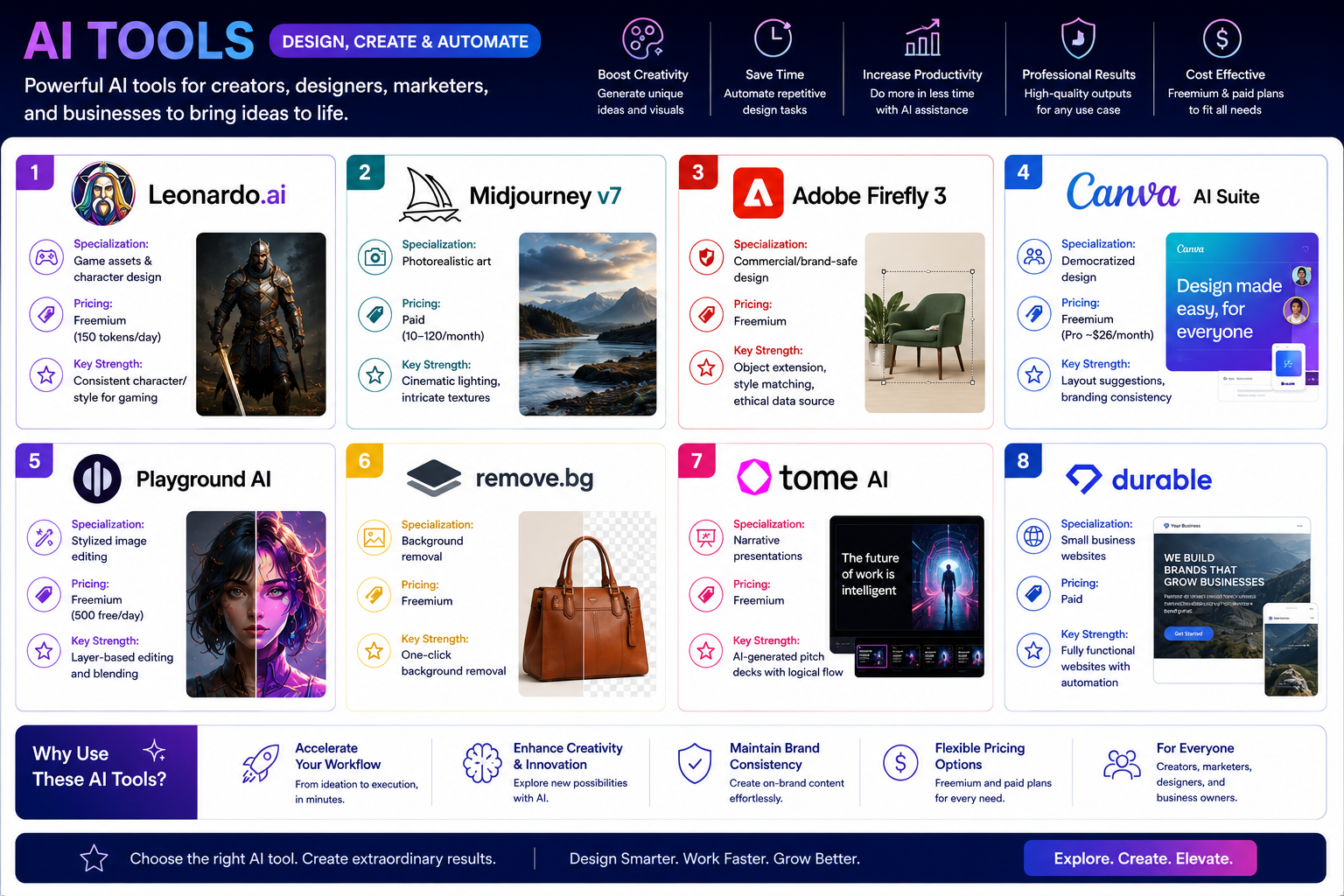
This roadmap provides a structured approach to mastering specialized AI tools for creative workflows. The focus areas are:
- Leonardo.ai – Game assets & character design with consistency
- Midjourney v7 – Photorealistic art with cinematic quality
- Adobe Firefly 3 – Commercial/brand-safe design with ethical data
- Canva AI Suite – Democratized design with brand consistency
- Playground AI – Stylized image editing and blending
- Remove.bg – One-click background removal
- Tome AI – Narrative presentations and pitch decks
- Durable AI – Small business website automation
Phase 1: Foundation Building (Weeks 1-3)
Core Competencies to Develop
- Foundational prompt engineering for text-to-image generation
- Understanding AI image model capabilities and limitations
- Basic design principles (composition, color theory, typography)
- Ethical AI use and copyright considerations
- Workflow integration basics
Free Training Resources
Leonardo.ai Free Tier – Start with 150 free tokens per day. Access community creations, explore preset styles, and practice basic text-to-image prompting. The platform offers in-platform guidance and an active community showcasing techniques.
Adobe Firefly Free Tier – Free access to core features including text-to-image, generative fill, and text effects. Adobe provides built-in tutorials and Content Credentials transparency about AI-generated content.
Canva AI Free Tier – Free access to basic AI features including Magic Design and limited text-to-image generation. Canva Design School offers free courses on AI integration in design workflows.
Remove.bg Free Tier – Free background removal with basic resolution. Test on multiple image types to understand edge-case performance.
University of Illinois Leonardo Guide – Free blog tutorials covering model training, image-to-image generation, and strength slider adjustments for precise control.
Paid Training Resources
Midjourney Basic Plan – $10/month for approximately 200 image generations. Essential for learning Midjourney's unique prompting syntax and parameters. The platform's Discord-based interface requires dedicated practice time.
Leonardo Paid Tier – $10-12/month unlocks model training (up to 10 models monthly), higher daily token limits, and advanced features like Canvas Editor for inpainting and outpainting.
Practical Application
- Create accounts on all freemium tools and complete their onboarding tutorials
- Generate 10 images using each platform's default settings to establish baselines
- Document which tools excel at different styles (photorealistic vs. illustrated vs. graphic design)
- Practice removing backgrounds from 20 images using Remove.bg to build speed
Phase 2: Tool-Specific Training (Weeks 4-12)
Track A: Leonardo.ai – Game Assets & Character Design
Learning Objectives
- Generate consistent characters across multiple scenes and poses
- Create transparent images for game asset integration
- Use Flow State mode for mass ideation
- Train custom models for specific art styles
- Master Canvas Editor for inpainting, outpainting, and sketch-to-image
Free Resources
University of Wyoming Leonardo Course – Free comprehensive course covering text-to-image prompts, negative prompts, creating transparent images, generating textures and tiles, using different image models, style and content references, consistent character creation, upscaling imagery, image-to-video, and Canvas Editor techniques for storyboard scripts, web banners, ad campaigns, and book covers.
Leonardo Community Discord – Free access to community showcases, prompt sharing, and technique discussions. Watch how experienced users achieve specific results.
YouTube Tutorials – Numerous free channels dedicated to Leonardo techniques including model training walkthroughs and character consistency methods.
Paid Resources
Leonardo Pro Plan – $24/month provides expanded tokens for production work, priority generation, and commercial usage rights suitable for professional game development.
Advanced Model Training (Paid Tier) – Train up to 10 custom models monthly. Each model requires curated datasets of 20-40 reference images. Training completes in approximately 10 minutes with results immediately available for generation.
Hands-On Practice
- Create a consistent character across 5 different scenes (forest, castle, ocean, desert, city)
- Train a custom model using 30 reference images of a specific art style
- Use Canvas Editor to inpaint missing elements and outpaint image boundaries
- Generate a complete 10-image asset pack for a hypothetical game
- Practice sketch-to-image by uploading rough drawings and refining with AI
Track B: Midjourney v7 – Photorealistic Art
Learning Objectives
- Master Midjourney's unique parameter system (ar, stylize, chaos, weird)
- Create consistent brand visuals matching corporate design guidelines
- Generate realistic portraits with authentic facial features
- Use image references to control output style
- Develop efficient prompting workflows for serialized content
Free Resources
Midjourney Documentation – Free official guides to all parameters, commands, and features. Essential reference for understanding how Midjourney interprets prompts differently from other tools.
Community Showcase – Free gallery of user-generated images with viewable prompts. Study successful prompts to understand effective structures.
Paid Resources
Leipzig School of Media Midjourney Crash Course – €395 for live online training (3.5 hours). Covers prompt engineering mastery, realistic portraits, consistent character creation, corporate design visual production, using personal photos as references, light and perspective techniques, and workflow integration with Photoshop, Canva, and Figma. Includes digital certificate of completion.
Midjourney Standard Plan – $30/month provides approximately 15 hours of fast GPU time and unlimited relax GPU time for learning without time pressure.
Pro Subscription – $60-120/month for business use with privacy features and faster generation speeds.
Hands-On Practice
- Create a series of 10 images maintaining consistent lighting across all
- Generate realistic portraits of the same character in different emotional states
- Use a personal photo as reference to create stylized brand visuals
- Build a mood board with 20 images exploring a specific aesthetic
- Reproduce a specific existing photograph's lighting and composition through prompting
Track C: Adobe Firefly 3 – Commercial & Brand-Safe Design
Learning Objectives
- Master generative fill for object addition, removal, and replacement
- Use text effects for stylized typography
- Apply generative recolor for brand color exploration
- Understand Content Credentials and ethical AI data sourcing
- Integrate Firefly with Photoshop and Illustrator workflows
Free Resources
Adobe Firefly Free Tier – 25 generative credits monthly. Access all core modules: Text to Image, Generative Fill, Text Effects, and Generative Recolor. Practice within Adobe's ethical data framework.
Adobe Help Center – Free official tutorials and documentation covering every feature with step-by-step instructions.
Paid Resources
"Extending Creativity with Adobe Firefly" (Packt Publishing) – Comprehensive book by Rollan Bañez covering Text to Image module, prompt writing, Generative Fill techniques, Text Effects in Adobe Express, Generative Recolor in Illustrator, and Firefly integration with Photoshop. Written for both beginners and professionals. Includes advanced settings for color, tone, lighting, and composition.
Adobe Creative Cloud All Apps – $54.99/month includes premium Firefly access plus Photoshop and Illustrator for integrated workflows.
Adobe Express Premium – $9.99/month for enhanced text effects and template access.
Hands-On Practice
- Use Generative Fill to remove unwanted objects from 10 different photos
- Create 5 stylized text effect headers for social media
- Apply Generative Recolor to transform a brand's color palette across multiple assets
- Generate a complete social media campaign (5 posts) maintaining brand style
- Practice workflow integration: generate in Firefly, refine in Photoshop
Track D: Canva AI Suite – Democratized Design
Learning Objectives
- Use Magic Design for auto-layout suggestions
- Apply brand consistency across multiple assets
- Generate presentations with AI-assisted content
- Integrate text-to-image for custom visuals
- Streamline workflows for non-designers
Free Resources
Canva Free Tier – Access Magic Design, limited text-to-image generations, and basic AI features. Canva Design School offers free courses on AI integration.
Canva Help Center – Free tutorials covering every AI feature with practical examples.
Paid Resources
Macao University of Tourism Canva AI Course – Certificate course covering Canva operations, AI generation functions, educational account verification, and practical applications for teaching and administration. Requires 70% attendance for certification.
Canva Pro – $26/month (annual billing) unlocks full Magic Studio AI features, brand kit with consistency controls, unlimited premium templates, and background removal tools.
Canva for Teams – $30/month per person for collaborative brand management.
Hands-On Practice
- Design a 10-slide presentation using Magic Design based on a text outline
- Create 5 social media graphics maintaining consistent brand colors and fonts
- Use text-to-image to generate custom illustrations matching brand style
- Build a brand kit with logo, colors, and fonts for automated consistency
- Resize one design into 5 different formats using Magic Switch
Track E: Specialized Workflow Tools
Playground AI – Stylized Image Editing
Learning Opportunities
- Free tier: 500 images daily for layer-based editing and blending
- Community Discord with technique sharing
- YouTube tutorials covering style transfer and image merging
- Paid Pro plan ($15/month) for commercial use and higher resolution
Hands-On Practice
- Blend two completely different images into one cohesive composition
- Apply style transfer from reference artwork to your photos
- Create a 5-image series exploring one concept across different artistic styles
Remove.bg – Background Removal
Learning Opportunities
- Free web tool with instant background removal
- API documentation for developers
- Bulk processing options for production workflows
- Desktop integration tutorials for Paint and other editors
Hands-On Practice
- Process 50 product images for consistent e-commerce presentation
- Create composite images placing subjects in different environments
- Test edge cases: hair, transparent objects, complex backgrounds
Tome AI – Narrative Presentations
Learning Opportunities
- Free tier for basic presentation generation
- Tome AI App Guide (Google Play) covering features and storytelling workflows
- Template gallery with pitch deck examples
- Community showcase for inspiration
Hands-On Practice
- Generate a complete pitch deck from a one-sentence prompt
- Refine AI-generated narrative for logical flow and persuasion
- Export and customize in Canva or PowerPoint
Durable AI – Small Business Websites
Learning Opportunities
GFU Cyrus Durable AI Workshop – 3-day comprehensive training (€price on request) covering automated website generation, text optimization with integrated AI writer, SEO fundamentals for small sites, branding and design customization, lead generation and form integration, CRM and email marketing connections, performance monitoring, and competitor comparison (Wix ADI, Bookmark, Framer AI, 10Web). Available in-person, online, or hybrid formats with cloud learning environments. Includes certificate of completion.
Durable AI Free Trial – Test basic website generation before committing.
Hands-On Practice
- Build a complete 5-page business website in under 10 minutes
- Customize AI-generated text to match brand voice
- Integrate contact forms and appointment booking
- Optimize for mobile viewing and page speed
Phase 3: Advanced Integration & Career Launch (Weeks 13-16)
Advanced Competencies
- Multi-tool workflow orchestration
- AI output refinement and quality control
- Brand consistency across distributed teams
- Ethical AI deployment and copyright management
- Client communication about AI-assisted work
Advanced Learning
Cross-Tool Workflow Development
- Design a production pipeline using multiple tools' strengths
- Document version control and iteration tracking
- Create template systems for repeatable results
- Build asset libraries from AI-generated content
Professional Ethics & Legal Considerations
- Study Adobe Content Credentials and similar transparency systems
- Understand copyright implications of AI-generated commercial work
- Develop disclosure practices for client work
- Research ongoing legal cases affecting AI art
Capstone Projects
Leonardo/Midjourney/Firefly Track
- Create a complete visual identity system (logo, assets, templates) for a fictional brand
- Document the prompt evolution from initial concepts to final deliverables
- Showcase consistent character or style across 20+ assets
Canva/Tome Track
- Build a complete presentation deck for a real or hypothetical business launch
- Demonstrate brand consistency across slides, social media, and web assets
- Produce a style guide documenting AI-assisted workflows
Durable AI Track
- Launch a functional small business website with SEO, lead capture, and analytics
- Customize beyond AI defaults to create unique brand expression
- Document performance metrics and optimization iterations
Portfolio Development
- Curate 10-15 strongest AI-assisted projects
- Document your process for each: prompts, iterations, tool combinations
- Highlight "the 20%" of human refinement beyond AI's 80%
- Include case studies showing problem-solving, not just final images
Career Applications
Entry-Level Roles (0-2 years experience)
Junior Graphic Designer
- Master Canva AI Suite and Adobe Firefly fundamentals
- Show proficiency in prompt engineering and AI refinement
- Employers expect AI literacy as baseline, not differentiator
- Salary range: $35,000-50,000
Social Media Content Creator
- Combine Remove.bg, Canva AI, and Tome AI for rapid content production
- Demonstrate brand consistency across multiple posts
- Portfolio should show volume and variety
- Salary range: $40,000-55,000
Junior Game Asset Artist
- Focus on Leonardo.ai with character consistency skills
- Train custom models demonstrating specific art styles
- Create asset packs showing production-ready work
- Salary range: $45,000-60,000
AI Prompt Specialist
- Emerging role focused on prompt engineering and output refinement
- Deep knowledge of at least 3 major platforms
- Portfolio documents prompt evolution and troubleshooting
- Salary range: $50,000-70,000
Mid-Level Roles (3-7 years experience)
Digital Designer
- Hybrid proficiency across Figma, Photoshop, and generative AI platforms
- Key skill: directing AI as "team member" for specific outcomes
- Show critical thinking and output verification
- Salary range: $55,000-80,000
Creative Technologist
- Bridge design and technical implementation
- Integrate AI tools into production workflows
- Document efficiency gains and quality improvements
- Salary range: $70,000-95,000
Brand Designer
- Master brand consistency across all AI tools
- Train custom models for specific brand aesthetics
- Demonstrate ethical AI use and copyright awareness
- Salary range: $65,000-90,000
Marketing Designer (Agency)
- Rapid prototyping and concept development for client campaigns
- Experience with Midjourney for mood boards and early concepts
- Ability to "push AI beyond generic results"
- Salary range: $60,000-85,000
Senior-Level Roles (8+ years experience)
Creative Director (AI-Integrated)
- Leadership perspective on AI as "extension of teams" not replacement
- Strategic implementation of AI across creative departments
- Budget and tool selection responsibility
- Salary range: $100,000-150,000
AI Workflow Consultant
- Design cross-tool pipelines for creative agencies
- Training and documentation for team adoption
- Quality assurance and output standards development
- Salary range: $90,000-140,000
Head of Digital Experience
- Build responsive, adaptive AI-powered service platforms
- Move beyond "brochure model" to intelligent systems
- Portfolio shows experiments pushing boundaries
- Salary range: $120,000-180,000
Product Designer (AI Natively)
- Design experiences where AI drives interactions
- Create "sculptures you can talk to" and poetic interfaces
- Unique, rough-around-the-edges creativity valued over polish
- Salary range: $100,000-160,000
Next Steps
Immediate Actions (This Week)
- Create accounts on free tiers of all 8 tools
- Choose your primary track based on career goals:
- Game/entertainment → Leonardo.ai
- Marketing/brand → Midjourney + Firefly
- Business/small client → Canva + Durable
- Presentation/storytelling → Tome + Canva
- Generate 10 images on each platform to understand differences
- Join communities – Discord servers for Leonardo, Midjourney, Playground AI
- Review job descriptions noting which AI skills employers request
Short-Term Goals (30 Days)
- Complete one free certification or structured tutorial series
- Build a portfolio page with 20 AI-assisted designs
- Document your process for each piece (prompts, iterations, tool combos)
- Practice "directing not just prompting" – refine outputs with specific feedback
- Remove backgrounds from 100 images to build speed and intuition
Long-Term Strategy (3-6 Months)
- Earn one paid certificate aligned with your track:
- Leonardo: Model training certification (through platform)
- Midjourney: Leipzig School of Media certificate
- Firefly: Adobe Certified Professional
- Canva: UTM or Canva Design School certification
- Durable: GFU workshop certificate
- Complete a major portfolio project showing end-to-end AI workflow
- Develop your "human 20%" – what you add beyond AI generation
- Network with agency leaders – they hire for "perspective and craft" not tool proficiency
- Stay current – tools update monthly; follow release notes and community channels
Critical Success Factors
Mindset Over Skillset
"Right now, for where most organisations are at on their AI journey, mindset is much more important than skillset when it comes to AI." – Oli Zammit-Tabona, Anything is Possible
Think With AI, Not Just Use It
Most design teams are still in "+AI" mode. The real value isn't technical mastery – it's showing you know how to think with AI
Human Taste Remains Core
"As designers, our tools constantly change. So we've never hired for tool proficiency, and probably never will. We hire for perspective and craft." – Niklas Mortensen, Designit
Push Beyond Generic
Don't just use AI to speed things up – use it to "mess with your thinking. To stretch ideas, break patterns, and see what emerges when nothing is fixed"
Ethical Practice
Understand the pros and cons, consider the ethical view, articulate positive use cases, and know what you would avoid
The 80/20 Rule
AI gets you 80% of what you want, but "that last 20% is where the art of our job happens"




 Group / 1: 1 Sessions