Training Roadmap: AI Tools for Video & Animation Production
Overview
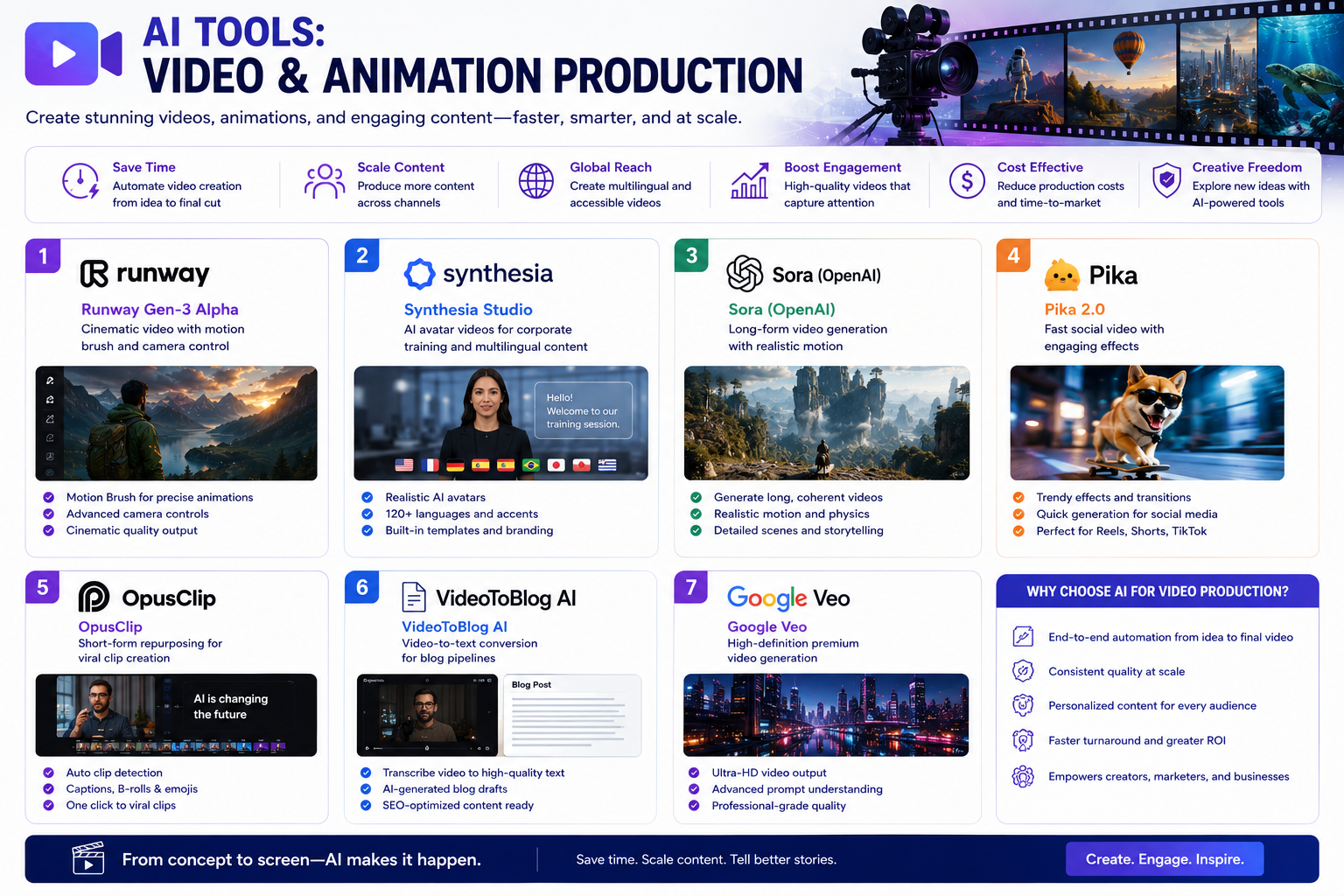
This roadmap provides a structured approach to mastering specialized AI tools for cinematic video, avatar generation, and short-form content repurposing. The focus areas are:
- Runway Gen-3 Alpha – Cinematic video with motion brush and camera control
- Synthesia Studio – AI avatar videos for corporate training and multilingual content
- Sora (OpenAI) – Long-form video generation with realistic motion
- Pika 2.0 – Fast social video with engaging effects
- OpusClip – Short-form repurposing for viral clip creation
- VideoToBlog AI – Video-to-text conversion for blog pipelines
- Google Veo – High-definition premium video generation
Phase 1: Foundation Building (Weeks 1–3)
Core Competencies to Develop
- Understanding text-to-video generation principles and limitations
- Basic prompt engineering for video (shot types, camera movements, lighting)
- Video storytelling fundamentals (pacing, transitions, narrative flow)
- Ethical considerations and content safety in AI video
- Workflow integration for different output formats (social, training, cinematic)
Free Training Resources
Runway AI Tutorial for Beginners (Skills Factory) – Free 18-minute video tutorial covering Runway's comprehensive toolkit for creating images, videos, and characters using Gen-4 and Gen-3 models . Topics include:
- Chat Mode for conversational AI assistance
- Tool Mode for accessing various AI capabilities
- Prompt engineering techniques for maximizing results
- Generation options and credit systems
- Keyframe control for precise video editing
- Consistent character creation for visual continuity
- Lip sync technology for realistic character animation
- Sketch feature for transforming drawings into dynamic content
OpenAI Academy – Visual Creation with ChatGPT & Sora – Free training covering the 7 elements of a perfect image prompt (Subject, Medium, Environment, Lighting, Color, Mood, Composition), creating brand-safe thumbnails, step-by-step demos for visual creation, introduction to Sora fundamentals, writing cinematic prompts using camera shots and movements, and best practices for professional-grade b-roll and storyboards .
Synthesia Free Account – Sign up for free to access basic AI video generation. Convert existing materials (PDFs, Word docs, PowerPoints, or URLs) into educational videos in minutes using the assisted creation approach . Free tier includes AI avatars, voices in 160+ languages, and basic editing tools.
Codecademy – Intro to AI Video Generation with Synthesia – Free beginner course (<1 hour) with no prerequisites. Learn to create professional AI-generated training videos from scripts, add and verify closed captions, build interactive elements, and apply brand safety and ethical avatar policies .
OpusClip Futurepedia Course (Editing & Captions Lesson) – Free lesson covering navigation of the Opus Clip AI editing interface, adjusting clip start and end points for precise scene selection, splitting scenes and modifying layouts, removing filler words ("uh", "um") using automatic detection, correcting transcript errors directly in captions, and customizing captions with highlights, font color changes, and emojis .
VideoToBlog AI – GitHub Open Source – Free project repository by Vishnu Durairaj that transforms video content into detailed blog posts by identifying stable frames, extracting key still frames, transcribing audio, and generating organized blog-ready summaries. Includes complete code using OpenCV, SSIM for frame similarity, and Faster-Whisper for transcription .
Google Veo – GitHub Implementation from Scratch – Free educational notebook by FareedKhan-dev offering step-by-step implementation of Google Veo 3 architecture using JAX. Covers data preprocessing, model architecture (Video VAE, Audio VAE, Conditional Encoder, Joint Denoising Model), training, inference, and safety integration with Synth ID .
科普中国 – 生成式AI动画制作员 Career Guide – Free comprehensive career guide (Chinese language) covering the role of generative AI animators, core competencies, AI tools mastery, prompt engineering frameworks, and career pathways with salary ranges .
Paid Training Resources
Runway Gen-3 Alpha Access – Freemium model with 125 free credits to start. Paid plans for extended generation capacity.
Synthesia Paid Plans – Starting at $29/month for full access to AI avatars, multilingual voices, templates, and SCORM export for LMS integration.
OpusClip Pro – $19+/month for advanced features including viral clip factories and audience-specific curation.
Practical Application
- Create free accounts on Runway, Synthesia, and OpusClip
- Watch the 18-minute Runway beginner tutorial and generate 5 test videos
- Complete Codecademy's Synthesia course (<1 hour) and create one training video
- Download VideoToBlog GitHub repository and test on a 5-minute YouTube video
- Review OpenAI Academy Sora module to understand foundational prompting
Phase 2: Tool-Specific Training (Weeks 4–12)
Track A: Runway Gen-3 Alpha – Cinematic Video Production
Learning Objectives
- Master Gen-3 Alpha and Gen-4 Turbo models for high-quality video generation
- Use Motion Brush for precise control over object movement
- Apply style transfer for consistent visual aesthetics
- Implement keyframe control for professional editing
- Create consistent characters across multiple scenes
- Use Act Two for enhanced storytelling
- Apply lip sync for character animation
Free Resources
Runway Aleph Guide (DataCamp) – Free tutorial covering Runway Aleph capabilities and limitations with a practical demo project for creating a complete video from start to finish . Topics include navigating features, generation options, and workflow optimization.
Runway Community Discord – Free access to community showcases, prompt sharing, and technique discussions.
YouTube Tutorial Library – Numerous free channels dedicated to Runway techniques including:
- Keyframe control for precise video editing
- Video expansion capabilities
- Image upscaling methods
- Consistent character workflows
- Lip sync integration
Paid Resources
AI Video Production and Visual Creation Certification (Taiwan) – Paid certification course (NT$6,800-8,800, 15 hours over 3 days) covering Sora, Veo 3, Lovart, and Vidnoz integration. Includes hands-on project producing a professional AI video. Taught by Robin Chen, an AI-certified instructor with extensive corporate training experience. Classes held in Taipei with live instruction .
Skills Factory Advanced Runway Modules – Extended paid tutorials for professional workflows.
Hands-On Practice
- Generate a 10-second cinematic clip using Gen-4 Turbo with specific camera instructions
- Create a consistent character across 3 different scenes using the Consistent Characters feature
- Use Motion Brush to animate a specific object in a static image
- Apply lip sync to an AI-generated character with a voiceover track
- Build a 30-second narrative video combining 5 generated clips with keyframe transitions
Track B: Synthesia Studio – AI Avatar & Corporate Training
Learning Objectives
- Create professional educational and training videos without cameras
- Convert existing materials (PDFs, PPTs, URLs) into video content
- Select appropriate AI avatars and voices for different audiences
- Add screen recordings for software tutorials
- Integrate B-roll from Sora, Veo, or stock libraries
- Add interactive elements (quizzes, branching scenarios, clickable buttons)
- Export SCORM files for Learning Management Systems
Free Resources
Synthesia Educational Video Guide – Detailed guide by Kevin Alster (Strategic Advisor at Synthesia) covering assisted creation from existing materials, video templates for microlearning and knowledge bases, AI avatar and voice selection (160+ languages), screen recording integration, B-roll placement strategies, and interactive element implementation .
Synthesia Free Plan – Create videos with watermarks, access basic avatars and voices, convert documents to video scripts.
Codecademy Synthesia Course – Free <1 hour course covering avatar-based video creation, closed captions verification, interactive elements, and ethical policies .
Paid Resources
Synthesia Personal Plan – $29/month for full access: 120+ avatars, 160+ languages, no watermark, background removal, brand kit.
Synthesia Enterprise Plan – Custom pricing for team collaboration, custom avatars, API access, and advanced analytics.
Hands-On Practice
- Convert a 10-slide PowerPoint deck into a 3-minute educational video using assisted creation
- Create a software tutorial with screen recording and a talking-head avatar side-by-side
- Add B-roll footage (generated from another AI tool) to break up talking-head sections
- Implement a knowledge check quiz midway through the video
- Export a SCORM file and test upload to an LMS
Track C: Sora (OpenAI) – Long-Form Cinematic Video
Learning Objectives
- Master cinematic prompt writing with camera shots and movements
- Generate consistent characters and scenes across longer videos
- Create professional b-roll, storyboards, and intros
- Understand Sora's current access model and capabilities
Free Resources
OpenAI Academy – Sora Module – Comprehensive free video training covering writing cinematic prompts for Sora using camera shots, movements, and contextual details; best practices for creating professional-grade b-roll, storyboards, intros, and animations with AI; integration with ChatGPT for thumbnail creation and visual planning .
OpenAI Sora Waitlist – Sign up for limited access as Sora rolls out.
Community Showcase – Review publicly shared Sora generations to understand capabilities and prompting strategies.
Paid Resources
Sora Access (When Available) – Pricing not yet announced; limited access program currently active.
Third-Party Prompt Libraries – Paid resources for prompt templates and examples.
Hands-On Practice
- Write 10 cinematic prompts incorporating specific camera shots (wide, close-up, tracking, aerial)
- Create a 15-second b-roll sequence for a hypothetical documentary
- Generate an intro sequence with consistent visual style
- Storyboard a 3-scene narrative using Sora outputs
Track D: OpusClip – Short-Form Repurposing
Learning Objectives
- Transform long-form content into viral short clips
- Master clip trimming and precise scene selection
- Apply automatic filler word removal
- Edit and correct AI-generated transcripts
- Customize captions with highlights and emojis
- Optimize for different social platforms
Free Resources
Futurepedia OpusClip Course (Lesson 1.4 – Editing & Captions) – Free detailed lesson covering full editing interface: preview and scrub through videos, adjust clip start/end points for precise scene selection, split scenes and modify layouts, remove filler words using automatic detection, correct transcript errors, customize captions with highlights and emojis . Includes practical exercise for polishing a generated clip.
OpusClip Free Plan – 60 minutes upload monthly, 10+ exports, basic editing features.
YouTube Tutorials – Community-created walkthroughs for advanced workflows.
Paid Resources
OpusClip Pro Plan – $19/month for 600+ minutes upload, 500+ exports/month, priority processing, and advanced customization.
OpusClip Business Plan – Custom pricing for team workflows and API access.
Hands-On Practice
- Upload a 30-minute podcast and generate 5 short clips
- Use filler word removal to clean up conversational audio
- Correct AI-generated transcript errors for brand name accuracy
- Add highlighted captions on key phrases for engagement
- Export clips in vertical format for TikTok/Reels
Track E: Google Veo – High-Definition Premium Video
Learning Objectives
- Understand Veo architecture (Video VAE, Audio VAE, Joint Denoising Model)
- Implement JAX-based video generation workflows
- Apply responsible AI and safety measures (Synth ID)
- Generate high-definition media for branding/marketing
Free Resources
Google Veo GitHub Implementation (From Scratch) – Complete educational notebook by FareedKhan-dev covering step-by-step implementation of Google Veo 3 architecture using JAX . Modules include:
- What is JAX and why it's important for performance
- TPUs and ML Pathways for scaling
- Data preprocessing (semantic deduplication, unsafe filtering, quality filtering)
- Video VAE (Variational Autoencoder) and Audio VAE
- Conditional Encoder (CLIP implementation)
- Transformers Block and Timestep Embedding Generation
- Joint Denoising Model (JDM)
- Training and inference with cascading reverse diffusion
- Synth ID for responsible AI and safety integration
Google Veo Technical Report & Model Card – Publicly available research documentation.
Limited Access Program – Apply for early access through Google.
Paid Resources
中华人事主管协会 Certification (Taiwan) – Includes Veo 3 hands-on training alongside Sora, Lovart, and Vidnoz. 15-hour in-person course in Taipei with certified instructor .
Cloud Credits for Training – Google Cloud credits for running Veo implementations on TPUs.
Hands-On Practice
- Run the JAX performance comparison notebook to understand compilation benefits
- Implement the Video VAE module using provided code structure
- Practice data preprocessing pipeline with synthetic video data
- Explore Synth ID watermarking for responsible AI content
Phase 3: Advanced Integration & Career Launch (Weeks 13–16)
Advanced Competencies
- Cross-tool workflow orchestration (Runway → OpusClip → Social)
- AI animation production management
- Brand-safe AI video deployment
- Quality control and output standardization
- Client communication and project scoping
Advanced Learning
Framework – From the comprehensive Chinese career guide , professional AI animators master six core competencies:
- Animation Professional Foundation – Motion rules, keyframes, rhythm, composition
- Complete AI Animation Toolchain – Text-to-video, image-to-video, motion generation, style transfer
- Cinematic Language & Aesthetic Sense – Lighting, color, composition, camera movement
- Narrative & Script Ability – Story structure, storyboards, emotional pacing
- Post-Production Refinement – Frame-level repair, color grading, audio sync, effects
- Delivery & Commercial Standards – Platform requirements, client expectations, rapid turnaround
Workflow Integration Practice
- Design a complete pipeline: Script → Storyboard (Runway/Sora) → Avatar (Synthesia) → Short Clips (OpusClip) → Blog (VideoToBlog)
- Document generation parameters for reproducibility
- Build template systems for consistent brand output
Capstone Projects
Runway/Sora Cinematic Track
- Create a 60-second narrative video with consistent characters and style
- Document all prompts, parameters, and iterations
- Apply post-production refinement (captions, transitions, audio)
Synthesia Corporate Track
- Build a complete 5-module training course with SCORM export
- Include interactive quizzes and branching scenarios
- Produce in 3+ languages using multilingual avatars
OpusClip/VideoToBlog Repurposing Track
- Transform one long-form video into 10 short clips + 1 blog post
- Optimize clips for 3 different platforms (TikTok, Instagram, YouTube Shorts)
- Document the ROI in terms of time saved vs. manual editing
Portfolio Development
- Curate 8-12 pieces showing different tools and capabilities
- Include "before/after" comparisons showing your refinement
- Document your process: prompt evolution, iteration cycles, tool combinations
- Highlight specific metrics: time saved, engagement improvements, output volume
Career Applications
Entry-Level Roles (0–2 years experience)
AI Video Editor
- Master OpusClip and basic Runway capabilities
- Focus on short-form repurposing and caption optimization
- Show ability to process high volumes of content quickly
- Salary range: $35,000–50,000
Junior AI Video Creator
- Proficiency in Runway or Pika for basic generation
- Understanding of prompt engineering for social media clips
- Portfolio showing 20+ generated clips
- Salary range: $40,000–55,000
Avatar Video Producer
- Expert in Synthesia or similar avatar platforms
- Experience creating training or marketing videos at scale
- Understanding of localization and multilingual workflows
- Salary range: $45,000–60,000
Mid-Level Roles (3–7 years experience)
(Generative AI Animator)
- Emerging role with high demand in China and global markets
- Combines traditional animation knowledge with AI tool proficiency
- Manage complete production pipeline: concept → storyboard → generation → refinement
- Salary range in China: 9K–30K RMB monthly (approximately $15,000–50,000 USD annual)
AI Video Producer
- Manage end-to-end video production using AI tools
- Coordinate between scriptwriters, voice talent, and post-production
- Optimize prompts for consistent brand output
- Salary range: $55,000–80,000
Short-Form Content Manager
- Use OpusClip to repurpose long-form content at scale
- Analyze engagement metrics to refine editing strategies
- Manage content calendars across multiple platforms
- Salary range: $50,000–75,000
Corporate Learning Video Specialist
- Create training videos using Synthesia and screen recording
- Work with subject matter experts to script and produce
- Export SCORM packages for LMS integration
- Salary range: $55,000–70,000
Senior-Level Roles (8+ years experience)
Expert Level
- Mastery of all major AI video tools
- Ability to produce broadcast-quality animation 10x faster than traditional methods
- Expert-level prompt engineering and style control
- Salary range: 30K–70K RMB monthly ($50,000–115,000 USD annual)
Head of AI Video Production
- Lead team of AI video creators
- Establish production standards and quality control
- Select and implement AI tools across organization
- Salary range: $90,000–150,000
AI Video Workflow Consultant
- Design automated video production pipelines for agencies
- Train teams on tool adoption and best practices
- Measure and report efficiency gains
- Salary range: $80,000–140,000
Freelance AI Video Creator
- Independent work producing videos for multiple clients
- Single short video quotes range from hundreds to tens of thousands
- High career flexibility and growth potential
- Annual potential: $60,000–200,000+ depending on client base
Next Steps
Immediate Actions (This Week)
- Create free accounts on:
- Runway (125 free credits)
- Synthesia (free tier)
- OpusClip (60 free minutes/month)
- VideoToBlog (clone GitHub repository)
- Watch foundational tutorials:
- 18-minute Runway beginner tutorial
- OpenAI Academy Sora module
- Codecademy Synthesia course (<1 hour)
- Choose your primary track based on career goals:
- Corporate/L&D → Synthesia focus
- Social media marketing → OpusClip + Runway
- Cinematic/filmmaking → Runway + Sora (when available)
- Technical/engineering → Google Veo implementation
- Generate your first 3 videos across different tools
- Join communities – Runway Discord, OpenAI forums, Synthesia community
Short-Term Goals (30 Days)
- Complete one free certification or structured tutorial series
- Build a portfolio page with 10 AI-generated videos
- Document your process for each piece (prompts, tools, iterations)
- For OpusClip users: Process at least 3 hours of source content into clips
- For Synthesia users: Export one SCORM-compliant training video
Long-Term Strategy (3–6 Months)
- Earn a paid certification:
- Chinese market: 中华人事主管协会 AI Video Certification
- International: DataCamp Runway Aleph projects
- Corporate: Synthesia Creator certification
- Complete a major portfolio project:
- 60-second cinematic narrative (Runway/Sora)
- 5-module training course (Synthesia)
- 20+ short clips from one source (OpusClip)
- Custom implementation (Veo GitHub project)
- Develop your specialization:
- "I create training videos at scale with multilingual avatars"
- "I repurpose podcast content into viral social clips"
- "I generate cinematic B-roll for documentary filmmakers"
- Network with production agencies – Many are actively hiring AI video specialists
- Stay current – Monitor new releases: Sora full access, Veo updates, Runway Gen-5
Critical Success Factors
Mindset Over Tools
The most valuable skill is not mastering any single tool, but understanding how to orchestrate multiple tools into efficient workflows. "AI can generate frames, but cannot replace human creativity, narrative logic, aesthetic judgment, emotional expression, cultural understanding, and detail refinement."
The Human 20%
AI gets you 80% of the way, but professionals distinguish themselves through the final 20% of refinement. This includes frame-level adjustments, narrative coherence, brand consistency, and emotional impact.
Rapid Iteration Culture
Professional AI video requires continuous refinement. "For a 60-second short film, I needed to iterate 50–80 times. Revisions are the real value; AI just accelerates the process."
Commercial Awareness
Understand platform requirements (TikTok vertical vs. YouTube landscape), client expectations (brand safety, turnaround time), and quality standards (resolution, audio sync, caption accuracy).
Ethical Practice
Always disclose AI-generated content where required. Use watermarking tools like Synth ID for responsible deployment. Understand copyright implications for commercial work.




 Group / 1: 1 Sessions