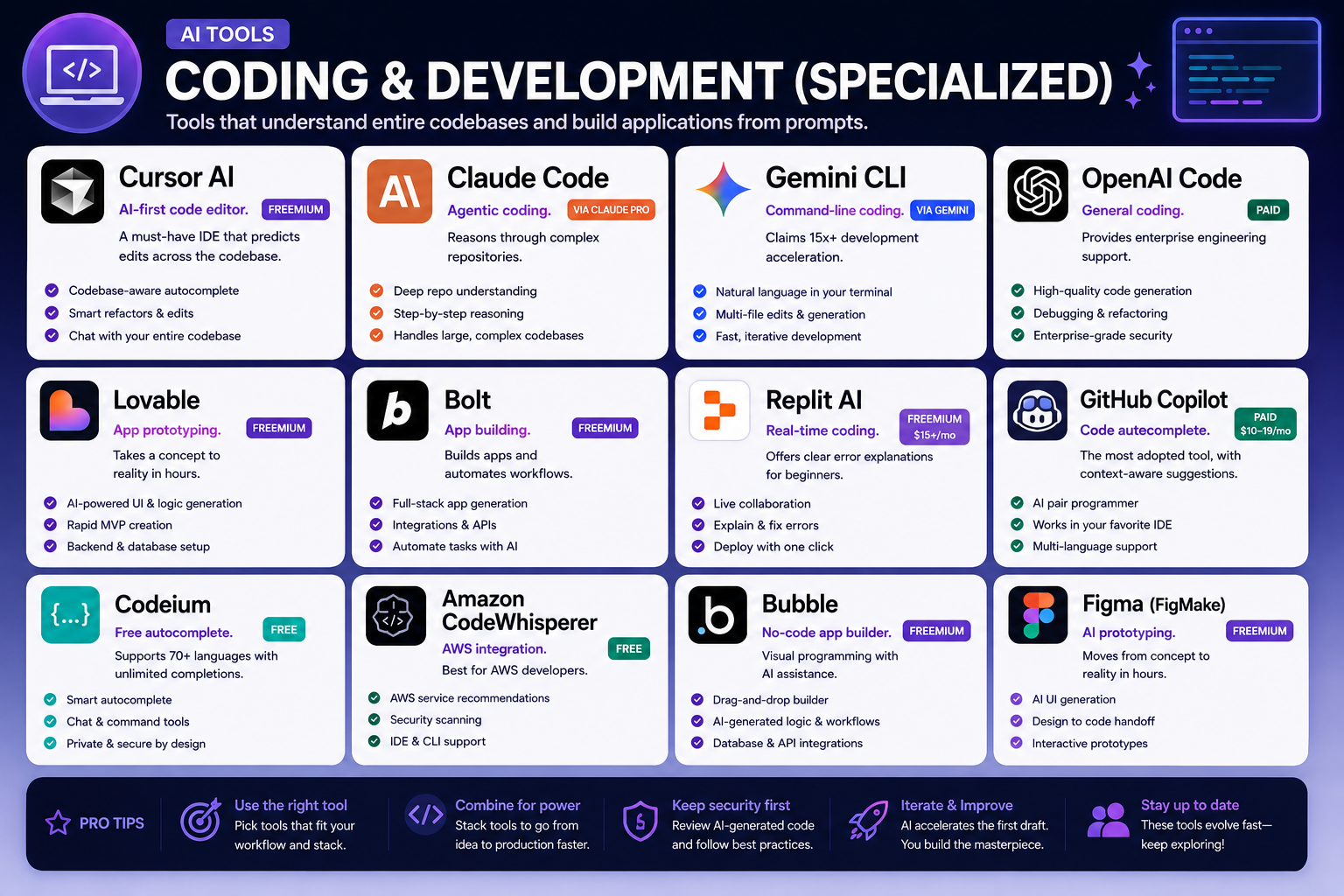
💻 Coding & Development (Specialized)
Tools that understand entire codebases and build applications from prompts.
- Cursor AI: AI-first code editor. Freemium. A must-have IDE that predicts edits across the codebase.
- Claude Code: Agentic coding. Via Claude Pro. Reasons through complex repositories.
- Gemini CLI: Command-line coding. Via Gemini. Claims 15x+ development acceleration.
- OpenAI Code: General coding. Paid. Provides enterprise engineering support.
- Lovable: App prototyping. Freemium. Takes a concept to reality in hours.
- Bolt: App building. Freemium. Builds apps and automates workflows.
- Replit AI: Real-time coding. Freemium ($15+/mo). Offers clear error explanations for beginners.
- GitHub Copilot: Code autocomplete. Paid (10–10–19/mo). The most adopted tool, with context-aware suggestions.
- Codeium: Free autocomplete. Free. Supports 70+ languages with unlimited completions.
- Amazon CodeWhisperer: AWS integration. Free. Best for AWS developers.
- Bubble: No-code app builder. Freemium. Visual programming with AI assistance.
- Figma (FigMake): AI prototyping. Freemium. Moves from concept to reality in hours.
This roadmap transforms you from a coding beginner or traditional developer into an AI-augmented engineer who can build full-stack applications, navigate massive codebases, and ship products faster than ever. You will follow a 5-Phase structure that progresses from foundational tools to enterprise-level agentic workflows.
Phase 1: Foundation (Week 1-2)
Goal: Master the essential autocomplete and beginner-friendly tools that accelerate daily coding.
Start with Autocomplete (GitHub Copilot, Codeium, CodeWhisperer)
Before generating entire applications, learn to let AI assist you line-by-line. Install GitHub Copilot (the most adopted tool at $10-19/month) in your preferred IDE—VS Code, IntelliJ, or Neovim. The key skill is learning when to accept, reject, or modify suggestions. Copilot learns from your coding patterns and offers context-aware completions that feel predictive, not random .
For a completely free alternative, install Codeium, which supports 70+ languages with unlimited completions. The learning exercise: write a function comment like "calculate the average of an array" and watch the AI generate the implementation. Then write the same function yourself. Compare approaches and understand why the AI made specific choices .
If you work extensively with AWS, Amazon CodeWhisperer is free and deeply integrated with AWS services. Ask it to "write a Lambda function that reads from S3" and observe how it generates cloud-native code with proper IAM patterns .
Learn Real-Time Collaboration (Replit AI)
Replit AI is designed for beginners with one killer feature: clear error explanations. When your code breaks, Replit doesn't just show a red line—it explains what went wrong and suggests fixes .
Create a free Replit account and open a Python or JavaScript file. Position your cursor inside a function, comment, or empty line, then press Ctrl + Enter (Windows/Linux) or Cmd + Enter (Mac) to trigger Ghostwriter. Type a natural language instruction like "generate a function that fetches data from an API and handles errors." The AI produces working code you can test immediately .
For deeper interaction, open the Ghostwriter side panel (the lightbulb icon), select your model preference (Claude 3 Haiku for speed, Replit Code Llama for code generation), and start a conversation about your project. Practice explaining what you want in plain English—this skill transfers directly to every other tool in this roadmap .
Embrace Learning to Code (With or Without AI)
AI tools are multipliers, not substitutes. Understanding fundamentals makes you a much more effective AI prompter.
If you are new to coding, start with Python basics—variables, loops, functions, and data structures. Use NumPy and Pandas for data handling, as these libraries appear across every AI workflow . The best free resource is Python.org official tutorial, combined with interactive platforms like Codecademy's free tier.
If you already code, skip to Phase 2. The AI tools will amplify your existing knowledge.
Phase 2: AI-First Coding (Week 3-4)
Goal: Transition from autocomplete to AI-native development using Cursor and Claude Code.
Master Cursor AI (The Industry Standard)
Cursor is not just VS Code with AI—it's a complete rethinking of how code gets written. Its Composer feature is the industry standard for multi-file editing, allowing you to describe a change and watch it propagate across your entire codebase . The user experience is polished, the learning curve is gentle, and the results are transformative.
Start with the Hobby tier (free) to explore. When you're ready to commit, the **Pro tier (20/month)∗∗includes
20/month)∗∗includes20 of API usage and extended Agent limits. The **Pro+ tier (60/month)∗∗adds
60/month)∗∗adds70 in API credits and 3x usage on all frontier models .
The key insight about Cursor's pricing: different models cost dramatically different amounts. Composer 2 (Cursor's model) costs 0.50per1Minputtokens,whileClaude4.6Opuscosts
0.50per1Minputtokens,whileClaude4.6Opuscosts5.00 per 1M input tokens—10x more expensive. A single complex coding session with Opus can consume $5+ of credits . Learn to use Composer 2 for everyday tasks and reserve Opus for the hardest problems.
Install Cursor, open a small project (even a personal script), and practice using Composer to refactor a function, add error handling, and write unit tests—all from natural language prompts.
Learn Agentic Coding (Claude Code)
Claude Opus 4.6 represents a meaningful leap forward for agentic AI. It demonstrates stronger planning, longer-running agentic behavior, improved reliability in large codebases, and sharper code review and debugging capabilities that help it identify and correct its own errors .
Access Claude Code through a Claude Pro account. Once authenticated, you can assemble agent teams to work on tasks together, with multiple AI agents handling parallel subtasks. The model achieves the highest score on the agentic coding evaluation Terminal-Bench 2.0 and performs better than any other model on real-world software engineering tasks .
The practical workflow: give Claude Code a large task like "refactor this API service to use async/await and add comprehensive error handling." The model will break the task into concrete steps, execute them, and produce polished work even when the task is complex. It feels less like a tool and more like a capable collaborator .
Understand Context Windows
Claude Opus 4.6 introduces a 1 million token context window (in beta), enabling you to reason over entire codebases, documentation sets, and extended tasks without constant context loss. This is a qualitative shift in how much context a model can actually use while maintaining peak performance .
Compare this to earlier models: on MRCR v2 (a long-context benchmark), Opus 4.6 scores 76%, while Sonnet 4.5 scores just 18.5%. This 4x improvement means you can now ask questions about your entire project, not just the file you're currently editing .
Phase 3: Full-Stack App Generation (Week 5-6)
Goal: Build complete applications from natural language prompts using Lovable, Bolt, and Figma Make.
Lovable: From Concept to Reality
Lovable is arguably the most complete end-to-end vibe coding tool for web app development. You describe what you want, Lovable generates a full-stack application with a React frontend and Supabase backend, and you see the live preview update in real-time as you iterate .
The best use case: a founder who wants to go from a product description to a working, shareable app without touching code. Lovable is more opinionated (React + Supabase) and more beginner-friendly than alternatives, with a real-time visual preview that shows you exactly what you're building .
For design integration, Lovable accepts screenshots or Figma links (via Builder.io integration). In testing, a news list component achieved 65% design fidelity, and a tree map component reached 85%—requiring about 3 iterations to reach acceptable results .
Bolt: Speed and Control
Bolt, built by StackBlitz, brings the full development environment into the browser. Describe what you want, Bolt generates the code, and you have a live environment where you see the output, edit the code directly, and deploy immediately .
Where Bolt excels: direct Figma metadata ingestion. Paste a Figma link, and Bolt reads the actual design data, preserving layer information, styles, and assets. This produces dramatically better results than screenshot-based approaches. In testing, Bolt achieved 86% design fidelity for a news list and 95% for a tree map—though it took 8-10 iterations to resolve issues .
Key workflow: Bolt separates design import from behavior refinement. First import your Figma design (locked to React + Tailwind during import), then add functional requirements and API integration prompts to make the interface interactive. For teams that need Angular, Vue, or other frameworks, those options apply after generation, not during Figma conversion .
Figma Make: Interactive Prototyping
Figma Make transforms design ideas or prompts into interactive prototypes with actual code generation. Start with a design or simply explain what you want, and the tool creates the UI along with necessary functionality .
The workflow:
- Open Figma and click "New Make" to create a Make file
- Describe what you want to build in the AI chat
- Attach Figma designs, frames, or images for context
- Generate and preview the interactive prototype
- Refine using prompts or direct edits
For example, prompt: "Create a book shopping application that lets people easily find and purchase their preferred books. The design must be simple and elegant without excess colors or clutter." Figma Make generates the layout, fundamental interactions, and can connect to Supabase for backend functionality .
Phase 4: Enterprise Integration (Week 7-8)
Goal: Deploy AI coding workflows in professional settings and build a portfolio.
Orchestration Pattern: Combine Everything
The most effective developers don't choose one tool—they orchestrate multiple tools. A common pattern emerges:
- Lovable or Bolt to generate the initial app from a prompt
- Figma Make to refine design and interactions
- Cursor for more precise editing and iteration on the generated code
- Claude Code for complex refactoring, debugging, and documentation
This layered approach gives you the speed of vibe coding with the precision of professional IDEs .
Enterprise Considerations (API Costs, Team Workflows)
Cursor's token-based pricing means costs can vary dramatically. A developer who primarily uses Composer 2 (0.50/1Minputtokens)willhaveaverydifferentmonthlybillthanonewhodefaultstoClaude4.6Opus(
0.50/1Minputtokens)willhaveaverydifferentmonthlybillthanonewhodefaultstoClaude4.6Opus(5/1M input tokens), even with the same number of coding sessions .
For teams, Cursor's Teams plan ($40/user/month) includes everything in Pro plus shared chats, commands, rules, centralized billing, usage analytics, RBAC, and SAML/OIDC SSO. The Enterprise plan adds pooled usage across the organization, invoice/PO billing, SCIM, AI code tracking API, audit logs, and priority support .
No-Code Alternative: Bubble
If you want to build applications without writing any code (or understanding generated code), Bubble is the leading visual programming platform. You build using graphics and images rather than text, making it accessible to non-programmers .
Bubble now includes AI-assisted build features. The platform's blog offers a Beginner's Guide to AI + Bubble, covering how the build experience works and how to get started whether you're brand new or ready to go deeper .
Build Your Portfolio Project
Create a complete full-stack application from concept to deployment:
- Design in Figma (or start with an idea)
- Generate the initial app using Lovable or Bolt
- Refine interactions using Figma Make
- Polish the code with Cursor
- Debug and optimize with Claude Code
- Deploy to production (one-click from Lovable or Bolt)
- Document the process, including prompts used and iterations required
This single project demonstrates your ability to ship real software using the complete AI toolchain.
Training Resources
Free Resources (No Cost)
- Cursor Official Documentation: The quickstart guide walks through installation, Composer usage, and model selection
- Replit Ghostwriter Guide: Step-by-step instructions for triggering AI assistance, using the side panel, and adjusting model preferences
- Figma Make Tutorial: GUVI's comprehensive tutorial covers the complete workflow from prompt to interactive prototype
- Python.org Official Tutorial: Free Python fundamentals for those new to coding
- Great Question Blog: Comparative analysis of vibe coding tools with practical recommendations
Structured Programs (Paid)
- Scaler IIT Roorkee AI Engineering Program: A comprehensive generative AI syllabus covering Python basics, machine learning, deep learning, transformers, prompt engineering, fine-tuning (LoRA/QLoRA), RAG systems, MLOps, and cloud deployment. Includes 12 modules ending with capstone projects
- EPAM Industry Blogs: In-depth technical evaluations of vibe coding tools with real performance metrics (though these are free to read, not structured courses)
Tool-Specific Learning
Each tool's official documentation serves as the primary learning resource:
- Bubble.io Blog: Tutorials on building Android apps, iPhone apps, and using AI-assisted features
- Anthropic Documentation: Claude Opus 4.6 system card, evaluation benchmarks, and API guides
- DigitalOcean Tutorial: Hands-on walkthrough using Claude Opus 4.6 with Claude Code to improve an existing project
Career Applications & Next Steps
Full-Stack AI Developer
Companies need developers who can ship faster—not just write code faster, but understand the entire pipeline from design to deployment. Your role: translate product requirements into prompts, orchestrate AI tools for maximum efficiency, and maintain the quality of generated code. This is not replacing developers; it's augmenting them. The best AI engineers understand both model architecture and real-world deployment challenges .
AI-Assisted Software Engineer
Traditional software engineering roles are evolving. You still need fundamentals (Python, data structures, algorithms), but you layer AI tools on top. Your workflow shifts from writing every line manually to guiding AI generation, reviewing outputs, and handling the edge cases the AI misses. Practice explaining what you want in natural language—this becomes your primary interface to the machine.
No-Code Application Builder (Bubble Specialist)
Not every business needs custom code. Many need applications built quickly and affordably. Specialize in Bubble to serve small businesses, startups, and internal teams. The platform's AI-assisted features reduce development time further. Market yourself as someone who can build production-ready applications without a traditional engineering budget.
E-commerce Platform Developer (Shopify, WooCommerce, Magento, BigCommerce)
Each platform has distinct requirements, but the AI coding workflow adapts.
For Shopify, use Cursor or Claude Code to generate custom Liquid templates, checkout extensions, and Shopify Functions. The AI understands Shopify's API patterns and can generate code that follows platform conventions.
For WooCommerce, generate custom WordPress plugins using AI tools. Bolt's framework flexibility (supporting PHP) makes it valuable here—import your design, then refine the WordPress-specific code in Cursor.
For BigCommerce and Magento (enterprise platforms), the focus shifts to integration and scaling. Use Claude Opus 4.6's 1M token context window to analyze entire codebases and suggest refactoring. These platforms have larger codebases and stricter compliance requirements—Claude's improved code review and debugging capabilities catch issues early .
Freelance Product Developer
Package your skills for non-technical founders. Offer a complete service: take an idea, design it in Figma, generate the app using Lovable or Bolt, refine with Cursor, and deploy. The value proposition: from concept to working product in days, not months. Use Replit for collaborative prototypes where clients can see progress in real-time .
AI Workflow Consultant
Help teams adopt AI coding tools effectively. Your services: tool selection and onboarding, custom prompt library development, cost optimization (balancing Composer 2 vs. frontier models), and training internal developers. The demand for structured AI education is growing as organizations build AI copilots, automated workflows, and knowledge assistants .
Your Next Steps for This Week
Day 1: Install Cursor (free Hobby tier). Open a small Python or JavaScript file. Use Composer to refactor one function and write a unit test. Experience the multi-file editing workflow.
Day 2: Create Replit free account. Build a simple API fetcher using Ghostwriter. Press Ctrl + Enter, type "function that fetches weather data and handles errors," and deploy the working code.
Day 3: Sign up for Claude Pro. Open Claude Code and ask it to review a piece of your existing code. Practice the agentic workflow: give it a complex task and watch it break into subtasks.
Day 4: Try Lovable (free tier). Prompt it to build a simple CRUD app for task management. Watch the real-time preview and iterate 3 times based on what you see.
Day 5: Open Figma Make. Describe a simple app idea (use the book shopping example). Generate the prototype and test the user flow. Refine using prompts.
By the end of 8 weeks, you will have built and deployed a complete application using the full AI coding toolchain—skills that translate directly to freelance work, full-time development roles, and e-commerce platform customization across Shopify, WooCommerce, BigCommerce, and Magento.




 Group / 1: 1 Sessions