Automation & Productivity AI Tools Roadmap
This roadmap transforms you from someone who manages their own time and tasks into an automation architect—someone who designs systems where AI handles repetitive work, optimizes schedules, and orchestrates workflows across dozens of applications. You will follow a 4-Phase structure that progresses from simple automation to intelligent productivity systems.
Phase 1: Foundation (Week 1-2)
Goal: Master the essential automation platforms that connect your apps and eliminate manual data transfer.
Zapier AI: The Connector
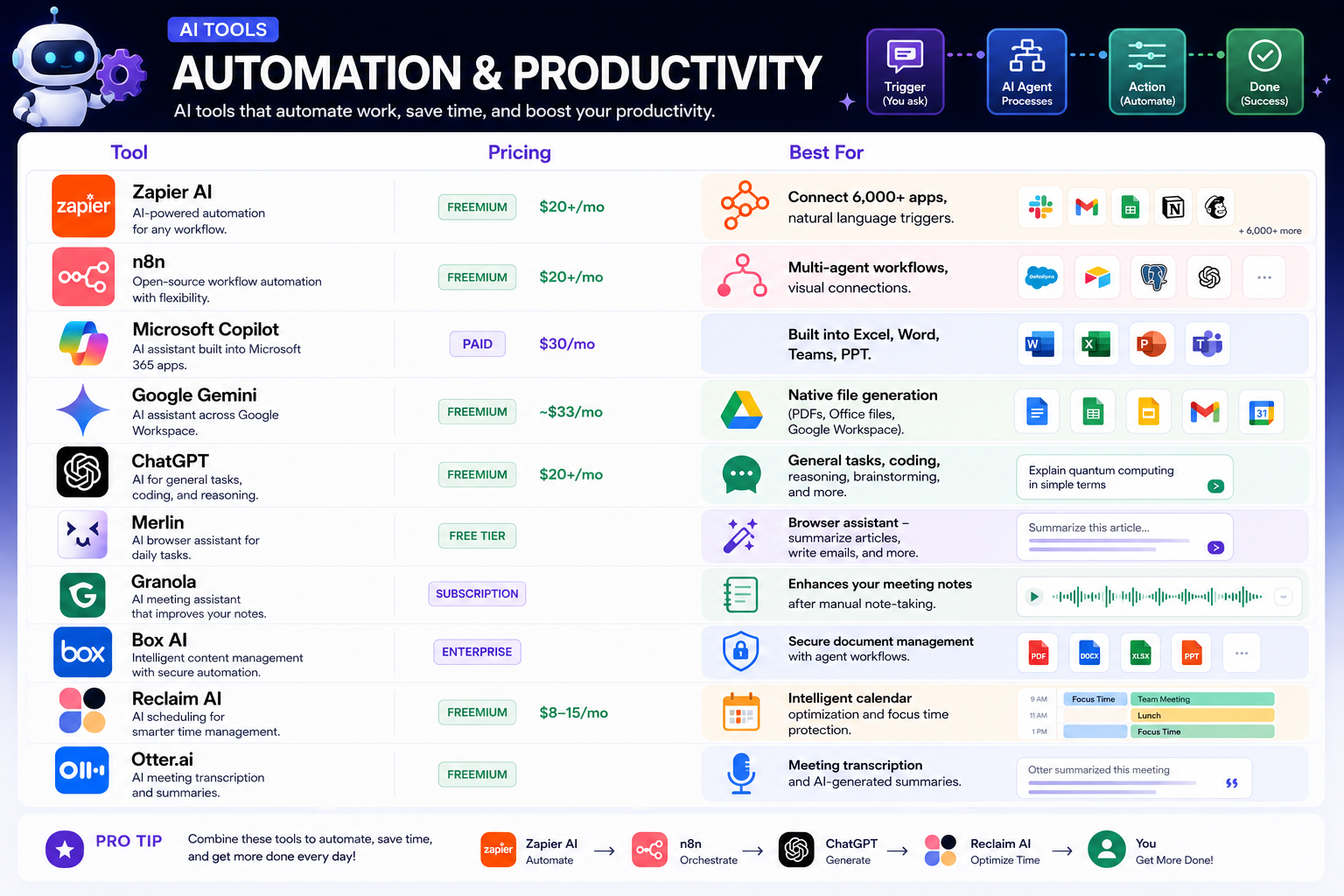
Zapier is the industry standard for a reason—it connects over 6,000 applications and allows you to build automations called "Zaps" where a trigger in one app causes an action in another.
Pricing: Free tier gives you 100 tasks per month. Paid plans start at $20+ per month.
What makes Zapier AI different: Traditional Zapier requires you to manually configure triggers and actions. Zapier AI lets you describe what you want in natural language, and the platform builds the workflow for you. Type "When I get an email from a new lead, add them to my CRM, send a welcome email, and create a task for my sales team," and Zapier figures out the steps.
The key skill to learn is workflow thinking. Before building anything, map out: What starts the process (trigger)? What happens next (actions)? What if something goes wrong (error handling)?
Free learning path:
- Create a free Zapier account
- Take Zapier University's "Getting Started with Zapier" course (free, 20 minutes)
- Build your first deterministic workflow: Gmail trigger → Google Sheets action. When you star an email, add its subject line to a spreadsheet
- Add a second action: send yourself a Slack notification when the spreadsheet updates
- Practice conditional logic: "If the email contains 'urgent,' send to Slack channel #urgent. Otherwise, send to #general"
Real-world e-commerce example: Connect Shopify to Google Sheets. When a new order comes in (trigger), add the order details to a spreadsheet (action). Then send a Slack message to your fulfillment team. All automatic, zero manual data entry.
n8n: Multi-Agent Workflows
While Zapier excels at simple connections, n8n offers more flexibility for complex, multi-agent workflows. It's open-source, can be self-hosted, and integrates deeply with LLMs.
Pricing: Freemium, with paid plans starting at $20+ per month. The self-hosted option is completely free if you run it yourself.
What n8n does differently: You build workflows visually, connecting nodes that represent triggers, actions, and AI agents. Unlike Zapier's linear Zaps, n8n supports branching, looping, and waiting for human input mid-workflow.
Learning path:
- Sign up for n8n cloud free tier (or install locally via Docker for full control)
- Build a workflow that reads from a webhook, sends the data to an LLM for classification, then routes based on the result
- Practice error handling: What happens if the API is down? Add a retry node
- Build the "Marketing Team Amplifier" project: lead form → sentiment analysis → high-value leads go to sales, low-value go to nurture sequence
Key difference from Zapier: n8n's AI nodes can call LLMs (OpenAI, Anthropic, local models) to make decisions based on content, not just rules. This is the difference between automation and intelligence.
Phase 2: Intelligent Productivity (Week 3-4)
Goal: Deploy AI assistants that work inside your existing productivity suite and browser.
Microsoft Copilot: Your Office Co-Pilot
If your organization uses Microsoft 365, Copilot is the most underutilized asset. It's built directly into Excel, Word, Teams, and PowerPoint—no new tabs, no separate logins.
Pricing: Free tier with limited features. Full access requires Copilot Pro at $30 per month.
What Copilot does uniquely: It works across your entire Microsoft graph—emails, calendar, chats, documents, meetings. Ask "summarize the emails I missed while I was on vacation" or "create a presentation from this Word document" and Copilot pulls from everything.
Learning path for each application:
Excel: Copilot can write formulas, create pivot tables, and generate charts from natural language. Instead of Googling "VLOOKUP syntax," type "show me total sales by region for last quarter" and Copilot builds the formula.
Word: Ask Copilot to summarize long documents, rewrite sections in a different tone, or generate a table of contents. For e-commerce, upload a supplier contract and ask "what are the termination clauses?"
Teams: During meetings, Copilot takes notes, identifies action items, and assigns owners. After the meeting, ask "what did we decide about the Q3 marketing budget?"
PowerPoint: Give Copilot a topic or a Word document, and it generates a complete slide deck with images, speaker notes, and transitions.
Free learning resource: Microsoft Learn offers free "Copilot for Microsoft 365" learning paths with hands-on labs.
Google Gemini: Native File Generation
Google Gemini is Google's answer to Copilot, but with a different emphasis. While Copilot focuses on your Microsoft data, Gemini focuses on generation—creating PDFs, Office files, and Google Workspace documents from scratch.
Pricing: Freemium, with full access at approximately $33 per month.
What Gemini does best: "Generate a project plan for launching a new product, as a Google Doc" or "Create a budget spreadsheet for a marketing campaign" produces actual files in your Google Drive, ready to edit.
Learning path:
- Sign up for Google Gemini (free tier available)
- Practice file generation: "Create a weekly content calendar for an e-commerce brand as a Google Sheet"
- Ask Gemini to analyze data: "Look at this spreadsheet of sales data and identify the top 5 products by profit margin" (upload the file)
- Use Gemini across Gmail: "Draft an email to suppliers about delayed shipment. Include our order numbers and request updated delivery dates"
ChatGPT: The General-Purpose Assistant
While not specialized for productivity workflows, ChatGPT remains essential for general tasks, coding, reasoning, and anything that doesn't fit neatly into Microsoft or Google ecosystems.
Pricing: Free tier (GPT-3.5/4o-mini). ChatGPT Plus at $20+ per month unlocks GPT-4, file uploads, and advanced features.
Learning path:
- Practice task decomposition: Instead of "help me with my email," try "I need to respond to a customer who received a damaged product. Draft three versions: one refund-focused, one replacement-focused, one store-credit-focused"
- Use custom instructions: Tell ChatGPT "you are an e-commerce customer service manager. Always prioritize customer retention over short-term profit"
- Upload files: Give ChatGPT your SOP document and ask "what steps are missing from this return process?"
Phase 3: Specialized Productivity (Week 5-6)
Goal: Deploy AI tools for specific productivity challenges—calendar optimization, meeting transcription, and browser assistance.
Reclaim AI: Intelligent Calendar Optimization
Most people manage calendars reactively—they accept meetings as they arrive and work fills the gaps. Reclaim AI does the opposite: you tell it what matters, and it protects that time.
Pricing: Freemium. Premium features at $8-15 per month.
How Reclaim works: Set a habit like "3 hours of deep work daily" or "30 minutes for learning every Tuesday." Reclaim automatically blocks that time, declines conflicting meetings, and reschedules tasks around your priorities. It syncs with Asana, ClickUp, Todoist, and Jira, pulling tasks directly into your calendar.
Learning path:
- Install Reclaim AI (connects to Google Calendar)
- Set a focus time goal: "4 hours per week for strategic planning"
- Add your tasks from Todoist or Asana—Reclaim schedules them automatically
- Observe how Reclaim protects your focus time when new meetings arrive
- Use Smart Meeting Polls: Instead of email tennis, Reclaim finds the best time across everyone's calendars
E-commerce application: A product manager has weekly inventory reviews, supplier calls, and team syncs. Reclaim automatically finds time for deep work on pricing strategy between meetings.
Otter.ai: Meeting Transcription and Summaries
Otter.ai transcribes meetings in real-time and generates summaries, action items, and keyword tags. It works across Zoom, Google Meet, Microsoft Teams, and in-person meetings via mobile app.
Pricing: Freemium. Paid plans offer longer transcriptions and more storage.
Learning path:
- Create free Otter account
- Join a meeting with Otter assistant (or upload an existing recording)
- After the meeting, ask Otter for the summary and action items
- Practice the "three-sentence rule" prompt: "Summarize this meeting in three sentences"
- Export action items to Asana or Trello via Zapier
Pro tip: Otter's custom vocabulary feature lets you add industry-specific terms (like "SKU," "FBA," "LTV") so transcriptions are accurate.
Merlin: Browser Assistant
Merlin is a browser extension that brings AI to every website you visit. Highlight any text and ask Merlin to summarize, translate, rewrite, or explain. It works across Gmail, LinkedIn, Twitter, news articles, and Google Docs.
Pricing: Free tier with daily limits.
Learning path:
- Install Merlin Chrome extension
- Open a long article. Highlight the text, click Merlin, and select "Summarize"
- Write an email in Gmail. Highlight it and ask Merlin to "make this more professional"
- On a competitor's product page, highlight the description and ask "write a similar description for my product"
Granola: Meeting Notes Enhancement
Granola takes a different approach to meeting notes. Instead of automatically transcribing (which can be intrusive), you take notes manually during the meeting. Afterward, Granola enhances them—filling in missing details, organizing by topic, and identifying action items.
Pricing: Subscription based.
Why this matters: Many people find automatic transcription invasive or legally problematic. Granola respects privacy while still providing AI assistance.
Box AI: Secure Document Workflows
For enterprise environments where security matters, Box AI provides AI capabilities inside Box's secure document management platform. Ask questions about contracts, summarize long reports, or generate document drafts—all while respecting permissions and compliance requirements.
Pricing: Enterprise only.
Phase 4: Orchestration & Career Launch (Week 7-8)
Goal: Build a complete productivity system that spans automation, calendar management, and AI assistance.
Build Your Integrated System
A professional productivity architecture combines multiple tools:
Trigger layer (Zapier/n8n): When a form is submitted, a support ticket is created, or a calendar event starts, fire an automation.
Processing layer (ChatGPT/Gemini/Copilot): For tasks requiring judgment—drafting responses, extracting key information, making decisions.
Scheduling layer (Reclaim.ai): Protect focus time, schedule tasks automatically, optimize meeting times.
Documentation layer (Otter/Granola): Capture meeting insights, generate summaries, create action items.
Execution layer (Merlin): Quick AI assistance inside your browser without switching apps.
Training Resources
Free Resources
- Zapier University: Free certification courses covering triggers, actions, filters, multi-step Zaps, and AI workflows
- n8n Documentation: Comprehensive guides with "Building your first workflow" tutorial
- Microsoft Learn: Copilot Learning Path: Free hands-on labs for Copilot in Excel, Word, and Teams
- Reclaim.ai Blog: Articles on calendar optimization, focus time protection, and AI scheduling
- Otter.ai Help Center: Video tutorials on transcription, custom vocabulary, and integrations
Paid Training
- Build Your AI Agents and Automated Flows (Harbour.Space Barcelona): 45-hour hands-on course covering n8n, Zapier, ChatGPT, and Claude APIs. Includes the "Marketing Team Amplifier" group project. Cost approximately €1500 (or €750 for degree students)
- Automation Architect Certification (Zapier): Professional credential for advanced workflow design
- Productivity with AI Masterclass (Udemy): Course covering Reclaim, Otter, and browser assistants
Career Applications
Automation Architect
Companies need people who design systems, not just individual workflows. Your role: map business processes, identify automation opportunities, select appropriate tools (Zapier for simplicity, n8n for flexibility), build multi-agent systems, and maintain them over time. The premium shifts from "who can work hard" to "who can design systems that work hard."
E-commerce Operations Manager for Shopify, WooCommerce, BigCommerce, and Magento
E-commerce operations involve hundreds of repetitive tasks. An automation architect builds systems that eliminate manual work.
For Shopify, build automations that sync inventory across channels, process orders through fulfillment, and trigger email sequences based on customer behavior. Use Zapier to connect Shopify to your CRM, email platform, and analytics tools. When a customer abandons their cart, Zapier sends a reminder email. When inventory drops below threshold, it creates a purchase order.
For WooCommerce (open source), the flexibility allows deeper customization. Use n8n (which runs locally or self-hosted) to build workflows that interact directly with WooCommerce's database and REST API. Create custom automations that Shopify's locked ecosystem cannot match—like real-time dropshipping order routing or custom fulfillment logic.
For BigCommerce and Magento (enterprise platforms), focus on multi-system orchestration. Connect ERP, CRM, WMS, and PIM through event-driven workflows. The operations manager becomes an integration specialist rather than a platform-specific expert. Use webhooks and event streams to build real-time order tracking, inventory sync across channels, automated notifications, and logistics workflows.
Marketing Operations Manager
Marketing teams need someone who can build lead nurturing systems, content distribution workflows, and reporting automations. Your toolkit: Zapier for app connections, Reclaim for calendar optimization, and Otter for meeting capture. The "Marketing Team Amplifier" project from the Harbour.Space course is exactly the portfolio piece this role requires.
Executive Assistant (AI-Augmented)
Modern executive assistants use AI to multiply their effectiveness. Manage an executive's calendar with Reclaim—ensuring focus time is protected while essential meetings happen. Automate the repetitive parts of their workflow with Zapier. Use Otter to capture meeting insights and Merlin for quick browser assistance. The role shifts from scheduling and email management to strategic time optimization.
AI Workflow Consultant
Small and mid-size businesses lack the expertise to build automation systems. Package your skills: audit their current workflows, design AI-powered alternatives, build and test the automations, and train their teams. This is a high-margin freelance niche because the ROI of automation is immediately visible—hours saved, errors eliminated, decisions faster.
Commerce Automation Specialist
The most advanced e-commerce teams are moving toward fully autonomous operations. Real-world job descriptions describe roles that build agentic systems for:
- Dynamic pricing adjustments based on demand signals
- Automated inventory allocation across warehouses
- Self-healing order fulfillment that reroutes around shipping delays
- Predictive customer service that resolves issues before the customer complains
This represents the frontier: moving from "automation that follows rules" to "automation that makes decisions."
Your Next Steps for This Week
Day 1: Create Zapier free account. Build your first Zap: form submission → Google Sheets → Gmail notification. Test it with a real submission.
Day 2: On n8n, build a conditional router. Map "urgent," "question," and "complaint" to different Slack channels or email addresses.
Day 3: Open Microsoft Copilot (if available) or Google Gemini. Generate a project plan for something you're working on. Export it as a real file.
Day 4: Install Reclaim AI (free tier). Set a focus time goal (e.g., "4 hours weekly for learning"). Observe how it protects that time.
Day 5: Build one complete automation for a real task you do weekly. Example: "When I receive an email with an attachment, save it to Google Drive and add a row to a spreadsheet." Run it for a week and count the minutes saved.
By the end of 8 weeks, you will have built autonomous workflows that connect apps, protect your calendar, and handle repetitive work—skills that translate directly to operations roles across Shopify, WooCommerce, BigCommerce, and Magento.




 Group / 1: 1 Sessions