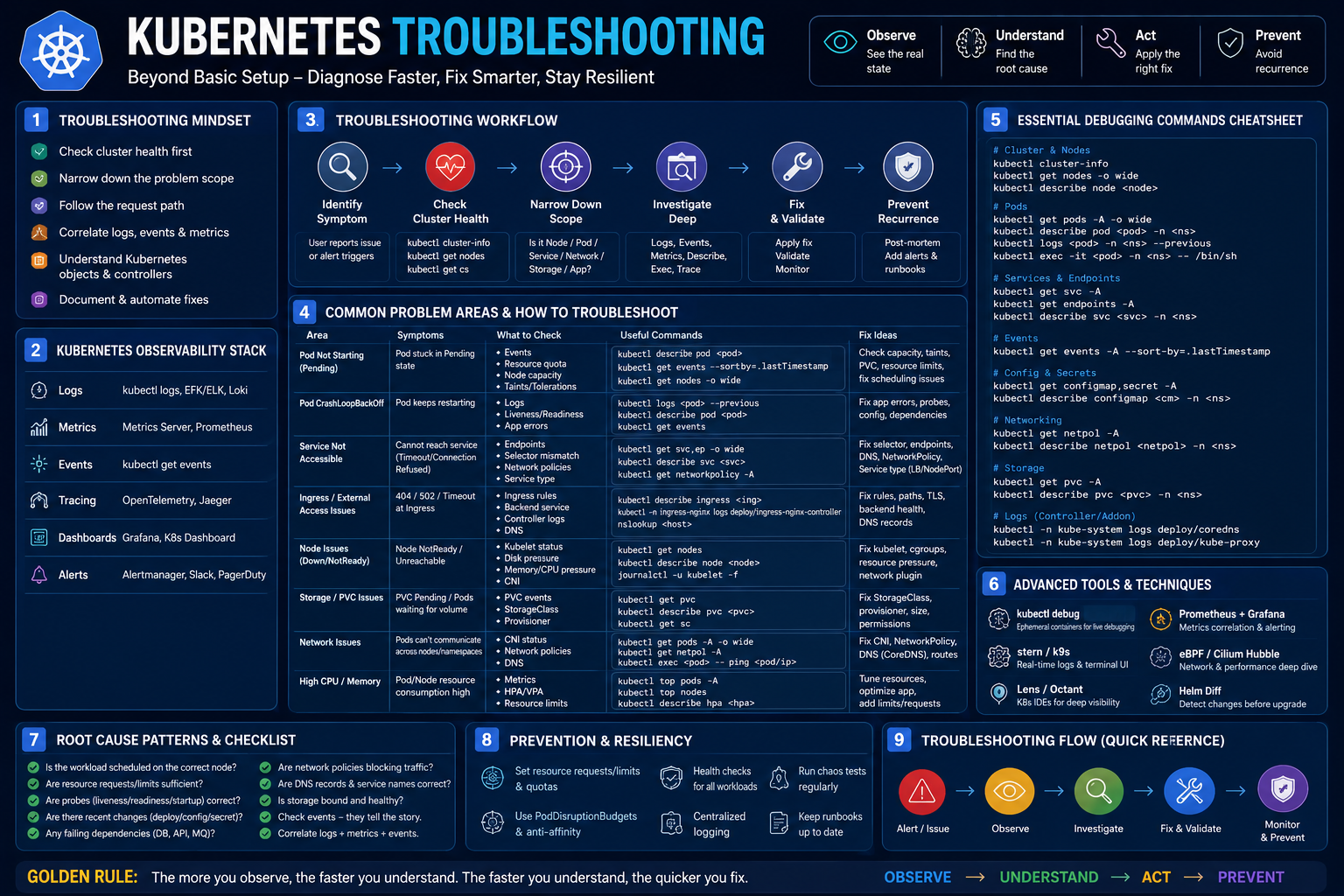
Moving beyond basic Kubernetes setup into advanced troubleshooting is what separates an operator from a true administrator. According to the CNCF, 51% of organizations cite a lack of internal expertise as a major obstacle, and teams spend an average of 34 days per year resolving Kubernetes incidents. Mastering this domain will make you an invaluable asset.
Below is a roadmap structured to move you from reactive debugging to proactive, AI-assisted resolution, including specific resources and career applications.
Phase 1: Master the Core Diagnostic Commands & Methodology
Before relying on any AI tool, you must be able to investigate manually. The troubleshooting domain accounts for 30% of the Certified Kubernetes Administrator (CKA) exam, making it the single heaviest-weighted area. You need to internalize a systematic approach: start from high-level object status and drill down into logs and events.
Key Skills to Develop:
- Pod Troubleshooting: Diagnose
CrashLoopBackOff and ImagePullBackOff. Use kubectl logs <pod-name> --previous to see why a crashed container failed. - Node & Cluster Issues: Learn to use
kubectl cordon, drain, and uncordon for node maintenance, and check cluster health with kubectl get --raw='/healthz?verbose'. - Networking Debugging: Diagnose service connectivity and DNS resolution failures.
Free / Low-Cost Training Resources:
- Kubernetes Documentation (Official): The "Tasks" and "Troubleshooting" sections are your canonical source. Use the built-in
kubectl explain command as a quick reference. - Hands-on Course (Free): The "Kubernetes 实战课程" on GitHub is an excellent resource. Its fifth section specifically covers "Kubernetes Dashboard" setup and use, but the earlier modules on Pods, Deployments, and Services provide the necessary troubleshooting context.
- Paid / Certification Prep:
- Certified Kubernetes Administrator (CKA) Study Guide (2nd Edition, 2026): Part VI is dedicated entirely to troubleshooting strategies for Pods, Services, and cluster infrastructure.
- Linux Foundation (LFWS313): A 1-day, live, instructor-led course focused exclusively on troubleshooting using hands-on labs and reality-based simulations. Upon completion, you earn a digital badge.
- Kubernetes Recipes (Apress, 2025): A practical, problem-solving book. Organized for easy lookup, it covers "Monitoring and Troubleshooting Strategies" and "Common Troubleshooting Scenarios".
Phase 2: Simulate Break-Fix Scenarios in a Sandbox
Theory is insufficient. You must create and resolve failures. This phase builds muscle memory for incident response.
Practice Environment & Exercises:
- Build your own cluster: Use Minikube or Kind (Kubernetes in Docker) on your local machine. A cluster built from "laptop motherboards" is a proven way to learn.
- Practice Fixes: Use the
--field-selector flag to find failed pods across all namespaces (kubectl get pods -A --field-selector=status.phase!=Running). Practice extracting recent cluster events sorted by timestamp. - Deliberate Practice: Set up a Deployment with a faulty image (e.g., a typo in the container name) and walk through the diagnostic process of
describe and logs to identify the ImagePullBackOff error.
Phase 3: Augment Your Workflow with AI-Powered SRE Tools
Once you understand the fundamentals, use AI to accelerate root cause analysis (RCA) and automate remediation. This is the cutting edge of Kubernetes operations. These tools analyze logs, metrics, and events to explain issues in plain English.
AI Tools for Troubleshooting:
- K8sGPT (Free, Open Source): This is your starting point. It codifies SRE experience into analyzers and uses AI (OpenAI, Azure, Google Gemini) to scan your cluster and explain issues in simple English. Run
k8sgpt analyze --explain to get a detailed, AI-generated diagnosis of problems like misconfigured Pods or failing Services. You can also integrate it with Claude Desktop for natural language queries about your cluster health. - KubeGraf (Free Tier Available): An autonomous AI SRE platform that runs locally (your data never leaves your environment). It provides three killer features:
- SafeFix™ Remediation: It generates a YAML diff preview (showing exactly what will change) and a "blast radius analysis" before you apply a fix.
- Evidence-Based RCA: It correlates logs, events, metrics, and recent deployments into a reproducible evidence chain, not a "black box" answer.
- Anomaly Fingerprinting: It detects recurring failure patterns, drastically cutting diagnosis time on repeat incidents.
- Metoro (Free Tier Available, YC-backed): An AI SRE platform powered by eBPF (kernel-level telemetry). It autonomously detects issues from live traffic, performs root cause analysis across telemetry and code, and can generate fixes. It becomes operational in under one minute with no code changes.
How to Practice with AI:
- Set up K8sGPT on a test cluster (like Minikube) following its quick start guide.
- Introduce a failure (e.g., a broken YAML indentation, a service pointing to the wrong port).
- Run
k8sgpt analyze --explain and compare the AI's diagnosis to the manual one you performed in Phase 1. This validates the AI's output against your growing knowledge.
Career Application & Next Steps
Kubernetes troubleshooting skills directly translate into roles like Kubernetes Administrator, DevOps Engineer, Site Reliability Engineer (SRE) , and Cloud Infrastructure Architect. CKA-certified professionals in the US earn between 90,000and
90,000and130,000 per year, a 15-25% premium over non-certified peers.
Your immediate Next Steps:
- Pursue the CKA Certification: It is the industry standard. The 2026 exam blueprint explicitly weights troubleshooting at 30%. Use the CKA Study Guide and the Kubernetes Recipes book to fill knowledge gaps. The certification is valid for two years and requires recertification, ensuring your skills stay current.
- Build a "War Stories" Portfolio: Document 5-10 troubleshooting scenarios you solve (using your own cluster). For each, write a short case study: "The symptom was X, I ran
kubectl describe and saw Y, the root cause was Z, and I fixed it by doing W." Include examples where you used K8sGPT or KubeGraf to accelerate the diagnosis. Host this on GitHub. - Join the Community: The Kubernetes Slack workspace has channels like
#kubernetes-users and #sig-network where real-world problems are discussed. Lurk, learn, and eventually help others. This is also where you learn about emerging issues before they become mainstream. - Go Deeper on Security: After becoming proficient in general troubleshooting, consider the Certified Kubernetes Security Specialist (CKS) certification. It focuses on securing cluster components and workloads—a natural next step that complements your operational skills




 Group / 1: 1 Sessions