This roadmap is designed to take you from a foundational understanding of e-commerce platforms to a specialized professional who can build, manage, and optimize online stores across the entire ecosystem—Shopify, Shopify Plus, WooCommerce, Magento, and BigCommerce. The goal is to prepare you for roles like E-commerce Manager, Platform Specialist, Solutions Architect, or freelance store developer.
🗺️ Phase 1: Foundation – Understanding the E-commerce Landscape (Weeks 1-3)
Before touching any platform, you need to understand the different business models and when each platform makes sense.
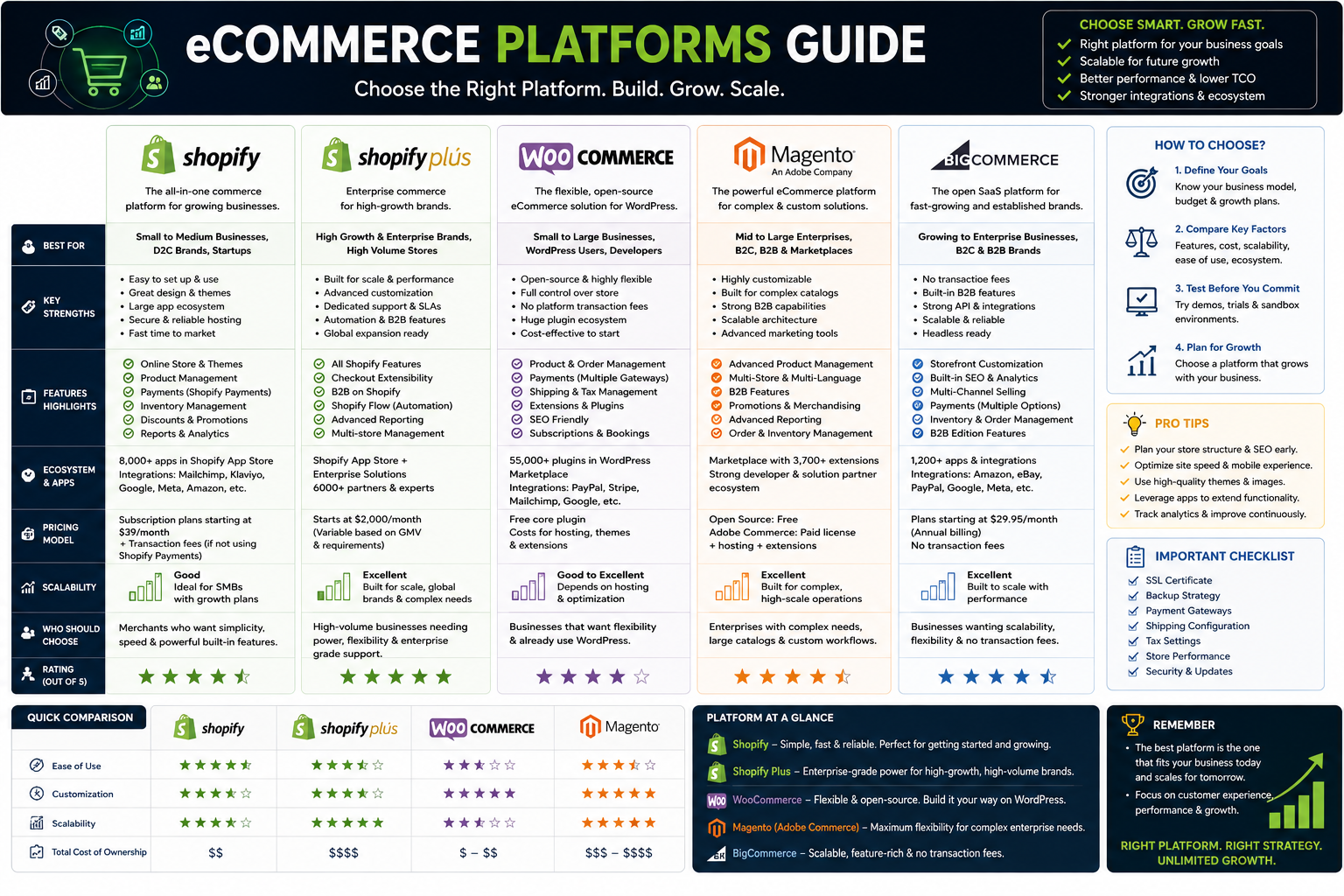
- The Four Platform Categories: Shopify and BigCommerce are hosted SaaS platforms—they handle hosting, security, and updates for you. WooCommerce and Magento are self-hosted—you control everything but must manage your own hosting and security . Shopify Plus sits in a hybrid space: it's still SaaS but with enterprise-grade power and customization.
- When to Use Which: For a small business launching quickly, choose Shopify or BigCommerce. For a content-driven brand already on WordPress, choose WooCommerce. For a large enterprise with complex B2B needs and dedicated developers, choose Adobe Commerce (Magento) . For a high-volume brand doing over 1M−
- 1M−2M annually that needs checkout customization and global expansion, choose Shopify Plus .
- Core Concepts to Master: Understand payment gateways, SKU management, inventory sync, shipping calculations, tax rules, and the difference between DTC (direct-to-consumer) and B2B (business-to-business) operations.
- Free Practice Environment: All platforms offer free trials or open-source versions. Shopify gives 14 days, BigCommerce gives 15 days, WooCommerce is free to install on any WordPress site, and Magento Open Source is free to download and run locally.
🛠️ Phase 2: Shopify & Shopify Plus – The SaaS Powerhouse (Weeks 4-8)
Shopify dominates the small-to-medium business market, making it the most employable platform to learn first.
Standard Shopify (Basic, Shopify, Advanced Plans)
- What You'll Learn: Master the Shopify admin dashboard, theme customization using Liquid (Shopify's templating language), app installation from the 8,000+ app ecosystem, product and inventory management, and basic Shopify Flow automation .
- The Limitations You Must Understand: On standard plans (Basic to Advanced), the checkout is mostly locked down. You can change colors and fonts, but you cannot add custom fields, modify discount logic, or create complex upsell flows. API limits are capped at 40 requests per second .
Shopify Plus – The Enterprise Tier
- When to Consider It: Brands doing over 1M−
- 1M−2M in annual revenue, running frequent flash sales, needing B2B wholesale portals, or requiring international expansion across multiple storefronts .
- Key Differentiators to Master:
- Checkout Extensibility: The single biggest unlock. You can add custom UI components, conditional discount logic, and loyalty program integrations directly into the checkout flow using Checkout Extensions and Shopify Functions .
- Launchpad: This automation tool schedules product drops, flash sales, and promotional campaigns. Instead of manually updating prices and activating discounts at 3 AM, Launchpad does it for you .
- B2B Suite: Native wholesale portal with company accounts, custom price lists, net payment terms, and draft order workflows .
- Higher API Limits: 80 requests per second (double standard plans) plus higher GraphQL quotas .
- Merchant Success Manager: Dedicated strategic support, not just a general support queue .
- The Financial Math: Shopify Plus starts at approximately 2,300permonth.However,transactionfeesdropfrom0.5
- 2,300permonth.However,transactionfeesdropfrom0.52M/month, this can save $7,000+ per month, effectively making Plus free or money-saving .
🔧 Phase 3: WooCommerce – The Open-Source Contender (Weeks 8-11)
If Shopify is the "Apple" of e-commerce (controlled ecosystem), WooCommerce is the "Android" (flexible, open, requires more assembly).
- The WordPress Dependency: WooCommerce is not standalone—it is a plugin that runs on WordPress. You must first learn basic WordPress administration: themes, plugins, pages, and posts .
- Technical Skills Required: Proficiency in PHP and MySQL is essential. Magento developers need deeper object-oriented PHP and XML knowledge, while WooCommerce developers need familiarity with WordPress hooks (actions and filters) .
- What It Does Well: WooCommerce shines for content-driven brands—blogs, media companies, publishers adding a store to an existing WordPress site. It is also the most beginner-friendly self-hosted option .
- When to Move Away: If you are running more than ten paid plugins and your developers spend weeks debugging conflicts, you have likely outgrown WooCommerce as a commerce engine .
- Practice Setup: Use Local WP or XAMPP to run a WordPress site entirely on your own computer. Install WooCommerce for free and build a test store without paying for hosting.
🏢 Phase 4: Magento (Adobe Commerce) – The Enterprise Beast (Weeks 11-14)
Magento is not for beginners. This is the platform for large enterprises with dedicated development teams and complex, high-volume operations.
- What Makes It Different: Magento uses an EAV (Entity-Attribute-Value) database model, which offers incredible flexibility but makes data migration and customization significantly more complex than other platforms . It is built for multi-store, multi-language, and multi-currency operations out of the box .
- Technical Skills Required (Significant): Advanced PHP (object-oriented), MySQL, XML, JavaScript, and familiarity with the Magento 2 architecture and Zend Framework. Developers also need experience with Composer, CLI tools, and version control systems like Git .
- When to Choose Magento: If you have a complex product catalog with thousands of configurable products, hybrid B2B/B2C business models, or unique fulfillment workflows that off-the-shelf platforms cannot handle .
- The Cost Reality: While Magento Open Source is free, hosting, development, extensions, and maintenance typically exceed 2,000−
- 2,000−3,000 per month. If your GMV cannot justify this, you should be on Shopify or BigCommerce .
📈 Phase 5: BigCommerce – The Scalable SaaS Alternative (Weeks 14-16)
BigCommerce often gets overlooked, but it is a powerful platform for mid-market brands that need enterprise features without Magento's complexity.
- Where It Fits: BigCommerce sits between Shopify and Magento. It offers more built-in B2B features than standard Shopify (customer group pricing, price lists, quote management) but remains fully hosted and managed .
- API-First Architecture: BigCommerce is designed for headless and API-driven development. If you need to integrate with multiple external systems (ERP, CRM, 3PL), BigCommerce's API-first approach is often smoother than Shopify's .
- Migration Patterns You Should Know: Each platform has unique migration challenges :
- Magento to BigCommerce: The EAV database model requires manual attribute mapping. URL patterns differ, so full redirect mapping is critical.
- WooCommerce to BigCommerce: WooCommerce products live as "custom post types" in WordPress. Blog content cannot be automated—it requires manual export, reformatting, and republishing.
- Shopify to BigCommerce: Shopify Liquid themes do NOT port to BigCommerce Stencil. The storefront is a full rebuild. Budget for it.
- When to Consider It: If you need native B2B tiers, are frustrated with Shopify's app dependency and transaction fees, or find WooCommerce's plugin conflicts consuming too much developer time .
🤖 Phase 6: AI Tools & Agentic Commerce – The Future (Advanced)
E-commerce is being transformed by AI agents that can take action, not just answer questions.
- AI for Store Operations: Tools like the Gorgias AI Agent can handle order tracking, returns, refunds, and FAQs automatically. It is trained on your brand voice, policies, and workflows, and can take real actions like issuing refunds or editing subscriptions .
- Open-Source E-commerce Automation: The open-accio-skill repository on GitHub offers standalone, vendor-free AI skills for e-commerce operators. Available skills include Amazon keyword scraping, product description generation (for Amazon, Shopify, eBay, and Etsy), and CJ Dropshipping API integration with Shopify sync .
- Agentic Commerce Development: commercetools offers training on AI Hub and Agent Gateway—tools that expose your products and checkout to LLMs, enabling "agentic commerce" where AI assistants can complete purchases on behalf of users .
- Practical Application: Learn to use AI for listing optimization, SEO content generation for product descriptions, and automated price monitoring across marketplaces.
📚 Resource Toolkit: Where to Learn (Free & Paid)
Shopify & Shopify Plus:
- Free: Shopify Compass (free courses on setup, dropshipping, and marketing). Shopify Partners program ($5/month or free development stores).
- Paid: Shopify Plus Academy (exclusive for Plus merchants). Udemy courses on Shopify development go on sale for under $20.
- YouTube Channels: Coding with Shopify, Ed Codes, and Shopify's own tutorials.
WooCommerce:
- Free: WooCommerce's official documentation and YouTube tutorials. Local WP (free local development environment).
- Paid: LinkedIn Learning's "WooCommerce Essential Training." Udemy's "Build an E-commerce Store with WooCommerce."
- Community: WordPress.org support forums and WooCommerce Slack community.
Magento:
- Free: Adobe's official Magento Open Source documentation. Mage2 TV YouTube channel.
- Paid: Adobe Commerce certifications (Developer, Frontend Developer, Architect). Udemy's "Magento 2 Training" courses.
- Community: Magento Stack Exchange and Reddit's r/Magento.
BigCommerce:
- Free: BigCommerce University (free certification courses on platform fundamentals and development).
- Paid: BigCommerce Partner training for agencies and developers.
- YouTube: BigCommerce's official channel with migration and setup tutorials.
Cross-Platform & AI Tools:
- Migration Tools: LitExtension and Cart2Cart (free demos available) for understanding cross-platform data mapping .
- AI Skills: GitHub's open-accio-skill repository (free, open-source) .
- Certification Preparation: Coursera's "E-commerce Platforms" and Google's Digital Marketing certificate provide context on the broader ecosystem.
💼 Career Application & Next Steps
1. The Job Market & Your Path
E-commerce platform expertise opens multiple career paths :
- Shopify Store Developer: Build, customize, and optimize Shopify stores using themes, apps, and integrations.
- E-commerce Manager: Lead strategy, marketing, SEO, and customer acquisition across platforms.
- Conversion Rate Optimization (CRO) Specialist: Analyze user behavior, run A/B tests, and improve store performance.
- E-commerce Consultant: Provide strategic guidance to businesses on platform selection, migration, and scaling.
- Agency Owner: Offer store development, marketing, and consulting services to clients.
2. Build Your Portfolio (The "Proof" is in the Store)
Theory is not enough. You need to show you can build and manage real stores.
- Create a Demo Store on Each Platform: Use free trials to build a functioning store (even with fake products). Take screenshots of the admin dashboard, product pages, and checkout flow.
- Document a Migration Plan: Write a 2-page plan for moving a hypothetical 5,000-product store from WooCommerce to BigCommerce. Include the URL redirect strategy, data cleaning steps, and content migration timeline .
- Show AI Integration: Use ChatGPT or Claude to generate optimized product descriptions for ten products. Show the "before" and "after" comparison.
3. Certifications That Open Doors
- Shopify: Shopify Partner certification (free). Shopify Plus certification (more advanced, requires Partner status)
- BigCommerce: BigCommerce Certified Developer
- Magento: Adobe Certified Professional (Developer or Frontend Developer) – highly recognized but challenging
- WooCommerce: No official certification, but WooExperts status is earned through proven experience
4. Get Your First Role
- Freelance Platforms: Start on Upwork or Fiverr. Offer low-stakes gigs: "Install a dropshipping app on Shopify" or "Fix my WooCommerce product import error."
- Inside Your Current Company: If you work in a non-e-commerce role, volunteer to help the marketing or digital team with store maintenance tasks.
- Internships: Many e-commerce agencies hire junior store builders. Build a portfolio of 2-3 demo stores first.
5. The Interview Question You Will Be Asked
"A client with $5M in annual revenue is on standard Shopify and complains the checkout is limiting conversions. They also want to start B2B wholesale. What do you recommend?"
Your Answer: *"At 5Mannually,theyarereadyforShopifyPlus.Thecheckoutcustomizationlimitationsonstandardplansarereal—theycannotaddcustomupsellsorconditionaldiscounts.PlusalsoincludesnativeB2Bwholesaleportalswithcompanyaccountsandnetpaymentterms.Thetransactionfeesavingsalone(from 0.5
5Mannually,theyarereadyforShopifyPlus.Thecheckoutcustomizationlimitationsonstandardplansarereal—theycannotaddcustomupsellsorconditionaldiscounts.PlusalsoincludesnativeB2Bwholesaleportalswithcompanyaccountsandnetpaymentterms.Thetransactionfeesavingsalone(from 0.52,300/month cost. I would recommend a migration audit, focusing on rebuilding their checkout using Checkout Extensibility and implementing Launchpad for their flash sale events."*
Next Step: Do not try to master all five platforms at once. Pick one—Shopify is the most marketable for immediate freelancing and full-time roles. Open a free trial, install a free theme, add ten products, and configure a payment gateway by the end of this week. Build one functional store, then learn your second platform by migrating that store's data to see how the process differs. The best e-commerce professionals understand multiple platforms, but they learn them one at a time through real builds.




 Group / 1: 1 Sessions