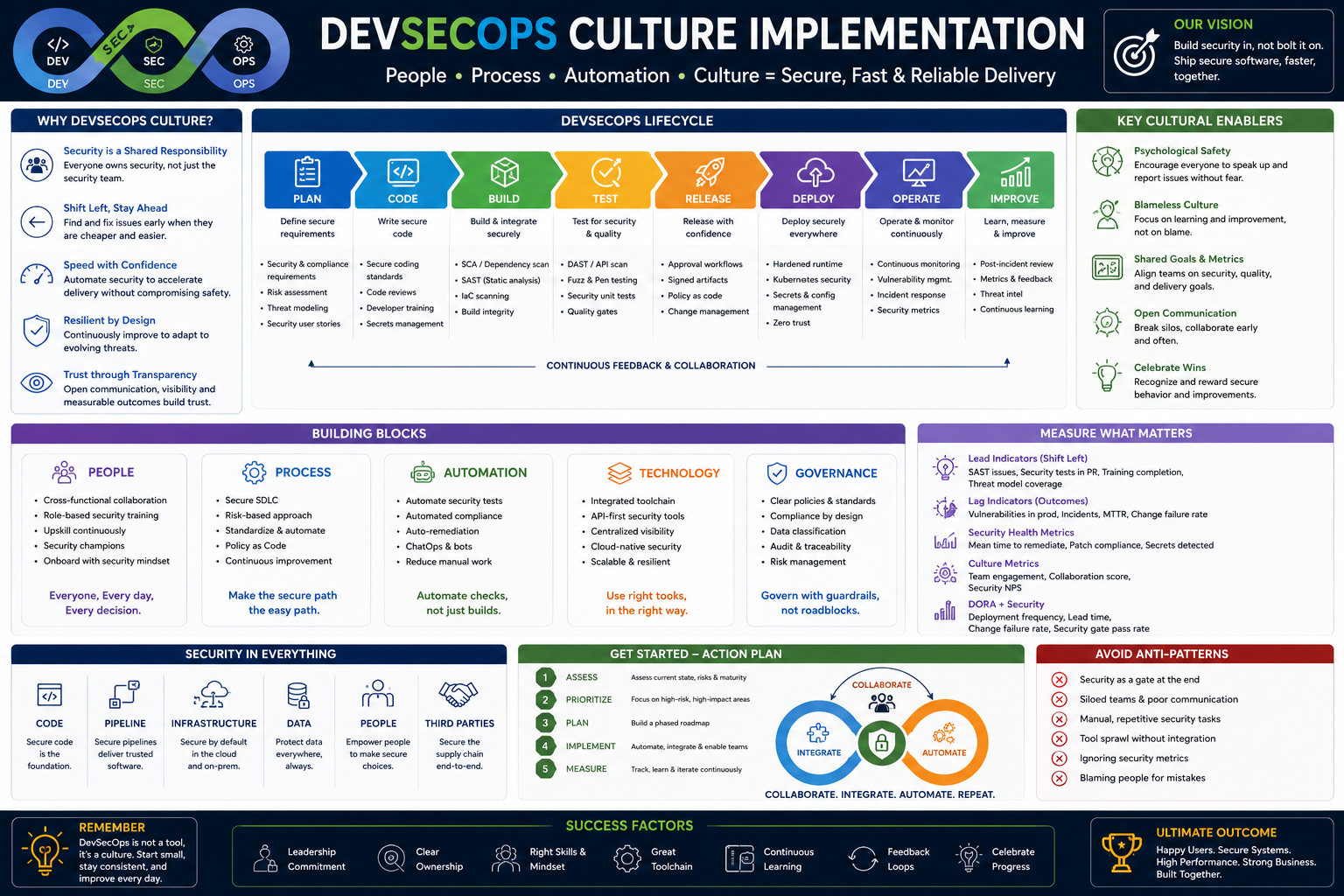
This roadmap is designed to take you from foundational security and DevOps concepts to a professional who can embed security seamlessly into every stage of the software development lifecycle (SDLC). Unlike traditional security roles that act as a gatekeeper at the end of development, DevSecOps integrates automated security controls directly into CI/CD pipelines, enabling teams to "shift left" (test earlier) and ultimately "shift everywhere" (secure every phase from coding to runtime). This roadmap prepares you for high-demand roles like DevSecOps Engineer, Security Automation Specialist, or Cloud Security Engineer, where you will reduce vulnerabilities and accelerate secure software delivery.
🗺️ Phase 1: Foundations – The DevSecOps Mindset & Toolkit (Weeks 1-4)
Before automating security, you must understand the landscape, the threats, and the core principles of the culture you are trying to embed.
Core Concepts to Master:
- The "Why" of DevSecOps: Understand that DevSecOps is not just a set of tools but a cultural transformation. Instead of security being a final "gate" that slows down releases, it becomes a shared responsibility integrated into daily workflows. Learn the principles: "Security as Code," "Shift Left," and "Continuous Feedback".
- The OWASP Top 10: This is your essential threat primer. Learn the most critical web application security risks (like injection, broken authentication, and sensitive data exposure). The OWASP Top 10 is the universal starting point for understanding what you are protecting against.
- Scripting & Automation: You cannot secure manual processes. Gain proficiency in a scripting language like Python or Bash to automate repetitive tasks. A free, excellent resource is Automate the Boring Stuff with Python.
- Linux & Container Basics: You will secure systems running on Linux and increasingly inside containers. Learn basic Linux administration and the fundamentals of Docker (how to build, run, and inspect containers).
Practice Goal:
- Set up a free Docker environment on your local machine. Run a vulnerable container (like OWASP WebGoat) to practice identifying basic security issues. Simultaneously, start working through the OWASP Top 10 documentation to map each vulnerability to a real-world risk.
🛠️ Phase 2: The Technical Toolkit – Pipeline Security & Automation (Weeks 5-12)
This phase focuses on the specific tools you will embed into CI/CD pipelines to automatically detect and block vulnerabilities.
The Core Tool Categories (All Free/Open Source):
Static Application Security Testing (SAST): Analyzes source code for vulnerabilities before it is compiled.
- Learn: SonarQube Community Edition or Semgrep. These tools integrate into your version control system (like GitHub) and scan every pull request for security flaws.
- Practice: Create a simple, intentionally vulnerable web app. Run a SAST scan against it. Identify and fix one of the reported issues. This shows you the "fix" loop.
Software Composition Analysis (SCA): Scans open-source dependencies for known vulnerabilities.
- Learn: Snyk (Free Tier) or OWASP Dependency-Check. Modern applications are built on thousands of open-source libraries; SCA ensures those libraries are secure.
- Practice: Take a sample project (like a Node.js or Python app). Run an SCA scan to see a list of its dependencies and any known CVEs (Common Vulnerabilities and Exposures).
Dynamic Application Security Testing (DAST): Tests the running application for vulnerabilities, simulating an external attack.
- Learn: OWASP Zed Attack Proxy (ZAP). Unlike SAST, DAST does not have access to source code and finds runtime issues.
- Practice: Run OWASP ZAP against a deliberately vulnerable application (like OWASP Juice Shop). Generate a report and try to understand the attack vectors.
Secrets Detection: Prevents hardcoded passwords, API keys, and tokens from being committed to your code repository.
- Learn: GitLeaks or TruffleHog. These tools scan your git history for accidentally committed secrets.
- Practice: Create a test repository, commit a fake API key, and run GitLeaks to see how it detects the secret. Then, learn to use a secrets manager (like HashiCorp Vault) to inject secrets securely at runtime.
Container & Kubernetes Security: Scans your container images and runtime configurations for risks.
- Learn: Trivy (for container and Infrastructure-as-Code scanning), Falco (for runtime threat detection), and Kyverno (for Kubernetes policy enforcement).
- Practice: Build a Docker image, run
trivy image against it, and review the vulnerability report. Then, deploy a test Kubernetes cluster (using minikube or kind) and install Falco to see it detect a shell spawned inside a container.
🚀 Phase 3: Integration & Orchestration (Weeks 13-16)
Tools are useless if they are not automated. This phase is about building the pipeline that connects everything.
- CI/CD Pipeline Logic: Learn a CI/CD tool like GitHub Actions, GitLab CI, or Jenkins. Your goal is to automate the entire security toolchain.
- The Pipeline in Action:
- Developer pushes code to a Git repository.
- A GitHub Action automatically triggers.
- The action runs a SAST scan, an SCA scan, and a Secrets scan on the code.
- If any "High" severity issue is found, the pipeline fails, preventing the code from being merged.
- If the code passes, it is built into a container image.
- The pipeline runs Trivy to scan the container image for vulnerabilities.
- The image is deployed to a staging environment.
- An automated DAST scan (using OWASP ZAP) runs against the staging app.
- If all checks pass, the pipeline deploys to production.
- Practice Goal: Build a "Hello World" application and write a single GitHub Actions workflow that runs a SAST and SCA scan on every
git push. This is your first automated DevSecOps pipeline.
👥 Phase 4: Culture, Monitoring & AI Evolution (Weeks 17-20)
A successful DevSecOps implementation is driven by people and continuous feedback, not just tools.
- The Human Element: "Shift Everywhere": While "shift left" moved security earlier, the modern practice is "shift everywhere"—embedding security in every phase, including runtime monitoring and operations. This requires breaking down silos. Learn strategies like Security Champion Programs (where developers are trained to advocate for security) and gamified training (using capture-the-flag events).
- Threat Modeling: Before you write a single line of code, learn to think like an attacker. Threat modeling is the structured process of identifying potential threats to your system design. Use free tools like the Microsoft Threat Modeling Tool or the OWASP Threat Modeling Playbook.
- Observability & Runtime Security: Security does not end at deployment. Learn to use Falco to detect abnormal behavior in your Kubernetes clusters (e.g., a container reading the
/etc/shadow file). Correlate security events with your observability data (metrics/logs/traces) to understand an attack's full scope. - AI in DevSecOps: AI is a double-edged sword. AI-powered coding assistants can accelerate development, but they also introduce new risks, like AI-generated vulnerabilities or "prompt injection" attacks. Learn the OWASP Top 10 for Large Language Models (LLMs). Conversely, use agentic AI to automate complex tasks like analyzing logs, correlating alerts, and even suggesting remediation code for detected vulnerabilities.
Practice Goal: Take your deployed application from Phase 3. Install Falco on your Kubernetes cluster. Simulate a suspicious activity (e.g., try to read a sensitive file inside a container). Watch Falco generate a real-time security alert. Now, document what you would tell the development team to change in their code to prevent this activity.
📚 Resource Toolkit: Where to Learn (Free & Paid)
Free & High-Value Courses & Certifications:
- OWASP DevSecOps Fundamentals: A free, printable certificate that covers shift-left testing and supply-chain risk. An excellent starting validation of your knowledge.
- Coursera (Cyber Security: DevSecOps): A comprehensive, 2-week (10 hours/week) course from Macquarie University. It includes hands-on modules on secure coding, CI/CD hardening, cloud-native security (Azure), and MLSecOps.
- Linux Foundation (Introduction to DevSecOps for Managers): A free, non-technical course ideal for understanding the cultural and process-driven aspects of a DevSecOps transformation. Covers value stream management and platform as a product.
- GitLab University: Offers free, self-paced courses covering the full DevSecOps lifecycle. You can register with any email address and access structured learning paths.
- Red Hat Academy & IBM SkillsBuild: If you have access through an academic institution, this provides no-cost access to professional courses like "DevSecOps Professional" and "Security Automation Specialist," including digital credentials.
- Free Tooling & Labs: For hands-on practice, KillerCoda provides free, in-browser Kubernetes, Docker, and Linux labs. The AWS Free Tier allows you to practice cloud-native security.
Paid Certifications (Career Accelerators):
- Certified DevSecOps Professional (CDP): A practical, tool-agnostic certification focused on real-world pipeline implementation.
- Certified Kubernetes Security Specialist (CKS): The gold standard for Kubernetes security, covering cluster hardening, system monitoring, and supply chain security.
- CompTIA Security+: A foundational, vendor-neutral cybersecurity certification that validates core security knowledge.
The AI-Powered Learning Path:
- IBM SkillsBuild: Provides free access to 1,000+ courses on topics like AI, cybersecurity, and DevSecOps. You can earn digital credentials upon completion.
- Use LLMs as a "Security Coach": Paste a snippet of vulnerable code or a confusing SAST report into an LLM (like ChatGPT or Claude). Ask: "Explain why this code is vulnerable to SQL injection," or "Rewrite my GitHub Actions YAML to fix this secret detection warning." This is the fastest way to learn remediation.
💼 Career Application & Next Steps
DevSecOps engineers are among the highest-paid cybersecurity professionals, with market growth estimated at 24% year-over-year. You must prove you can automate security, not just talk about it.
1. Job Market & Your Target Roles
- DevSecOps Engineer: Embed security tools and policies directly into CI/CD pipelines. This is your primary target role.
- Security Automation Specialist: Focus on building the automation and scripting that powers security scans and incident response.
- Cloud Security Engineer: Apply DevSecOps principles to secure cloud-native environments (AWS, Azure, GCP).
- Application Security (AppSec) Engineer: Partner with development teams to conduct threat modeling, code reviews, and security training.
2. Build Your Portfolio (Three Definitive Projects)
Project 1 (The Pipeline):
- What: Create a GitHub repository for a simple Python or Node.js application. Write a GitHub Actions workflow that triggers on
pull_request. The workflow must run: a SAST scan (Semgrep), an SCA scan (Snyk), and a secrets scan (GitLeaks). The pipeline should fail if any critical finding is detected. - Why: This is the core deliverable of a DevSecOps engineer. It proves you can translate security policies into automated code.
Project 2 (Container Hardening):
- What: Write a
Dockerfile for a simple web app. Use Trivy to scan the image. Then, rewrite the Dockerfile to follow best practices (use a non-root user, use a distroless base image). Show the "before" scan report and the "after" report with zero critical vulnerabilities. - Why: Demonstrates you understand secure software supply chain and can implement "security as code" at the container level.
Project 3 (The Story of a Fix):
- What: Document a complete "vulnerability to remediation" story. Find a real CVE (like a Log4j vulnerability) in a test project. Show the SCA tool detecting it. Show the pipeline blocking the build. Then, update the dependency and show the pipeline passing. Publish the entire narrative in your GitHub
README.md. - Why: This proves the "value" of DevSecOps—catching a critical risk before it ever reaches production.
3. Document Everything & Build Your Brand
- GitHub is Your Resume: Create a repository named
devsecops-pipeline-demo. For each project, include a README.md with an architecture diagram (draw.io is free), step-by-step instructions to reproduce your work, and screenshots of the pipeline failing and passing. - Write a Blog Post: On Medium or Dev.to, write a post titled "How I Built an Automated Security Pipeline for Free using GitHub Actions." This establishes your expertise and is shareable on LinkedIn.
4. The Interview Question You Will Be Asked
"Our developers say security scanning slows them down. They want to bypass the pipeline to ship a critical feature faster. How do you respond?"
Your Answer: "I would empathize with their goal of shipping value but explain that 'slowing down' is a short-term cost for long-term velocity. A single critical vulnerability found in production could take days or weeks to remediate, versus seconds if caught in the pipeline. I would invite them to review the pipeline with me—perhaps we are scanning incorrectly or generating too many false positives. Together, we can tune the rules, prioritize 'High' and 'Critical' issues only, and make the scan asynchronous for non-critical paths. The goal is not to block them but to ensure the feature they ship is secure and doesn't create a major incident next week." This answer shows technical knowledge and the cultural/soft skills critical for a DevSecOps role.
Next Step: Do not try to learn every tool at once.
- Create a free GitHub account.
- Follow the OWASP DevSecOps Fundamentals lab guide to understand the landscape.
- Pick one SAST tool (like Semgrep) and one SCA tool (like Snyk).
- Write a simple Python or JavaScript "Hello World" function.
- Commit the code.
- Write a GitHub Actions YAML file that installs Semgrep and runs it on your code.
- Watch the pipeline run.
Your first pipeline does not need to be perfect. It just needs to exist. Once you have automated one security check, you have crossed the threshold from a security enthusiast to a practising DevSecOps engineer. From there, you add tools one by one. Start today.




 Group / 1: 1 Sessions