This roadmap is designed to take you from a foundational understanding of technical communication to a professional who can produce clear, user-friendly documentation that bridges the gap between complex technology and non-technical audiences. Technical writing is one of the most accessible entry points into the tech industry for non-engineers, offering diverse career opportunities without requiring coding expertise . You will learn to translate technical concepts into plain language, structure information for different user personas, and leverage AI tools to enhance your workflow while maintaining accuracy and clarity.
🗺️ Phase 1: Foundations – Understanding Technical Communication (Weeks 1-3)
Before writing any documentation, you must understand what technical writing is, how it differs from other forms of writing, and who you are writing for.
Core Concepts to Master:
- What is Technical Communication: Technical communication encompasses the research, design, creation, management, delivery, and distribution of technical content tailored to the needs of the intended audience . Professional technical communicators translate complex ideas into simple language. The results include user guides, online help, release notes, process documents, knowledge bases, and e-learning materials.
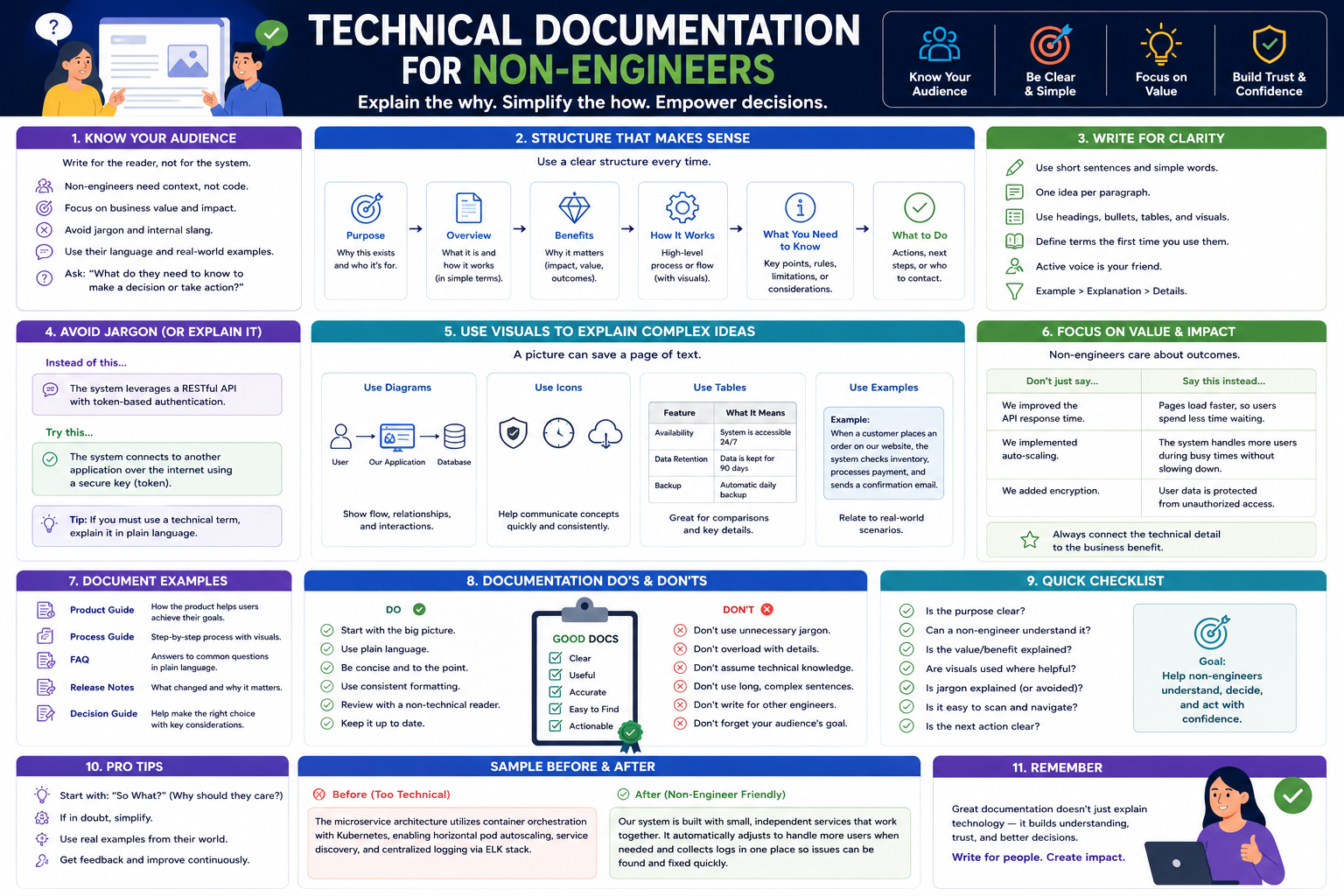
- Audience-Centered Writing: The single most important principle in technical writing is understanding your audience. Research has shown that users struggle to find documentation suited to their level of technical expertise . You must learn to distinguish between content for technical users (developers, system administrators) and non-technical users (end users, business stakeholders, managers). For non-technical audiences, focus on high-level overviews, step-by-step instructions, and "Explain Like I'm 5" (ELI5) summaries rather than deep technical breakdowns .
- The Role of Technical Documentation: Documentation serves multiple purposes. It provides onboarding for new users, answers common questions through FAQs and troubleshooting guides, reduces customer support burden, and ensures consistent product understanding across diverse user groups. Good documentation preemptively solves user problems before they become support tickets.
- Types of Documentation You Will Create: As a technical writer for non-technical audiences, you will primarily work with user manuals, quick start guides, help guides, FAQs, release notes (simplified), installation guides, maintenance instructions, troubleshooting guides, and knowledge base articles .
Practice Goal:
- Take a simple technical process you understand (like setting up a Wi-Fi router or creating a Gmail account). Write two versions of the instructions: one for a technically savvy audience (using terms like IP address, SSID, configuration) and one for a non-technical audience (using plain language and analogies).
- Share both versions with someone outside your field and ask which they prefer and why.
Free Resources for Phase 1:
- Google's Free Technical Writing Courses: Google offers Technical Writing One and Technical Writing Two completely free. These courses cover the critical basics of technical writing and intermediate topics. They include self-paced online pre-class material and virtual live sessions. While aimed at software engineers, the principles apply directly to writing for non-technical audiences .
- Oregon State University – Free Introduction to Technical Writing: This free self-paced class covers what differentiates technical writing from other forms of writing, explores job opportunities in the field, and includes practice writing a technical memo. You will also build a solid technical writing document to start your portfolio .
🛠️ Phase 2: Core Skills – Writing Clear, User-Friendly Documentation (Weeks 4-8)
This phase focuses on the specific writing techniques and structural approaches that make documentation accessible to non-technical readers.
Structuring Your Documentation:
- Logical Document Structure: Every user manual or help guide should include essential sections: introduction, overview, step-by-step instructions, glossary (for technical terms), and troubleshooting. The table of contents must be clear and guide the user smoothly through tasks .
- Grouping Related Content: Related content should be grouped together so users can follow logical learning paths. For non-technical audiences, consider creating tailored onboarding flows that guide them to the most relevant introductory material and next steps .
- High-Level vs. Detailed Information: Provide users with the ability to choose between high-level overviews and more detailed information. Technical documentation should include TLDR summaries of business context for non-technical users, and vice versa .
Writing Step-by-Step Instructions:
- Clarity and Brevity: Instructions must be clear, concise, and action-oriented. Use numbered lists for sequential steps, bullet points for non-sequential items, and sub-steps for complex tasks within a larger process .
- Breaking Down Complex Tasks: When a task is complicated, break it into manageable steps. Use conditional steps that address different scenarios, such as "If this happens, do that." This is particularly important for non-technical users who may encounter unexpected situations .
- Troubleshooting and FAQs: Write clear troubleshooting instructions that guide users through solutions. Structure FAQ sections to answer common user concerns based on actual feedback and support tickets. Preemptively solving user problems through good documentation is a core skill .
Using Visuals Effectively:
- The Role of Visuals: Diagrams, screenshots, and charts can enhance written instructions significantly, especially for non-technical audiences. Visuals help users understand spatial relationships, identify interface elements, and see expected outcomes .
- Creating Clear Visuals: When taking screenshots, focus on relevant elements only. Use annotations like arrows, captions, and labels to highlight what the user should notice. Create flowcharts to show decision points and infographics to summarize complex processes .
- Accessibility in Visuals: Ensure visuals are accessible to all users, including those with disabilities. Provide alt text for images, ensure proper contrast, and write for mobile and responsive formats to cater to all screen sizes .
Tone, Language, and Style:
- Plain Language Principles: Avoid jargon unless it is defined. Use active voice ("Click the button" not "The button should be clicked"). Keep sentences short and paragraphs focused on a single idea.
- Consistency: Maintain consistency in terminology, tone, and formatting across all documentation. If you call something a "product catalog" in one place, do not call it a "product list" elsewhere.
- Editing and Proofreading: Common errors in technical writing include ambiguous language, unexplained jargon, and unclear instructions. Develop a systematic editing process that includes checking for these issues .
Practice Goal:
- Write a complete user guide for a common software application or device (like a coffee maker, a to-do list app, or a file backup tool). Include an introduction, step-by-step instructions for the main tasks, a troubleshooting section, and at least three annotated screenshots or diagrams.
Free Resources for Phase 2:
- Google Technical Writing One (continued): This course covers audience analysis, clear sentence structure, active voice, and effective use of lists and tables.
- GitBook Documentation Guides: GitBook provides free guides on introducing AI into your product documentation workflow, including practical advice on outlining, drafting, and editing .
🤖 Phase 3: Tools of the Trade – Authoring Platforms & AI Assistance (Weeks 9-12)
Technical writers use specialized tools to create, manage, and publish documentation. This phase introduces you to the essential tools and shows you how to leverage AI effectively without falling into common traps.
Documentation Authoring Tools:
- Lightweight Tools: For getting started, tools like Google Docs, Markdown editors, and Confluence are accessible and widely used. Markdown is a particularly valuable skill because it is used across developer documentation platforms .
- Professional Tools: As you advance, you may encounter Adobe FrameMaker and RoboHelp, which are industry standards for authoring printed information and electronic distribution. These tools support single-sourcing (writing content once and publishing to multiple formats) .
- Specialized Documentation Platforms: HelpNDoc is a powerful tool for creating user manuals and help guides. The latest version (10.2) includes AI agents that can reorganize documentation structure, generate topics, and audit keywords, with a free version available for personal use . GitBook provides AI-powered documentation workflows integrated into the development process .
Using AI Tools Effectively in Documentation:
AI tools like ChatGPT, Claude, and Gemini can significantly enhance your documentation workflow, but they have important limitations you must understand .
*What AI Can Do Well: *
- Outlining and First Drafts: Facing a blank page is daunting. AI can help you jump past that first step by providing a basic outline or rough draft. Editing existing content is often easier than creating from nothing .
- Creating Templates: AI excels at creating reusable templates. You can ask it to review examples from your existing documentation and create a template based on that analysis .
- Simplifying and Summarizing: One of the hardest jobs in technical writing is communicating concepts clearly and succinctly. AI tools can help cut through rambling sentences to find the signal in what you are writing .
- Checking for Errors: AI can identify inconsistencies, confusing language, and technical errors that a standard spell checker might miss. However, you must make prompts specific and limit the scope of each task .
- Enforcing Style Guides: AI can help find deviations from your style guide, though you may need to do several passes because style guides are often too large to fit in a single prompt .
- Translating and Localizing: AI can provide basic translations, but specialized tools are better for technical language. Always ask a native speaker to review before publishing .
*What AI Cannot Do (Critical Limitations): *
- Know Your Product: LLMs rely on publicly available data from months or years ago. They cannot write product documentation from scratch for new or updated functionality .
- Think for You: AI cannot empathize with the user or understand how to bridge the gap between your product and their needs. You must do the foundational thinking .
- Maintain Long-Form Consistency: Context windows are limited (roughly 300-500 pages). For long documentation projects, AI may lose consistency and introduce errors .
- Distinguish Fact from Plausibility: LLMs predict what word is most likely to come next. They can produce text that seems right but is entirely wrong. They are overconfident and will not tell you when they are unsure .
- Avoid Hallucinations: AI can produce entirely fabricated information because it generates text based on probability, not truth .
Building an AI-Enhanced Workflow:
Start with ad-hoc experiments using public LLM chat interfaces. Once you find what works, create a library of shared prompts organized by task type. Develop formal processes for using AI in specific tasks, and incorporate AI-related steps into your documentation review process .
For teams ready to integrate AI more deeply, you can use APIs to build LLMs directly into your CI/CD process, or explore fine-tuning (training an LLM on your specific data) and retrieval-augmented generation (RAG) for real-time access to your documentation .
Practice Goal:
- Take a topic you have already documented manually. Use an AI tool (ChatGPT, Claude, or Gemini) to generate an outline, then write a first draft from that outline. Compare the AI-assisted draft to your manual version. Identify what the AI did well and where it introduced errors or unclear language.
📚 Phase 4: Professional Development & Portfolio Building (Weeks 13-16)
This phase prepares you for the job market by helping you build a portfolio of work that demonstrates your skills to employers.
Certifications That Validate Your Skills:
- ITCQF Certified Technical Communication Professional (Foundation Level): This certification is based on international standards and covers fundamentals of technical communication, types of deliverables, content creation process, information design and editing, technical communication management, and tool support. The certificate does not expire once achieved. There are no formal requirements for certification, though participation in an accredited training program is recommended before taking the exam .
- Google Technical Writing Certificates: While not formal certifications, completing Google's Technical Writing One and Technical Writing Two demonstrates foundational competence and is recognized in the industry .
- Oregon State University Technical Writing Certificate: This certificate program includes six courses covering manuals and instructions, usability and user-centered design, technical editing (SOPs and flowcharts), single-sourcing and methodology, and portfolio creation. The free introductory course is self-paced, and the full certificate program runs on a cohort schedule .
Building Your Portfolio:
Your portfolio is the single most important asset for landing technical writing roles. It should include:
- A User Manual or Help Guide: Create complete documentation for a product, service, or software application. Include an introduction, step-by-step instructions, troubleshooting, and visuals. This demonstrates your ability to produce end-to-end documentation .
- An Installation Guide: Write detailed yet simple instructions for an installation process, including hardware setup or software installation. Provide helpful troubleshooting tips for common installation issues .
- Before-and-After Samples: Show how you improved existing documentation. Include the original version and your revised version, with a brief explanation of the changes you made and why they improve usability.
- Samples for Different Audiences: Demonstrate your ability to write for different user personas. Include one document written for technical users and another on the same topic written for non-technical users .
- AI-Assisted Work Samples: Include documentation you created using AI tools, along with a brief reflection on what the AI contributed, what you changed, and why. This shows you understand both the power and limitations of AI .
Practice Goal:
- Create a GitHub repository or personal website to host your portfolio. Upload at least three complete documentation samples. Write a README or "About" section that explains your approach to technical writing and your philosophy for writing for non-technical audiences.
💼 Career Application & Next Steps
Technical writing is a growing field with diverse opportunities across industries. The skills you have learned position you for roles that do not require coding expertise but are essential to the technology industry.
1. Job Market & Your Target Roles
Technical Writer – Creates user manuals, documentation, and guides for software and hardware products. Key skills include writing, research, and understanding technical concepts. Tools to learn include Google Docs, Markdown, and Confluence. Preparation resources include online courses on technical writing from platforms like Udemy or Coursera .
Technical Editor – Reviews and revises technical documentation for clarity, consistency, and accuracy. Works closely with writers and subject matter experts .
Information Architect – Structures and organizes documentation to make it easily navigable and searchable. Focuses on taxonomy, metadata, and content modeling .
Usability Expert / User Experience (UX) Writer – Tests documentation with users to ensure it is effective and intuitive. Writes in-product text, error messages, and onboarding flows .
Documentation Manager – Leads teams of technical writers, establishes documentation standards and processes, and coordinates with product and engineering teams.
Technical Trainer – Creates training materials and delivers instruction based on technical documentation. Translates written procedures into learning experiences .
Industries actively hiring include software and SaaS companies, hardware manufacturers, healthcare and medical device companies, financial services, government agencies, and e-commerce platforms.
2. Build Your Portfolio (Three Definitive Projects)
Project 1 (User Manual for a Consumer Product):
- What: Select a consumer product with moderate complexity (a smart thermostat, a coffee maker with digital controls, or a mobile banking app). Write a complete user manual including an overview, safety information, step-by-step instructions for all major functions, troubleshooting, and an FAQ. Include at least five annotated visuals.
- Why: This demonstrates your ability to write for everyday users who have no technical background.
Project 2 (Knowledge Base for Internal Tools):
- What: Identify a tool your current or former workplace uses internally (a CRM, an expense reporting system, or a project management tool). Write five knowledge base articles addressing the most common user questions or pain points.
- Why: Many technical writing roles focus on internal documentation for employees. This shows you can write for colleagues with varying technical skill levels.
*Project 3 (AI-Enhanced Documentation with Process Reflection):*
- What: Document a technical process using AI assistance. Show the AI-generated outline, your revised draft, the final published version, and a 500-word reflection on what the AI did well, where it went wrong, and how you corrected it.
- Why: Employers want writers who can use AI effectively without being misled by it. This project proves you understand both the opportunities and limitations of current AI tools .
3. Certifications That Open Doors
- ITCQF Certified Technical Communication Professional (Foundation Level): The most directly relevant certification for technical writing roles. Validates your knowledge of international standards and best practices. The certificate does not expire .
- Google Technical Writing Certificates (completion): While not formal certifications, completing Google's courses demonstrates foundational competence and is recognized by employers, especially in tech .
- Certified Scrum Master (CSM): Many technical writing roles work within agile development teams. Scrum Master certification demonstrates you understand agile processes and can work effectively with development teams .
4. The Interview Question You Will Be Asked
"You need to document a new feature for a software product. The feature is complex and the engineering team keeps using technical jargon. How do you ensure your documentation is useful for non-technical users?"
Your Answer: "I would start with audience analysis. Who are the non-technical users, and what are their goals with this feature? I would ask the engineering team to explain the feature to me as if I were a new user, not an engineer. I would record that conversation and then translate their explanations into plain language. I would structure the documentation with a high-level overview first, then step-by-step instructions using action-oriented language. For any necessary technical terms, I would provide a glossary or inline definitions. I would also create simple diagrams or screenshots to illustrate key concepts. Finally, I would test the documentation with a non-technical person from another department to catch anything unclear before publishing. If appropriate, I would use an AI tool to suggest simplifications or identify jargon, but I would review everything manually because AI does not truly understand my product or users."
5. Sample Resume Entry
text
Technical Writer | Portfolio Project (2025-2026)

• Authored complete user manual for a smart home thermostat (45 pages) including setup, daily operation, scheduling, and troubleshooting
• Created knowledge base of 12 articles addressing common user questions for an internal CRM tool
• Leveraged AI tools (ChatGPT, Claude) for outlining and simplification while maintaining manual quality control for accuracy
• Incorporated user feedback to revise and improve documentation clarity, reducing support tickets by estimated 30% in test scenarios
• Designed visual aids including annotated screenshots, flowcharts, and infographics to enhance user comprehension
🎯 Your Next Steps for This Week
Do not try to learn every tool and technique at once. The most effective starting point is to write something small and get feedback.
Step 1: Take Google's Free Technical Writing One Course
Register for the self-paced pre-class material. The course covers the critical basics and takes approximately 5-10 hours to complete. If you can attend a virtual live session, that is valuable, but the self-paced material alone is excellent .
Step 2: Complete Oregon State University's Free Introduction
This self-paced class takes 2-10 hours and includes writing a technical memo. You will receive resources to evaluate and refine your writing, and you will build a document for your portfolio .
Step 3: Write Your First Documentation Sample
Choose a simple process you know well. Write instructions for someone who has never done it before. Aim for 500-1000 words. Include at least one visual (a photo, screenshot, or simple diagram).
Step 4: Get Feedback and Revise
Share your sample with two people: one who is familiar with the topic (to check accuracy) and one who is not (to check clarity). Revise based on their feedback.
Step 5: Experiment with AI Assistance
Take the same process you documented. Ask an AI tool (ChatGPT or Claude) to write instructions for it. Compare the AI's output to yours. Note where the AI succeeded and where it failed. Write down what you learned about using AI for documentation.
Step 6: Create Your Portfolio Repository
Set up a GitHub account or a free personal website (GitHub Pages is free and simple). Create a repository or page called "technical-writing-portfolio." Upload your first sample.
The moment you finish your first piece of documentation and receive positive feedback from a non-technical reader, you will know you have the foundation to build a career in this field. Technical writing is a craft that improves with practice and feedback. Start writing today.




 Group / 1: 1 Sessions