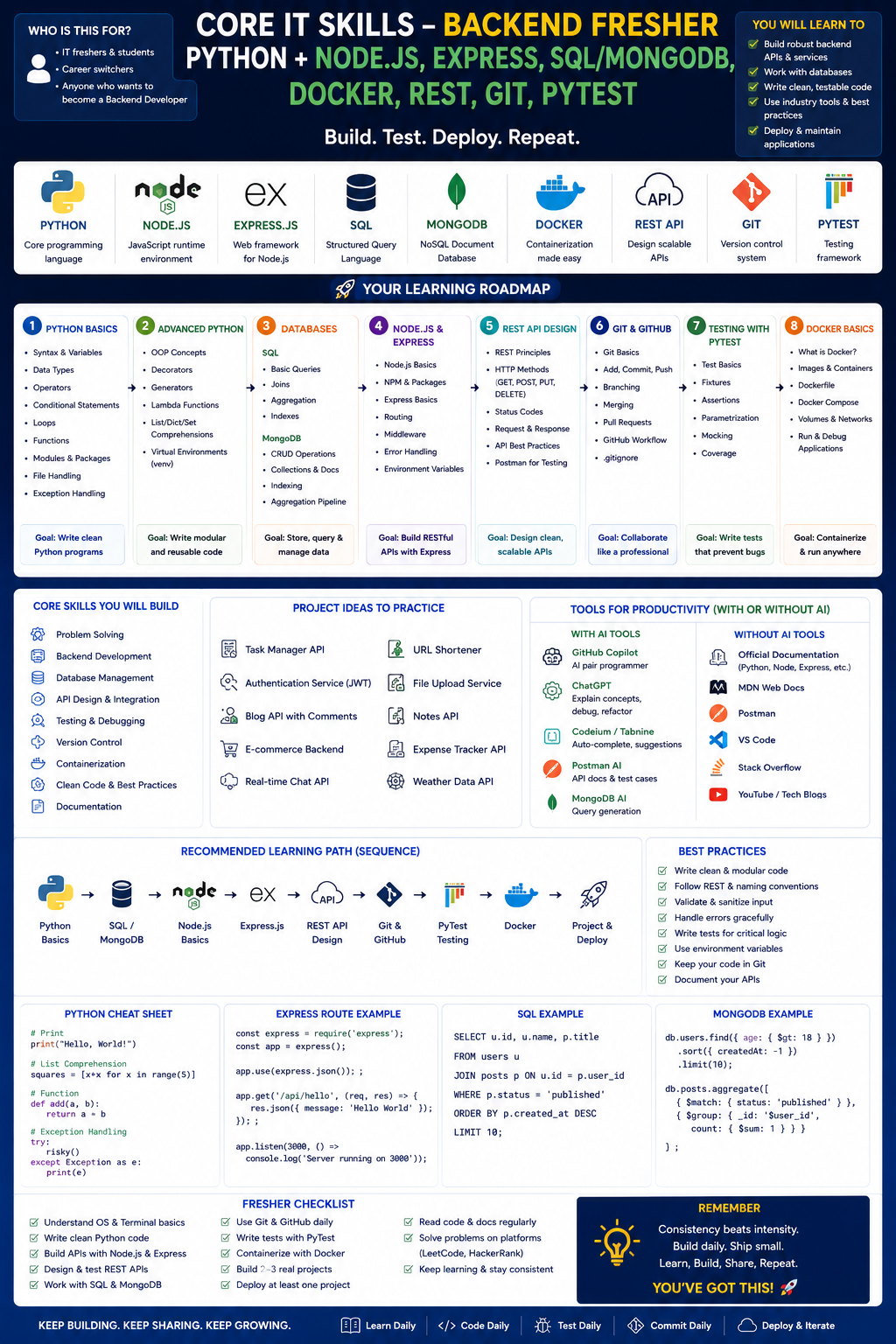
Here is a structured roadmap for a fresher aiming to become a Backend Developer using Python + Node.js, along with supporting tools like Express, SQL/MongoDB, Docker, REST, Git, and PyTest. The roadmap includes guidance on using AI tools ethically, free and paid resources, career applications, and next steps—all without tables.
Backend Development Roadmap (Fresher – Python + Node.js Focus)
Phase 1: Core Programming Foundations (First)
Python Fundamentals
- Syntax, data types, loops, functions, error handling
- Data structures: lists, dictionaries, sets, tuples
- File I/O and working with JSON/CSV
- OOP: classes, inheritance, encapsulation, magic methods
- Modules and package management (pip, virtual environments)
Node.js Fundamentals
- JavaScript basics (var/let/const, arrow functions, destructuring, spread/rest)
- Asynchronous patterns: callbacks, promises, async/await
- Event loop basics
- NPM: initializing projects, installing dependencies, scripts
Version Control (Git)
- init, add, commit, push, pull, branch, merge, rebase basics
- .gitignore, working with remote repos (GitHub/GitLab)
Recommended Practice
- Build a CLI-based to-do list in both Python and Node.js
- Solve 20–30 logic problems on HackerRank (Python) and LeetCode easy (JS)
Phase 2: Backend Basics – REST APIs & Databases
REST Principles
- HTTP methods (GET, POST, PUT, PATCH, DELETE)
- Status codes, headers, request/response structure
- Statelessness, resource naming conventions
Python Backend (Flask → FastAPI as progression)
- Flask: routes, request parsing, JSON responses, templates (basic)
- FastAPI: automatic docs, dependency injection, async support, Pydantic models
Node.js Backend (Express)
- Setting up Express server, routing, middleware
- Request handling, response formatting, error middleware
- Environment variables (dotenv)
SQL Databases
- Relational concepts: tables, primary/foreign keys, indexes
- Basic queries: SELECT, INSERT, UPDATE, DELETE, JOIN, GROUP BY
- Using SQLite (local) then PostgreSQL
- Python: SQLAlchemy ORM, psycopg2
- Node.js: Sequelize or Knex, pg package
NoSQL Databases (MongoDB)
- Document model, collections, embedded vs referenced documents
- Basic CRUD operations (find, insert, update, delete)
- Indexing and aggregation pipeline basics
- Python: PyMongo, MongoEngine
- Node.js: Mongoose ODM
Combined Practice Project
- Build a simple blog API with users, posts, and comments
- Implement both SQL (PostgreSQL) and MongoDB versions separately
- Secure routes with basic authentication (no JWT yet)
Phase 3: Testing, Containers, and Tooling
Testing in Python (PyTest)
- Writing test functions, assertions, fixtures
- Parametrized tests, mocking (pytest-mock)
- Coverage reporting (pytest-cov)
Testing in Node.js
- Jest: unit tests, async tests, setup/teardown
- Supertest for API endpoint testing
Docker Basics
- Dockerfile for Python app and Node.js app
- Building images, running containers
- Port mapping, volume mounting for live code reload
- Docker Compose: multi-container setup (app + database)
- Best practices: .dockerignore, non-root user, multi-stage builds (basic)
Additional Backend Skills
- Environment-based configuration (dev, staging, prod)
- Logging (Python: logging module, Node.js: winston/pino)
- Error handling middleware in Express and FastAPI
- API versioning basics
Phase 4: Integration & Polish
- Connecting all pieces: app + PostgreSQL + MongoDB + Redis (optional cache) with Docker Compose
- Writing integration tests for API endpoints
- Git branching strategy (feature branches, pull requests)
- Basic CI/CD concepts (GitHub Actions: run tests on push, build Docker image)
Capstone Projects
- URL Shortener – Python (FastAPI) + PostgreSQL + Redis for caching + Docker
- Task Manager API – Node.js (Express) + MongoDB + JWT auth + Jest tests
- Hybrid Mini-Project – One microservice in Python, another in Node.js, communicating via REST
Using AI Tools (Ethically & Effectively)
Use AI for:
- Explaining error messages and debugging hints
- Generating repetitive boilerplate (Express route skeletons, Dockerfile templates)
- Suggesting refactoring improvements (e.g., converting callback code to async/await)
- Creating unit test stubs from your functions
Avoid AI for:
- Writing entire API logic from scratch without understanding
- Generating database schema without thinking about relationships
- Bypassing error handling or security practices (SQL injection, no input validation)
Good AI Practice:
- Ask: "Explain how JWT refresh tokens work in Express step by step."
- After AI gives code, modify it to add logging or change one feature.
- Ask AI to generate a buggy version of your code, then fix it manually.
Free Training Resources
Learning Platforms
- YouTube (free):
- FreeCodeCamp – Backend Development with Node & Express
- Corey Schafer – Flask + Docker series
- Programming with Mosh – Python + SQL
- Net Ninja – MongoDB + Mongoose
- Documentation: FastAPI tutorial, Express guide, Docker get-started
- OpenClassrooms – free backend tracks (partial in English)
Practice & Challenges
- HackerRank (SQL, Python, JavaScript tracks)
- Exercism (Python and Node.js tracks with mentors)
- Roadmap.sh (backend roadmap interactive)
- Postman API Fundamentals (free student track)
- KataCoda (interactive Docker labs, some free)
Free Courses
- Microsoft Learn – Build Node.js apps, Docker containers
- Codecademy (free tier) – Python + Node.js basics
- MongoDB University – free MongoDB + Node.js courses
- PostgreSQL Tutorial (postgresqltutorial.com) – free
Paid Training Resources (optional but structured)
Udemy – Node.js: The Complete Guide (Maximilian Schwarzmüller)
- Best for: Node + Express + SQL/Mongo real projects
- Cost: ~$15 (sale)
Udemy – Python and Flask Bootcamp (Jose Portilla)
- Best for: Python web fundamentals
- Cost: ~$15 (sale)
Pluralsight – Backend Path: Python + Node.js combined
- Best for: professional depth
- Cost: $29/month
Docker Mastery (Udemy – Bret Fisher)
- Best for: containerization for devs
- Cost: ~$15 (sale)
Frontend Masters – Complete Intro to Databases + Node.js
- Best for: advanced backend patterns + testing
- Cost: ~$39/month
Recommendation: Start with free resources for months 1–2. If you need structure, buy Node.js: The Complete Guide + Docker Mastery on Udemy sale. Use YouTube for Python backend.
Career Applications
As a fresher with Python + Node.js backend skills, you can target:
- Junior Backend Developer – building APIs, working with databases
- API Integration Engineer – connecting services, writing middleware
- Cloud Support Associate (backend focus) – debugging app + DB issues
- DevOps Engineer (entry) – Docker, CI pipelines (with Python/Node scripting)
- Software Engineer (full-stack leaning backend) – small teams where you own the server
These roles exist in: fintech, e-commerce, edtech, healthtech, logistics, and SaaS companies.
Next Steps (Timeline: 3–9 months)
Months 1–2: Core + Git + SQL
- Python + Node basics → 2 CLI apps each
- SQL (PostgreSQL) basic queries + one simple database schema
- Git: push 5 small projects to GitHub
Months 3–4: REST APIs + Databases
- Express API with MongoDB (CRUD, Mongoose)
- FastAPI with PostgreSQL (SQLAlchemy)
- Docker: run each app + database in containers
Months 5–6: Testing, Integration, Polish
- PyTest for Python API
- Jest + Supertest for Node API
- Write Docker Compose files for both stacks
- Build two backend projects (one per primary stack)
Months 7–8: Specialize (choose primary stack)
- If Python-heavy: learn Celery, async tasks, Django basics
- If Node-heavy: learn NestJS, WebSockets (Socket.io)
- Learn JWT authentication, role-based access control (RBAC)
- Add one caching layer (Redis)
Months 9: Portfolio & Job Readiness
- Polish GitHub READMEs for 2–3 projects
- Document Docker setup and testing strategy
- Write a blog post (or LinkedIn article) on one backend concept
- Practice live coding: implement a small API endpoint in 30 min with tests
Interview Preparation
- System design basics (junior level): design a URL shortener or chat app
- SQL: medium-level joins, aggregation, indexing questions
- Node.js: event loop, streaming, cluster module
- Python: decorators, generators, context managers
- Docker: commands, Dockerfile best practices, volume vs bind mount
- Behavioral: explain why you chose MongoDB vs SQL for a project
Sample Weekly Plan (First 2 months)
Monday – Python fundamentals: functions, error handling (1 hour theory + type along)
Tuesday – Node.js fundamentals: async/await, promises (1 hour) + NPM scripts
Wednesday – Git practice: branch, merge, resolve a fake conflict
Thursday – SQL basics: SELECT, JOIN on a sample dataset (use SQLite or PostgreSQL)
Friday – Use AI tool to explain a confusing topic (e.g., event loop). Then solve 2 coding problems without AI.
Saturday – Build one small API endpoint: start with Flask (GET /health) + test manually with Postman
Sunday – Rest or review someone’s open-source backend PR on GitHub (look for beginner-friendly issues)
Final Advice for Freshers
- Do not learn both Python and Node deeply at the same time – pick one for month 1–2, then add the other.
- Master one database type first (PostgreSQL) before adding MongoDB.
- Docker is not optional for backend roles – learn enough to run your app + DB together.
- Testing separates junior from employable: start writing tests from month 2.
- Use AI as a faster Google, not a replacement for thinking through error messages.
- Join backend communities: r/node, r/flask, r/golang (optional), Python Discord, Dev.to backend tag.
Once you can build, test, and containerize a REST API in either Python or Node.js with a database, you are ready for internship or junior backend roles.




 Group / 1: 1 Sessions