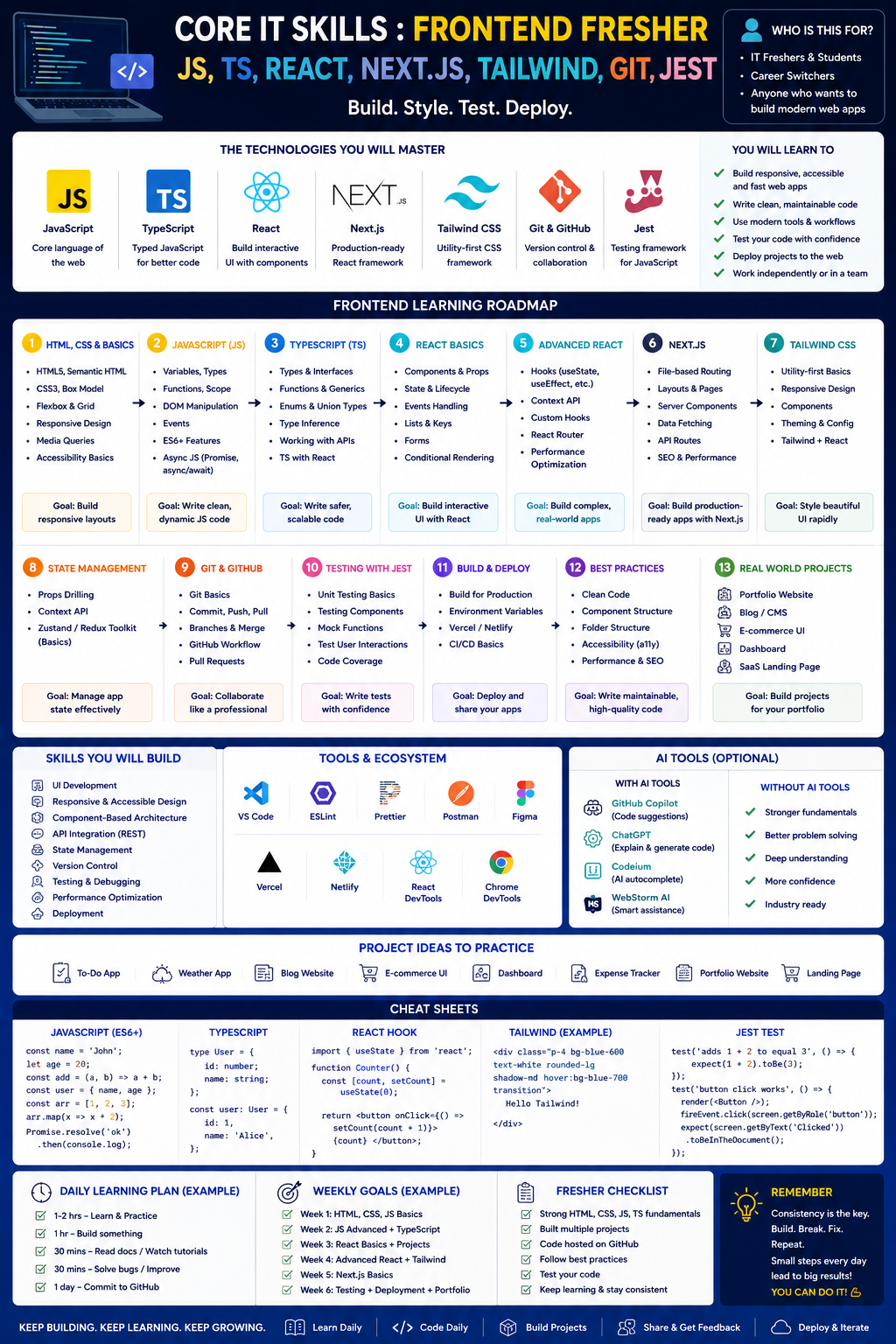
Here is a structured roadmap for a fresher aiming to become a Frontend Developer using JavaScript, TypeScript, React, Next.js, Tailwind CSS, Git, and Jest. The roadmap includes guidance on using AI tools ethically, free and paid resources, career applications, and next steps—all without tables.
Frontend Development Roadmap (Fresher – Modern Stack )
Phase 1: Foundations (Months 1-2)
Start with the three core technologies every website is built on. HTML provides the structure, CSS handles visual presentation, and JavaScript adds behavior and interactivity .
HTML & CSS
- Semantic HTML5 elements (header, nav, main, section, article, footer)
- Forms, input types, and validation
- CSS Box Model, Flexbox, and Grid layouts
- Responsive design with media queries
- CSS custom properties (variables) and basic animations
- Accessibility basics (ARIA labels, alt text, semantic structure)
JavaScript Essentials
- Variables (var, let, const), data types, and operators
- Functions (regular and arrow), scope, and closures
- Arrays and objects – including array methods (map, filter, reduce, find)
- DOM manipulation and event handling
- ES6+ features: destructuring, spread/rest operators, template literals, modules
- Asynchronous JavaScript: Promises, async/await, fetch API
- Error handling with try/catch
Version Control (Git)
- init, add, commit, push, pull, branch, merge
- Working with GitHub – repositories, pull requests, issues
Milestone Project: Build a responsive personal portfolio site using HTML, CSS, and vanilla JavaScript. Deploy it using GitHub Pages or Netlify .
Free Resources
- freeCodeCamp – Responsive Web Design and JavaScript Algorithms courses
- The Odin Project – Foundations track
- MDN Web Docs – Complete HTML, CSS, JavaScript tutorials
- YouTube: SuperSimpleDev, freeCodeCamp, Traversy Media
Paid Resources
- Scrimba – Frontend Developer Career Path (~$24.50/month annually, built in partnership with Mozilla and aligned with MDN Curriculum)
- Mimo – Front-End career path (9.99−9.99−39.99/month, includes AI tutor)
Phase 2: Modern Framework & Type Safety (Months 3-4)
With fundamentals in place, add a modern JavaScript framework and type safety. React is the strongest choice for job seekers in 2026, used by roughly 44.7% of professional developers .
React Fundamentals
- Components (functional components), JSX syntax
- Props and component composition
- State management with useState and useEffect hooks
- Event handling, conditional rendering, list rendering (keys)
- Forms and controlled components
- Fetching data from APIs within useEffect
- React Router for navigation
- Context API for simpler state sharing (before Redux)
TypeScript
- Types, interfaces, and type annotations
- Working with arrays, objects, and functions in TypeScript
- Unions, literals, and type narrowing
- Generics basics
- Integrating TypeScript into React components (defining Props and State types)
CSS Framework
- Tailwind CSS – utility-first styling, responsive design with Tailwind classes
- Customizing Tailwind config, using variants and directives
Milestone Project: Build a weather app or task manager with React and TypeScript, fetching data from an external API, styled with Tailwind CSS .
Free Resources
- React documentation (react.dev) – Learn React section
- TypeScript Handbook (typescriptlang.org)
- Tailwind CSS documentation
- YouTube: Codevolution (React + TypeScript), Jack Herrington
Paid Resources
- Scrimba – Learn React course (free tier available, part of career path)
- Udemy – React - The Complete Guide (Maximilian Schwarzmüller, ~$15 on sale)
- Frontend Masters – React and TypeScript courses ($39/month
Phase 3: Production Skills (Months 5-6)
This phase bridges the gap between projects that work and projects that are production-ready .
Testing (Jest + React Testing Library)
- Writing unit tests with Jest (matchers, mocks, spies)
- Testing React components with React Testing Library
- Testing user interactions (fireEvent, userEvent)
- Async testing (waitFor, findBy queries)
- Test coverage reporting
Build Tools
- Vite – fast development builds and optimized production output
- Understanding package managers (npm, pnpm, yarn)
- Environment variables (development vs production)
Performance Optimization
- Core Web Vitals (LCP, FID, CLS)
- Code splitting and lazy loading
- Image optimization (Next.js Image component)
- Memoization (React.memo, useMemo, useCallback)
API Integration Patterns
- REST APIs with fetch and Axios
- Basic GraphQL queries (if time permits)
Milestone Project: Build an e-commerce product page or analytics dashboard using React, TypeScript, and Jest testing. Include unit tests with React Testing Library to demonstrate production-level code quality .
Free Resources
- Jest documentation (jestjs.io)
- React Testing Library documentation (testing-library.com)
- Vitest documentation (vite-based testing alternative)
- YouTube: Web Dev Simplified (testing), Jack Herrington
Paid Resources
- Udemy – Hands-On React (includes TypeScript, Jest, React Testing Library, ~$15 on sale)
- Frontend Masters – Testing fundamentals
Phase 4: Advanced & Job Readiness (Months 7-8)
The final phase focuses on what gets you hired .
Next.js (App Router)
- Server-side rendering (SSR) vs static site generation (SSG)
- File-based routing (App Router)
- Data fetching patterns (fetch in Server Components, client-side fetching)
- API routes in Next.js
- Metadata and SEO optimization
- Middleware for authentication and redirects
- Image optimization (next/image)
- Deployment on Vercel
Advanced State Management
- Redux Toolkit (or Zustand as lighter alternative)
- When to use Context vs Redux vs Zustand
Portfolio Building
- Build 3-4 portfolio projects and deploy them to live URLs
- Write clean READMEs for each project (technologies used, decisions, live demo link)
- Treat each repository like a professional deliverable
Interview Preparation
- Technical interview practice: JavaScript fundamentals, React patterns, data structures
- LeetCode or HackerRank (easy-medium problems)
- System design basics (junior level): design a weather app or e-commerce product page
Capstone Project: Build a full application with authentication, database integration, and deployment using Next.js. This shows you can ship a complete, production-ready product that goes beyond a tutorial exercise .
Free Resources
- Next.js documentation (nextjs.org) – Learn section
- Vercel deployment guides
- YouTube: Fireship (Next.js), Lee Robinson (Vercel)
- LeetCode (free tier for practice)
Paid Resources
- Udemy – Next.js 14 & React (Maximilian Schwarzmüller, ~$15 on sale)
- Frontend Masters – Complete Intro to React + Next.js ($39/month)
Using AI Tools (Ethically & Effectively)
The 2026 hiring landscape increasingly values developers who are masters of AI-assisted coding. Companies are looking for developers who can use AI tools to accelerate their workflow while maintaining quality and security standards .
Use AI for:
- Debugging errors and explaining error messages
- Generating repetitive boilerplate code (component skeletons, test stubs)
- Suggesting refactoring improvements
- Explaining complex concepts in simpler terms
- Generating mock data for testing
Avoid AI for:
- Writing entire application logic without understanding
- Generating code you cannot explain
- Bypassing security practices or accessibility requirements
- Solving assignment questions without learning
Good AI Practice:
- Prompt example: "Explain React useEffect cleanup function like I'm 10. Then give me 3 buggy examples to fix."
- After AI generates code, type it manually, add comments, and modify at least one feature
- Ask AI to test you: "Give me 5 React component bugs to find and fix."
- Use AI as a faster Google, not a replacement for thinking
Free Training Resources (Summary)
Complete Learning Paths
- freeCodeCamp – Full frontend curriculum (HTML, CSS, JavaScript, React, testing) – completely free
- The Odin Project – Full Stack JavaScript track (includes frontend) – completely free
Individual Courses (Free)
- Scrimba – Free courses: Learn HTML and CSS (5.7 hrs), Learn JavaScript (9.4 hrs), Learn React (15.1 hrs)
- YouTube – freeCodeCamp, Traversy Media, Web Dev Simplified, Codevolution, Jack Herrington
Practice Platforms
- HackerRank – JavaScript and TypeScript tracks
- LeetCode – Easy-medium problems for logic and algorithms
- Exercism – JavaScript and TypeScript tracks with mentors
Paid Training Resources (Optional but Structured)
Scrimba – Frontend Developer Career Path
- Best for: Hands-on learners wanting a structured, MDN-aligned path
- Price: ~24.50/monthonannualplan(or
- 24.50/monthonannualplan(or294/year)
- Duration: 81.6 hours, includes interactive scrims where you edit code directly in the browser
- Includes: HTML, CSS, JavaScript, React, TypeScript, responsive design, accessibility, UI design, and solo projects
Mimo – Front-End Career Path
- Best for: Complete beginners who like AI-powered learning and mobile practice
- Price: Free tier available; Pro 9.99/month,Max
- 9.99/month,Max39.99/month
- Includes: HTML, CSS, JavaScript, React, TypeScript (13 sections, 85 challenges, 13 portfolio projects)
Udemy (Courses ~$15 on sale)
- React - The Complete Guide (Maximilian Schwarzmüller)
- Next.js 14 & React (Maximilian Schwarzmüller)
- Hands-On React with TypeScript and Testing (Nick Ovchinnikov) – includes Jest, React Testing Library
Frontend Masters
- Best for: Working developers and serious learners wanting depth
- Price: $39/month
- Includes: Complete Intro to React, TypeScript, Testing, Next.js
Meta Front-End Developer Professional Certificate (Coursera)
- Best for: Learners wanting a recognized certificate
- Price: ~$59/month, ~7 months duration
Career Applications
Frontend development remains one of the most accessible entry points into tech in 2026. JavaScript is used by 66% of professional developers, and React dominates with roughly 44.7% adoption .
As a fresher with this skillset, you can target:
- Junior Frontend Developer – building UI components, implementing designs, integrating APIs
- React Developer – specializing in React-based applications
- UI Developer – focusing on responsive, accessible interfaces
- Frontend Engineer (startups) – broader role including some backend via Next.js API routes
- Technical Support Engineer (frontend focus) – debugging UI issues
Salary Expectations (2026) – U.S. Bureau of Labor Statistics
- Web developers and digital designers: median $98,090 per year
- Senior frontend roles (under software development): median $133,080 per year
- Job growth projected at 7% through 2034 with roughly 14,500 annual openings
Next Steps (Timeline: 6-12 months)
Months 1-2: Foundations
- Complete HTML + CSS + JavaScript basics
- Build 2 static websites (personal portfolio, landing page)
- Learn Git basics – push all code to GitHub
- Milestone: Responsive personal site deployed on Netlify
Months 3-4: Framework + Type Safety
- Build React app with TypeScript (weather app or task manager)
- Learn Tailwind CSS – restyle your portfolio
- Practice state management (useState, useEffect, Context)
- Milestone: React + TypeScript app fetching from public API
Months 5-6: Production Skills
- Learn Jest + React Testing Library – add tests to your React app
- Learn Vite for faster builds
- Study performance optimization (Core Web Vitals, lazy loading)
- Milestone: Tested React application with good coverage
Months 7-8: Advanced + Portfolio
- Build Next.js application with App Router
- Deploy on Vercel
- Polish 3-4 portfolio projects with clean READMEs and live demos
- Practice technical interview questions (LeetCode easy-medium)
- Milestone: Full Next.js app with SSR/SSG + deployment
Months 9+: Job Readiness
- Apply for junior frontend developer roles
- Contribute to open-source (look for "good first issue" labels)
- Network on LinkedIn and attend local tech meetups
- Continue learning: advanced TypeScript, GraphQL, or backend basics
Sample Weekly Plan (First 2 months)
Monday – HTML/CSS: Watch tutorial (1 hour) + type along. Build a small component (navigation bar, card layout).
Tuesday – JavaScript fundamentals: Solve 2-3 coding problems on array methods and DOM manipulation.
Wednesday – Continue JavaScript: Build a small interactive feature (accordion, tab component, image slider).
Thursday – Git practice: Initialize repo, commit changes, push to GitHub. Review previous code and refactor.
Friday – Use AI tool to explain a tricky concept (closures, event loop, this keyword). Then solve 2 exercises without AI.
Saturday – Work on portfolio site – add responsive design and deploy to GitHub Pages.
Sunday – Rest or review someone else's open-source pull request (look for beginner-friendly repos).
Final Advice for Freshers
- Master fundamentals before frameworks – JavaScript is the engine; React is just a library. Weak JavaScript leads to React confusion .
- Build projects consistently – A portfolio of deployed projects matters more than certificates when applying .
- Use AI as a tutor, not a crutch – The 2026 hiring market values developers who can efficiently use AI tools while understanding the code they produce .
- Learn TypeScript early – At 44% developer adoption, TypeScript is quickly becoming a requirement rather than a nice-to-have .
- Testing separates junior from employable – Start writing tests from month 3-4.
- No computer science degree? No problem – Employers prioritize portfolio projects and problem-solving ability over degrees .
Once you can build, test, and deploy a responsive React or Next.js application with TypeScript and Tailwind CSS, you are ready for internship or junior frontend roles.




 Group / 1: 1 Sessions