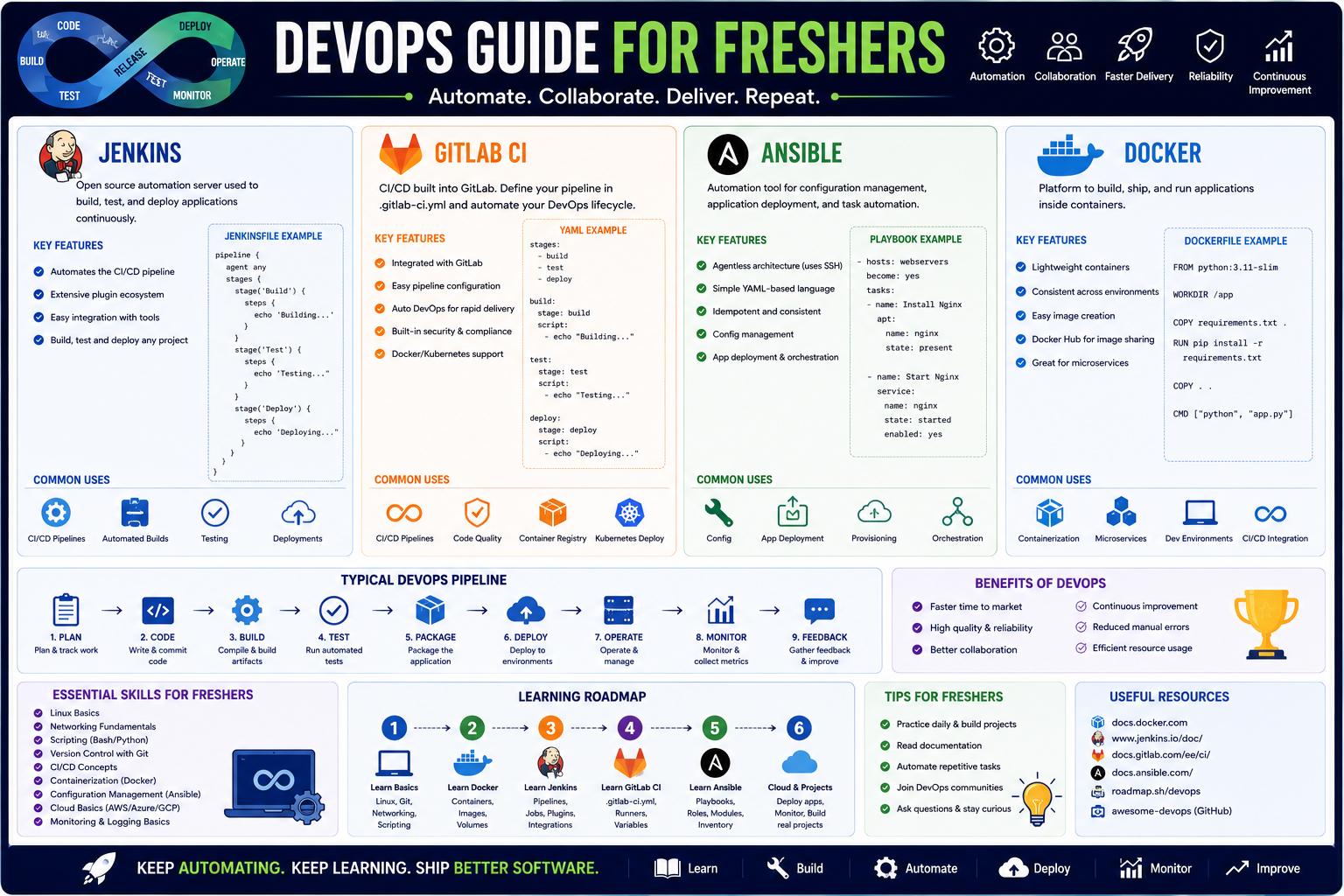
This roadmap is designed for a fresher—someone comfortable with basic computer operations and ready to build the automation mindset that modern software teams depend on. You will learn Jenkins, GitLab CI, Ansible, and Docker by working on an end-to-end project from your laptop to a simulated cloud environment. The goal is to transform manual deployment processes into automated, repeatable, and reliable pipelines. This path prepares you for entry-level roles like Junior DevOps Engineer, Cloud Automation Associate, or CI/CD Specialist in a market where automation skills remain in critical demand.
🗺️ Phase 1: The Mindset Shift – What DevOps Really Is (Weeks 1-2)
Before you touch any tool, you must understand that DevOps is not about tools. It is about culture, automation, measurement, and sharing. Tools enable the practice, but the mindset—breaking down silos between development and operations—is what makes DevOps successful .
Core Principles to Master
DevOps isn't a job title you hold while everyone else works traditionally. It is a way of working that emphasizes continuous integration, continuous delivery, microservices, infrastructure as code, monitoring and logging, and communication and collaboration. Your goal is not to become an expert in every tool but to understand how they fit together to solve real problems .
Key vocabulary for a fresher:
- CI (Continuous Integration): Automatically testing and merging code changes multiple times per day.
- CD (Continuous Delivery/Deployment): Automatically deploying validated code to production environments.
- IaC (Infrastructure as Code): Managing servers and networks using configuration files instead of manual clicks.
- Containerization: Packaging applications with their dependencies into portable units.
Prerequisite Check
You need basic command-line familiarity (just navigating directories and running commands), a GitHub account, and a computer with internet access. No prior DevOps experience is required .
Practice Goal for Phase 1: Automate a simple repetitive task on your own computer—like renaming multiple files or backing up a folder—using a Bash script. This validates your understanding that automation is the heart of DevOps.
Free Resources for Phase 1:
- DevOps Roadmap 2026 (DEV Community): A comprehensive, community-validated roadmap breaking the journey into clear phases from fundamentals to production systems. It emphasizes building projects over just learning tools .
- KodeKloud Free Labs: Offers hands-on lab environments for DevOps prerequisites including CLI navigation, package management, and programming basics for Python. You can practice without setting up your own environment .
🐧 Phase 2: Foundations – Linux, Networking, and Version Control (Weeks 3-6)
You cannot do DevOps without Linux. Almost all cloud servers run Linux, and you will interact with it daily through the command line.
Linux Fundamentals
Focus on the skills you will use every single day:
- File system navigation:
ls, cd, pwd, mkdir, rm, cp, mv - Permissions:
chmod, chown, understanding read/write/execute - Process management:
ps, top, kill, systemd - Package management:
apt (Ubuntu/Debian) or yum/dnf (RHEL/CentOS) - Networking basics:
curl, ping, ss, understanding ports
Version Control with Git
Git is non-negotiable. Every DevOps pipeline starts with code in a repository.
Core skills to master:
- Basic commands:
git clone, add, commit, push, pull, log - Branching and merging:
git branch, checkout, merge, understanding merge conflicts - Collaboration workflows: Pull requests, code reviews, fork-based workflows
Practice Goal: Create a GitHub repository. Make five commits across two branches. Create a pull request and merge it. Resolve a merge conflict intentionally.
Free Resources for Phase 2:
- KodeKloud Linux Administration (20 labs): Free hands-on labs covering shell scripting, package management, networking, security, and system administration. Perfect for building muscle memory .
- KodeKloud Git & Version Control (15 labs): Labs from basics to advanced topics including branching, merging, remote repositories, and collaboration workflows .
- DevOps Roadmap 2025 GitHub Repository: A comprehensive guide covering Linux OS fundamentals, file system management, and networking concepts like TCP/IP, DNS, and VPN .
📦 Phase 3: Containerization with Docker (Weeks 7-10)
Docker is the tool that makes "it works on my machine" a thing of the past. It packages applications and their dependencies into isolated containers that run identically anywhere.
Core Docker Concepts
- Dockerfile: A text file with instructions for building a container image. You will write your first Dockerfile in this phase.
- Images and Containers: Images are blueprints (like a class in programming). Containers are running instances (like objects).
- Docker Compose: Define and run multi-container applications (e.g., a web app + database + cache) with a single command.
- Container Registry: Storing and sharing images (Docker Hub, GitHub Container Registry) .
Your Docker learning sequence:
- Run your first container:
docker run hello-world - Write a Dockerfile that copies a simple application into a container
- Build an image and run it locally
- Push your image to Docker Hub
- Use Docker Compose to run a web app with a database
Practice Goal: Containerize a simple "Hello World" web application (Python Flask or Node.js). Write the Dockerfile, build the image, run the container, and push the image to Docker Hub. Document each step.
Free Resources for Phase 3:
- KodeKloud Docker (9 labs): Hands-on labs covering basic commands, images, networking, storage, and Docker Compose for multi-container applications. The labs run in your browser .
- KodeKloud Studio Labs: Additional free lab environments for practicing containerization without installing anything locally .
Paid Resources for Phase 3:
- DevOps Complete Course: Zero to Hero (Udemy): Covers containerization with Docker alongside the full DevOps stack. Updated June 2025. Typically $10-15 during sales .
- DevOps w praktyce – Kurs video (Polish language): Includes 1.5 hours of Docker content including Docker Compose, Docker Swarm, and Portainer. Basic level .
⚙️ Phase 4: Configuration Management with Ansible (Weeks 11-14)
Ansible automates server configuration. Instead of manually SSHing into servers to install packages and change settings, you write playbooks that describe the desired state, and Ansible makes it happen.
Why Ansible for Freshers
Ansible uses YAML syntax, which looks like plain English. It is agentless—you do not need to install anything on the target servers beyond SSH access. This makes it the most accessible configuration management tool for beginners .
Core Ansible Concepts
- Inventory: The list of servers Ansible manages
- Playbooks: YAML files containing tasks to execute
- Modules: Reusable units of work (e.g.,
apt, copy, service, git) - Variables: Making playbooks reusable across different environments
Your Ansible learning sequence:
- Set up an inventory file with one server (localhost is fine)
- Write an ad-hoc command:
ansible all -m ping - Write a playbook that installs nginx, starts the service, and copies an index.html file
- Run the playbook and verify the web server works
- Add variables to make the playbook configurable
Practice Goal: Write an Ansible playbook that provisions a complete web server on a local VM or cloud instance. The playbook should install nginx, configure a virtual host, copy your static website files, and ensure the service is running.
Free Resources for Phase 4:
- KodeKloud Ansible (7 labs): Hands-on labs covering YAML syntax, inventory management, playbooks, modules, variables, and conditional logic .
- Coursera DevOps Complete Course: Includes Ansible with practical labs and integration with Terraform. Free to audit .
- DevOps Roadmap 2026 (Luca Berton): Clear explanation of Ansible's role alongside Terraform, written by an experienced infrastructure engineer .
Paid Resources for Phase 4:
- DevOps w praktyce (Polish): 8-hour course with dedicated sections on Ansible vs Terraform, Ansible installation, and playbook writing .
🔄 Phase 5: CI/CD Pipelines – Jenkins and GitLab CI (Weeks 15-20)
CI/CD is where automation comes together. You will build pipelines that automatically build, test, and deploy code every time a developer pushes changes to the repository.
Jenkins vs. GitLab CI
Jenkins is the most popular open-source automation server. It is highly extensible but requires more setup. GitLab CI is integrated with GitLab repositories, offers simpler configuration, and is increasingly popular in 2026 .
As a fresher, you should understand both but focus on one for hands-on practice. GitLab CI has a gentler learning curve because the configuration lives inside your repository.
Core Pipeline Concepts
- Pipeline as Code: Your pipeline definition lives in a file (Jenkinsfile or .gitlab-ci.yml) alongside your application code
- Stages: Sequential steps (e.g., "build" → "test" → "deploy")
- Jobs/Runners: The machines that execute pipeline tasks
- Artifacts: Outputs from jobs (like compiled binaries or test reports)
Your CI/CD learning sequence:
- Set up a Jenkins server locally (using Docker) or enable GitLab CI on a test project
- Create a pipeline with three stages: Build (install dependencies), Test (run unit tests), Package (build a Docker image)
- Configure the pipeline to trigger automatically on every git push
- Add a deployment stage that pushes the Docker image to a registry
- For Jenkins, learn to configure agents and manage credentials
Practice Goal: Build a complete CI/CD pipeline for a simple application. The pipeline should:
- Trigger on push to the main branch
- Run unit tests (fail if any test fails)
- Build a Docker image
- Push the image to Docker Hub
- Deploy the container to a server (even your local machine counts)
This single pipeline encompasses most of what junior DevOps engineers do daily.
Free Resources for Phase 5:
- KodeKloud Jenkins (5 labs): Labs covering installation, configuration, CLI usage, backup/restore, and building continuous delivery pipelines .
- KodeKloud GitLab & Version Control (15 labs): Includes GitLab CI/CD workflows .
- Coursera DevOps Complete Course: Extensive Jenkins coverage including pipeline syntax, GitHub webhooks, and integration with Maven. Free to audit .
Paid Resources for Phase 5:
- Udemy DevOps Complete Course: Zero to Hero: Updated June 2025, covers building robust CI/CD pipelines with Jenkins integrated with Docker and Kubernetes .
☁️ Phase 6: Cloud Platforms and Infrastructure as Code (Weeks 21-24)
Your pipelines need somewhere to run and deploy to. That is the cloud. You will learn one major cloud provider (AWS is the market leader) and Terraform for provisioning infrastructure.
Cloud Provider Basics
AWS (Amazon Web Services) is recommended for freshers because it has the largest market share, the most learning resources, and a generous free tier. Focus on these services initially:
- EC2: Virtual servers in the cloud
- IAM: Users, groups, and permissions
- S3: Object storage for artifacts and backups
- VPC: Your private network in the cloud
Terraform for Infrastructure as Code
Terraform lets you define your entire cloud infrastructure in configuration files. Version control your servers just like you version control your code.
Core Terraform concepts:
- Providers: Plugins for different cloud platforms (aws, azurerm, google)
- Resources: Individual components (aws_instance, aws_s3_bucket)
- State: Terraform tracks what it has created
- Modules: Reusable collections of resources
Practice Goal: Write Terraform configuration that provisions an EC2 instance, security group, and S3 bucket. Run terraform plan to see what will change, then terraform apply to create the resources. After verifying, run terraform destroy to clean up (avoid unexpected cloud costs).
Free Resources for Phase 6:
- A Cloud Guru / Pluralsight (Free tier): AWS fundamentals courses. Free tier available with limited access.
- Terraform Registry: Free documentation and examples for all major providers.
- AWS Free Tier: New accounts receive 12 months of free access to EC2, S3, and other core services. Set up a budget alarm immediately.
📊 Phase 7: Monitoring, Observability, and Portfolio Building (Weeks 25-26)
You cannot fix what you cannot see. Monitoring tells you when something is wrong. Observability helps you understand why.
Prometheus and Grafana
Prometheus collects metrics from your applications and infrastructure. Grafana visualizes those metrics in dashboards. Together, they form the standard open-source monitoring stack .
What to monitor:
- Infrastructure metrics: CPU, memory, disk, network
- Application metrics: Request rates, error rates, latency
- Pipeline metrics: Build duration, test pass rate, deployment frequency
Practice Goal: Set up Prometheus to scrape metrics from a running application. Install Grafana, connect it to Prometheus, and build a simple dashboard showing CPU usage and request latency.
Free Resources for Phase 7:
- Prometheus Documentation: Free, comprehensive, with getting-started guides.
- Grafana Playground: Free demo environment to practice building dashboards.
📚 Consolidated Resource Toolkit
Free Hands-On Labs and Platforms
KodeKloud Free Labs provides browser-based lab environments for practicing DevOps skills without any local setup. Available labs include: CLI navigation, package management, DNS, Python basics, Linux administration (20 labs), Docker (9 labs), Git (15 labs), Ansible (7 labs), Jenkins (5 labs), and Kubernetes (7 labs) .
KodeKloud Studio Labs offers additional free lab environments across categories including Content Hubs and Educational Library, perfect for practicing what you learn .
GitHub DevOps Roadmap 2025 is a community-curated repository covering Linux OS fundamentals, networking concepts, Git workflows, scripting with Python and Bash, CI/CD with Jenkins and GitHub Actions, Docker, Kubernetes, Terraform, Ansible, Prometheus, Grafana, and DevSecOps practices .
Free Structured Learning Paths
DevOps Roadmap 2026 (DEV Community) presents a clear seven-phase progression from programming fundamentals to production systems. Phase 1 covers Python/Go and Linux (Bash, processes, systemd, permissions). Phase 2 covers Git, GitHub, and networking (DNS, HTTP/HTTPS, TCP/IP). Phase 3 covers cloud providers (AWS, Azure, GCP) and IaC (Terraform, Ansible). Phase 4 covers CI/CD with Jenkins and GitLab CI. Phase 5 covers Docker and Kubernetes. Phase 6 covers monitoring with Prometheus and Grafana. Phase 7 covers DevSecOps security scanning .
Coursera DevOps Learning Roadmap provides comprehensive content including a DevOps Complete Course specialization from Packt (updated May 2025). The course covers: DevOps principles and tools including version control, CI, and containerization; building CI/CD pipelines with Jenkins and Maven; containerization with Docker and Kubernetes; Git version control strategies; Ansible for automation; and monitoring with Prometheus and Grafana. Free audit option available .
Coursera DevOps Complete Course includes projects such as setting up Git environments, integrating GitHub with local repositories, installing and configuring Maven and Jenkins, creating Jenkins jobs with GitHub webhooks, implementing CI/CD workflows using Jenkins pipelines, writing and executing Ansible playbooks for automated deployments, and monitoring applications using Prometheus and Grafana .
DevOps Roadmap 2026 (Luca Berton) offers an 18-year infrastructure engineer's perspective with clear month-by-month progression. Phase 1 (months 1-3) covers Linux fundamentals (filesystem, bash, systemd, networking), Git (branching strategies, pull requests), and networking basics. Phase 2 (months 4-6) covers Docker (multi-stage builds, Compose), CI/CD pipelines (GitHub Actions most popular, Jenkins for enterprise), and IaC (Terraform, Ansible). Phase 3 (months 7-9) covers Kubernetes core concepts and GitOps. Phase 4 (months 10-12) covers cloud providers and observability. Includes certification recommendations including CKA .
Free Community Content
DevOps Project Ideas (DEV Community) features community discussion of real-world project ideas including end-to-end CI/CD pipelines with Jenkins + Docker + Kubernetes, Ansible-based infrastructure automation with dynamic inventory, GitOps workflows with GitLab and ArgoCD, auto-scaling applications on AWS EKS with monitoring, and secure Jenkins pipelines using Vault .
Free AI-Assisted Learning Tools
ChatGPT/Claude as a DevOps Tutor can explain complex pipelines in plain language. Paste a Jenkinsfile or GitHub Actions YAML and ask for line-by-line explanation. Ask for debugging help when pipelines fail—"My Docker build fails with 'permission denied'. What could cause this?" Ask for best practices—"Review my Ansible playbook and suggest improvements." Generate practice scenarios—"Create a broken Jenkins pipeline for me to debug."
GitHub Copilot (free for students) can accelerate writing Terraform configurations, Dockerfiles, and pipeline definitions through intelligent code completion.
Paid Training (Worth Considering After Free Resources)
Udemy DevOps Complete Course: Zero to Hero (Mohd Shahid, updated June 2025) offers 3.5 hours of focused content covering core DevOps concepts, AWS services (EC2, IAM, VPC, S3), Linux administration, Git and GitHub, Docker, Kubernetes, Terraform, Ansible, Jenkins CI/CD pipelines, and monitoring with Prometheus and Grafana. Includes practical labs and interview questions. Typically $10-15 during sales .
Packt DevOps Complete Course (available on Coursera, updated May 2025) is a comprehensive program from Packt, a global technical learning content provider with twenty years of experience. The specialization includes hands-on projects using Git, Maven, Jenkins, Docker, Kubernetes, Ansible, Prometheus, and Grafana .
DevOps w praktyce – Kurs video (Polish language, 8 hours 1 minute, 51 lessons, basic level) from Helion covers Jenkins, Ansible, Terraform, and Docker. Includes practical scenarios on DigitalOcean, Ubuntu, and C#. Created by Piotr Kośka .
Recommended Certifications for Career Validation
CKA (Certified Kubernetes Administrator) from CNCF is described as the "gold standard" Kubernetes certification and is worth getting on your DevOps journey, though advanced for freshers .
AWS Certified DevOps Engineer validates expertise in CI/CD, monitoring, and infrastructure automation on AWS .
💼 Career Application & Next Steps
DevOps engineers are in high demand because they bridge the gap between development and operations. As a fresher, your entry point is to prove you can automate meaningful workflows, not just list tools.
1. The Fresher Entry Point
Junior DevOps Engineer focuses on maintaining CI/CD pipelines, assisting with infrastructure automation, monitoring systems, and supporting development teams. Requires Linux fundamentals, scripting, CI/CD basics, and containerization knowledge .
Cloud Automation Associate focuses on automating cloud infrastructure using IaC, managing deployments, and implementing monitoring. Requires one cloud provider (AWS recommended) and Terraform/Ansible basics.
CI/CD Specialist (Junior) focuses exclusively on pipeline maintenance and improvement—creating Jenkins jobs, writing GitHub Actions workflows, troubleshooting build failures. A great entry point if you enjoy debugging.
Industries actively hiring include technology companies (SaaS, startups), financial services (automating trading platforms), e-commerce (handling peak traffic), healthcare (compliance automation), and consulting (client infrastructure modernization).
2. Career Progression
The standard progression path in DevOps follows experience levels:
Junior (0-2 years) focuses on Linux, scripting, and CI/CD pipelines. Engineers at this level typically master the toolchain and learn to automate routine tasks .
Mid (2-4 years) focuses on Kubernetes, IaC, and cloud architecture. Engineers begin designing systems and mentoring juniors.
Senior (4-7 years) focuses on architecture, security, and mentoring teams. Engineers make strategic decisions about tooling and practices.
Staff (7+ years) focuses on strategy, platform design, and organization-wide impact. Engineers influence multiple teams and departments.
Principal (10+ years) focuses on industry leadership through speaking, writing, and community contribution .
3. Build Your Portfolio (Three Definitive Projects)
Project 1 (Complete CI/CD Pipeline):
- What: Deploy a Node.js or Python application using an end-to-end pipeline. Use Docker to containerize the app. Use Jenkins or GitLab CI to build, test, and deploy. Deploy to a cloud provider (AWS free tier EC2 or a cheap VPS). Add a deployment stage that uses Docker Compose to run the container. Include automated testing that fails the pipeline if tests fail.
- The Narrative: "I built an automated CI/CD pipeline that reduces manual deployment time from 20 minutes to 30 seconds and ensures only tested code reaches production."
- Why: This is the core deliverable of a DevOps engineer. It proves you understand the entire software delivery lifecycle .
Project 2 (Infrastructure as Code Automation):
- What: Write Terraform configuration that provisions a complete environment: VPC, EC2 instance, security groups, and an S3 bucket for artifacts. Then write Ansible playbooks that configure the EC2 instance (install web server, deploy your application, start services, configure firewall). Connect the two tools so Terraform outputs the EC2 IP address that Ansible uses.
- The Narrative: "I automated the entire infrastructure provisioning process, replacing manual server setup with version-controlled, repeatable code that creates identical environments every time."
- Why: Infrastructure as Code is what separates traditional sysadmins from modern DevOps engineers. This project proves you can code infrastructure .
Project 3 (Monitoring and Observability Setup):
- What: Deploy Prometheus and Grafana alongside your running application. Configure Prometheus to scrape metrics from your application (use a client library to expose metrics endpoints). Build a Grafana dashboard showing application request rate, error rate, and latency percentiles. Set up alerts that notify you (email or Slack) when error rate exceeds 5% or latency exceeds 500ms.
- The Narrative: "I implemented comprehensive monitoring that provides real-time visibility into application health and automatically alerts on anomalies."
- Why: Monitoring is often overlooked but critical in production. This demonstrates you care about keeping systems healthy after deployment .
How to Document These Projects: For every project, create a GitHub repository with a detailed README containing: the architecture diagram (draw.io is free), technologies used, step-by-step setup instructions, troubleshooting common errors, and screenshots of successful pipeline runs and dashboards.
4. The Interview Question You Will Be Asked
Question: "Our team currently deploys manually by SSHing into servers and running git pull. This causes frequent errors and delays. How would you design an automated solution?"
Your Answer: "I would build a CI/CD pipeline. First, I would containerize the application using Docker so it runs identically everywhere. Then, I would set up Jenkins or GitLab CI to monitor the repository. When developers push code, the pipeline automatically triggers: it builds a new Docker image, runs unit tests, pushes the image to a registry, and then connects to the server via SSH to pull and restart the container. I would add a testing stage that fails the pipeline if tests break, preventing bad code from reaching production. To make deployments safe, I would implement a blue-green strategy: deploy the new version alongside the old one, run smoke tests, then switch traffic. Finally, I would set up Prometheus and Grafana to monitor application health after deployment, with alerts if the new version causes errors. The result: deployments become a button click (or fully automatic), releases are faster, and failures can be rolled back instantly."
This answer demonstrates understanding of the entire pipeline, safety mechanisms (blue-green deployments), and production readiness (monitoring).
5. Sample Resume Entry
text
Junior DevOps Engineer (Project-Based) | Portfolio

• Built automated CI/CD pipeline using Jenkins and Docker, reducing application deployment time from manual 15 minutes to automated 45 seconds
• Provisioned cloud infrastructure using Terraform (AWS EC2, VPC, S3) and configured servers using Ansible playbooks with 40+ tasks
• Containerized 3 applications using multi-stage Docker builds, reducing final image sizes by 60%
• Implemented monitoring stack (Prometheus + Grafana) with custom dashboards and alerts for application health metrics
• Managed version control workflows including Git branching strategies, pull request reviews, and automated testing integration
• Documented all projects with architecture diagrams and step-by-step reproduction guides
🎯 Your Next Steps for This Week
Do not try to learn Jenkins, Docker, Ansible, and GitLab CI simultaneously. The most efficient path is to automate one small thing end-to-end, then expand.
Step 1: Set Up Your Lab Environment
Install Docker Desktop (free) and VirtualBox (free). Create an account on GitHub (free). Sign up for AWS Free Tier and immediately set a budget alarm for $10. This takes one evening.
Step 2: Write Your First Dockerfile
Choose a simple application (a "Hello World" in any language). Write a Dockerfile that runs it. Build and run the container. Push it to Docker Hub. Document the commands in a text file.
Step 3: Write Your First Ansible Playbook
On your local machine, write a playbook that installs a package, creates a directory, and copies a file. Run it with ansible-playbook against localhost. Verify it worked.
Step 4: Build Your First Pipeline
Set up Jenkins using Docker (see official documentation). Create a freestyle job that runs a simple shell command on build trigger. Then upgrade to a pipeline job that pulls code from GitHub.
Step 5: Document Everything in GitHub
Create a repository named "devops-fresher-portfolio." For each project, write a README explaining what you built, how to run it, and what you learned. Include screenshots.
Step 6: Connect the Pieces
Take your Dockerized application. Create a Jenkins pipeline that:
- Checks out code from GitHub
- Builds the Docker image
- Pushes to Docker Hub
- Stops and restarts the container on your server (or local machine)
The moment you push code to GitHub and watch Jenkins automatically build, test, and deploy your application, you will understand the power of DevOps. That feeling—watching automation eliminate manual work—is why this field exists. Start that pipeline today.
This response is AI-generated, for reference only.




 Group / 1: 1 Sessions