This roadmap is designed for a fresher—someone with curiosity, basic logic skills, and the drive to build complete web applications from scratch. You will learn React, Node.js, Python, Java, and SQL by working on an end-to-end project from your laptop to cloud deployment. The goal is to transform you from someone who follows tutorials into someone who can design databases, build APIs, create responsive interfaces, and ship working software. This path prepares you for entry-level roles like Junior Full Stack Developer, Software Engineer, or Web Application Developer in a market where companies increasingly value developers who understand the entire product lifecycle.
The developer ecosystem in 2026 is overwhelming—frontend frameworks, backend languages, cloud platforms, and AI tools seem endless. But here is the truth: hiring is not about touching every trending framework. It is about whether you understand how software behaves in production—how it scales, fails, secures data, and delivers value. Focus on one solid stack, build 3–5 serious projects, deploy at least one to the cloud, and practice explaining your architecture decisions.
🗺️ Phase 1: The Mindset Shift – What Full Stack Means in 2026 (Weeks 1-2)
Before writing any code, understand that full stack development is not about knowing every tool. It is about understanding how applications are structured end-to-end and being able to own a feature from database to UI.
What "Developer" Actually Means in 2026
A strong developer is now expected to:
- Design scalable systems
- Integrate AI responsibly where it adds value
- Understand cloud deployment basics
- Secure applications by default
- Collaborate across product, design, and DevOps
Full stack developers are especially valued because they understand how to build responsive, user-friendly interfaces, develop secure and scalable backend systems including APIs, and deploy applications to the cloud so they perform reliably as usage grows. This combination gives companies end-to-end execution power within a single role.
The 2026 Full Stack Landscape
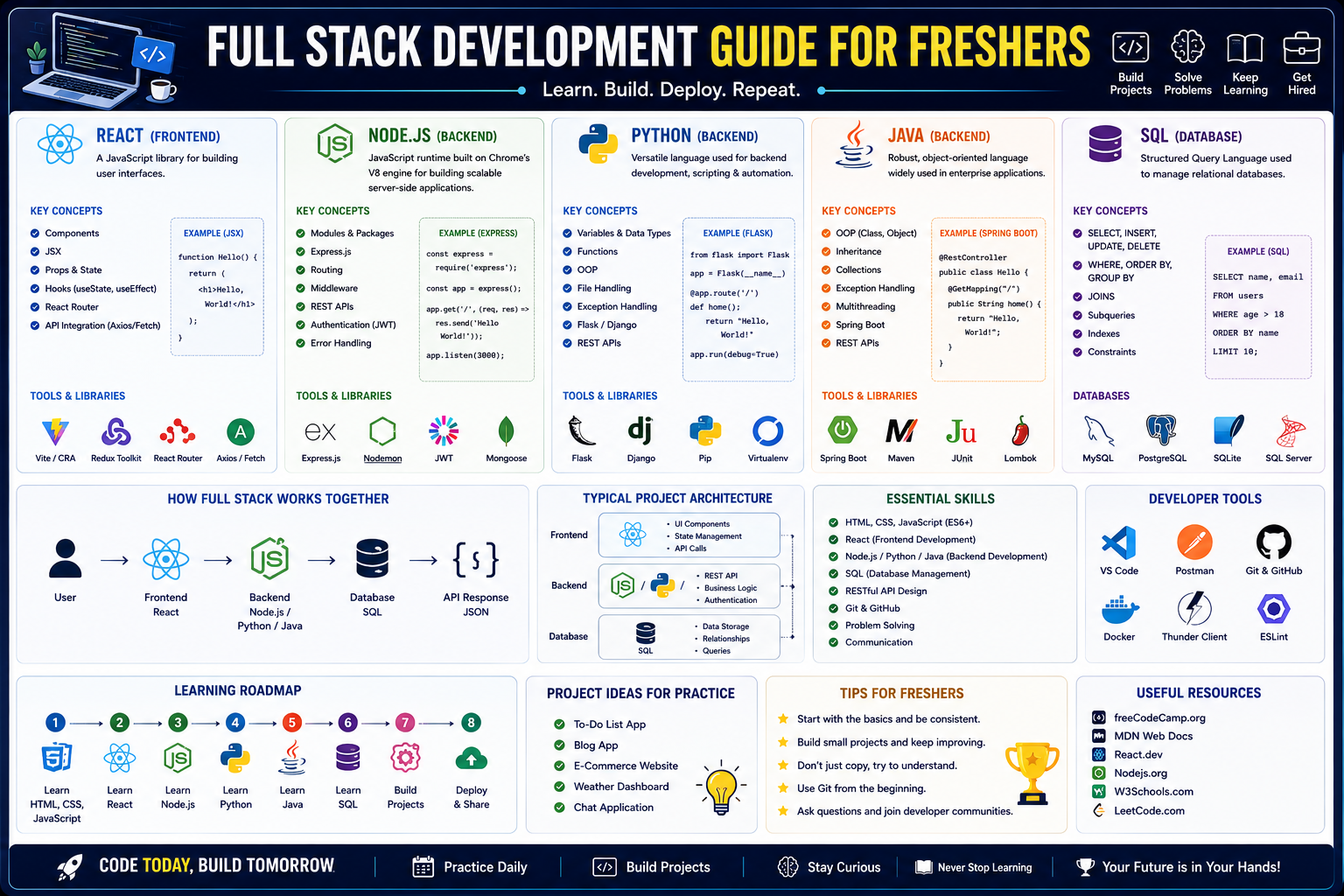
You will need skills across multiple layers:
- Frontend: HTML, CSS, JavaScript, and a modern framework like React
- Backend: Choose one path—Node.js with JavaScript/TypeScript, Python with Django/Flask, or Java with Spring Boot
- Databases: SQL (PostgreSQL, MySQL) and NoSQL (MongoDB) basics
- Version Control: Git and GitHub workflows
- Deployment: Docker, basic CI/CD, and cloud platforms
The good news? You do not need to master everything at once. Depth in one stack matters more than surface knowledge of many.
Prerequisite Check
You need a computer, an internet connection, and willingness to build. No prior coding experience required, but basic logic helps. Install VS Code (free), Git, and create a GitHub account.
Practice Goal for Phase 1: Write a one-paragraph description of a web application you would like to build (e.g., "a task manager with user accounts" or "a book review site"). This clarifies your "why" before the "how."
Free Resources for Phase 1:
- The Odin Project offers a completely free, open-source, project-based full stack curriculum. You will use real developer tools from day one (VS Code, Git, terminal, browser DevTools). It expects you to research, experiment, and struggle—mirroring how professional developers actually work.
- freeCodeCamp provides the most comprehensive free curriculum with certifications in JavaScript, Python, HTML/CSS, and relational databases. Each certification requires building projects that demonstrate practical skills. The entire platform is free, supported by donations.
🌐 Phase 2: Frontend Foundations – HTML, CSS, and JavaScript (Weeks 3-6)
Before touching React, you must understand the core technologies of the web. These are non-negotiable.
HTML – The Structure
Learn to create the skeleton of web pages. Focus on semantic HTML5 elements: header, nav, main, section, article, footer. Understand forms, inputs, and basic accessibility (alt text, proper heading hierarchy).
CSS – The Style
Learn to make things look good and work on any screen size. Core skills include selectors and properties, the box model (margin, padding, border), Flexbox and Grid for layouts, and responsive design with media queries. CSS frameworks like Tailwind or Bootstrap can speed you up, but learn vanilla CSS first.
JavaScript – The Behavior
JavaScript brings your pages to life. Focus on modern ES6+ syntax: variables (let, const), functions (arrow functions), arrays and objects, array methods (map, filter, reduce), DOM manipulation (selecting elements, adding event listeners, updating content), fetch for API calls, and understanding async/await for promises.
Practice Goal: Build a responsive personal portfolio website. It should have a navigation bar, a grid layout for projects, a contact form (just frontend for now), and dynamic content loaded from a JavaScript array (e.g., project cards generated by JavaScript, not hardcoded HTML). Deploy it for free using GitHub Pages.
Free Resources for Phase 2:
- Scrimba Free Tier offers interactive screencasts where you pause and edit the instructor's code directly. Free courses include Learn HTML and CSS (5.7 hours) and Learn JavaScript (9.4 hours). All free courses include completion certificates.
- Khan Academy provides visual, step-by-step lessons on JavaScript, HTML/CSS, and SQL. The platform excels at making abstract concepts concrete through interactive visualizations, perfect for absolute beginners.
- MDN Web Docs is the authoritative reference for HTML, CSS, and JavaScript. Use it alongside a structured course, not as your primary learning tool.
⚛️ Phase 3: Advanced Frontend – React.js (Weeks 7-10)
Once you understand vanilla JavaScript, React helps you build fast, interactive user interfaces that update instantly as users interact with your application.
Core React Concepts
- Components and Props: Reusable building blocks. Your entire UI is a tree of components.
- State and
useState: Data that changes over time (user input, fetched data, toggles). - Effects and
useEffect: Running code when components load or when specific data changes (perfect for fetching API data). - Routing with React Router: Creating multi-page experiences in a single-page application (SPA).
- State Management (Context API or Redux): Sharing data across many components without "prop drilling."
Practice Goal: Build a task management or movie search application. Features should include: adding, deleting, and completing tasks (or searching an external API like OMDB for movies), using useEffect to load initial data from localStorage (or an API), using useState for all interactive elements, and implementing routing (e.g., home page, about page, task detail page). Style with CSS Modules or Tailwind.
Free Resources for Phase 3:
- Scrimba Learn React (Free) – The interactive format works exceptionally well for React because you can see component re-renders in real time. Free React course covers components, props, state, events, hooks, and building projects.
- Simplilearn Free MERN Stack Course – A 1-hour beginner-level course covering JavaScript frameworks and full stack concepts with certificate upon completion.
- Full Stack Python/React Syllabus (Scaler) – Detailed syllabus covering React components, props, lifecycle, state management, routing, and API integration.
🖥️ Phase 4: Backend Foundations – Choose Your Path (Weeks 11-18)
You now need to choose a backend language. The choice matters less than building real projects with it. Here are the three most viable paths for 2026.
Path A: Node.js with JavaScript/TypeScript
Node.js allows you to use JavaScript on the server, keeping one language across your entire stack.
Core skills: npm (package manager), Express.js framework, routing and middleware, handling HTTP requests/responses, environment variables, and TypeScript for type safety.
Practice Goal: Build a REST API for a blog platform. Endpoints should include GET /posts, GET /posts/:id, POST /posts, PUT /posts/:id, DELETE /posts/:id. Use Express.js and store data in an array initially (database will come later). Test with Postman or Thunder Client.
Free Resources: Scrimba free courses cover Node.js (3.5 hours) and Express.js (4 hours) in the interactive scrim format. The Odin Project's Full Stack JavaScript path walks through Node, Express, and MongoDB with project-based learning.
Path B: Python with Django or Flask
Python's simplicity and massive library ecosystem make it excellent for backend development.
Django (Batteries-Included): Comes with an ORM, authentication, admin panel, and more built-in. Great for larger applications where you want structure out of the box. Flask (Microframework): Lightweight and flexible. Perfect for microservices and smaller APIs where you want control over each component.
Core skills: Python syntax and OOP, Django REST Framework (DRF) or Flask, URL routing and views, serializers (converting database models to JSON), authentication (JWT or sessions).
Practice Goal: Build a book review API with Django REST Framework. Models should include Book (title, author, genre, published date) and Review (user, rating, comment, foreign key to Book). Implement endpoints for listing books, viewing single book with reviews, and posting new reviews (authentication required). Use Django's built-in admin for easy data management.
Free Resources: Scaler's Python Full Stack Syllabus covers Python syntax, OOP, Django, Flask, and Django REST Framework in a structured learning path. freeCodeCamp's Python curriculum includes backend development with Flask.
Path C: Java with Spring Boot
Java remains a stable, high-demand backend skill for enterprise systems. Spring Boot is the most widely used framework for building production-ready Java applications.
Core skills: Core Java (OOP, collections, exceptions, modern Java 8+ features), Spring Boot (dependency injection, REST controllers, JPA for database operations), Maven or Gradle for dependency management.
Practice Goal: Build the same book review API using Spring Boot. Use Spring Data JPA for database operations, Spring Web for REST endpoints, and Spring Security for basic authentication. Package as a JAR and run it.
Free Resources: Java learning paths on freeCodeCamp and Coursera (audit option). Spring.io guides (free, official). The Odin Project provides foundational programming concepts that transfer.
Which Path Should You Choose?
- Node.js if you want one language (JavaScript/TypeScript) for everything and high demand in startups and modern tech companies
- Python with Django if you prioritize readability, rapid development, and strong data science/AI integration options
- Java with Spring Boot if you target enterprise roles, banking, or large-scale systems where stability matters
All three paths lead to jobs. Pick one, go deep, and the others become easier to learn later.
🗄️ Phase 5: Databases – SQL and NoSQL (Weeks 19-22)
Every application needs to store and retrieve data. Database knowledge is a core full stack skill.
SQL Databases (PostgreSQL or MySQL)
Relational databases are the industry standard for structured data. Learn to design schemas, write queries, and use joins.
Core skills: SELECT, INSERT, UPDATE, DELETE, WHERE filters, JOIN (INNER, LEFT, RIGHT), GROUP BY aggregations, indexing for performance, and schema design principles (normalization, foreign keys).
Practice Goal: Take your book review API from Phase 4 and move data storage from memory to a PostgreSQL database. Create tables for users, books, and reviews with proper foreign key relationships. Write SQL queries to fetch "all books with their average rating" using a JOIN and GROUP BY.
NoSQL Databases (MongoDB)
NoSQL databases are flexible for unstructured data or rapid iteration.
Core skills: Documents and collections, inserting/updating/finding documents, embedding vs. referencing, basic aggregation pipelines.
Practice Goal: Build a simple logging or analytics feature for your application that stores data in MongoDB (e.g., tracking page views or API usage). Use MongoDB's flexible schema to add new fields without migrations.
Free Resources: Scaler syllabus covers PostgreSQL, MySQL, MongoDB, and Redis fundamentals including schema design and CRUD operations. Khan Academy offers free SQL instruction with interactive exercises.
🔗 Phase 6: Connecting Frontend to Backend – REST APIs (Weeks 23-24)
Your frontend and backend are separate. REST APIs are how they talk to each other.
Core REST Concepts
Understand REST architecture principles, HTTP methods (GET, POST, PUT, DELETE), status codes (200 OK, 201 Created, 400 Bad Request, 401 Unauthorized, 404 Not Found, 500 Internal Server), authentication (JWT tokens, sessions), and API testing with Postman or Thunder Client.
Practice Goal: Connect your React frontend from Phase 3 to your backend API from Phase 4. In React, use fetch() or axios to call your API endpoints. Display data from the database in your UI. Add forms that POST new data to your API. You now have a full stack application.
🐳 Phase 7: DevOps Basics – Docker, Deployment, and Cloud (Weeks 25-26)
Code only matters if users can access it. Deployment is what separates hobby projects from real products.
Docker – Containerization
Docker packages your application with all its dependencies so it runs the same everywhere.
Core skills: Dockerfile (instructions for building your image), docker build, docker run, Docker Compose (running multiple containers together, like your app + database).
Practice Goal: Write a Dockerfile for your backend API. Write a docker-compose.yml that starts both your backend container and a PostgreSQL container with volumes for persistent data. Run docker-compose up and verify your entire stack starts with one command.
Deployment Platforms
Choose one free or low-cost platform to deploy your application:
- Render or Railway: Simple, generous free tiers, great for beginners
- Netlify + Vercel: Excellent for frontend hosting, some backend support
- AWS EC2 (free tier): More complex but valuable enterprise experience
Practice Goal: Deploy your full stack application so anyone with the URL can use it. Deploy your React frontend to Netlify or Vercel. Deploy your backend API to Render or Railway. Connect them using environment variables. Your application is now live.
Basic CI/CD with GitHub Actions
Automate testing and deployment when you push code.
Practice Goal: Create a .github/workflows/deploy.yml file. Configure it to run tests on every push to the main branch. For bonus points, add a step that automatically deploys to your hosting platform when tests pass.
Free Resources: Scaler syllabus covers Docker, Nginx, GitHub Actions CI/CD, environment variables, and production deployment preparation. IBERO roadmap includes containers, CI/CD, and cloud platforms (AWS, Azure, GCP).
🤖 Phase 8: AI Tools in Full Stack Development – The 2026 Reality (Ongoing Integration)
AI has fundamentally changed development workflows. The question is not whether to use AI tools but how to use them effectively without becoming dependent on them.
The 2026 AI Development Stack
Professional developers in 2026 use a small, intentional set of AI tools covering planning, verification, terminal speed, and prototyping.
- Claude Code excels at plan-driven refactors and deep repository work. When a task spans multiple modules, Claude maps the codebase, proposes a plan, and executes safely.
- Codex (OpenAI) handles task-oriented execution with clear audit trails. It builds, tests, and provides patches in a repeatable loop.
- GitHub Copilot CLI provides quick help in the terminal—generating scripts, explaining command output, and reducing context switching.
- Lovable enables rapid prototypes and UI flows before you invest engineering time, turning ideas into clickable prototypes fast.
How to Use AI as a Fresher
Do use AI for:
- Explaining error messages in plain language
- Generating boilerplate code (React components, Express routes, SQL schemas)
- Suggesting test cases for your functions
- Refactoring messy code into cleaner patterns
- Generating documentation and comments
Do NOT use AI for:
- Copy-pasting code you do not understand
- Bypassing the learning process (you will fail interviews)
- Writing critical security or authentication logic without review
- Generating entire applications without understanding each piece
Smart learning workflow: Write code yourself first. When stuck, ask AI to explain or generate alternatives. Compare its solution to yours. Understand why it works. Then refactor.
Practice Goal: Use an LLM to generate a boilerplate React component with state and props. Manually review every line. Ask the LLM to explain any syntax you do not recognize. Then modify the component to add a new feature without asking the AI.
Free Resource: Google AI Studio has evolved into a full-stack vibe coding platform with the Antigravity programming agent. It supports React, Next.js, and Firebase integration. The platform remains free for prototyping, though production workloads move to paid APIs.
📚 Consolidated Resource Toolkit
Completely Free, Comprehensive Curriculums
freeCodeCamp offers the most comprehensive free coding platform available. It provides certification tracks covering JavaScript, Python, HTML/CSS, relational databases, and backend development. Each certification requires building projects that demonstrate practical skills. The entire platform is free with no premium tier, no paywall, no trial period—supported by donations. The curriculum was restructured in early 2026 with new certifications rolling out alongside a unified full stack developer path.
The Odin Project is completely free, open-source, and project-heavy. It offers two full paths: Full Stack JavaScript and Full Stack Ruby on Rails. The curriculum uses real developer tools from day one (VS Code, Git, terminal, browser DevTools) and assigns projects with minimal hand-holding. It expects you to research, experiment, and struggle—mirroring how professional developers actually work. Ideal for self-starters who learn by building.
Scrimba Free Tier offers several free courses using the interactive scrim format where learners pause the screencast and edit the instructor's code directly. Free courses include Learn HTML and CSS (5.7 hours), Learn JavaScript (9.4 hours), Learn React, Learn Node.js (3.5 hours), and Learn Express.js (4 hours). All free courses include completion certificates. Career paths require Pro ($24.50/month on annual plan), but the free courses cover enough for foundational skills.
CS50 from Harvard is Harvard University's introduction to computer science, available free on edX. Taught by David Malan, it has drawn over 6 million registrants. The curriculum covers C, Python, SQL, JavaScript, and foundational CS concepts including algorithms, data structures, and memory management. Expects 10-20 hours per week over 12 weeks and includes challenging problem sets. Teaches computational thinking, not just coding syntax.
Khan Academy provides completely free, visual, step-by-step lessons on JavaScript, HTML/CSS, and SQL. The platform excels at making abstract concepts concrete through interactive visualizations. The computing section is narrower than freeCodeCamp but works well as an introduction for absolute beginners or younger learners.
Comprehensive Syllabus References
Scaler Python Full Stack Developer Syllabus 2026 provides a detailed, modular syllabus covering:
- Module 1: Python Programming Foundations (syntax, OOP, error handling)
- Module 2: Frontend Fundamentals (HTML5, CSS3, JavaScript, ES6)
- Module 3: Advanced Frontend with React.js (components, state, routing, API integration)
- Module 4: Backend with Django (MVC/MVT, ORM, authentication, DRF)
- Module 5: Backend with Flask (microservices, routing, extensions)
- Module 6: Databases SQL and NoSQL (PostgreSQL, MySQL, MongoDB, Redis)
- Module 7: REST API Development (principles, JWT, OAuth2, Postman)
- Module 8: Version Control (Git, GitHub workflows, pull requests)
- Module 9: DevOps and Deployment (Docker, Nginx, CI/CD with GitHub Actions)
- Module 10: Cloud Deployment (AWS EC2, Lambda, monitoring)
- Module 11: Testing and Debugging (PyTest, breakpoints, CI/CD testing)
- Module 12: Capstone Projects (e-commerce, dashboard, microservice app)
Practice Platforms and References
MDN Web Docs is the authoritative reference for HTML, CSS, and JavaScript. Not a structured course, but essential alongside any learning path.
W3Schools offers a simple, beginner-friendly reference with try-it editors for HTML, CSS, JavaScript, Python, and SQL. Certificates available for fee.
Exercism provides mentored coding exercises across 60+ languages. Excellent for practice alongside a structured course.
Codewars offers coding challenges (kata) across 50+ languages. Great for algorithm practice and interview preparation.
Paid Certifications and Structured Learning
AWS Certified Developer Associate validates cloud development skills. Relevant after completing the roadmap.
Meta Backend Professional Certificate (Coursera) covers Django, APIs, and databases. Free to audit, certificate with payment.
IBM Full Stack Software Developer (Coursera) covers Cloud Native, Node.js, React, and GitHub. Free to audit.
💼 Career Application & Next Steps
Full stack developers remain in high demand. According to the Bureau of Labor Statistics, demand for web and full-stack developers is projected to grow 7% over the next decade. Software developers earn a median of $133,080 per year with 15% job growth projected through 2034 and roughly 129,200 openings per year.
The Fresher Entry Point
Junior Full Stack Developer builds features across the entire stack—from database schemas to REST APIs to React components. Requires proficiency in one frontend framework, one backend language/framework, SQL, Git, and basic deployment knowledge. Found at startups, product companies, and consultancies.
Frontend Developer (Pathway to Full Stack) focuses on building user interfaces and integrating with existing APIs. Strong entry point with clear progression to backend.
Backend Developer (Pathway to Full Stack) focuses on APIs, databases, and system architecture. Entry point for developers comfortable with servers and data.
Industries actively hiring include SaaS and product-first startups (end-to-end execution valued), fintech and e-commerce (transaction systems needing reliability), AI and data-driven platforms (full stack understanding helps integrate AI features), and consulting (client-facing delivery roles).
1. Build Your Portfolio (Three Definitive Projects)
Project 1 (Full Stack Application with Authentication):
- What: Build an e-commerce or task management application with user accounts. Frontend: React with routing and state management. Backend: Your chosen stack (Node/Express, Django, or Spring Boot). Database: PostgreSQL or MongoDB with user, product, and order tables. Features: User registration/login (JWT auth), product listing, shopping cart, order placement.
- Why: This project demonstrates the complete full stack workflow—database design, API development, authentication, and interactive frontend.
Project 2 (Deployed Application with CI/CD):
- What: Take your application from Project 1. Containerize it with Docker. Set up GitHub Actions to run tests on every push. Deploy the frontend to Vercel or Netlify and the backend to Render or Railway. Ensure everything works with environment variables for API URLs and database connections.
- The Narrative: "I built and deployed a full stack application with automated CI/CD. Deployments happen automatically when I push to main, reducing manual work and ensuring consistent environments."
- Why: Deployment and automation skills differentiate you from candidates who only code locally. Companies need developers who can ship.
Project 3 (Feature-Rich Application with Third-Party Integrations):
- What: Build an application that integrates external APIs and includes advanced features. Examples: weather dashboard with user preferences saved to database, recipe finder with bookmarking, expense tracker with charts. Add real-time features with WebSockets (e.g., live comments or notifications).
- Why: Demonstrates full stack depth—handling external data, managing application state, and implementing complex interactions.
How to Document Your Portfolio: For every project, create a GitHub repository with a detailed README containing: architecture diagram (draw.io is free), technologies used, setup instructions (clone, install, environment variables, run), screenshots or live link, and a brief reflection on challenges and solutions.
2. The Interview Question You Will Be Asked
Question: "Walk me through how you would build a simple task management application from scratch. What technologies would you use and why?"
Your Answer: "I would approach this in layers. First, I would design the database—a PostgreSQL table for 'tasks' with columns for id, title, description, status (pending/completed), created_at, and a user_id foreign key for authentication. I would use a relational database because task data has clear relationships and I need transactional integrity.
For the backend, I would use Node.js with Express. It is lightweight, uses JavaScript across the stack, and has excellent middleware support for authentication and validation. I would create REST endpoints: GET /tasks (return user's tasks), POST /tasks (create new task), PUT /tasks/:id (update), DELETE /tasks/:id. I would add JWT authentication so each user only sees their own tasks.
For the frontend, I would use React. The component structure would include a TaskList (fetches and displays tasks), TaskForm (adds new tasks), and TaskItem (individual task with edit/delete buttons). I would use useState for component-level state and useEffect to fetch data on load. For styling, I would use Tailwind CSS for rapid, consistent design.
Finally, I would Dockerize the application and deploy to Render or Railway for the backend and Vercel for the frontend. I would set up a simple CI pipeline with GitHub Actions to run tests on push. This stack gives me a complete, scalable application that I can build in a few days and extend later with features like due dates or categories."
This answer demonstrates understanding across all layers—database design, API development, frontend architecture, and deployment.
3. Sample Resume Entry
text
Junior Full Stack Developer (Project-Based) | Portfolio

• Built full stack task management application using React, Node.js, Express, and PostgreSQL with JWT authentication
• Designed RESTful API with 8 endpoints handling CRUD operations and user-specific data isolation
• Containerized application with Docker and deployed to cloud (Vercel + Render) with automated CI/CD via GitHub Actions
• Implemented responsive UI with Tailwind CSS, achieving 95+ Lighthouse performance score
• Managed version control with Git using feature branch workflow and pull request code reviews
• Deployed live application accessible at [your-url.vercel.app] with complete source code on GitHub
4. The Learning Sequence That Works
The most successful path for full stack beginners:
- Frontend first: HTML → CSS → JavaScript → React. You see visual results quickly, maintaining motivation.
- Backend second: Pick one backend language and build simple APIs before connecting to frontend.
- Database third: Learn SQL by connecting your backend to a real database.
- Connect everything: Build the full stack application where frontend calls your API.
- Deploy last: Take your working application and make it live.
Do not try to learn React, Node, and databases simultaneously. Learn one layer at a time.
🎯 Your Next Steps for This Week
Do not try to learn full stack development in a week. The journey takes months, but you can start today.
Step 1: Choose Your First Technology
If you have no coding experience, start with HTML and CSS. If you have some experience, start with JavaScript. Use Scrimba's free HTML/CSS course (5.7 hours) or freeCodeCamp's responsive web design certification. Spend this week in one resource, not ten.
Step 2: Set Up Your Development Environment
Install VS Code. Install Git. Create a GitHub account. Create your first repository. Make your first commit. These are the tools professional developers use every day.
Step 3: Build Something Small by Day 3
Build a single webpage about yourself or your hobby. Use HTML for structure, CSS for styling, and a tiny bit of JavaScript for interactivity (e.g., a button that changes the background color). Deploy it to GitHub Pages for free. You now have a live website.
Step 4: Commit to Consistency, Not Intensity
Spend 1-2 hours daily, not 12 hours on weekends. Consistency builds habits. Intensity burns out.
Step 5: Join a Community
Join freeCodeCamp's forums, The Odin Project's Discord, or local tech meetups. Learning alone is harder. Ask questions when stuck.
The moment you deploy your first full stack application and realize that people anywhere in the world can use something you built, you will understand why this career is worth pursuing. That feeling—seeing your code solve real problems for real users—is the foundation of development. Start building today.




 Group / 1: 1 Sessions