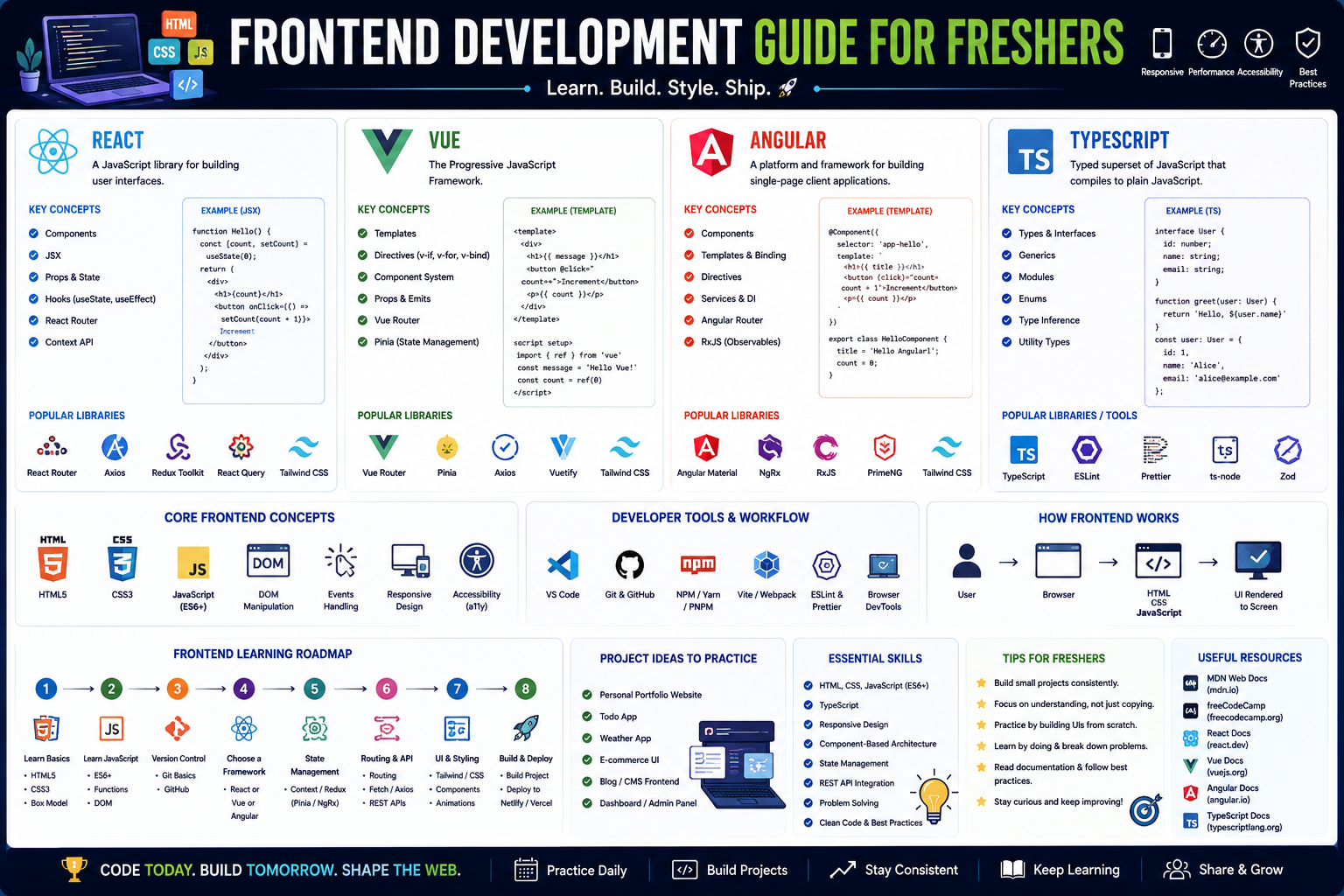
This roadmap is designed for a fresher—someone ready to build the interactive, visually compelling experiences users love. You will learn React, Vue, Angular, and TypeScript through systematic skill-building and projects that mirror real development workflows. The goal is to transform you from someone who knows syntax into a professional who can ship accessible, performant, and maintainable user interfaces. This path prepares you for entry-level roles like Junior Frontend Developer, UI Developer, or Frontend Engineer Associate.
🗺️ Phase 1: The Mindset Shift – What Frontend Means in 2026 (Weeks 1)
Before you dive into code, it’s crucial to understand the modern role and its landscape. Frontend Development is more than just making things look pretty; it is about building robust, accessible, and high-performance user interfaces that delight users.
Differentiating Frontend vs. Backend
As a Frontend Developer, you specialize in the client-side—everything users see and interact with directly in their browser. This includes layout, navigation, forms, and animations. Backend Developers focus on the server-side: databases, user authentication, and application logic.
The 2026 Frontend Core Stack
While tools change, the fundamentals remain your anchor. In 2026, mastering a modern stack is essential for employability:
- The Languages: HTML (Structure), CSS (Style), JavaScript (Logic).
- The "Big Three" Frameworks: React.js (most jobs), Vue.js (high growth in Asia/Europe), Angular (enterprise).
- The Non-Negotiable: TypeScript is now the standard for large-scale apps.
✅ Prerequisite Check
You need a computer, an internet connection, and a willingness to learn. No prior experience is required. This week, install VS Code, Git, and Node.js, and create a GitHub account.
Free Resources for Phase 1:
- JavaScript Info: The very best place to learn modern JavaScript fundamentals online.
- Great Learning: Offers a comprehensive Frontend Development Free Course covering HTML, CSS, and React, with a certificate of completion.
🎨 Phase 2: The Non-Negotiable Foundations – HTML, CSS & JavaScript (Weeks 2-8)
Every framework is built on these three pillars. Skipping this phase means building your career on a weak foundation.
HTML5 – The Skeleton (Week 2-3)
Learn to write semantic, meaningful code, which is critical for accessibility (a11y) and SEO. Focus on semantic elements (<header>, <nav>, <main>, <article>, <section>), forms and input types, and iframes and media elements.
Project: Build the HTML structure for a blog or a personal portfolio page.
CSS3 – The Skin (Weeks 4-6)
This is where you make things beautiful and responsive. Master the Box Model, Flexbox and Grid (these are required for any modern layout), responsive design with Media Queries, and animations and transitions.
Project: Style your portfolio page. Make it fully responsive so it looks perfect on mobile, tablet, and desktop.
JavaScript – The Brain (Weeks 7-8)
You cannot use React or Vue without solid JavaScript. Focus on ES6+ features (let/const, arrow functions, destructuring, template literals), DOM Manipulation (selecting/adding/removing elements), Asynchronous JavaScript (callbacks → Promises → async/await), and Fetch API (getting data from servers).
Project: Build a fully functional To-Do List App or a Weather Dashboard that calls a real API (like OpenWeatherMap) to fetch live data.
Free Resources for Phase 2:
- Great Learning (HTML/CSS): Offers a Front End Development - HTML & CSS course covering everything from syntax to building a complete e-commerce project.
- Great Learning (JavaScript): Provides a dedicated Front End Development - JavaScript course, culminating in building dynamic apps like a Calculator and a To-Do List.
- Learn Vue: Offers an excellent interactive tutorial for Vue.js basics, which also reinforces core JS concepts.
⚛️ Phase 3: Framework Foundations – Choosing Your Path (Weeks 9-12)
Now you are ready to pick a framework to streamline your work. In 2026, the choice is largely driven by the job market in your area.
The 2026 Framework Landscape
- React.js: The market leader with the most job opportunities globally. It is a library (not a full framework) for building UIs, giving you flexibility but requiring you to choose extra tools for routing and state management.
- Vue.js: Extremely popular, especially in Asian markets. It has a gentler learning curve than React and is a full-featured framework that includes official routing and state management solutions out of the box.
- Angular: The enterprise powerhouse. A full-fledged framework using TypeScript by default. If you aim to work in large corporations or banks, this is your path.
Deep Dive: React (The Most Common Starter Path)
Core Concepts to Master:
- JSX: Writing HTML-like syntax inside your JavaScript files.
- Components: The building blocks of a React app (Functional Components).
- Hooks:
useState (managing changing data) and useEffect (performing operations like fetching data). - Props: Passing data from a parent component to a child component.
Beginner Project: Rebuild your To-Do List from scratch using React. This will teach you state management and component structure.
Free Resources for Phase 3:
- Great Learning (React): A Front End Development - React JS course that teaches JSX, Components, and State Management through hands-on projects.
- Great Learning (Angular): A collection of free courses covering Angular7, AngularJS, and TypeScript, which form a complete learning path for the Angular ecosystem.
- Learn Vue: The official Learn Vue platform offers a free, interactive tutorial that is the best way to get started with the Vue framework.
- ReactPlay: An interactive platform to learn and practice React by building real projects.
🔧 Phase 4: Essential Modern Tooling & TypeScript (Weeks 13-16)
Modern frontend work relies heavily on a set of tools that make development faster, safer, and more predictable.
TypeScript – The Game Changer
In 2026, TypeScript is not optional. It adds static typing to JavaScript, catching bugs before you even run your code. 80% of large-scale frontend jobs require TypeScript.
- What to learn: Basic types (
string, number, boolean), Interfaces, and Component typing in React/Vue.
The 2026 Toolchain
- Build Tools: Vite is the modern standard, known for its incredible speed.
- Version Control: Git and GitHub are non-negotiable for collaboration.
- Package Managers: pnpm is the fastest and most efficient, though
npm is still everywhere.
Project: Refactor your React project into TypeScript. Add strict typing to all your components and variables.
Free Resources for Phase 4:
- Great Learning (TypeScript): A Front End Development - TypeScript course covering data types, classes, objects, interfaces, and generics specifically for Angular7 development.
- GitHub Skills: Free, interactive courses to learn Git and GitHub workflows.
🎨 Phase 5: Styling & State Management for the Real World (Weeks 17-20)
As your apps grow, you need strategies to manage complex UI and data.
Modern Styling (Tailwind CSS)
Tailwind CSS has become a dominant force. Instead of writing custom CSS, you use utility classes (flex, p-4, text-center) directly in your HTML, allowing for rapid UI development.
State Management
For simple apps, built-in tools like React Context or Vue Pinia are enough. For complex apps with data shared across many components:
- React: Zustand is the new favorite (simpler than Redux).
- Vue: Pinia is the official, recommended solution.
- Cross-framework: TanStack Query is the "gold standard" for managing data fetching and caching.
Project: Build a small e-commerce product page. Use Tailwind CSS for styling. Add a "cart" feature that uses a state management tool to track items across the page.
Free Resources for Phase 5:
- Great Learning (jQuery & CSS): Offers specific modules on CSS Properties and jQuery Fundamentals for legacy system support.
- Vue.js Docs (Pinia): The official Vue.js documentation has a fantastic, free guide to learning Pinia.
🚀 Phase 6: The Full-Stack Frontier – BFF & Deployment (Weeks 21-24)
"Frontend Developer" now often means you can build and deploy a full, working application using metaframeworks.
Metaframeworks: The Next Step
- For React: Next.js is the industry standard. It handles server-side rendering (SSR) for better SEO and performance.
- For Vue: Nuxt 3 serves the same purpose, offering SSR, file-based routing, and more.
Backend for Frontend (BFF)
You don't need to be a backend expert, but knowing how to build a simple API is a massive advantage. Learn Node.js and Express to create your own endpoints if needed.
Deployment
- Platforms: Vercel and Netlify are the standard for deploying frontend apps with zero configuration. They integrate directly with your Git repository.
Final Project: Take your e-commerce page and rebuild it using Next.js. Deploy the final version to Vercel. This is your "job-ready" portfolio piece.
Free Resources for Phase 6:
- Next.js Learn: The official, free, and excellent tutorial from Vercel for learning Next.js.
- Coursera (Project): The "Implement a Simple Blog Platform" guided project is perfect for practicing frontend-backend integration and CRUD operations.
📚 Consolidated Free Resource Toolkit
Completely Free, Comprehensive Learning Platforms
Great Learning offers a vast library of free, self-paced Frontend courses with certificates. Their catalog includes: Front End Development - HTML & CSS (E-commerce Project), Front End Development - React JS, Front End Development - Angular7 & TypeScript, Front End Development - JavaScript (Calculator & To-Do List projects), and jQuery Fundamentals. This is one of the best single sources for systematic learning.
Learn Vue is the best interactive tutorial for learning Vue.js, directly from the core team. It allows you to write code in the browser and see the results immediately, which is perfect for beginners.
Great Learning (TypeScript) provides a focused Front End Development - TypeScript course covering data types, classes, objects, interfaces, and generics, specifically taught with Angular7 in mind.
Coursera provides a structured "Web Development Learning Roadmap" with clear success criteria for each project. Their guided projects include "Build a Personal Portfolio Webpage" (2-4 hours), "Develop a Dynamic To-Do List App" (4-6 hours), and "Implement a Simple Blog Platform" (6-8 hours). You can audit these courses for free.
Learning & Practice Platforms
- JavaScript Info is the essential resource for deep, accurate JavaScript knowledge.
- ReactPlay is an interactive platform specifically for learning React by doing.
- Learn Vue provides the best interactive tutorial for Vue.js.
- GitHub Skills offers free, interactive courses to master Git and GitHub workflows.
- Learn Programming sites: For supplementary practice, use learnpython.org (Python), learn-golang.org (Go), and phptherightway.com (PHP).
AI-Assisted Learning & Tools
AI is now a first-class tool for developers. The key is to use it to accelerate learning, not to bypass it.
Frontman is an open-source AI agent that lives in your browser. It allows you to click any element on your live dev site and describe a change in plain English, and it will edit the actual source code for you. It works with Next.js, Astro, and Vite (React, Vue, Svelte). It is free and open-source, though you need to bring your own API key for Claude or ChatGPT.
ChatGPT/Claude
- As a Tutor: Explain complex concepts in simple terms.
- As a Reviewer: Paste your code and ask "What are the potential performance or accessibility issues here?"
- As a Pair Programmer: "I'm trying to add a dark mode toggle to my React app using a Context. Generate the boilerplate code for me."
💼 Career Application & Next Steps
Frontend development is a high-demand field. With a solid portfolio and a knack for problem-solving, you open doors to numerous opportunities.
1. The Fresher Entry Point
- Junior Frontend Developer: You'll build UI components, fix bugs, and collaborate with designers and backend teams. Requires HTML/CSS/JS, one framework (React, Vue, or Angular), and Git.
- UI Developer: Focuses on translating design mockups (from Figma) into pixel-perfect, responsive, and interactive web pages. Strong HTML/CSS and attention to detail are key.
- WordPress Frontend Developer: Many companies use WordPress. You'd be responsible for creating custom themes and plugins using PHP, JS, and CSS.
- Industries actively hiring include technology (startups to FAANG), e-commerce (building storefronts and carts), finance (dashboards and trading interfaces), and marketing agencies (landing pages and interactive campaigns).
2. Build Your Portfolio (Three Definitive Projects)
Project 1 (The Foundation – Personal Portfolio & To-Do App):
- What: Your first portfolio website (responsive) and a pure JavaScript To-Do App (CRUD operations, DOM manipulation, local storage).
- Why: This proves you understand the core technologies (HTML, CSS, JS) without framework dependencies.
Project 2 (The Framework Project – E-commerce Product Page):
- What: Build an e-commerce product listing page using React or Vue. Implement product cards, a shopping cart, and a checkout summary. Use a tool like TanStack Query to fetch product data from a fake API (like FakeStoreAPI). Style with Tailwind CSS.
- Why: This demonstrates your ability to handle state, work with APIs, and build complex UIs with a modern framework.
Project 3 (The Production Project – Full-Stack Blog with Next.js):
- What: Build a blog platform using Next.js. Implement features like listing posts, viewing a single post, and an admin area (even a simple one) to add new posts. Deploy it live on Vercel.
- Why: This is the "proof of work" that impresses employers. It shows you can build and deploy a full-stack, production-grade application.
How to Document Your Portfolio:
- GitHub is your new resume. For every project, have a clean
README.md with a live demo link (if possible), setup instructions, and screenshots. - Write a case study for your main project. What problem did it solve? What was the hardest bug you fixed? This shows your thinking process.
3. The Interview Question You Will Be Asked
Question: "Explain the difference between a <div> and a <span>. When would you use one over the other?"
Your Answer: "<div> is a block-level element, meaning it takes up the full width available and creates a line break before and after it. It is used for structuring larger sections of a page, like a header, a content container, or a footer. <span>, on the other hand, is an inline element, meaning it sits within a line of text without breaking the flow. I would use a <span> for styling or manipulating a small piece of text or an icon inside a paragraph or a heading, while a <div> is for page layout and structural groupings."
4. Sample Resume Entry
text
Junior Frontend Developer (Project-Based) | Portfolio

• Built responsive e-commerce product page using React, TypeScript, and Tailwind CSS, implementing a global state store for cart management.
• Developed and deployed a full-stack blog platform with Next.js and Vercel, achieving 95+ Lighthouse performance scores.
• Containerized development environment using Vite, reducing build times by 80% for a team of 2.
• Collaborated on open-source UI component library, fixing 5+ accessibility bugs and improving documentation.
🎯 Your Next Steps for This Week
Do not try to master React and Vue in your first month. Master the fundamentals.
Step 1: Set Up Your Environment
Install VS Code, Git, and Node.js. Create a GitHub account. Learn the basic terminal commands (cd, ls, mkdir).
Step 2: Build a Single Webpage by Day 7
Using HTML and CSS, build a simple landing page about your favorite hobby or pet. Do not use any frameworks. Get it looking exactly how you want.
Step 3: Add Interactivity
Add a simple JavaScript feature. A button that toggles "dark mode" or a "like" button that increments a counter. This proves you understand events and state changes.
Step 4: Take a Free Great Learning Course
Start the Front End Development - HTML & CSS course. It includes a final project that you can immediately add to your portfolio.
Step 5: Document Your Journey on LinkedIn
Share what you are learning. The frontend community is incredibly supportive. Posting a screenshot of your first To-Do app will generate encouragement and connections.
The moment you build a fully functional To-Do list that remembers your tasks after refreshing the page (using localStorage), you will realize you have the fundamental power of a frontend developer. You can now build interfaces that do things. That is the beginning of a fantastic career. Start building today.




 Group / 1: 1 Sessions