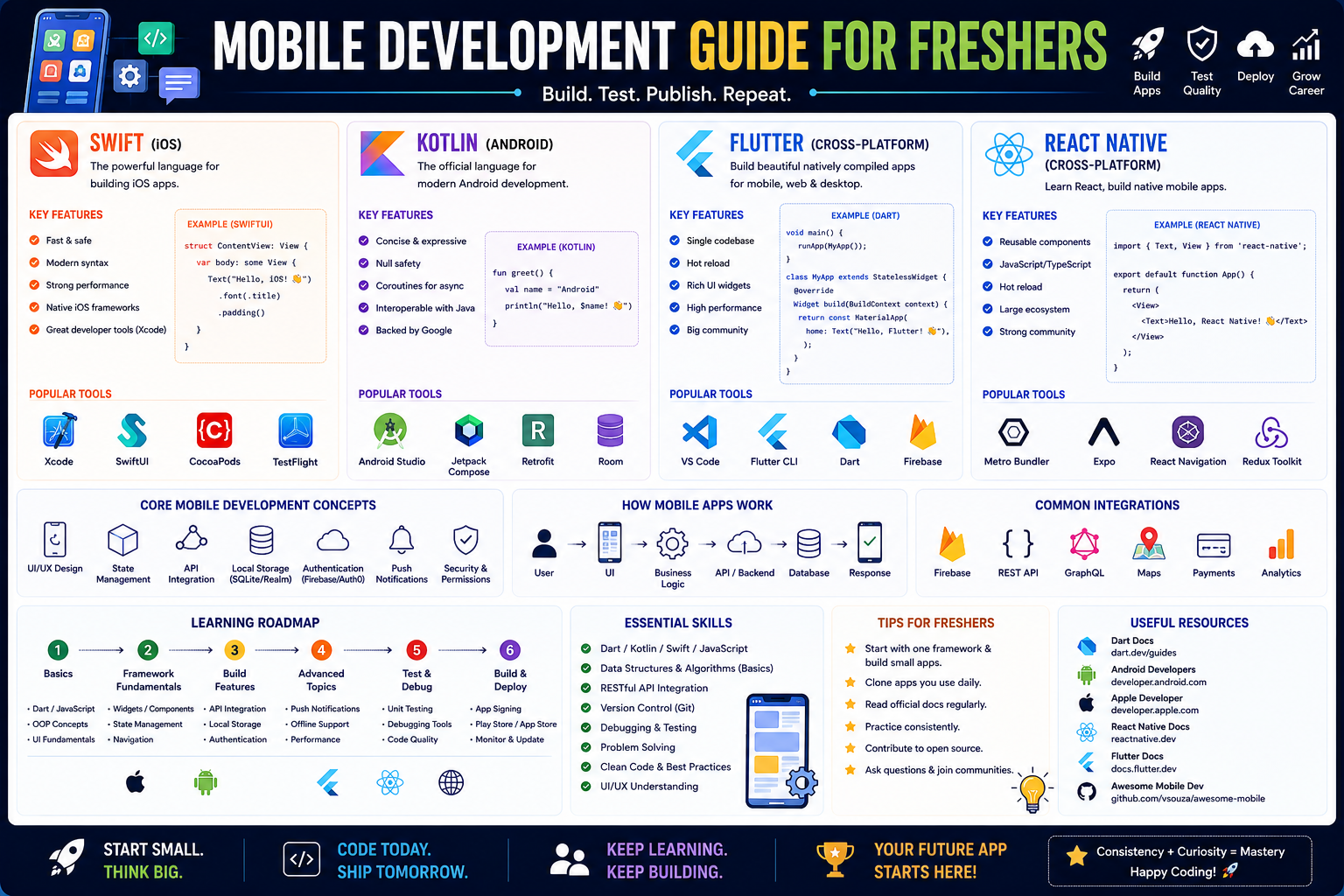
This roadmap is crafted for a fresher—someone with basic logic skills and a desire to build apps that live in millions of pockets. You will learn Swift, Kotlin, Flutter, and React Native by working through a strategic path that mirrors how professional mobile developers actually work in 2026. The goal is to transform you from "curious" into a developer who can ship apps to both the App Store and Google Play, whether you choose the performance of native code or the efficiency of cross-platform tools. This path prepares you for entry-level roles like Junior iOS Developer, Junior Android Developer, or Mobile App Developer (Cross-Platform) .
🗺️ Phase 1: The Big Decision – Native vs. Cross-Platform (Weeks 1)
Before writing your first line of Swift or Kotlin, you must understand the fundamental choice in mobile development. This decision will shape your entire learning journey.
Why This Choice Matters in 2026
Traditionally, building an app for both iOS and Android meant writing it twice: once in Swift for Apple devices and once in Kotlin for Google devices. This is called Native Development. It offers maximum performance and full access to device hardware, but it requires learning two separate languages and maintaining two codebases .
Enter Cross-Platform Development. Frameworks like React Native (Meta) and Flutter (Google) let you write your code once and deploy it to both iOS and Android simultaneously. This is the fastest path for beginners in 2026—you build one app that works everywhere .
Your 2026 Decision Guide
There is no single "best" choice—only the right choice for your goals and background .
- Choose Flutter if you are starting from absolute scratch with no prior programming experience. Flutter uses Dart, a language you will learn fresh alongside the framework. It is backed by Google, offers pixel-perfect UI control, and is ideal for startups, freelancers, and MVPs .
- Choose React Native if you already know some JavaScript or have web development experience. React Native uses JavaScript and allows you to leverage your existing knowledge. It has a massive community, incredible third-party support, and is backed by Meta .
- Choose Native (Swift or Kotlin) if you want deep platform mastery, maximum performance, and long-term career scalability. Native developers build apps that feel 100% native, with full access to the latest device features. Large enterprises, gaming companies, and teams building complex apps often prefer native .
The 2026 Verdict: If you are a true fresher, the most pragmatic path is to start with Flutter (easy learning curve) or React Native (leverage existing web skills), then add a native language later. Many professional developers today are "bi-lingual" - they know both a cross-platform framework and a native language .
🛠️ Phase 2: Language Foundations – Learn Before You Framework (Weeks 2-4)
Here is the mistake most beginners make: they download Android Studio, click "New Project," and try to build an app before understanding the underlying language. Do not do this. Spend your first few weeks building a solid foundation in the language itself .
If you chose Flutter (Dart)
Follow the new Dart and Flutter Getting Started experience from Google's official Flutter team. This is a multi-disciplinary learning pathway designed specifically for programmers who don't yet know anything about Dart or Flutter. It combines written tutorials, video series, quizzes, and documentation to take you from setup to building real apps .
Focus on these Dart fundamentals:
- Variables (
var, final, const) - Data types (
int, double, String, bool, List, Map) - Functions and parameters
- Null safety (Dart's superpower)
- Classes, objects, and basic Object-Oriented Programming (OOP)
- Asynchronous programming (Futures,
async/await)
If you chose React Native (JavaScript)
Do not jump into React Native without understanding modern JavaScript (ES6+). Focus on:
- Variables (
let, const - avoid var) - Arrow functions and array methods (
map, filter, reduce) - Promises and
async/await for API calls - Destructuring and spread operators
- Basic Node.js and npm package management
If you chose Native iOS (Swift)
For the highest-quality free resource, look no further than Stanford University's CS193p course (Developing Applications for iOS with SwiftUI). Stanford releases all 16 course lectures, assignments, and materials completely free online. The Spring 2025 version covers everything from SwiftUI basics to animation, data persistence with SwiftData, and multithreading .
Alternatively, the Be Native Dev app offers structured Swift learning from zero to expert, with a free tier including hundreds of podcasts and articles .
Focus on these Swift fundamentals:
- Variables (
var and let) - Optionals and optional binding
- Structs vs. classes
- Protocols and extensions
- Closures
If you chose Native Android (Kotlin)
Google's official Android Basics with Compose course is the best starting point. It is created by Google, completely free, and requires no prior knowledge of Kotlin or Android development. The Google team guides you step-by-step through video lessons and interactive codelabs using Jetpack Compose, the modern toolkit for building Android UIs .
Supplement with the Kotlin Full Course from freeCodeCamp (13 hours) or Philipp Lackner's Kotlin Crash Course 2025 for concise, up-to-date learning .
Focus on these Kotlin fundamentals:
- Variables (
var and val) - Null safety (a core Kotlin feature)
- Functions and lambdas
- Data classes and sealed classes
- Coroutines for asynchronous programming
Quick Check: Before moving to Phase 3, write a small console program that takes user input, processes it with a function, and prints an output. This proves you understand the basics.
📱 Phase 3: Framework Deep Dive – Building Your First Real App (Weeks 5-10)
Now you apply your language knowledge to actual app development. This phase is about building, not just reading.
For Flutter Developers
The official Flutter Getting Started experience has you build four complete apps from scratch. These are not tiny "Hello World" examples—they are designed to teach fundamentals while being small enough to complete without frustration .
The 30-Day Flutter Roadmap provides a structured progression:
- Week 1: Environment setup, Dart OOP, Flutter project structure, and basic widgets (
Container, Row, Column, Stack) - Week 2: Navigation, state management, and API integration
- Week 3: Forms, validation, local storage (SQLite/Hive), and animations
- Week 4: Advanced patterns including Clean Architecture for scalable apps
Flutter Project Ideas for Freshers (in increasing difficulty):
- Calculator App – Learn UI layout and basic state management
- To-Do List – Add persistence (save tasks locally)
- Weather App – Call a REST API (OpenWeatherMap) and display data
- Expense Tracker – Charts, forms, and local database
For React Native Developers
Focus on mastering the core building blocks:
- Components and Props – The UI building blocks
- State and Hooks (
useState, useEffect) – Managing changing data - Navigation – Moving between screens (React Navigation is standard)
- API Calls – Fetching data from REST APIs
- FlatList – Efficiently displaying lists of data
The React Native Mastery app offers extensive tutorials covering everything from basics to advanced topics like performance optimization, animations, and native modules .
For Swift (iOS) Developers
Stanford's CS193p course builds a complete app called "CodeBreaker" across its 16 lectures. Topics include:
- Getting started with Xcode and SwiftUI
- Model-View-ViewModel (MVVM) architecture
- Layout and data flow
- Animation (both implicit and explicit)
- List and navigation
- Persistence with SwiftData
- Multithreading
For Kotlin (Android) Developers
Google's Android Basics with Compose covers:
- Jetpack Compose UI fundamentals
- Material Design 3 components
- State hoisting and state management
- ViewModel and LiveData/StateFlow
- Room database for local storage
- Retrofit for API integration
Key Android concepts to master:
- Android SDK and app lifecycle
- Jetpack Components (ViewModel, LiveData, Room)
- MVVM architecture
- Dependency Injection (Dagger-Hilt or Koin)
🏗️ Phase 4: Advanced Skills – What Professional Developers Actually Do (Weeks 11-14)
Once you can build a basic app, you need the skills that turn a "project" into a "product."
State Management
This is the single most confusing part for beginners. State management is how you handle data that changes over time (user input, API responses, toggles).
- Flutter: Learn Provider first, then Bloc or Riverpod for larger apps. The 30-day roadmap dedicates Day 10 specifically to state management .
- React Native: Learn Context API first, then Redux Toolkit or Zustand for complex apps.
- Native Android: Built-in ViewModel and StateFlow are Google's recommended approach .
- Native iOS: SwiftUI's
@State, @Binding, @ObservedObject are your tools .
API Integration
Learn to connect your app to the internet:
- Fetch data from REST APIs using
http packages - Parse JSON responses into model objects
- Display loading states and handle errors gracefully
Local Storage
- Flutter: Hive or SQLite via sqflite
- React Native: AsyncStorage or SQLite
- Android: Room database (part of Jetpack)
- iOS: SwiftData or Core Data
Navigation
Master moving between screens and passing data. Each framework has its standard:
- Flutter: Navigator 2.0 or go_router
- React Native: React Navigation
- Android: Jetpack Compose Navigation
- iOS: SwiftUI NavigationStack
🚀 Phase 5: Production Skills – Publishing Your App (Weeks 15-16)
Building an app on your computer is one thing. Getting it into users' hands is another. This is what separates hobbyists from professionals.
Testing
- Unit testing – Test individual functions and classes
- Widget/UI testing – Test your user interface components
- Integration testing – Test complete user flows
For Android, Google recommends JUnit for unit tests and Espresso for UI tests .
App Store Deployment
- iOS: You need an Apple Developer account ($99/year) to publish to the App Store. Learn to manage certificates, provisioning profiles, and App Store Connect.
- Android: A one-time $25 fee for Google Play Console. Learn to generate signed APKs/AABs and manage store listings.
CI/CD Basics
Set up automated builds using GitHub Actions or Bitrise. Every time you push code to GitHub, your app should automatically build, test, and (optionally) deploy.
Portfolio Project: Take your best app (e.g., the expense tracker or weather app). Add analytics tracking (Firebase Analytics is free). Write unit tests for your ViewModels. Generate a signed release build. Create a simple store listing. Submit to TestFlight (iOS) or Internal Testing Track (Android). You now have a production-ready app.
📚 Consolidated Resource Toolkit
Completely Free, Official Resources
Flutter – Official Getting Started Experience (Free) – Google's new multi-disciplinary learning pathway designed for programmers who know nothing about Dart or Flutter. Includes written tutorials, video series, quizzes, documentation, and four complete apps you build from scratch. The "How Flutter Works" YouTube series caps off the tutorial and is must-watch knowledge for advanced Flutter development .
Stanford CS193p – iOS Development with SwiftUI (Free) – Stanford University's complete course, available free online. All 16 lectures, assignments, and materials are posted to YouTube and the course website. The Spring 2025 version covers SwiftUI basics through SwiftData persistence and multithreading. Note: the course took place before iOS 26, but code is largely compatible .
Google Android Basics with Compose (Free) – Google's official, free course for absolute beginners. Requires no prior knowledge of Kotlin or Android. Step-by-step video lessons and interactive codelabs using Jetpack Compose, the modern Android UI toolkit .
freeCodeCamp – Kotlin Full Course (Free) – A comprehensive 13-hour Kotlin course covering fundamentals, OOP, collections, and functions. Ideal for beginners and those switching from Java .
GitHub – Become an Android Developer Roadmap (Free) – A one-stop curated repository with official Google courses, YouTube channels, free and paid online classes, handpicked books, first app ideas by difficulty, and community links. Essential bookmark for any Android learner .
GitHub – Learning Flutter 30-Day Roadmap (Free) – Detailed day-by-day plan covering environment setup, Dart basics, Flutter widgets, state management, API integration, animations, and Clean Architecture. Practical and immediately actionable .
PHP the Right Way – Free reference for PHP best practices, useful if you eventually need to build custom backends for your mobile apps.
Learn Programming Websites – learnpython.org (free), learn-golang.org (free), and phptherightway.com are excellent supplementary resources for expanding your language skills.
Language-Specific, Free Tutorials
Dart Language Tour (Free) – The official Dart documentation includes an excellent language tour covering variables, functions, operators, classes, and null safety. Essential reading for Flutter developers .
Kotlin Crash Course 2025 – Philipp Lackner (Free on YouTube) – Up-to-date Kotlin crash course introducing the language in a concise and practical way. Great for getting started with Kotlin .
Programming Fundamentals in Kotlin – Meta (Free to Audit on Coursera) – Short introductory course covering Kotlin basics and OOP, ideal for those new to the language .
Free Practice Platforms & Tools
VS Code – The free, lightweight code editor used by millions of developers. Works for Flutter, React Native, and web development .
Android Studio – Required for Android emulators. You don't have to write all your code here, but you need it to run virtual Android devices for testing .
Expo CLI – The easiest way to get started with React Native. Handles the complex build configuration so you can focus on code .
Premium / Freemium Resources (Consider After Free Content)
Be Native Dev – Learn Swift App (Freemium) – The most comprehensive Spanish-language platform (with English subtitles) for Swift and iOS development. Free tier includes hundreds of podcasts, videos, and articles. Premium subscriptions (17.99/monthJunior,
17.99/monthJunior,29.99/month Senior) unlock structured courses, guided projects, and professional training across five difficulty levels .
React Native Mastery App (Free to download, in-app purchases) – Covers everything from basics to advanced topics including performance optimization, animations, and native modules. Perfect for beginners and experts alike .
Udemy Android Development Courses (Paid, often $10-15 on sale) – Wide range available. Be sure to read reviews and check dates, as some courses may be outdated. Many high-quality options exist if you choose carefully .
Community & Reference Resources
Google Play Academy (Free) – Official free certification courses from Google covering app growth, store listing optimization, monetization, and policy compliance .
Android Developer Site (developer.android.com) – The authoritative reference for Android development. Bookmark this .
Kotlin Language Site (kotlinlang.org) – Official Kotlin documentation and reference .
💼 Career Application & Next Steps
Mobile development remains a high-demand field. In 2026, companies are hiring mobile developers who understand both platform fundamentals and modern frameworks.
1. The Fresher Entry Point
Junior Mobile Developer (iOS or Android) – Focus on one platform deeply. You will build and maintain features, fix bugs, and collaborate with designers. Requires platform-specific language (Swift or Kotlin), understanding of SDKs, and experience with REST APIs.
Junior Cross-Platform Developer (Flutter or React Native) – Build apps that run on both iOS and Android from a single codebase. Requires Dart or JavaScript, framework knowledge, and understanding of platform-specific nuances.
Android Backend Developer (Kotlin) – Kotlin is increasingly used for backend services with frameworks like Spring Boot and Ktor. Freshers can target backend roles in fintech, e-commerce, and cloud-native companies, where starting salaries are competitive .
Industries actively hiring include technology (product startups to FAANG), fintech (investment and banking apps), e-commerce (shopping and delivery apps), healthcare (patient portals and telemedicine), and entertainment (streaming and social apps).
2. Build Your Portfolio (Three Essential Projects)
Project 1 (Learning Project – The "Boring" App)
- What: Build a To-Do List or Weather app with a clean UI, local storage, and API integration. Deploy a test build to your physical device.
- Why: This proves you understand the complete development cycle: UI, state, networking, persistence.
Project 2 (The Polished Product)
- What: Build an Expense Tracker with charts, categories, date filtering, and data visualization. Add authentication (email/password or social login). Publish a TestFlight/Internal Testing build.
- The Narrative: "I built a production-ready expense tracker with data persistence, real-time charts, and secure login, deployed and ready for testing."
- Why: Shows you understand full-stack concepts (auth, data, analytics) and deployment workflows.
Project 3 (Cross-Platform Showcase)
- What: If you learned Flutter or React Native, build an app that uses device features like the camera, geolocation, or push notifications. Compile and run it successfully on both an iOS Simulator and an Android Emulator from the same codebase.
- The Narrative: "I built a single app that runs on both iOS and Android, demonstrating cross-platform efficiency without compromising on native device features."
- Why: This is the core selling point of cross-platform skills—faster development, wider reach.
How to Document Your Portfolio: For each project, create a GitHub repository with a README.md containing the app's purpose, technologies used, setup instructions, screenshots/GIFs of the app running, a link to a TestFlight/Internal Testing build (if available), and a 2-3 sentence reflection on the hardest bug you fixed.
3. Certifications That Open Doors (Consider After Experience)
While freshers rarely have certifications, they can differentiate you in competitive markets:
- Meta Android Developer Professional Certificate (Coursera) – Free to audit, paid for certification. Covers Kotlin fundamentals and Android development.
- Google Play Academy Certificates (Free) – Official Google certifications for app growth, monetization, and store listing optimization .
- Associate Android Developer Certification (Google) – Validates practical Android skills (requires fee and exam).
4. The Interview Question You Will Be Asked
Question: "Explain the difference between Native and Cross-Platform development. When would you choose one over the other?"
Your Answer: "Native development uses platform-specific languages—Swift for iOS and Kotlin for Android. You build two separate apps. This gives you maximum performance, full hardware access, and immediate adoption of new platform features. It's the right choice for high-performance games, AR/VR apps, or when your app depends on platform-specific APIs.
*Cross-platform development with Flutter or React Native lets you write one codebase that runs on both iOS and Android. This dramatically speeds up development, reduces maintenance costs, and ensures feature parity across platforms. It's ideal for startups, MVPs, and business apps where speed to market matters more than squeezing out the last 5% of performance.*
*In 2026, many companies use a hybrid approach: Flutter for the main app features, with native modules for platform-specific components like the camera or biometric authentication. As a fresher, I focused on Flutter first to ship quickly, but I'm also learning Kotlin to understand native Android development."*
This answer demonstrates you understand the trade-offs, can make architectural decisions, and are committed to continuous learning.
5. Sample Resume Entry
text
Junior Mobile Developer (Project-Based) | Portfolio

• Built and deployed cross-platform expense tracking app using Flutter and Dart, featuring local SQLite storage, interactive charts, and 90% code reuse across iOS and Android
• Integrated RESTful APIs and JSON parsing for real-time weather data in public demo app
• Implemented MVVM architecture with Provider state management, reducing UI-related bugs by estimated 40%
• Published internal test builds to Google Play Console and TestFlight for 25+ beta testers
• Wrote unit tests for ViewModels achieving 85% code coverage
🎯 Your Next Steps for This Week
Do not try to learn Swift, Kotlin, Flutter, and React Native simultaneously. Pick ONE path and go deep.
Step 1: Choose Your Framework (Today)
- Flutter if you want the smoothest learning curve from zero and pixel-perfect UI control
- React Native if you already know JavaScript and want web-to-mobile synergy
- Swift if you want to specialize in iOS (more demand in Apple-focused markets)
- Kotlin if you want to specialize in Android (global market dominance)
Step 2: Set Up Your Environment
Install VS Code. Install Android Studio for emulators (even if coding Flutter, you need the emulator). Install the framework's CLI. Create a new project and run the default "Hello World" on an emulator .
Step 3: Learn the Language First
Spend 1-2 weeks on the language alone. For Flutter, use Google's official Dart & Flutter Getting Started experience. For iOS, start Stanford's CS193p. For Android, start Google's Android Basics with Compose .
Step 4: Build a Single Screen App
Build a simple "Profile Card" app that displays your name, a bio, and a profile picture (from the internet). Learn layout, images, and text. Get it running on both a physical device and an emulator.
Step 5: Add Interactivity
Add a button that changes the background color or increments a counter. This teaches you state management—the most important concept in modern mobile dev.
Step 6: Join the Community
Follow the official Flutter, React Native, Swift, or Android subreddits and Discord servers. Mobile development is collaborative—ask questions when stuck.
The moment you see your app running on your own phone—something you built, not downloaded—you will understand the magic of mobile development. You now have the roadmap. Start building today.




 Group / 1: 1 Sessions