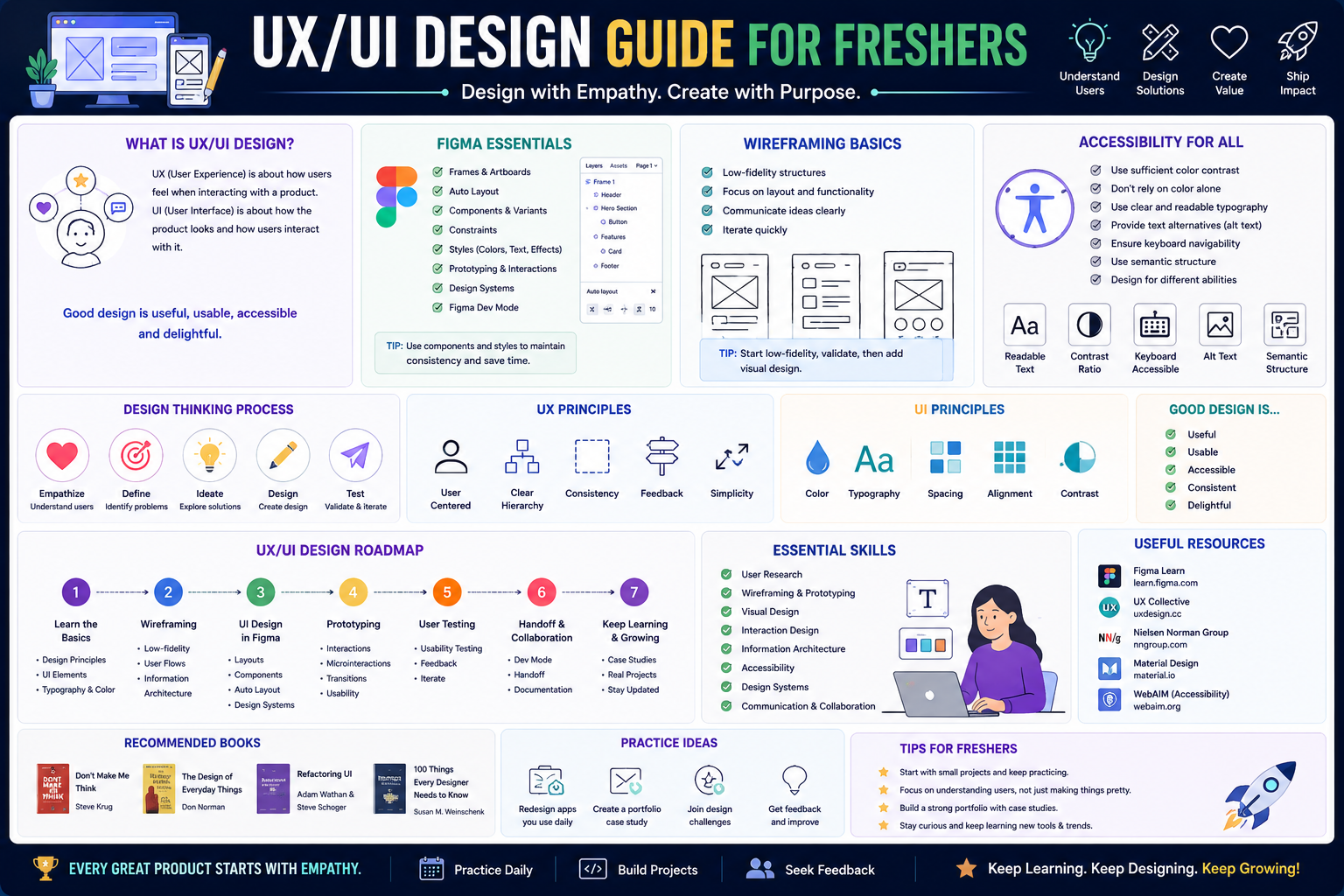
This roadmap is designed for a fresher—someone with curiosity, empathy, and a desire to shape digital experiences that are useful, usable, and delightful. You will learn Figma, wireframing, prototyping, user research, and accessibility by working on an end-to-end design project that mirrors real-world workflows. The goal is to transform you from someone who "knows what looks good" into a professional who can solve user problems, validate solutions, and collaborate with developers. This path prepares you for entry-level roles like Junior UX/UI Designer, Product Designer, or Visual Designer in a market where the World Economic Forum has named UI/UX design one of the fastest-growing jobs by 2030 .
🗺️ Phase 1: The Mindset Shift – What UX/UI Design Really Is (Weeks 1-2)
Before you open Figma, understand that design is not just about making things "pretty." It is about solving problems for people. UX (User Experience) design focuses on the structure and flow—how something works and feels. UI (User Interface) design focuses on the visual elements—how something looks. Together, they create products that users love.
What "Designer" Actually Means in 2026
A strong designer today is expected to:
- Empathize with users through research and interviews
- Define problems clearly before jumping to solutions
- Ideate and prototype multiple solutions quickly
- Test and iterate based on real user feedback
- Collaborate with developers to make designs real
- Design accessibly so everyone can use your products
Design is one of the most in-demand professions in 2026, and companies prioritize user-friendly designs as mobile usage continues to grow globally . The field welcomes career-changers from backgrounds like graphic design, marketing, psychology, and even engineering .
Prerequisite Check
You need a computer (8GB RAM minimum), an internet connection, a free Google account, and a willingness to learn by doing. No prior design experience is required. Sign up for a free Figma account at figma.com .
Practice Goal for Phase 1: Look around at the apps you use daily—your food delivery app, your banking app, your social media feed. Write down three things that frustrate you and three things that delight you. This is your first user research.
Free Resources for Phase 1:
- W3C Web Accessibility Initiative (WAI) – Introduction to Web Accessibility provides a free, comprehensive foundation on making products usable for everyone, including people with disabilities .
- Google UX Design Certificate (Free Audit) – The first course, "Foundations of User Experience (UX) Design," can be audited for free on Coursera. It covers what UX is, what designers do, and common job titles .
🧠 Phase 2: UX Foundations – Research, Empathy & Structure (Weeks 3-6)
Before you open Figma, you must understand the user and the problem. This phase is about thinking, not drawing.
Core Concepts to Master
User Research
Learn how to understand your users. This includes conducting user interviews, creating surveys, and analyzing existing data. The goal is to move from assumptions to evidence .
Personas
Create fictional profiles of your target users based on research. A persona might be "Busy Priya, 28, orders groceries weekly but gets frustrated by slow checkout." Include demographics, goals, pain points, and behaviors .
User Journey Maps
Map out the steps a user takes to accomplish a goal. For a food delivery app, this might be: opens app → searches for restaurant → browses menu → adds to cart → checks out → waits for delivery → receives food. Identify pain points at each step .
Information Architecture
Organize content so users can find what they need. This includes sitemaps, navigation structures, and categorization. Sketch this on paper or use free tools like Miro .
Wireframing
Create low-fidelity (lo-fi) sketches of your screens. These are black-and-white, focus on layout and content hierarchy, and ignore colors and fonts. Wireframes help you test structure before investing in visual polish .
Practice Goal: Choose an app you use frequently (e.g., a food delivery app). Create a user journey map for completing an order. Identify 3 pain points. Sketch 5 low-fidelity wireframes that address one pain point.
Free Resources for Phase 2:
- Google UX Design Certificate (Course 2, Free Audit) – "Start the UX Design Process: Empathize, Define, and Ideate" covers personas, journey maps, and problem statements .
- freeCodeCamp's UI/UX Design Tutorial (YouTube) – This free 1-2 hour video walks you through the entire design process from wireframing to mockup, using a live website project .
- Miro Free Tier – An infinite canvas for brainstorming, journey mapping, and flowcharts. Great for remote collaboration .
🎨 Phase 3: UI Foundations – Figma, Visual Design & Prototyping (Weeks 7-10)
Now you bring your wireframes to life with color, typography, and interactivity. Figma is the industry standard tool, and you will build confidence by recreating existing designs before creating your own.
Core Concepts to Master
Figma Fundamentals
Learn the interface: frames, shapes, text, images, components, auto layout, constraints, and styles. Start by recreating familiar app screens (Instagram, Spotify, your banking app) to understand spacing, alignment, and component structure before designing from scratch .
Visual Hierarchy
Guide the user's eye to what matters most. Use size, color, contrast, and spacing to show importance. Headlines should be largest, buttons should stand out, and secondary information should recede .
Color Systems
Learn color theory basics: primary, secondary, and accent colors. Understand contrast (text must be readable). Use free tools like Adobe Color to generate harmonious palettes. Never rely on color alone to convey meaning—always pair with text or icons for accessibility .
Typography
Choose readable fonts and establish a hierarchy. Typically 2-3 font families maximum, with consistent sizes (e.g., 32px headline, 16px body, 12px caption). Google Fonts offers free, high-quality fonts .
Components & Variants
Create reusable UI elements like buttons, cards, and input fields. In Figma, components are master elements that update everywhere when you edit them. Variants allow a single component to have multiple states (default, hover, pressed, disabled) .
Prototyping
Link your screens together to create a clickable, interactive demo. Add transitions, animations, and micro-interactions. Test the flow before any code is written. Tools like Maze (free tier) help you gather usability metrics .
Practice Goal: Recreate the login screen of your favorite app in Figma, matching spacing, colors, and fonts exactly. Then create a clickable prototype that moves from login → home screen → profile screen. This builds muscle memory.
Free Resources for Phase 3:
- freeCodeCamp's Figma Tutorial (YouTube) – A highly-rated, beginner-friendly video that walks you through wireframing, UI layout, and mockup creation in Figma .
- Google UX Design Certificate (Course 5, Free Audit) – "Create High-Fidelity Designs and Prototypes in Figma" is dedicated entirely to mastering the tool .
- Figma's Official YouTube Channel – Free tutorials covering everything from basics to advanced features like auto layout and variants.
- UI Design with Figma (Free Community Course) – A 5-module course covering UI principles, Figma interface, components, prototyping, and a final landing page project. Offered by the Grove Journal community .
♿ Phase 4: Accessibility – Designing for Everyone (Weeks 11-13)
Accessibility (a11y) is not a "nice to have." It is a core requirement for modern digital products, both ethically and legally. Over 1 billion people worldwide live with disabilities. Designing accessibly improves experiences for everyone .
Core Concepts to Master
WCAG (Web Content Accessibility Guidelines)
The international standard for accessibility. Key principles (POUR):
- Perceivable: Users can perceive the information (e.g., alt text for images)
- Operable: Users can operate the interface (e.g., keyboard navigation)
- Understandable: Users can understand the content (e.g., clear error messages)
- Robust: Content works with assistive technologies (e.g., screen readers)
Color Contrast
Text must have sufficient contrast against its background. WCAG requires:
- Normal text (under 18pt): 4.5:1 minimum contrast ratio
- Large text (18pt+): 3:1 minimum contrast ratio
- Use free tools like WebAIM Contrast Checker to verify .
Design Heuristics for Accessibility
- Buttons and links must be clearly distinguishable (not just color changes)
- Focus indicators must be visible for keyboard users
- Touch targets must be large enough (minimum 44x44 pixels)
- Never rely solely on color to convey meaning (e.g., "red means error")—add text labels
Alternative Text
Every meaningful image needs descriptive text that screen readers can read. Write alt text that conveys the purpose of the image, not just what it looks like. For decorative images, use empty alt text (alt="") .
Practice Goal: Take one of your previous designs. Run it through the WebAIM Contrast Checker. Fix any contrast issues. Add focus indicators to your prototype. Review all images and add appropriate alt text.
Free Resources for Phase 4:
- W3C WAI – Tips for Getting Started Designing for Web Accessibility – Brief, actionable descriptions of what to address in user interface and visual design .
- Digital Accessibility Foundations – Free Online Course – A self-paced course from W3C WAI designed for designers and other non-technical learners. The course is free, with an optional certificate available for a fee .
- Level Access Designer Courses – Free microlearning courses on color fundamentals, image fundamentals, buttons and links, and accessible design heuristics. Most courses are 15-45 minutes .
- WebAIM Contrast Checker – Free tool to verify your color contrast meets WCAG standards.
🤖 Phase 5: AI Tools – The 2026 Design Accelerator (Weeks 14-15)
AI is not replacing designers. It is removing the blank canvas problem and accelerating ideation. In 2026, professional designers use AI to explore variations, generate assets, and speed up handoff. As a fresher, learning these tools makes you immediately valuable .
Google Stitch – The Game Changer
Launched by Google Labs in May 2025 and significantly upgraded in March 2026, Google Stitch is a free, browser-based AI design tool that turns plain English descriptions into fully designed, multi-screen UI with production-ready code. It is currently free through Google Labs (350 generations per month in Standard Mode, 50 in Experimental Mode) .
Key Features for Designers:
- Multi-Screen Generation: Describe an entire user journey ("I want a checkout flow with cart, payment, and confirmation pages"), and Stitch generates up to 5 connected screens with consistent layouts and colors .
- Voice Interaction: Speak directly to the canvas. Say "show me this in a dark theme" or "give me three different menu layouts," and the interface responds instantly .
- Design Agent: An AI agent tracks your project history, offers critiques, generates variations, and helps you explore multiple design directions simultaneously .
- One-Click Figma Export: Every design can be exported to Figma with editable layers and Auto Layout, bridging AI-generated concepts and professional refinement .
How to Use Stitch as a Learning Tool:
- Generate initial concepts to overcome creative blocks
- Export to Figma and study how the AI structured components
- Use the Design Agent to critique your work ("What would make this checkout flow more usable?")
- Generate design systems and component libraries rapidly
Important Caveats from March 2026:
- Stitch currently lacks design system management (no component libraries or design tokens across projects)
- Accessibility compliance is inconsistent and often needs manual review
- It excels at the "zero-to-one" phase (blank page to solid draft) but the "one-to-100" phase (production-ready, accessible, brand-consistent) still requires traditional tools
- Stitch remains a Google Labs experiment with no announced pricing or enterprise roadmap as of March 2026
Practice Goal: Use Google Stitch to generate a 3-screen prototype for a habit tracking app. Export to Figma. Analyze how the AI structured the components. Manually improve the accessibility and refine the visual design. Document what the AI did well and where you needed to intervene.
Free Resource for Phase 5:
- Google Stitch – Free at stitch.withgoogle.com with a Google account. No installation required. Includes infinite canvas, design agent, voice interaction, and one-click Figma export .
📁 Phase 6: Portfolio & Career Preparation (Weeks 16-18)
Your portfolio is the single most important asset for landing a design job. Companies hire based on what you can show, not what you can say.
What Makes a Strong Junior Portfolio
- 3-5 complete projects showing end-to-end process
- Case studies, not just pretty screens. Each case study must include: Problem statement (what were you solving?), Research (who did you talk to? what did you learn?), Ideation (what did you sketch? what alternatives did you consider?), Wireframes (low-fi to high-fi), Prototype (clickable link), Testing (what did users say? how did you iterate?), Final design (polished screens with rationale), Results (metrics if available) .
5 Portfolio Projects to Build (increasing difficulty) :
- Food Delivery App Redesign – Analyze an existing app (Swiggy/Zomato), identify pain points, redesign the checkout flow. Metric goal: reduce checkout steps.
- Fintech Budget Tracker – Design a mobile dashboard for young professionals with income/expense charts and savings goals. Add micro-animations.
- Job Portal Mobile App – 12 screens including search, filters, company profiles, easy-apply flow. Create responsive web version too.
- Fitness App Onboarding – 5-step personalized flow with A/B testing of two onboarding versions.
- E-learning Dashboard – Advanced project with course progress tracker, certificates, recommendations. Run an accessibility audit.
Hosting Your Portfolio:
- Behance (free) – Great for discovery by recruiters
- Dribbble (free for beginners) – UI-focused community
- Your own website (using Squarespace, Webflow, or GitHub Pages) – Most professional option
Practice Goal: Choose one project from the list above. Complete it end-to-end in 2 weeks. Document your process in a case study (problem → research → wireframes → prototype → testing → final). Publish to Behance.
Free Resources for Phase 6:
- Google UX Design Certificate (Course 7, Free Audit) – "Design a User Experience for Social Good & Prepare for Jobs" covers portfolio building, resume writing, and interview preparation .
- Behance – Free portfolio platform owned by Adobe. Recruiters actively search Behance for emerging designers .
📚 Consolidated Resource Toolkit
Completely Free, Comprehensive Courses
Google UX Design Certificate (Free Audit on Coursera) is the most structured, respected free path. The full 7-course program (over 200 hours) can be audited for free, covering: Foundations of UX, Research, Wireframing, Prototyping, High-Fidelity Design in Figma, Dynamic UI, and Portfolio Preparation. You will complete 3 end-to-end projects (mobile app, responsive website, cross-platform experience). Graduates report career improvement within 6 months .
W3C Web Accessibility Initiative (WAI) offers the Digital Accessibility Foundations free online course, a self-paced program for designers and other non-technical learners. Covers accessibility principles, WCAG, and inclusive design. Optional certificate available for a fee .
freeCodeCamp's UI/UX Design Tutorial (YouTube/Class Central) is a 1-2 hour video that walks you through a professional designer's complete workflow: wireframing, UI layout, and mockup creation in Figma. Highly rated (4.5 stars from 170+ reviews) for being beginner-friendly and hands-on .
UI Design with Figma (Grove Journal Community) is a free 5-module course covering: Introduction to UI Design, Core Design Principles, Hands-on Figma Training, Wireframing & Prototyping, and Portfolio Building. Includes a final landing page project. Available via LinkedIn learning community .
Level Access Designer Courses offer free microlearning (15-60 minutes each) on specific accessibility topics: Color fundamentals (45 min), Image fundamentals (30 min), Buttons and links (20 min), Accessible design heuristics (15 min), Alternative text writing (20 min). Self-paced with certificates available .
Official Certifications (Budget-Friendly Options)
Google UX Design Certificate (Paid) – $199 for 6-month access through Minnesota State Colleges. Includes all 7 courses, 3 portfolio projects, exclusive access to Google's Employer Consortium (150+ hiring organizations including Google, Salesforce, Ford, Verizon). 75% of US graduates report career improvement within 6 months .
Coursera (Paid Subscription) – $49/month after free trial. Unlimited access to Google UX Certificate plus thousands of other design courses. Cancel anytime. Cheaper than certificate-only options if you complete quickly .
Free Practice Platforms & Tools
Figma – Free tier includes unlimited personal files, unlimited collaborators, and all core features (components, auto layout, variants, prototyping). The industry standard .
Miro – Free tier for whiteboarding, user flows, journey maps. Essential for remote collaboration .
Maze – Free tier for usability testing (heatmaps, task completion rates, video recordings). 80%+ UX job descriptions mention testing skills .
WebAIM Contrast Checker – Free tool to verify WCAG color contrast compliance.
Google Stitch – Free AI design tool (Google Labs). Turn text prompts into multi-screen prototypes with one-click Figma export. 350 generations/month free .
Real-World Learning Resources
Entri.app 6-Month UI/UX Roadmap provides a detailed week-by-week plan tailored for beginners juggling full-time work. Includes monthly projects, case study templates, freelancing strategies, and India-specific salary data (₹6-18 LPA) .
Estonian Academy of Arts UI/UX Intensive Course (15 academic hours, €330) is an in-person option for those who prefer structured classroom learning. Covers Figma, research, wireframing, prototyping, design systems, and AI tools. Ideal for building a complete project in one week with instructor feedback .
Skill Up Graphic Designer: UI/UX Job Ready Programme (£447, 3 months, online) includes 25 core courses, 25 career development courses, lifetime access to 3000+ courses, CV and portfolio training, and interview preparation. Self-paced with tutor support .
💼 Career Application & Next Steps
UI/UX design is a high-growth field. In the US, entry-level salaries range from 55,000−
55,000−85,000. In India, freshers earn ₹6-18 LPA (lakhs per annum) with starting salaries ₹8-12 LPA in tech hubs, and freelance designers earn ₹30K-60K monthly within 6 months .
1. The Fresher Entry Point
Junior UX Designer focuses on research, wireframing, user flows, and testing. You work closely with product managers and developers to ensure solutions meet user needs .
Junior UI Designer focuses on visual design, components, design systems, and prototyping in Figma. You ensure the product is beautiful, consistent, and on-brand .
Product Designer (Junior) – Combines UX and UI skills. Common in startups where designers wear multiple hats .
Visual Designer focuses more on marketing assets, illustrations, and brand expression alongside product work .
Industries actively hiring include technology (SaaS, startups, FAANG), fintech (banking, investment, payment apps), e-commerce (shopping and delivery), healthcare (patient portals, telemedicine), and consulting (client work across industries) .
2. The 6-Month Roadmap Summary
- Month 1: Foundations + Figma basics. Complete Google UX Certificate Module 1. Build your first login screen in Figma. Create lo-fi wireframes for a mock e-commerce app .
- Month 2: Master design principles. Internalize color theory, typography, spacing, grids. Redesign 3 real apps. Study WCAG basics. Document design decisions with rationale .
- Month 3: Conquer user research. Create personas, journey maps, user flows. Validate with 5+ people. Build wireframes for a fitness tracker app. Test and iterate .
- Month 4: Prototype and test. Build clickable prototypes in Figma. Run usability tests using Maze free tier. Fix issues based on real user data. Create version 2 .
- Month 5: Build your portfolio. Curate 3-5 projects. Launch Behance or Dribbble profile. Specialize with 2 niche projects (fintech dashboard, health app) .
- Month 6: Certify, network, land work. Complete Google UX Certificate. Apply to 50+ roles on LinkedIn/Naukri. Network (5 weekly connections). Land first freelance gig or job offer .
3. Build Your Portfolio (Three Essential Projects)
Project 1 (Redesign – The Learning Project)
- What: Choose a familiar app with a clear pain point. Conduct user interviews (3-5 people). Create journey maps and personas. Wireframe solutions. Build high-fidelity screens in Figma. Create a clickable prototype. Test with users.
- The Narrative: "I analyzed why users abandon cart at 68% in food delivery apps. Through 5 user interviews, I discovered unclear shipping costs were the primary friction point. I redesigned the checkout flow from 9 steps to 5, tested with Maze achieving 92% task success (vs 62% original), and documented a 40% faster completion time."
- Why: Redesign projects show you can critique existing products, conduct research, and improve measurable outcomes .
Project 2 (Original App – The From-Scratch Project)
- What: Identify a problem you personally experience (e.g., "tracking job applications is messy"). Build a complete original app solution from research to prototype. Include onboarding, core features, settings, and profile screens.
- Why: Original projects demonstrate initiative, problem-framing skills, and end-to-end design thinking .
Project 3 (Accessibility Audit & Fix)
- What: Take an existing design (yours or public). Run a full accessibility audit using WCAG 2.2 guidelines. Fix all contrast issues, add focus indicators, ensure screen reader compatibility, and document "before/after" with rationale.
- Why: Accessibility skills are increasingly required by law and sought by employers. This project differentiates you from 80% of junior portfolios that ignore accessibility .
Portfolio Documentation Template: For each project, include Problem statement (with data if possible), Research summary (who you talked to, what you learned), Wireframes (3 iterations minimum), Prototype link (clickable), Testing results (metrics: completion rate, time on task), Final high-fidelity screens, and Reflection (what would you do differently?) .
4. Certifications That Matter
Industry-recognized certifications validate your skills for employers:
Google UX Design Certificate is the most respected entry-level certification. Industry-recognized credential from Google, includes digital badge, and provides exclusive access to Google's Employer Consortium (150+ hiring organizations). 75% of graduates report career improvement within 6 months .
W3C Digital Accessibility Foundations Certificate (optional fee) validates your accessibility knowledge. Recognized internationally and demonstrates commitment to inclusive design .
Skill Up QLS Endorsed Diploma includes CPD-accredited certificates for each course (25 core courses + 25 career development courses). Lifetime access to 3000+ courses. Includes CV, portfolio, and job search training .
5. The Interview Question You Will Be Asked
Question: "Walk me through your design process for a mobile app that helps people track their daily water intake."
Your Answer: *"I would start with research, not screens. First, I would interview 5-7 potential users to understand their current hydration habits, pain points, and motivations. I might discover that people forget to log water because existing apps are too complex—they want one-tap logging.*
From that research, I would create user personas (e.g., 'Busy Priya, 28, works long hours, wants simple reminders') and map the user journey from morning to night, identifying key moments for intervention (waking up, after meals, before bed).
Next, I would sketch low-fidelity wireframes focusing on the core flow: one-tap log, history view, and smart reminders. I would test these wireframes with the same users to ensure the structure makes sense before investing in visual design.
For high-fidelity design, I would apply a calm, encouraging color palette (blues for hydration, greens for health), clear typography, and large touch targets (for one-tap logging). I would build a clickable prototype in Figma with micro-animations (a water droplet filling when you log).
I would conduct usability tests with 5 users using Maze to measure task completion and time. If users struggled to find the reminder settings, I would iterate—maybe adding a settings shortcut on the home screen.
Throughout, I would ensure accessibility: 4.5:1 contrast ratio, focus indicators for keyboard users, alt text for images, and screen reader compatibility. Finally, I would document my decisions in a case study and hand off to developers with a clean Figma file, annotations, and a DESIGN.md file from Google Stitch if I used AI for initial exploration.
The key is that the final design solves a real user problem, not just looks beautiful. My metric would be 'daily active users who log at least 3 glasses'—tracking behavior change, not just screens built."
This answer demonstrates research, empathy, iteration, testing, accessibility, and collaboration—the complete design process employers seek.
6. Sample Resume Entry
text
Junior UX/UI Designer (Project-Based) | Portfolio

• Completed Google UX Design Certificate (200+ hours) with 3 end-to-end portfolio projects including e-commerce checkout redesign achieving 40% faster task completion
• Proficient in Figma (components, auto layout, variants, prototyping) and accessibility standards (WCAG 2.2)
• Conducted user research with 15+ participants including interviews, surveys, and usability testing using Maze
• Redesigned fitness app onboarding achieving 35% higher plan completion through A/B testing of two versions
• Leveraged AI tools (Google Stitch) to accelerate ideation, generating 50+ design variations per project
• Built accessible designs with 4.5:1+ color contrast, keyboard navigation, and screen reader compatibility
🎯 Your Next Steps for This Week
Do not try to learn Figma, UX research, and accessibility simultaneously in your first week. Build momentum with small wins.
Step 1: Set Up Your Tools (Day 1)
Create a free Figma account. Create a free Google account for Stitch. Install Miro (free tier). Bookmark WebAIM Contrast Checker.
Step 2: Start Google UX Certificate (Week 1-2)
Audit the first course, "Foundations of User Experience (UX) Design," on Coursera. Watch the videos, complete the readings, and do the activities. This gives you the theoretical foundation you need.
Step 3: Watch freeCodeCamp's Figma Tutorial (Week 2)
Spend 2 hours watching the UI/UX Design Tutorial. Follow along in Figma. You will build a complete website design from start to finish .
Step 4: Recreate One Screen (Week 2-3)
Choose an app you love. Recreate its login screen in Figma exactly—same spacing, same colors, same fonts. This builds muscle memory.
Step 5: Run Your First Usability Test (Week 3)
Ask a friend to complete a task using your prototype. Watch where they click. Listen to their questions. Document 3 things you would change.
Step 6: Join the Community
Follow UI/UX designers on LinkedIn and Behance. Join r/UI_Design and r/userexperience on Reddit. Post your work for feedback. The design community is supportive—you will learn faster with critique.
The moment you watch a user successfully complete a task in your prototype—without your help—you will understand the power of user-centered design. You have the roadmap. Start building your first wireframe today.




 Group / 1: 1 Sessions